2010 NISSAN NOTE Drive
[x] Cancel search: DrivePage 189 of 235
When checking or replacement is required, NISSAN
recommends contacting a NISSAN dealer or quali-
fied workshop for servicing.
CAUTION
•Use only Genuine NISSAN Matic D ATF. Do
not mix with other fluids.
•Using automatic transmission fluid other than
Genuine NISSAN Matic D ATF will cause dete-
rioration in driveability and automatic trans-
mission durability, and may damage the auto-
matic transmission, which is not covered by
the warranty.
CHECKING BRAKE PEDAL
If the brake pedal suddenly goes down further than
normal, the pedal feels “spongy” or the vehicle
seems to take longer to stop, see a NISSAN dealer
or qualified workshop.
CHECKING HANDBRAKE
Periodically check the holding ability of the hand-
brake by parking on a steep hill and restraining the
vehicle by using only the handbrake. If it does not
hold satisfactorily, see a NISSAN dealer or qualified
workshop.
WARNING
•Use only new fluid. Old, inferior, or contami-
nated fluid may damage the brake and clutch
systems. The use of improper fluids can dam-
age the brake system and affect the vehicle’s
stopping ability.
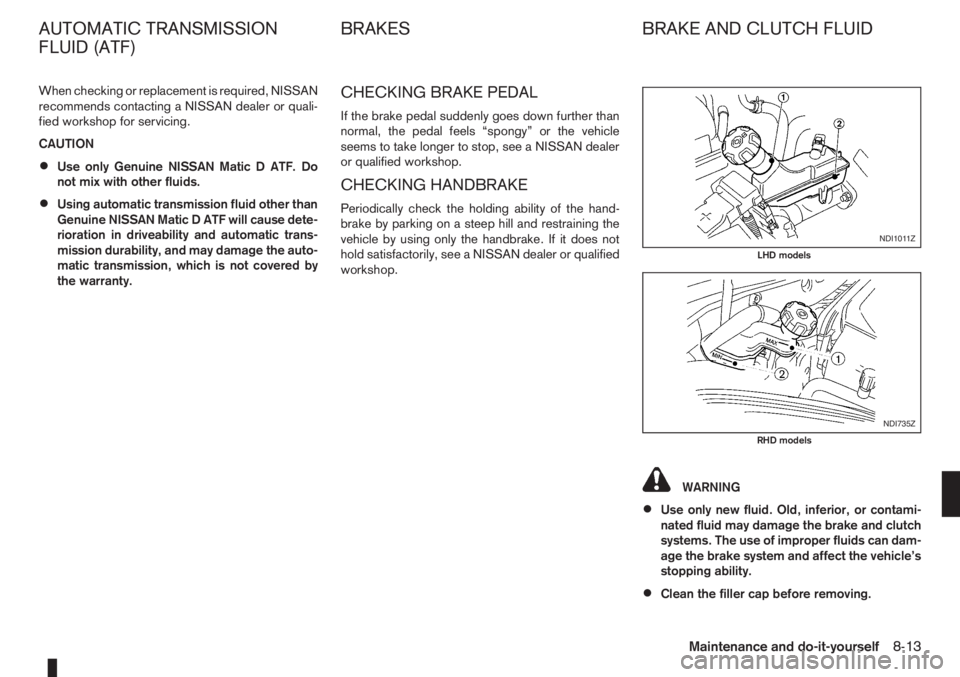
•Clean the filler cap before removing.
NDI1011Z
LHD models
NDI735Z
RHD models
AUTOMATIC TRANSMISSION
FLUID (ATF)BRAKES BRAKE AND CLUTCH FLUID
Maintenance and do-it-yourself8-13
Page 192 of 235
ommends to visually check the green indicatorjA status periodically. If it is not visible, replace
the battery as soon as possible.
•If battery replacement or check is required, con-
tact a NISSAN dealer or qualified workshop.
REINITIALISATION PROCEDURE
AFTER BATTERY RECONNECTION
Power window (Driver’s side —
where fitted)
When the vehicle battery has been connected, the
system must be reinitialised as follows:
1. Push down and hold the driver’s side window
switch until the window glass is completely low-
ered then release the switch.
2.In one continuous operation, pull up and hold
the driver’s side window switch until the window
glass is completely closed and continue holding
the switch for a further 5 seconds.
3. The system is now reinitialised.
Repeat the procedure every time the vehicle battery
is connected.
If the reinitialisation procedure cannot be performed
successfully, take your vehicle to a NISSAN dealer
or qualified workshop.
JUMP-STARTING
If jump-starting is necessary, see “Jump-starting” in
the “6. In case of emergency” section. If the engine
does not start by jump starting, the battery may have
to be replaced. Contact a NISSAN dealer or quali-
fied workshop.
8-16Maintenance and do-it-yourself
Page 193 of 235
INTEGRATED KEYFOB/INTELLIGENT
KEY BATTERY REPLACEMENT
CAUTION
•Be careful not to touch a circuit board or a
battery terminal.
NISSAN GREEN PROGRAM
An improperly disposed battery can harm the
environment. Always conform to local regula-
tions for battery disposal.
•The Integrated keyfob/Intelligent Key is wa-
ter-resistant; however, if it does get wet, im-
mediately wipe it until it gets completely dry.
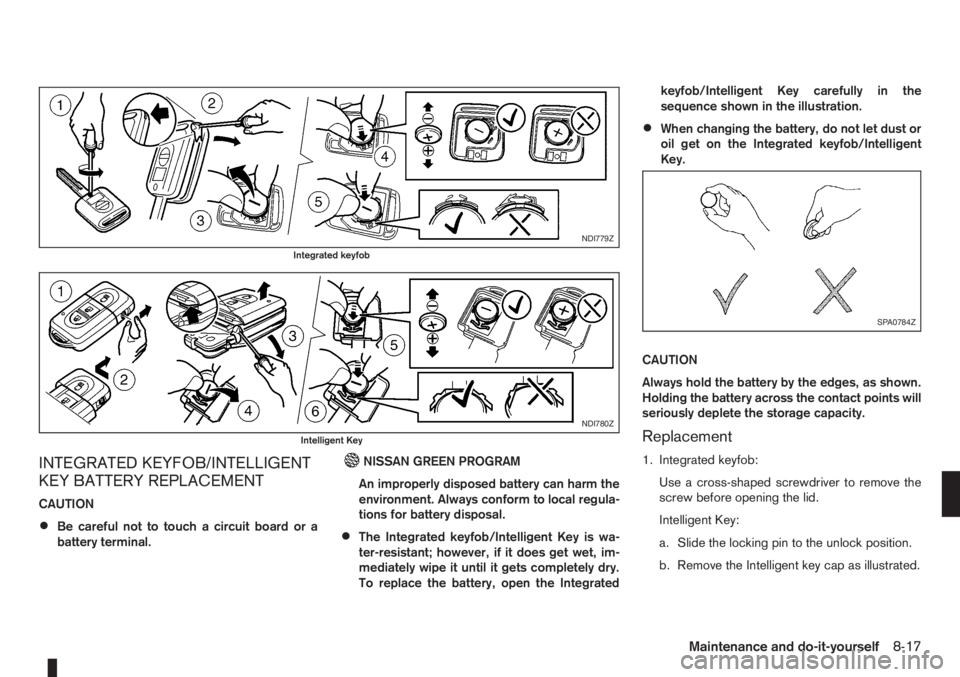
To replace the battery, open the Integratedkeyfob/Intelligent Key carefully in the
sequence shown in the illustration.
•When changing the battery, do not let dust or
oil get on the Integrated keyfob/Intelligent
Key.
CAUTION
Always hold the battery by the edges, as shown.
Holding the battery across the contact points will
seriously deplete the storage capacity.
Replacement
1. Integrated keyfob:
Use a cross-shaped screwdriver to remove the
screw before opening the lid.
Intelligent Key:
a. Slide the locking pin to the unlock position.
b. Remove the Intelligent key cap as illustrated.
NDI779Z
Integrated keyfob
NDI780Z
Intelligent Key
SPA0784Z
Maintenance and do-it-yourself8-17
Page 194 of 235

2. Insert a flat blade screwdriver or a suitable tool
into the slit of the corner and twist it to open the
lid.
3. Replace the battery with a new one.
For models equipped with Integrated keyfob, use
the following battery type:
CR2016
For models equipped with Intelligent Key, use
the following battery type:
CR2032
•Do not touch the internal circuit and electric ter-
minals as doing so could cause a malfunction.
•Make sure that the + side faces the bottom of the
case, as illustrated.
4. Install the lid in the reverse order of removal.
5. Operate the buttons to check its operation.
Contact a NISSAN dealer or qualified workshop
if you need assistance for battery replacement.
WARNING
Be sure the ignition switch is in the “OFF” or
LOCK position. Otherwise the cooling fan or the
engine may start to operate suddenly.
1. Visually inspect each belt for signs of unusual
wear, cuts, fraying or looseness. If the belt is in
poor condition or loose, have it replaced or ad-
justed by a NISSAN dealer or qualified work-
shop.
2. Have the belts checked regularly for condition
and tension in accordance with the maintenance
schedule as shown in the separately provided
Warranty Information and Maintenance booklet.WARNING
Be sure the engine and ignition switch are off
and that the handbrake is engaged securely.
CAUTION
•Be sure to use the correct socket to remove
the spark plugs. An incorrect socket can
cause damage to the spark plugs.
•Always replace spark plugs with recom-
mended or equivalent ones.
Replace spark plugs according to the maintenance
schedule. For details, see the separately provided
Warranty Information & Maintenance Booklet.
If replacement is required, see a NISSAN dealer or
qualified workshop for servicing.
DRIVE BELTS SPARK PLUGS (Petrol engine
models)
8-18Maintenance and do-it-yourself
Page 195 of 235
WARNING
•Operating the engine without the air cleaner
filter, can cause you or others to be burned.
The air cleaner filter not only cleans the intake
air, it also stops flame if the engine backfires.
If the air cleaner filter is not installed and the
engine backfires, you could be burned.
•Do not drive without the air cleaner filter.
•Be careful when working on the engine with-
out the air cleaner filter.
VISCOUS PAPER TYPE
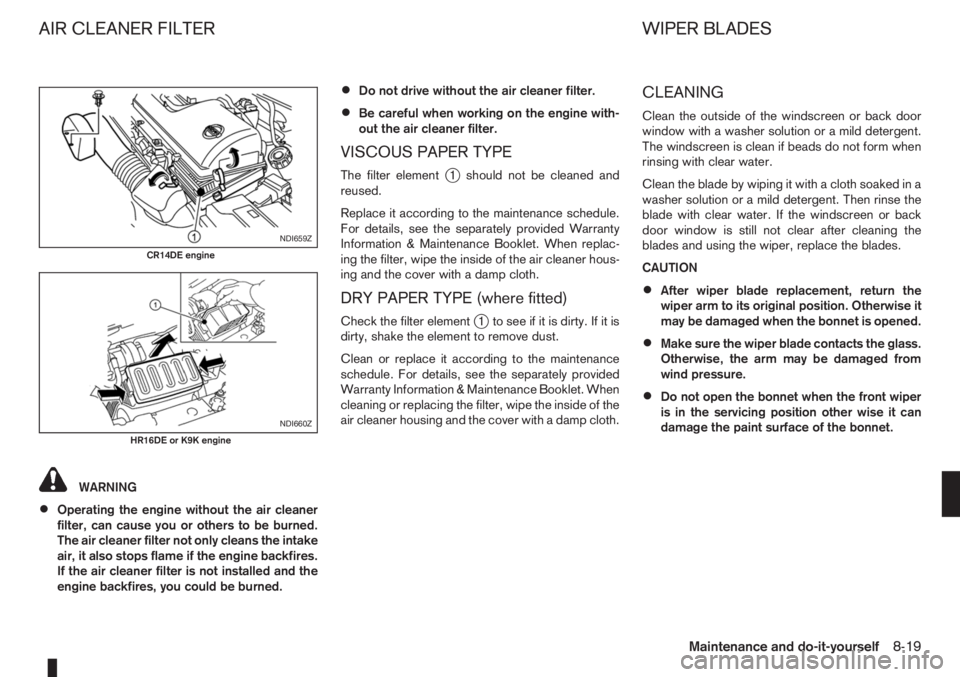
The filter elementj1 should not be cleaned and
reused.
Replace it according to the maintenance schedule.
For details, see the separately provided Warranty
Information & Maintenance Booklet. When replac-
ing the filter, wipe the inside of the air cleaner hous-
ing and the cover with a damp cloth.
DRY PAPER TYPE (where fitted)
Check the filter elementj1 to see if it is dirty. If it is
dirty, shake the element to remove dust.
Clean or replace it according to the maintenance
schedule. For details, see the separately provided
Warranty Information & Maintenance Booklet. When
cleaning or replacing the filter, wipe the inside of the
air cleaner housing and the cover with a damp cloth.
CLEANING
Clean the outside of the windscreen or back door
window with a washer solution or a mild detergent.
The windscreen is clean if beads do not form when
rinsing with clear water.
Clean the blade by wiping it with a cloth soaked in a
washer solution or a mild detergent. Then rinse the
blade with clear water. If the windscreen or back
door window is still not clear after cleaning the
blades and using the wiper, replace the blades.
CAUTION
•After wiper blade replacement, return the
wiper arm to its original position. Otherwise it
may be damaged when the bonnet is opened.
•Make sure the wiper blade contacts the glass.
Otherwise, the arm may be damaged from
wind pressure.
•Do not open the bonnet when the front wiper
is in the servicing position other wise it can
damage the paint surface of the bonnet.
NDI659Z
CR14DE engine
NDI660Z
HR16DE or K9K engine
AIR CLEANER FILTER WIPER BLADES
Maintenance and do-it-yourself8-19
Page 197 of 235

PASSENGER COMPARTMENT
CAUTION
Never use a fuse of higher or lower amperage
rating than that specified on the fuse box cover.
If any electrical equipment does not operate, check
for an open fuse.
The fuse box is located in the lower part of the
instrument panel at the driver’s side.
The affected circuits
j2 are shown on the back of
the fuse box lidj1.
1. Make sure the ignition switch and the headlight
switch are in the “OFF” position.
2. Open the fuse box lid.
3. Locate and remove the fuse with the fuse puller
(where fitted).
NOTE
The fuse puller is stored in the fusebox.4. If the fuse is openjA , replace it with a new fusejB.
5. Close the fuse box lid.
NOTE
If the new fuse opens again, after installing,
have the electrical system checked and re-
paired by a NISSAN dealer or qualified work-
shop.
NDI1004
NDI737Z
NDI624Z
FUSES
Maintenance and do-it-yourself8-21
Page 205 of 235
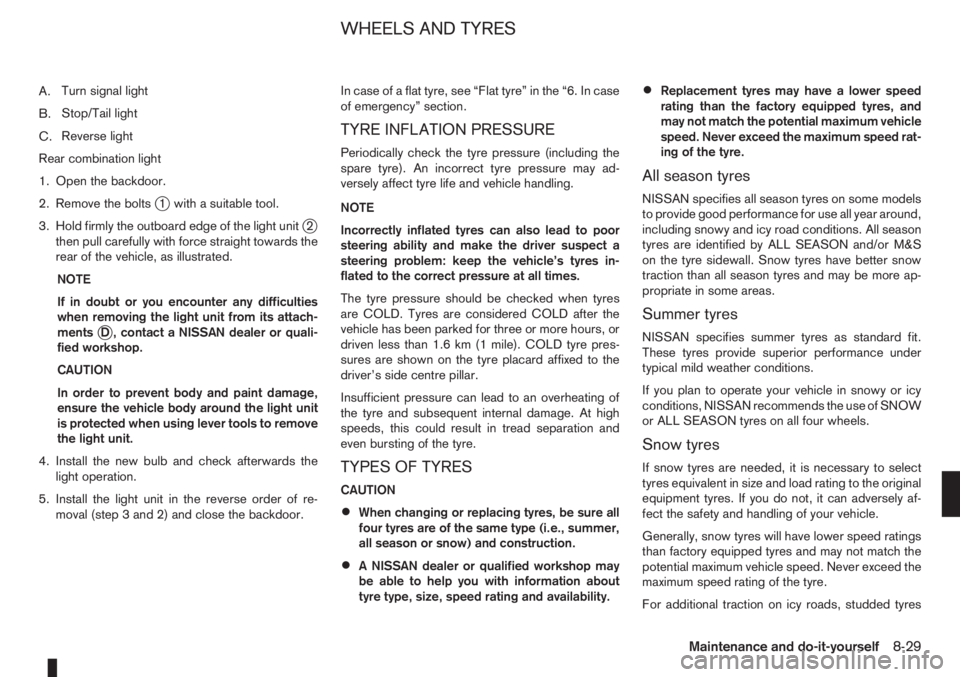
A.Turn signal light
B.Stop/Tail light
C.Reverse light
Rear combination light
1. Open the backdoor.
2. Remove the bolts
j1 with a suitable tool.
3. Hold firmly the outboard edge of the light unit
j2
then pull carefully with force straight towards the
rear of the vehicle, as illustrated.
NOTE
If in doubt or you encounter any difficulties
when removing the light unit from its attach-
ments
jD , contact a NISSAN dealer or quali-
fied workshop.
CAUTION
In order to prevent body and paint damage,
ensure the vehicle body around the light unit
is protected when using lever tools to remove
the light unit.
4. Install the new bulb and check afterwards the
light operation.
5. Install the light unit in the reverse order of re-
moval (step 3 and 2) and close the backdoor.In case of a flat tyre, see “Flat tyre” in the “6. In case
of emergency” section.
TYRE INFLATION PRESSURE
Periodically check the tyre pressure (including the
spare tyre). An incorrect tyre pressure may ad-
versely affect tyre life and vehicle handling.
NOTE
Incorrectly inflated tyres can also lead to poor
steering ability and make the driver suspect a
steering problem: keep the vehicle’s tyres in-
flated to the correct pressure at all times.
The tyre pressure should be checked when tyres
are COLD. Tyres are considered COLD after the
vehicle has been parked for three or more hours, or
driven less than 1.6 km (1 mile). COLD tyre pres-
sures are shown on the tyre placard affixed to the
driver’s side centre pillar.
Insufficient pressure can lead to an overheating of
the tyre and subsequent internal damage. At high
speeds, this could result in tread separation and
even bursting of the tyre.
TYPES OF TYRES
CAUTION
•When changing or replacing tyres, be sure all
four tyres are of the same type (i.e., summer,
all season or snow) and construction.
•A NISSAN dealer or qualified workshop may
be able to help you with information about
tyre type, size, speed rating and availability.
•Replacement tyres may have a lower speed
rating than the factory equipped tyres, and
may not match the potential maximum vehicle
speed. Never exceed the maximum speed rat-
ing of the tyre.
All season tyres
NISSAN specifies all season tyres on some models
to provide good performance for use all year around,
including snowy and icy road conditions. All season
tyres are identified by ALL SEASON and/or M&S
on the tyre sidewall. Snow tyres have better snow
traction than all season tyres and may be more ap-
propriate in some areas.
Summer tyres
NISSAN specifies summer tyres as standard fit.
These tyres provide superior performance under
typical mild weather conditions.
If you plan to operate your vehicle in snowy or icy
conditions, NISSAN recommends the use of SNOW
or ALL SEASON tyres on all four wheels.
Snow tyres
If snow tyres are needed, it is necessary to select
tyres equivalent in size and load rating to the original
equipment tyres. If you do not, it can adversely af-
fect the safety and handling of your vehicle.
Generally, snow tyres will have lower speed ratings
than factory equipped tyres and may not match the
potential maximum vehicle speed. Never exceed the
maximum speed rating of the tyre.
For additional traction on icy roads, studded tyres
WHEELS AND TYRES
Maintenance and do-it-yourself8-29
Page 206 of 235
may be used. However, some provinces and states
prohibit their use. Check local, state and provincial
laws before installing studded tyres. Skid and trac-
tion capabilities of studded snow tyres, on wet or
dry surfaces, may be poorer than that of non-stud-
ded snow tyres.
SNOW CHAINS
Use of snow chains may be prohibited in some ar-
eas. Check the local laws before installing snow
chains. When installing snow chains, make sure they
are of proper size for the tyres on your vehicle and
are installed according to the chain manufacturer’s
suggestions. Use chain tensioners when recom-
mended by the snow chain manufacturer to ensure
a tight fit. Loose end links of the snow chain must be
secured or removed to prevent the possibility of
whipping action damage to the fenders or undercar-
riage.
In addition, drive at a reduced speed. Otherwise,
your vehicle can be damaged and/or vehicle han-
dling and performance may be adversely affected.
Snow chains must be installed only on the front
wheels and not on the rear wheels.
CAUTION
Do not drive with snow chains on paved roads
which are clear of snow. Driving with chains in
such conditions can cause damage to the vari-
ous mechanisms of the vehicle due to some
overstress.
•Never install snow chains on a small size spare
tyre.
•Never install snow chains on a temporary-use
spare tyre.
•Do not drive with snow chains on paved roads
which are clear of snow. Driving with chains in
such conditions can cause damage to the
various mechanisms of the vehicle due to
some overstress.
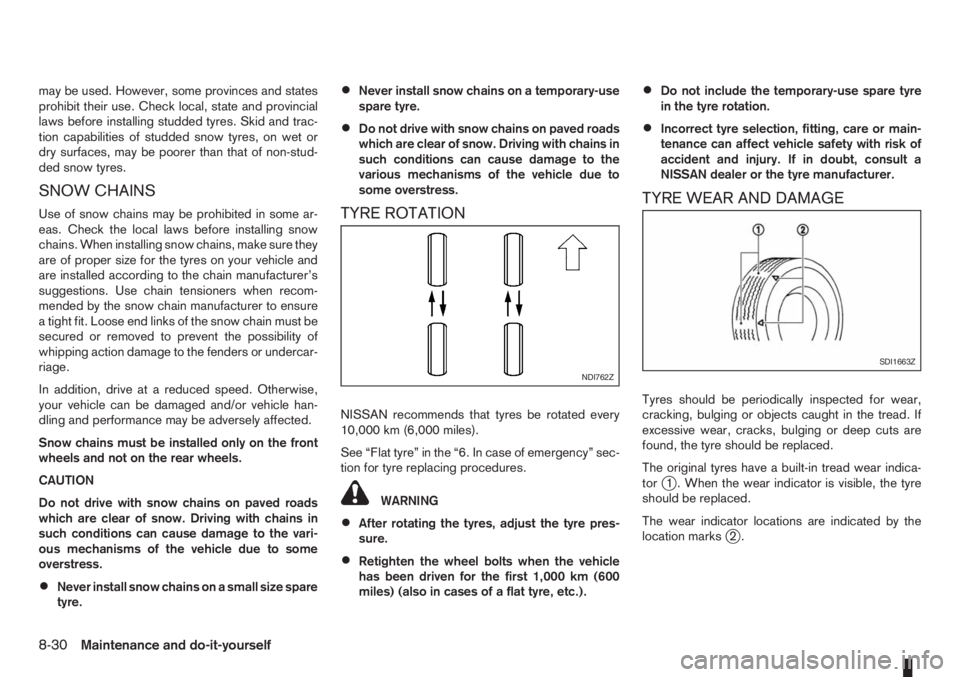
TYRE ROTATION
NISSAN recommends that tyres be rotated every
10,000 km (6,000 miles).
See “Flat tyre” in the “6. In case of emergency” sec-
tion for tyre replacing procedures.
WARNING
•After rotating the tyres, adjust the tyre pres-
sure.
•Retighten the wheel bolts when the vehicle
has been driven for the first 1,000 km (600
miles) (also in cases of a flat tyre, etc.).
•Do not include the temporary-use spare tyre
in the tyre rotation.
•Incorrect tyre selection, fitting, care or main-
tenance can affect vehicle safety with risk of
accident and injury. If in doubt, consult a
NISSAN dealer or the tyre manufacturer.
TYRE WEAR AND DAMAGE
Tyres should be periodically inspected for wear,
cracking, bulging or objects caught in the tread. If
excessive wear, cracks, bulging or deep cuts are
found, the tyre should be replaced.
The original tyres have a built-in tread wear indica-
tor
j1 . When the wear indicator is visible, the tyre
should be replaced.
The wear indicator locations are indicated by the
location marks
j2.
NDI762ZSDI1663Z
8-30Maintenance and do-it-yourself