2010 NISSAN MURANO oil
[x] Cancel search: oilPage 16 of 425
Black plate (12,1)
Model "Z51-D" EDITED: 2009/ 8/ 3
SDI2172
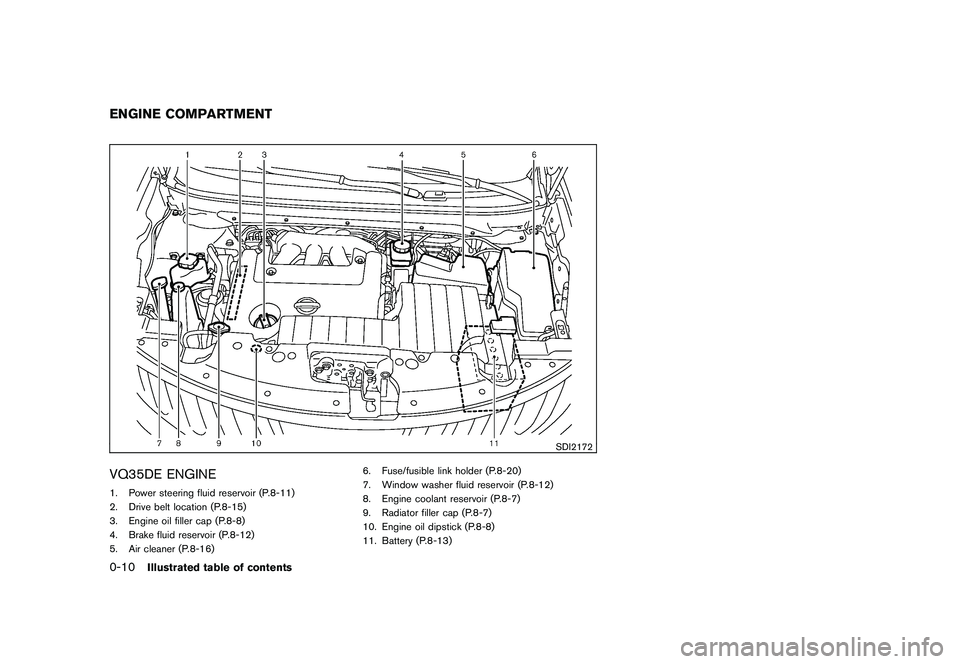
VQ35DE ENGINE1. Power steering fluid reservoir (P.8-11)
2. Drive belt location (P.8-15)
3. Engine oil filler cap (P.8-8)
4. Brake fluid reservoir (P.8-12)
5. Air cleaner (P.8-16)6. Fuse/fusible link holder (P.8-20)
7. Window washer fluid reservoir (P.8-12)
8. Engine coolant reservoir (P.8-7)
9. Radiator filler cap (P.8-7)
10. Engine oil dipstick (P.8-8)
11. Battery (P.8-13)ENGINE COMPARTMENT0-10
Illustrated table of contents
Page 17 of 425

Black plate (13,1)
Model "Z51-D" EDITED: 2009/ 8/ 3
Warninglight Name
Page
All-Wheel Drive (AWD) warning
light (AWD models)* 2-10Anti-lock Braking System
(ABS) warning light2-11Brake warning light
2-11Charge warning light2-12Engine oil pressure warning
light 2-12Intelligent Key warning light 2-12Low tire pressure warning light 2-12Master warning light
2-14Seat belt warning light 2-14Supplemental air bag warning
light 2-14Indicator
light Name
Page
All-Wheel Drive (AWD) LOCK
indicator light (AWD models)* 2-14Continuously Variable Trans-
mission (CVT) position indicator
light2-15Cruise indicator light
2-15Front passenger air bag status
light 2-15High beam indicator light 2-15Malfunction Indicator Light
(MIL)2-15Overdrive off indicator light 2-16Slip indicator light
2-16Small light indicator lights 2-16Turn signal/hazard indicator
lights 2-16Vehicle Dynamic Control (VDC)
off indicator light
2-16
*: if so equipped
WARNING AND INDICATOR LIGHTS
Illustrated table of contents
0-11
Page 88 of 425

Black plate (84,1)
Model "Z51-D" EDITED: 2009/ 8/ 3
All-Wheel Drive (AWD) warning light (AWD
models)*
Low tire pressure warning light
High beam indicator light
Anti-lock Braking System (ABS) warning
light
Master warning light
Malfunction Indicator Light (MIL)
Seat belt warning light
Overdrive off indicator light
Brake warning light
Supplemental air bag warning light
Slip indicator light
All-Wheel Drive (AWD) LOCK indicator light
(AWD models)*
Small light indicator light
Charge warning light
Continuously Variable Transmission (CVT)
position indicator light
Turn signal/hazard indicator lights
Engine oil pressure warning light
Cruise indicator light
Vehicle Dynamic Control (VDC) off indicator
light
Intelligent Key warning light
Front passenger air bag status light*: if so equipped
CHECKING BULBSWith all doors closed, apply the parking brake
and push the ignition switch to the ON position
without starting the engine. The following lights
will come on (if so equipped):
,
or
,
,
,
,
,
The following lights come on briefly and then go
off (if so equipped):
,
or
,
,
,
,
,
,
If any light does not come on, it may indicate a
burned-out bulb or an open circuit in the
electrical system. Have the system checked by
a NISSAN dealer.
Some indicators and warnings are also dis-
played on the dot matrix crystal display on the
speedometer. (See “DOT MATRIX LIQUID
CRYSTAL DISPLAY” later in this section.)
WARNING LIGHTS
All-Wheel Drive (AWD) warning
light (AWD models)
The light comes on when the ignition switch is
pushed to ON. It turns off soon after the engine
is started.
If the AWD system malfunctions, or the diameter
of the front and the rear wheels are different, the
warning light will either remain illuminated or
WARNING/INDICATOR LIGHTS AND
AUDIBLE REMINDERS2-10
Instruments and controls
Page 90 of 425

Black plate (86,1)
Model "Z51-D" EDITED: 2009/ 8/ 3
WARNING
.Your brake system may not be
working properly if the warning light
is on. Driving could be dangerous. If
you judge it to be safe, drive care-
fully to the nearest service station
for repairs. Otherwise, have your
vehicle towed because driving it
could be dangerous.
. Pressing the brake pedal with the
engine stopped and/or low brake
fluid level may increase your stop-
ping distance and braking will re-
quire greater pedal effort as well as
pedal travel.
. If the brake fluid level is below the
minimum or MIN mark on the brake
fluid reservoir, do not drive until the
brake system has been checked at a
NISSAN dealer.
Charge warning light
If the light comes on while the engine is running,
it may indicate the charging system is not
functioning properly. Turn the engine off and
check the alternator belt. If the belt is loose,
broken, missing or if the light remains on, see a NISSAN dealer immediately.
CAUTION
Do not continue driving if the alternator
belt is loose, broken or missing.
Engine oil pressure warning light
This light warns of low engine oil pressure. If the
light flickers or comes on during normal driving,
pull off the road in a safe area, stop the engine
immediately
and call a NISSAN dealer or other
authorized repair shop.
The engine oil pressure warning light is
not designed to indicate a low oil level.
Use the dipstick to check the oil level. (See
“ENGINE OIL” in the “8. Maintenance and do-it-
yourself” section.)
CAUTION
Running the engine with the engine oil
pressure warning light on could cause
serious damage to the engine almost
immediately. Such damage is not cov-
ered by warranty. Turn off the engine as
soon as it is safe to do so.
Intelligent Key warning light
After the ignition switch is pushed to the ON
position, this light comes on for about 2 seconds
and then turns off.
This light warns of a malfunction with the
electrical steering lock system (if so equipped)
or the Intelligent Key system.
If the light comes on while the engine is
stopped, it may be impossible to free the
steering lock (if so equipped) or to start the
engine. If the light comes on while the engine is
running, you can drive the vehicle. However in
these cases, contact a NISSAN dealer for repair
as soon as possible.
Low tire pressure warning light
Your vehicle is equipped with a Tire Pressure
Monitoring System (TPMS) that monitors the tire
pressure of all tires except the spare.
The low tire pressure warning light warns of low
tire pressure or indicates that the TPMS is not
functioning properly.
After the ignition switch is pushed ON, this light
illuminates for about 1 second and turns off.
2-12
Instruments and controls
Page 98 of 425
Black plate (94,1)
Model "Z51-D" EDITED: 2009/ 8/ 3
11. Low washer fluid warningThis warning appears when the washer tank fluid
is at a low level. Add washer fluid as necessary.
(See “WINDOW WASHER FLUID” in the “8.
Maintenance and do-it-yourself” section.)12. Door/lift gate open warning (ignition
switch is in the ON position)This warning appears if any of the doors and/or
the lift gate are open or not closed securely. The
vehicle icon indicates which door is open on the
display.13. “Time to rest” indicatorThis indicator appears when the set “time to
rest” indicator activates. You can set the time for
up to 6 hours. (See “TRIP COMPUTER” later in
this section.)14. Low outside temperature warningThis warning appears if the outside temperature
is below 378F(3 8C) . The warning can be set not
to be displayed. (See “TRIP COMPUTER” later
in this section.)
SIC3578
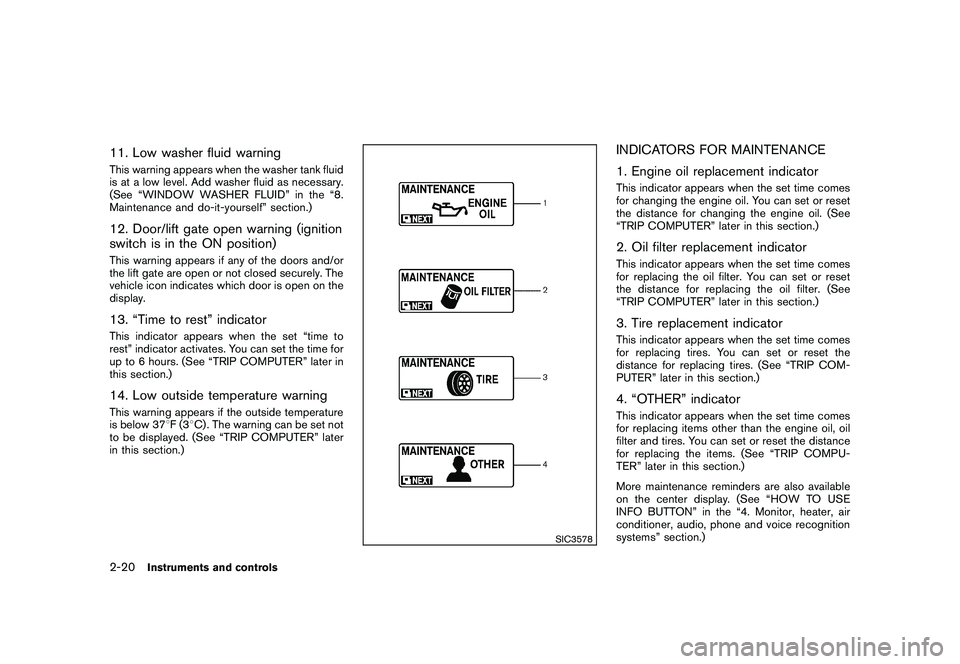
INDICATORS FOR MAINTENANCE
1. Engine oil replacement indicatorThis indicator appears when the set time comes
for changing the engine oil. You can set or reset
the distance for changing the engine oil. (See
“TRIP COMPUTER” later in this section.)2. Oil filter replacement indicatorThis indicator appears when the set time comes
for replacing the oil filter. You can set or reset
the distance for replacing the oil filter. (See
“TRIP COMPUTER” later in this section.)3. Tire replacement indicatorThis indicator appears when the set time comes
for replacing tires. You can set or reset the
distance for replacing tires. (See “TRIP COM-
PUTER” later in this section.)4. “OTHER” indicatorThis indicator appears when the set time comes
for replacing items other than the engine oil, oil
filter and tires. You can set or reset the distance
for replacing the items. (See “TRIP COMPU-
TER” later in this section.)
More maintenance reminders are also available
on the center display. (See “HOW TO USE
INFO BUTTON” in the “4. Monitor, heater, air
conditioner, audio, phone and voice recognition
systems” section.)
2-20
Instruments and controls
Page 102 of 425
Black plate (98,1)
Model "Z51-D" EDITED: 2009/ 8/ 3
SIC3678
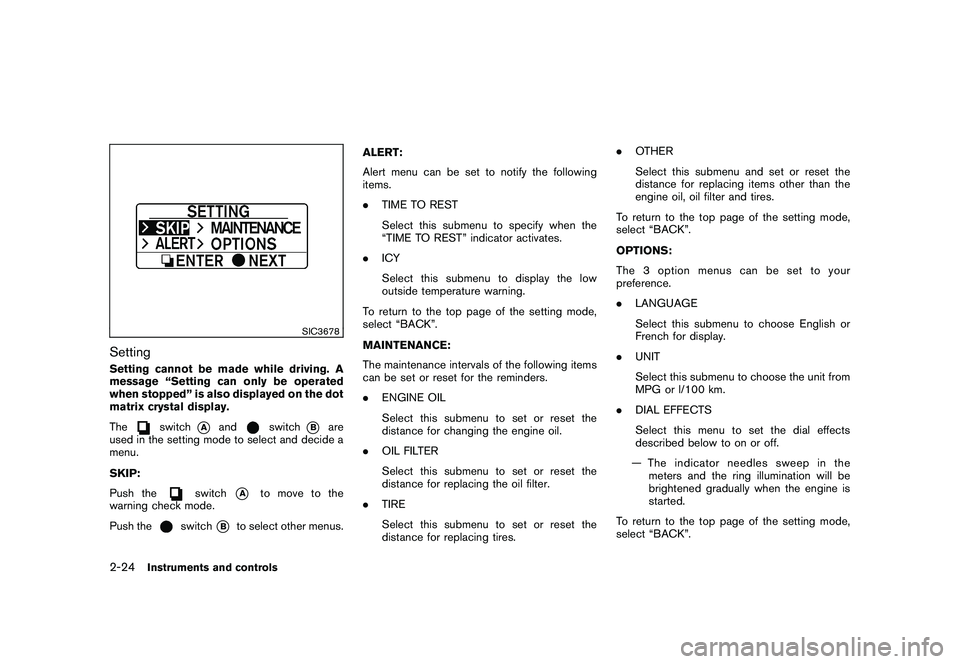
SettingSetting cannot be made while driving. A
message “Setting can only be operated
when stopped” is also displayed on the dot
matrix crystal display.
The
switch
*A
and
switch
*B
are
used in the setting mode to select and decide a
menu.
SKIP:
Push the
switch
*A
to move to the
warning check mode.
Push the
switch
*B
to select other menus. ALERT:
Alert menu can be set to notify the following
items.
.
TIME TO REST
Select this submenu to specify when the
“TIME TO REST” indicator activates.
. ICY
Select this submenu to display the low
outside temperature warning.
To return to the top page of the setting mode,
select “BACK”.
MAINTENANCE:
The maintenance intervals of the following items
can be set or reset for the reminders.
. ENGINE OIL
Select this submenu to set or reset the
distance for changing the engine oil.
. OIL FILTER
Select this submenu to set or reset the
distance for replacing the oil filter.
. TIRE
Select this submenu to set or reset the
distance for replacing tires. .
OTHER
Select this submenu and set or reset the
distance for replacing items other than the
engine oil, oil filter and tires.
To return to the top page of the setting mode,
select “BACK”.
OPTIONS:
The 3 option menus can be set to your
preference.
. LANGUAGE
Select this submenu to choose English or
French for display.
. UNIT
Select this submenu to choose the unit from
MPG or l/100 km.
. DIAL EFFECTS
Select this menu to set the dial effects
described below to on or off.
— The indicator needles sweep in the meters and the ring illumination will be
brightened gradually when the engine is
started.
To return to the top page of the setting mode,
select “BACK”.
2-24
Instruments and controls
Page 108 of 425
Black plate (104,1)
Model "Z51-D" EDITED: 2009/ 8/ 3
.High — High sensitive operation
. Low — Low sensitive operation
To turn the rain-sensing auto wiper system off,
push up the lever to the OFF position, or pull
down the lever to the LO or HI position.
CAUTION
Do not touch the rain sensor and
around it when the wiper switch is in
the INT position and the ignition switch
is in the ON position. The wipers may
operate unexpectedly and cause to an
injury or a wiper damage.
. The rain-sensing auto wipers are in-
tended for use during rain. If the switch
is left in the INT position, the wipers
may operate unexpectedly when dirt,
fingerprints, oil film or insects are stuck
on or around the sensor. The wipers
may also operate when exhaust gas or
moisture affect the rain sensor.
. The rain-sensing auto wipers may not
operate if rain does not hit the rain
sensor even if it is raining.
WARNING
In freezing temperatures the washer
solution may freeze on the rear window
glass and obscure your vision. Warm
the rear window with the defroster
before you wash the rear window.
CAUTION
.Do not operate the washer continu-
ously for more than 30 seconds.
. Do not operate the washer if the
reservoir tank is empty.
. Do not fill the window washer
reservoir tank with washer fluid
concentrates at full strength. Some
methyl alcohol based washer fluid
concentrates may permanently stain
the grille if spilled while filling the
window washer reservoir tank.
. Pre-mix washer fluid concentrates
with water to the manufacturer’s
recommended levels before pouring
the fluid into the window washer
reservoir tank. Do not use the
window washer reservoir tank to
mix the washer fluid concentrate and water.
If the rear window wiper operation is
interrupted by snow or ice, the wiper may
stop moving to protect its motor. If this
occurs, turn the wiper switch to the OFF
position and remove the snow or ice that is
on and around the wiper arms. In approxi-
mately 1 minute, turn the switch on again
to operate the wiper.REAR WINDOW WIPER AND
WASHER SWITCH
2-30
Instruments and controls
Page 240 of 425
Black plate (236,1)
Model "Z51-D" EDITED: 2009/ 8/ 3
REMOTE CONTROLLER AND HEAD-
PHONES BATTERY REPLACEMENTReplace the battery as follows:
1. Open the lid.
2. Replace both batteries with new ones..Size AA (remote control)
. Size AAA (headphones)
Make sure that the +and 7ends on
the batteries match the markings in-
side the compartment.
3. Close the lid securely. If the battery is removed for any reason
other than replacement, close the lid
securely.
.If you will not be using the remote
control for long periods of time,
remove the batteries.
. Replacement of the batteries is
needed when the remote control
only functions at extremely close
distances to the MES or not at all.
. Be careful not to touch the battery
terminal.
. An improperly disposed battery can
harm the environment. Always con- firm local regulations for battery
disposal.
. When changing batteries, do not let
dust or oil get on the remote control
and headphones.
FCC Notice:
Changes or modifications not expressly
approved by the manufacturer compliance
could void the user’s authority to operate
the equipment. This device complies with
Part 15 of the FCC Rules and RSS-210 of
Industry Canada. Operation is subject to
the following two conditions: (1) This
device may not cause harmful interference,
and (2) this device must accept any inter-
ference received, including interference
that may cause undesired operation of
the device.
BEFORE OPERATING THE DVD EN-
TERTAINMENT SYSTEM
PrecautionsStart the engine when using the DVD entertain-
ment system.
WARNING
The driver must not attempt to operate
the DVD system or wear the head- phones while the vehicle is in motion so
that full attention may be given to
vehicle operation.
CAUTION
.
Only operate the DVD while the
vehicle engine is running. Operating
the DVD for extended periods of
time with the engine OFF can dis-
charge the vehicle battery.
. Do not allow the system to get wet.
Excessive moisture such as spilled
liquids may cause the system to
malfunction.
. While playing VIDEO-CD media, this
DVD player does not guarantee
complete functionality of all VI-
DEO-CD formats.Copyright and trademark.The technology protected by the U.S. patent
and other intellectual property rights owned
by Macrovision Corporation and other right
holders is adopted for this system.
. This copyright protected technology cannot
be used without a permit from Macrovision
Corporation. It is limited to be personal use,
4-68
Monitor, heater, air conditioner, audio, phone and voice recognition systems