2010 NISSAN MURANO reset
[x] Cancel search: resetPage 229 of 425
Black plate (225,1)
Model "Z51-D" EDITED: 2009/ 8/ 3
— Transfer Missing Titles to CFTransfers the information of the album
recorded without titles to a Compact-
Flash card. Visit
www.nissanusa.com/gracenote/ for de-
tails.
e. “Music Box” Settings (See “Music Box settings” later in this section.)
f. CDDB Version (the version of the built-in Gracenote Database is displayed.)
SAA1688
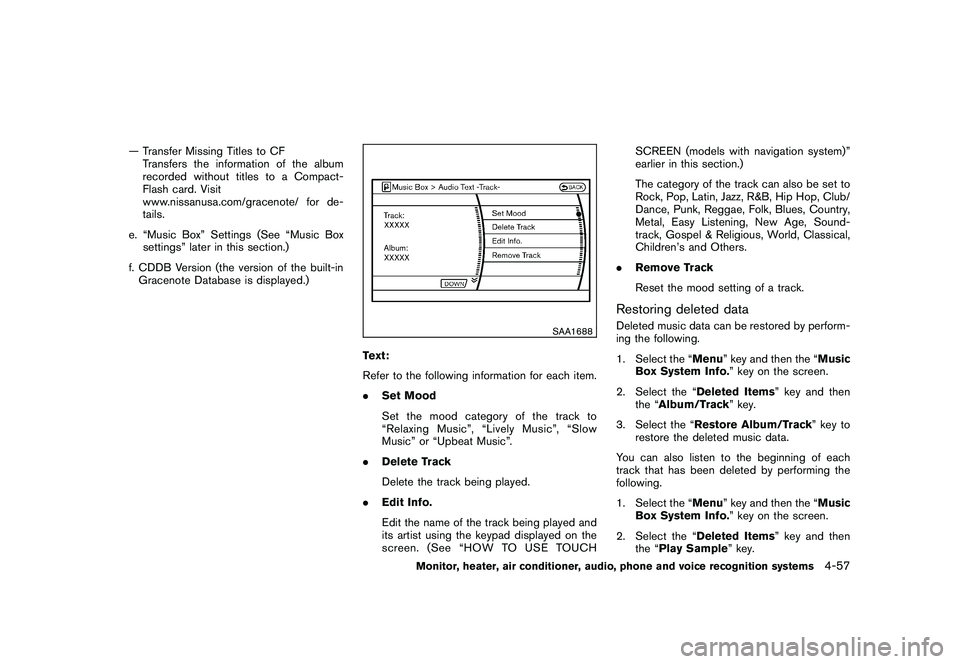
Text:
Refer to the following information for each item.
. Set Mood
Set the mood category of the track to
“Relaxing Music”, “Lively Music”, “Slow
Music” or “Upbeat Music”.
. Delete Track
Delete the track being played.
. Edit Info.
Edit the name of the track being played and
its artist using the keypad displayed on the
screen. (See “HOW TO USE TOUCH SCREEN (models with navigation system)”
earlier in this section.)
The category of the track can also be set to
Rock, Pop, Latin, Jazz, R&B, Hip Hop, Club/
Dance, Punk, Reggae, Folk, Blues, Country,
Metal, Easy Listening, New Age, Sound-
track, Gospel & Religious, World, Classical,
Children’s and Others.
. Remove Track
Reset the mood setting of a track.
Restoring deleted dataDeleted music data can be restored by perform-
ing the following.
1. Select the “Menu ” key and then the “Music
Box System Info. ” key on the screen.
2. Select the “Deleted Items ” key and then
the “ Album/Track ” key.
3. Select the “Restore Album/Track” key to restore the deleted music data.
You can also listen to the beginning of each
track that has been deleted by performing the
following.
1. Select the “Menu ” key and then the “Music
Box System Info. ” key on the screen.
2. Select the “Deleted Items ” key and then
the “Play Sample ” key.
Monitor, heater, air conditioner, audio, phone and voice recognition systems
4-57
Page 233 of 425
Black plate (229,1)
Model "Z51-D" EDITED: 2009/ 8/ 3
STEERING-WHEEL-MOUNTED CON-
TROLS FOR AUDIO
ENTER (models with navigation system)
or tuning (models without navigation
system) switchPush the switch upward or downward to select
a channel, track, CD or folder when they are
listed on the display.
Tune/Track:
RADIO
.Pushing DOWN “
”/UP “
” shorter
Next or previous preset channel
. Pushing DOWN “
”/UP “
” longer
Next or previous station
CD
. Pushing DOWN “
”/UP “
” shorter
Next track or the beginning of the current
track
. Pushing DOWN “
”/UP “
” longer
Disc change (When only one disc is loaded,
the 1st track of the disc will be selected.)
CD/CF (if so equipped) with MP3/WMA
. Pushing DOWN “
”/UP “
” shorter Next track or the beginning of the current
track
. Pushing DOWN “
”/UP “
” longer
Folder change (When the last folder on a
disc is playing, the next disc will be
selected.)
iPod
®(if so equipped)
. Pushing DOWN “
”/UP “
” shorter
Previous or next track (Start/Pause or Menu
can be selected when the ENTER button is
pushed.)
. Pushing DOWN “
”/UP “
” longer
Rewind or fast forward search
Music Box hard-disk drive audio system (if
so equipped)
. Pushing DOWN “
”/UP “
” shorter
Next track or the beginning of the current
track
. Pushing DOWN “
”/UP “
” longer
Playlist change (When the last playlist is
playing, the next playlist will be selected.)
ENTER switch operation:
You can also use the ENTER switch to select the
items on the usual setting menu screen. After selecting an MP3 folder using the up and
down switch, push the ENTER switch to
complete the selection.
While the display is in the NAVI, STATUS or
Audio setting screen, some audio functions can
also be controlled using the ENTER switch. The
function varies depending on if you push the
switch shorter (less than 1.5 seconds) or longer
(more than 1.5 seconds) .
BACK switch
Push this switch to go back to the previous
screen or cancel the selection if it is not
completed.Volume control switchesPush the upper (+) or lower (
) side switch to
increase or decrease the volume.SOURCE select switchPush the source select switch to change the
mode, Preset A, Preset B, Preset C, “iPod
®” (if
so equipped) , “Music Box” (if so equipped) , CD,
and CompactFlash (if so equipped) . If they are
not ready to function, those modes will be
skipped.
Monitor, heater, air conditioner, audio, phone and voice recognition systems
4-61
Page 263 of 425
Black plate (259,1)
Model "Z51-D" EDITED: 2009/ 8/ 3
Onceyouhaveconfirmedthenameand
location, the system begins the call.
When prompted by the system, say the number
you wish to call. (See “How to say numbers”
earlier in this section and “MAKING A CALL BY
ENTERING A PHONE NUMBER” earlier in this
section for more details.)
“Redial”
Use the Redial command to call the last number
that was dialed within the vehicle.
NOTE:
The system will not redial the last number
dialed by the handset keypad.
The system acknowledges the command, re-
peats the number and begins dialing.
If a redial number does not exist, the system
announces, “There is no number to redial” and
ends the VR session.
“Callback”
Use the Call Back command to dial the number
of the last incoming call within the vehicle.
The system acknowledges the command, re-
peats the number and begins dialing. If a call
back number does not exist, the system
announces, “There is no number to call back”and ends the VR session.
International
For dialing more than 10 digits or any special
characters, please say “Call International”.
When the system acknowledges the command,
the system will prompt you to speak the number.
During a call
During a call there are several command options
available. Press the
button on the steering
wheel to mute the receiving voice and enter
commands.
. “Help” — The system announces the avail-
able commands.
. “Go back/Correction” — The system an-
nounces “Go back,” ends the VR session
and returns to the call.
. “Cancel/Quit” — The system announces
“Cancel,” ends the VR session and returns
to the call.
. “Send/Enter/Call/Dial” — Use the Send
command to enter numbers during a call.
For example, if you were directed to dial an
extension by an automated system:
Say: “Send one two three four.”
The system acknowledges the command
and sends the tones associated with the numbers. The system then ends the VR
session and returns to the call.
. “Transfer Call” — Use the Transfer Call
command to transfer the call from the
Bluetooth
®Hands-Free Phone System to
the cellular phone when privacy is desired.
The system announces, “Transfer call. Call
transferred to privacy mode.” The system
then ends the VR session.
You can also issue the Transfer Call
command again to return to a hands-free
call through the vehicle.
. “Mute” — Use the Mute command to mute
your voice so the other party cannot hear it.
Use the mute command again to unmute
your voice.
NOTE:
If the other party ends the call or the
cellular phone network connection is lost
while the Mute feature is on, the Mute
feature may need to be reset to “off.”
Monitor, heater, air conditioner, audio, phone and voice recognition systems
4-91
Page 291 of 425
Black plate (287,1)
Model "Z51-D" EDITED: 2009/ 8/ 3
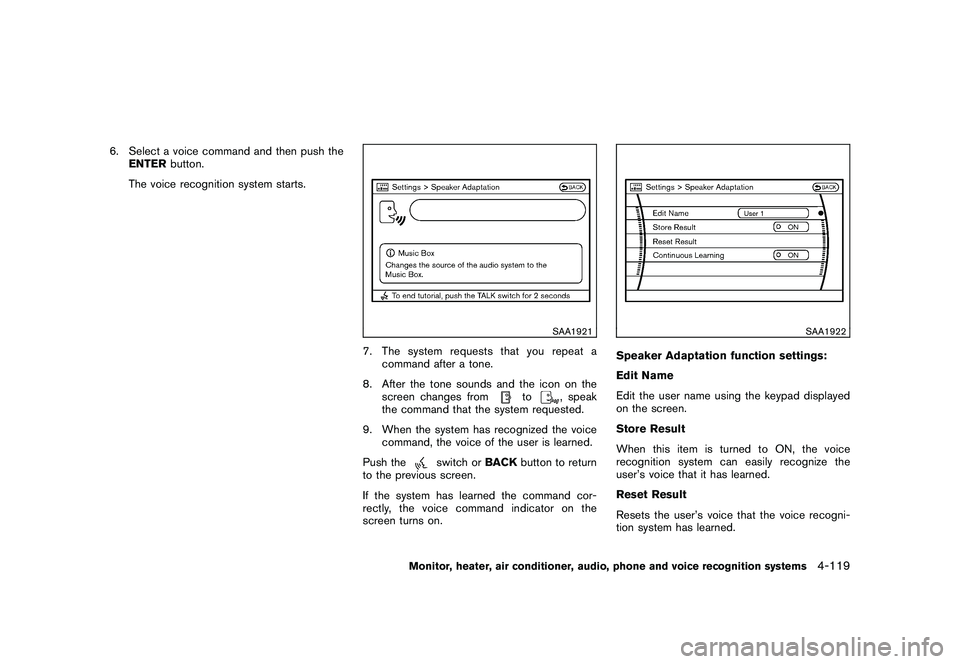
6. Select a voice command and then push theENTER button.
The voice recognition system starts.
SAA1921
7. The system requests that you repeat a command after a tone.
8. After the tone sounds and the icon on the screen changes from
to
, speak
the command that the system requested.
9. When the system has recognized the voice command, the voice of the user is learned.
Push the
switch or BACKbutton to return
to the previous screen.
If the system has learned the command cor-
rectly, the voice command indicator on the
screen turns on.
SAA1922
Speaker Adaptation function settings:
Edit Name
Edit the user name using the keypad displayed
on the screen.
Store Result
When this item is turned to ON, the voice
recognition system can easily recognize the
user’s voice that it has learned.
Reset Result
Resets the user’s voice that the voice recogni-
tion system has learned.
Monitor, heater, air conditioner, audio, phone and voice recognition systems
4-119
Page 298 of 425

Black plate (294,1)
Model "Z51-D" EDITED: 2009/ 8/ 3
alternate tires and wheels allow the TPMS to
continue to function properly.Additional information.The TPMS does not monitor the tire
pressure of the spare tire.
. The TPMS will activate only when the
vehicle is driven at speeds above 16 MPH
(25 km/h) . Also, this system may not detect
a sudden drop in tire pressure (for example a
flat tire while driving) .
. The low tire pressure warning light does not
automatically turn off when the tire pressure
is adjusted. After the tire is inflated to the
recommended pressure, the vehicle must be
driven at speeds above 16 MPH (25 km/h)
to activate the TPMS and turn off the low tire
pressure warning light. Use a tire pressure
gauge to check the tire pressure.
. Tire pressure rises and falls depending on
the heat caused by the vehicle’s operation
and the outside temperature. Low outside
temperature can lower the temperature of
the air inside the tire which can cause a
lower tire inflation pressure. This may cause
the low tire pressure warning light to
illuminate. If the warning light illuminates in
low ambient temperature, check the tire
pressure for all four tires.
For additional information, see “Low tire pres- sure warning light” in the “2. Instruments and
controls” section and “TIRE PRESSURE MON-
ITORING SYSTEM (TPMS)” in the “6. In case of
emergency” section.
WARNING
.
If the low tire pressure warning light
illuminates while driving, avoid sud-
den steering maneuvers or abrupt
braking, reduce vehicle speed, pull
off the road to a safe location and
stop the vehicle as soon as possi-
ble. Driving with under-inflated tires
may permanently damage the tires
and increase the likelihood of tire
failure. Serious vehicle damage
could occur and may lead to an
accident and could result in serious
personal injury. Check the tire pres-
sure for all four tires. Adjust the tire
pressure to the recommended COLD
tire pressure shown on the Tire and
Loading Information label to turn
the low tire pressure warning light
OFF. If the light still illuminates
while driving after adjusting the tire
pressure, a tire may be flat. If you
have a flat tire, replace it with a
spare tire as soon as possible. (See “FLAT TIRE” in the “6. In case of
emergency” section for changing a
flat tire.)
. When a spare tire is mounted or a
wheel is replaced, the TPMS will not
function and the low tire pressure
warning light will flash for approxi-
mately 1 minute. The light will
remain on after 1 minute. Contact
your NISSAN dealer as soon as
possible for tire replacement and/
or system resetting.
. Replacing tires with those not ori-
ginally specified by NISSAN could
affect the proper operation of the
TPMS.
. Do not inject any tire liquid or
aerosol tire sealant into the tires,
as this may cause a malfunction of
the tire pressure sensors.
CAUTION
.The TPMS may not function properly
when the wheels are equipped with
tire chains or the wheels are buried
in snow.
. Do not place metalized film or any
5-4
Starting and driving
Page 313 of 425
Black plate (309,1)
Model "Z51-D" EDITED: 2009/ 8/ 3
switch and release it. Take your foot off the
accelerator pedal. Your vehicle will maintain the
set speed.
.To pass another vehicle, depress the
accelerator pedal. When you release the
pedal, the vehicle will return to the previously
set speed.
. The vehicle may not maintain the set speed
on winding or hilly roads. If this happens,
drive without the cruise control.
To cancel the preset speed, use one of the
following methods:
a) Push the CANCEL switch.
b) Tap the brake pedal.
c) Turn the MAIN switch off. The CRUISE light will turn off.
. If you depress the brake pedal while pushing
the RESUME/ACCELERATE or SET/
COAST switch and reset at the cruising
speed, the cruise control will disengage.
Turn the MAIN switch off once and then turn
it on again.
. The cruise control will automatically cancel if
the vehicle slows more than 8 MPH (13
km/h) below the set speed.
. If you move the selector lever to the N
(Neutral) position, the cruise control will be canceled.
To reset at a faster cruising speed, use one
of the following methods:
. Depress the accelerator pedal. When the
vehicle attains the desired speed, push and
release the SET/COAST switch.
. Push and hold the RESUME/ACCELERATE
switch. When the vehicle attains the desired
speed, release the switch.
. Push, then quickly release the RESUME/
ACCELERATE switch. Each time you do
this, the set speed will increase by about 1
MPH (1.6 km/h) .
To reset at a slower cruising speed, use one
of the following methods:
. Lightly tap the brake pedal. When the
vehicle attains the desired speed, push the
SET/COAST switch and release it.
. Push and hold the SET/COAST switch.
Release the switch when the vehicle slows
down to the desired speed.
. Push, then quickly release the SET/COAST
switch. Each time you do this, the set speed
will decrease by about 1 MPH (1.6 km/h) . To resume the preset speed,
push and
release the RESUME/ACCELERATE switch.
The vehicle will resume the last set cruising
speed when the vehicle speed is over 25 MPH
(40 km/h) .
Starting and driving
5-19
Page 322 of 425
Black plate (318,1)
Model "Z51-D" EDITED: 2009/ 8/ 3
The VDC OFF switch is used to turn off the VDC
system. The VDC off indicator illuminates to
indicate the VDC system is off. When the VDC
switch is used to turn off the system, the VDC
system still operates to prevent one drive wheel
from slipping by transferring power to a non
slipping drive wheel. The
indicator flashes
if this occurs. All other VDC functions are off and
the Slip indicator will not flash. The VDC System
is automatically reset to on when the ignition
switch is placed in the off position then back to
the on position.
The VDC system computer has a built-in
diagnostic feature that tests the system each
time you start the engine and move the vehicle at
a low speed forward or backward. When the
self-test occurs, you may hear a “clunk” noise
and/or feel a pulsation in the brake pedal. This is
normal and is not an indication of a malfunction.
WARNING
. The VDC system is designed to help
improve driving stability but does
not prevent accidents due to abrupt
steering operation at high speeds or
due to careless or dangerous driv-
ing techniques. Reduce vehicle
speed and be especially careful
when driving and cornering on slip-
pery surfaces and always drive care- fully.
. If engine control related parts are
not standard equipment or are ex-
tremely deteriorated, both the
and
indicator lights may illumi-
nate.
. Do not modify the vehicle’s suspen-
sion. If suspension parts such as
shock absorbers, struts, springs,
stabilizer bars, bushings and
wheels are not NISSAN approved
for your vehicle or are extremely
deteriorated the VDC system may
not operate properly. This could
adversely affect vehicle handling
performance, and the
indicator
may flash or bothand
indicator lights may illuminate.
. If brake related parts such as brake
pads, rotors and calipers are not
standard equipment or are extre-
mely deteriorated, the VDC system
may not operate properly and both
and
indicator lights may
illuminate.
. When driving on extremely inclined
surfaces such as higher banked
corners, the VDC system may not operate properly and the
in-
dicator may flash or bothand
indicator lights may illuminate.
Do not drive on these types of
roads.
. When driving on an unstable sur-
face such as a turntable, ferry,
elevator or ramp, the
indicator
may flash or bothand
indicator lights may illuminate. This
is not a malfunction. Restart the
engine after driving onto a stable
surface.
. If wheels or tires other than the
recommended ones are used, the
VDC system may not operate prop-
erly and the
indicator may flash
or bothand
indicator
lights may illuminate.
. The VDC system is not a substitute
for winter tires or tire chains on a
snow covered road.
. The ABLS system helps provide
increased traction, but will not pre-
vent accidents due to abrupt steer-
ing operation or by careless driving
or dangerous driving practices. Re-
duce vehicle speed and be espe-
5-28
Starting and driving
Page 328 of 425

Black plate (324,1)
Model "Z51-D" EDITED: 2009/ 8/ 3
TIRE PRESSURE MONITORING SYS-
TEM (TPMS)This vehicle is equipped with the Tire Pressure
Monitoring System (TPMS) . It monitors tire
pressure of all tires except the spare. When
the low tire pressure warning light is lit, one or
more of your tires is significantly under-inflated.
If the vehicle is being driven with low tire
pressure, the TPMS will activate and warn you
of it by the low tire pressure warning light. This
system will activate only when the vehicle is
driven at speeds above 16 MPH (25 km/h) . For
more details, see “WARNING/INDICATOR
LIGHTS AND AUDIBLE REMINDERS” in the
“2. Instruments and controls” section and “TIRE
PRESSURE MONITORING SYSTEM (TPMS)”
in the “5. Starting and driving” section.
WARNING
.If the low tire pressure warning light
illuminates while driving, avoid sud-
den steering maneuvers or abrupt
braking, reduce vehicle speed, pull
off the road to a safe location and
stop the vehicle as soon as possi-
ble. Driving with under-inflated tires
may permanently damage the tires
and increase the likelihood of tire
failure. Serious vehicle damage could occur and may lead to an
accident and could result in serious
personal injury. Check the tire pres-
sure for all four tires. Adjust the tire
pressure to the recommended COLD
tire pressure shown on the Tire and
Loading Information label to turn
the low tire pressure warning light
OFF. If the light still illuminates
while driving after adjusting the tire
pressure, a tire may be flat. If you
have a flat tire, replace it with a
spare tire as soon as possible.
. When a spare tire is mounted or a
wheel is replaced, the TPMS will not
function and the low tire pressure
warning light will flash for approxi-
mately 1 minute. The light will
remain on after 1 minute. Contact
your NISSAN dealer as soon as
possible for tire replacement and/
or system resetting.
. Replacing tires with those not ori-
ginally specified by NISSAN could
affect the proper operation of the
TPMS.
. Do not inject any tire liquid or
aerosol tire sealant into the tires,
as this may cause a malfunction of the tire pressure sensors.
CHANGING A FLAT TIREIf you have a flat tire, follow the instructions
below.Stopping the vehicle1. Safely move the vehicle off the road and
away from traffic.
2. Turn on the hazard warning flashers.
3. Park on a level surface and apply the parking brake. Move the selector lever to the P
(Park) position.
4. Turn off the engine.
5. Raise the hood to warn other traffic, and to signal professional road assistance person-
nel that you need assistance.
6. Have all passengers get out of the vehicle and stand in a safe place, away from traffic
and clear of the vehicle.
WARNING
.Make sure the parking brake is
securely applied and the transmis-
sion is shifted into the P (Park)
position.
FLAT TIRE6-2
In case of emergency