2010 NISSAN MAXIMA air condition
[x] Cancel search: air conditionPage 109 of 457

CAUTION
cThe outlet and plug may be hot during
or immediately after use.
cThe power outlets are not designed for
use with a cigarette lighter.
cDo not use with accessories that ex-
ceed a 12 volt, 120W (10A) power draw.
Do not use double adapters or more
than one electrical accessory.
cUse power outlets with the engine run-
ning to avoid discharging the vehicle
battery.
cAvoid using power outlets when the air
conditioner, headlights or rear window
defroster is on.
cBefore inserting or disconnecting a
plug, be sure the electrical accessory
being used is turned OFF.
cPush the plug in as far as it will go. If
good contact is not made, the plug may
overheat or the internal temperature
fuse may open.
cWhen not in use, be sure to close the
cap. Do not allow water to contact the
outlet.
MAP POCKETS SEATBACK POCKETS
The seatback pockets are located on the back of
the driver’s and passenger’s seats. The pockets
can be used to store maps.
LIC1393LIC0016
STORAGE
Instruments and controls2-37
Page 117 of 457

To fully close the moonroof, push the switch
toward
s2.
To open or close the moonroof part way, push the
switch in any direction while the moonroof is
sliding to stop it in the desired position.
Tilting the moonroof
Close the moonroof by pushing the switch
toward
s2. Release the switch, then push
the switch toward
s2again to tilt the
moonroof up.
To tilt the moonroof down, push the switch
toward
s1.
WARNING
cIn an accident you could be thrown from
the vehicle through an open moonroof.
Always use seat belts and child
restraints.
cDo not allow anyone to stand up or
extend any portion of their body out of
the moonroof opening while the vehicle
is in motion or while the moonroof is
closing.
CAUTION
cRemove water drops, snow, ice or sand
from the moonroof before opening.
cDo not place heavy objects on the
moonroof or surrounding area.
Auto-reverse function (when closing or
tilting down the moonroof)
The auto-reverse function can be activated when
the moonroof is closed or tilted down by auto-
matic operation when the ignition switch is
placed in the ON position or for about 45 sec-
onds after the ignition switch is placed in the OFF
position.
Depending on the environment or driving
conditions, the auto-reverse function may
be activated if an impact or load similar to
something being caught in the moonroof
occurs.
WARNING
There are some small distances immedi-
ately before the closed position which
cannot be detected. Make sure that all
passengers have their hands, etc., inside
the vehicle before closing the moonroof.When closing:
If the control unit detects something caught in the
moonroof as it moves to the front, the moonroof
will immediately open backward.
When tilting down:
If the control unit detects something caught in the
moonroof as it tilts down, the moonroof will im-
mediately tilt up.
If the auto-reverse function malfunctions and re-
peats opening or tilting up the moonroof, keep
pushing the tilt down switch within 5 seconds
after it happens; the moonroof will fully close
gradually. Make sure nothing is caught in the
moonroof.
Sunshade
Open and close the sunshade by sliding it for-
ward or backward.
If the moonroof does not close
Have your NISSAN dealer check and repair the
moonroof.
Instruments and controls2-45
Page 135 of 457

WARNING
cRadio waves could adversely affect
electric medical equipment. Those who
use a pacemaker should contact the
electric medical equipment manufac-
turer for the possible influences before
use.
cThe Intelligent Key transmits radio
waves when the buttons are pushed.
The FAA advises the radio waves may
affect aircraft navigation and communi-
cation systems. Do not operate the In-
telligent Key while on an airplane. Make
sure the buttons are not operated unin-
tentionally when the unit is stored for a
flight.
The Intelligent Key system can operate all the
door locks using the remote controller function or
pushing the request switch on the vehicle without
taking the key out from a pocket or purse. The
operating environment and/or conditions may af-
fect the Intelligent Key system operation.
Be sure to read the following before using the
Intelligent Key system.
CAUTION
cBe sure to carry the Intelligent Key with
you when operating the vehicle.
cNever leave the Intelligent Key in the
vehicle when you leave the vehicle.
The Intelligent Key is always communicating with
the vehicle as it receives radio waves. The Intel-
ligent Key system transmits weak radio waves.
Environmental conditions may interfere with the
operation of the Intelligent Key system under the
following operating conditions.
cWhen operating near a location where
strong radio waves are transmitted, such as
a TV tower, power station and broadcasting
station.
cWhen in possession of wireless equipment,
such as a cellular telephone, transceiver,
and CB radio.
cWhen the Intelligent Key is in contact with or
covered by metallic materials.
cWhen any type of radio wave remote control
is used nearby.
cWhen the Intelligent Key is placed near an
electric appliance such as a personal com-
puter.cWhen the vehicle is parked near a parking
meter.
In such cases, correct the operating conditions
before using the Intelligent Key function or use
the mechanical key.
Although the life of the battery varies depending
on the operating conditions, the battery’s life is
approximately 2 years. If the battery is dis-
charged, replace it with a new one.
When the Intelligent Key battery is almost dis-
charged, insert the Intelligent key into the Intelli-
gent Key port to start the engine. Replace the
discharged battery with a new one as soon as
possible. For additional information, see “Push
Button Ignition Switch “ in the “Starting and
Driving” section.
Since the Intelligent Key is continuously receiving
radio waves, if the key is left near equipment
which transmits strong radio waves, such as sig-
nals from a TV and personal computer, the bat-
tery life may become shorter.
For information regarding replacement of a bat-
tery, see “Battery replacement” in the “Mainte-
nance and do-it-yourself” section.
NISSAN INTELLIGENT KEY™
Pre-driving checks and adjustments3-7
Page 161 of 457

4 Monitor, climate, audio, phone and voice
recognition systems
Control panel buttons — color screen without
Navigation System (if so equipped)..................4-4
How to use the NISSAN controller...............4-5
How to select menus on the screen..............4-6
How to use the STATUS button..................4-6
How to use the INFO button.....................4-7
How to use the SETTING button.................4-9
OFF button.............................4-15
Control panel buttons — color screen with
Navigation System (if so equipped).................4-16
How to use the NISSAN controller..............4-17
How to use the touch screen...................4-18
How to select menus on the screen.............4-20
How to use the STATUS button.................4-20
How to use the INFO button....................4-20
How to use the SETTING button................4-24
OFF button.............................4-31
Image viewer (if so equipped)......................4-31
Using the image viewer........................4-31
RearView Monitor (if so equipped)..................4-34
How to read the displayed lines.................4-34
How to park with predicted course lines..........4-35Difference between predicted and actual
distances.....................................4-36
How to adjust the screen.......................4-39
Operating tips.................................4-39
Vents...........................................4-40
Heater and air conditioner (automatic) (Type A)......4-41
Automatic operation...........................4-41
Manual operation..............................4-42
Operating tips.................................4-43
Heater and air conditioner (automatic) (Type B)......4-44
Automatic operation...........................4-44
Manual operation..............................4-45
Operating tips.................................4-46
Rear seat air conditioner (if so equipped)............4-47
Controls......................................4-47
Servicing air conditioner...........................4-48
Audio system....................................4-48
Radio........................................4-48
FM radio reception............................4-48
AM radio reception............................4-49
Satellite radio reception (if so equipped).........4-49
Audio operation precautions....................4-49
Page 164 of 457

WARNING
cPositioning of the heating or air condi-
tioning controls and display controls
should not be done while driving in or-
der that full attention may be given to
the driving operation.
cDo not disassemble or modify this sys-
tem. If you do, it may result in accidents,
fire, or electrical shock.
cDo not use this system if you notice any
abnormality, such as a frozen screen or
lack of sound. Continued use of the
system may result in accident, fire or
electric shock.
cIn case you notice any foreign object in
the system hardware, spill liquid on it,
or notice smoke or smell coming from
it, stop using the system immediately
and contact your nearest NISSAN
dealer. Ignoring such conditions may
lead to accidents, fire or electrical
shock.
1. STATUS button (P. 4-6)
2. INFO button (P. 4-7)
3. NISSAN controller (P. 4-5)
4.
OFF brightness control button
(P. 4-15)5. BRIGHT + (brightness control) button
6. BRIGHT – (brightness control) button
7.
BACK (previous) button (P. 4-5)
8. SETTING button (P. 4-9)
LHA1146
CONTROL PANEL BUTTONS — COLOR
SCREEN WITHOUT NAVIGATION
SYSTEM (if so equipped)
4-4Monitor, climate, audio, phone and voice recognition systems
Page 170 of 457

Display settings
Select the “Display” key. The Display settings
screen will appear.Brightness/contrast:
Select the “Brightness” key or the “Contrast” key
to adjust the brightness or contrast of the map
background. Use the NISSAN controller to adjust
the brightness to darker or brighter and the con-
trast to lower or higher.
The new settings are automatically saved when
you exit the setting screen by pressing the BACK
button or any other mode button.Display off:
Select the “Display ON” key. The amber indicator
next to “Display ON” turns off and the message
above will be displayed briefly. When the audio,
HVAC (Heater and air conditioner) , or any mode
button on the control panel is operated, the dis-
play turns on for that operation. If one of the
control panel buttons is pressed, the display will
not automatically turn off until that operation is
finished. Otherwise, the screen turns off auto-
matically after 5 seconds.
LHA0929LHA0930WHA0823
4-10Monitor, climate, audio, phone and voice recognition systems
Page 185 of 457
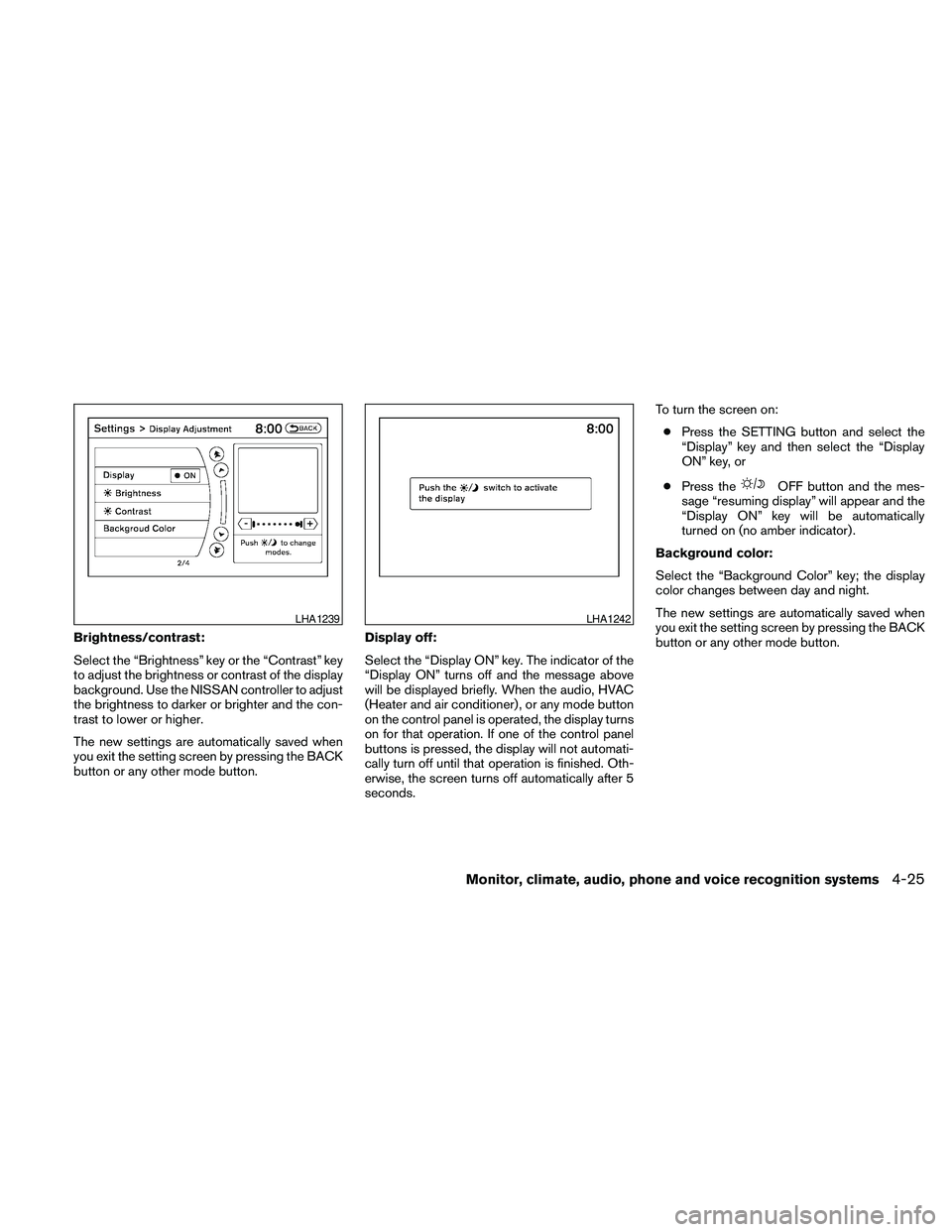
Brightness/contrast:
Select the “Brightness” key or the “Contrast” key
to adjust the brightness or contrast of the display
background. Use the NISSAN controller to adjust
the brightness to darker or brighter and the con-
trast to lower or higher.
The new settings are automatically saved when
you exit the setting screen by pressing the BACK
button or any other mode button.Display off:
Select the “Display ON” key. The indicator of the
“Display ON” turns off and the message above
will be displayed briefly. When the audio, HVAC
(Heater and air conditioner) , or any mode button
on the control panel is operated, the display turns
on for that operation. If one of the control panel
buttons is pressed, the display will not automati-
cally turn off until that operation is finished. Oth-
erwise, the screen turns off automatically after 5
seconds.To turn the screen on:
cPress the SETTING button and select the
“Display” key and then select the “Display
ON” key, or
cPress the
OFF button and the mes-
sage “resuming display” will appear and the
“Display ON” key will be automatically
turned on (no amber indicator) .
Background color:
Select the “Background Color” key; the display
color changes between day and night.
The new settings are automatically saved when
you exit the setting screen by pressing the BACK
button or any other mode button.
LHA1239LHA1242
Monitor, climate, audio, phone and voice recognition systems4-25
Page 201 of 457

1. Temperature control buttons (driver’s
side)
2. AUTO climate control ON button
3.
(front defroster) button
4.
Air recirculation button
5. MODE (manual air flow control) button
6. Temperature control buttons (passen-
ger’s side)
7. DUAL (passenger side temperature
control) ON/OFF button
8.
Fresh air intake button9.
(fan speed control) dial/OFF but-
ton
10.
(rear window defroster) button
11. A/C (air conditioner) ON/OFF button
WARNING
cThe air conditioner cooling function op-
erates only when the engine is running.cDo not leave children or adults who
would normally require the assistance
of others alone in your vehicle. Pets
should also not be left alone. They
could accidentally injure themselves or
others through inadvertent operation of
the vehicle. Also, on hot, sunny days,
temperatures in a closed vehicle could
quickly become high enough to cause
severe or possibly fatal injuries to
people or animals.
cDo not use the recirculation mode for
long periods as it may cause the interior
air to become stale and the windows to
fog up.
Start the engine and operate the controls to
activate the air conditioner.
AUTOMATIC OPERATION
Cooling and/or dehumidified heating
(AUTO)
This mode may be used all year round as the
system automatically works to keep a constant
temperature. Air flow distribution and fan speed
are also controlled automatically.
1. Push the AUTO button on. (The indicator on
the button will illuminate and AUTO will be
displayed.)
Type A
LHA1139
HEATER AND AIR CONDITIONER
(automatic) (Type A)
Monitor, climate, audio, phone and voice recognition systems4-41