Page 239 of 312
Examples:
1-800-662-6200
“One eight zero zero six six two six two zero
zero”
Improving Recognition of Phone numbers:
Recognition of phone numbers can be improved
by saying the phone number in 3 groups of
numbers. For example, to call 800-662-6200,
say “Eight Zero Zero” first, and the system will
then ask to speak the next three digits. Then, say
“Six Six Two”. After recognition, the system will
then ask to speak the last 4 digits. Say, “Six Two
Zero Zero”. Using this method of phone digit en-
try can improve recognition performance.
INFO:
For best recognition, speak “zero” for the num-
ber “0” and “oh” for the letter “o”.
9-6Voice recognition
Page 240 of 312
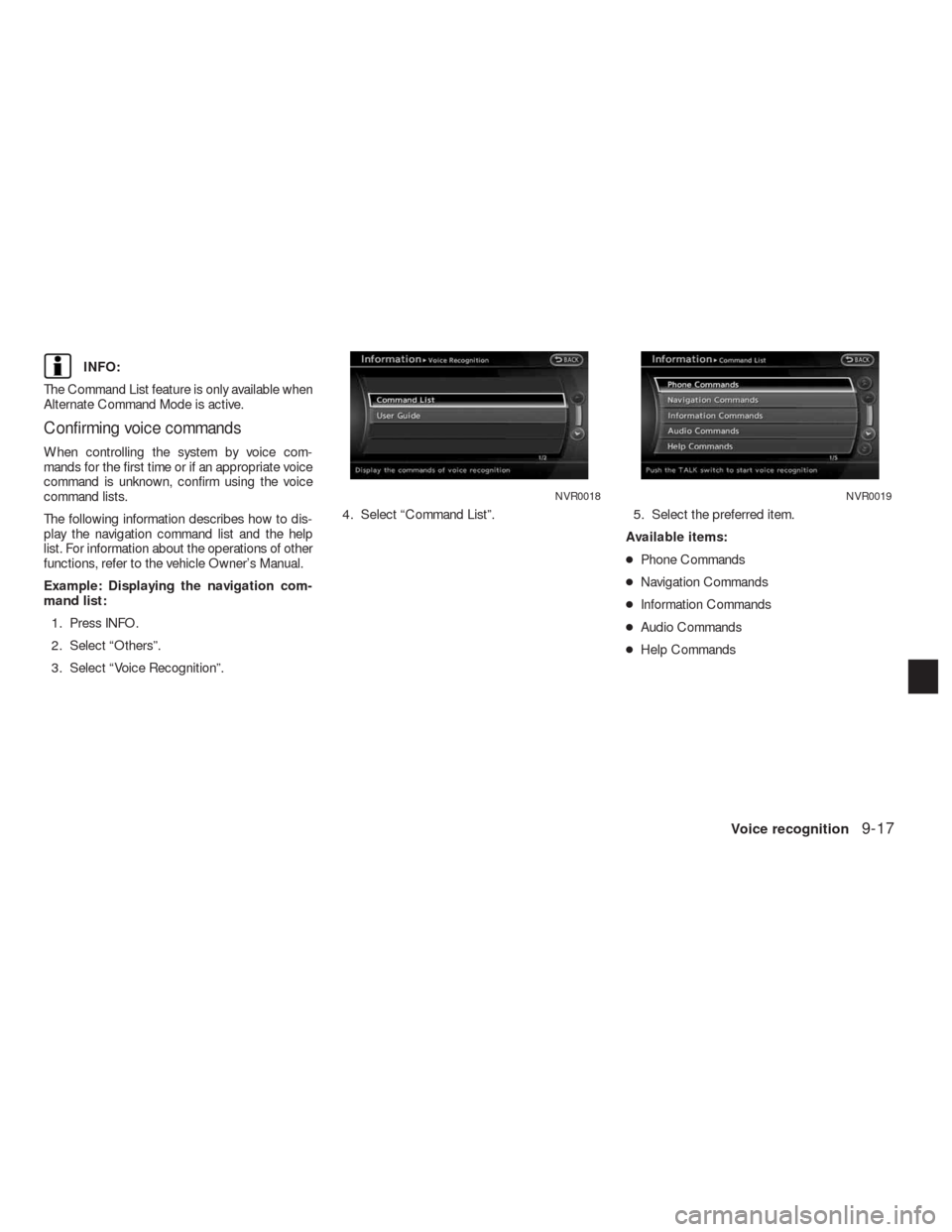
Command list
Category Command:
COMMAND ACTION
Navigation Operates Navigation function.
Phone Operates Phone function.
Information Displays Vehicle Information function.
Audio Operates Audio function.
Help Displays User Guide.
Navigation Command:
COMMAND ACTION
Home Sets a route to the home location that is stored in the Address book.
Address Searches for a location by the street address specified, and sets a route (for continental US only) .
Places Sets a route to a facility near the current vehicle location.
Address Book Searches for information stored in the Address Book.
Previous Destinations Sets a route to a previous destination.
Information Command:
COMMAND ACTION
Fuel Economy Displays fuel economy information.
Trip Computer Displays trip information.
Maintenance Displays maintenance information.
Traffic Information Turns the traffic information system on and off.
Where am I? Displays current vehicle location.
Voice recognition9-7
Page 241 of 312
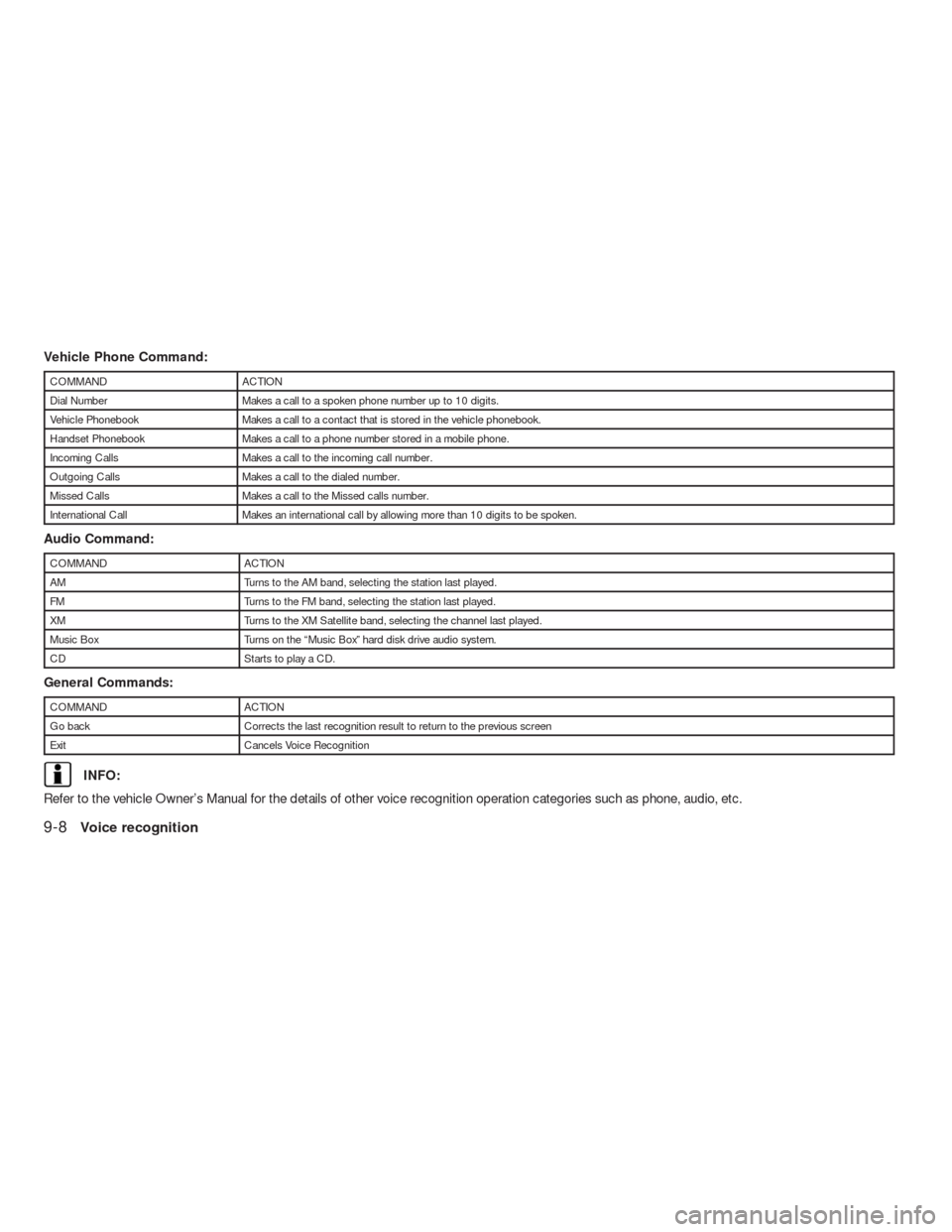
Vehicle Phone Command:
COMMAND ACTION
Dial Number Makes a call to a spoken phone number up to 10 digits.
Vehicle Phonebook Makes a call to a contact that is stored in the vehicle phonebook.
Handset Phonebook Makes a call to a phone number stored in a mobile phone.
Incoming Calls Makes a call to the incoming call number.
Outgoing Calls Makes a call to the dialed number.
Missed Calls Makes a call to the Missed calls number.
International Call Makes an international call by allowing more than 10 digits to be spoken.
Audio Command:
COMMAND ACTION
AM Turns to the AM band, selecting the station last played.
FM Turns to the FM band, selecting the station last played.
XM Turns to the XM Satellite band, selecting the channel last played.
Music Box Turns on the “Music Box” hard disk drive audio system.
CD Starts to play a CD.
General Commands:
COMMAND ACTION
Go back Corrects the last recognition result to return to the previous screen
Exit Cancels Voice Recognition
INFO:
Refer to the vehicle Owner’s Manual for the details of other voice recognition operation categories such as phone, audio, etc.
9-8Voice recognition
Page 242 of 312
VOICE COMMAND EXAMPLES
To use the voice recognition function, speaking
one command is sometimes sufficient, but at
other times it is necessary to speak two or more
commands. As examples, some additional basic
operations that can be performed by voice com-
mands are described here.
Example 1: Setting a destination by a
street address
1. Press
located on the steering wheel
switch.2. The system announces, “Would you like to
access Phone, Navigation, Information, Au-
dio or Help?”.
3. Speak “Navigation”.4. Speak “Address”.
NGT0070NGT0071
Voice recognition9-9
Page 245 of 312
13. To confirm the destination location on the
map, speak “Show map”. To calculate a
route, speak “Calculate route”.
Example 2: Placing a call to the phone
number 800–662–6200
1. Press
located on the steering wheel
switch.2. The system announces, “Would you like to
access Phone, Navigation, Information, Au-
dio or Help?”.
3. Speak “Phone”.4. Speak “Dial Number”.
NGT0077NGT0070NGT0079
9-12Voice recognition
Page 247 of 312
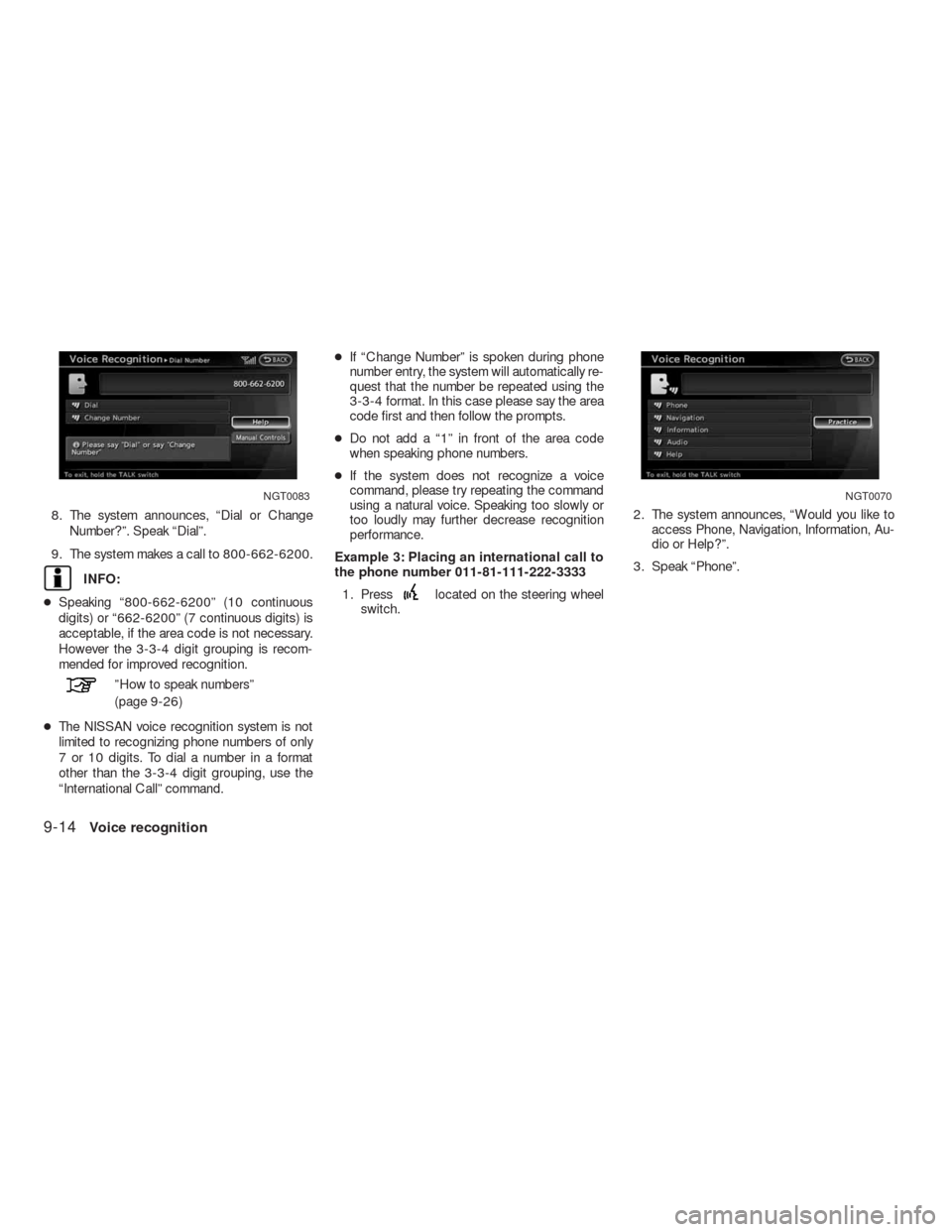
8. The system announces, “Dial or Change
Number?”. Speak “Dial”.
9. The system makes a call to 800-662-6200.
INFO:
●Speaking “800-662-6200” (10 continuous
digits) or “662-6200” (7 continuous digits) is
acceptable, if the area code is not necessary.
However the 3-3-4 digit grouping is recom-
mended for improved recognition.
”How to speak numbers”
(page 9-26)
●The NISSAN voice recognition system is not
limited to recognizing phone numbers of only
7 or 10 digits. To dial a number in a format
other than the 3-3-4 digit grouping, use the
“International Call” command.●If “Change Number” is spoken during phone
number entry, the system will automatically re-
quest that the number be repeated using the
3-3-4 format. In this case please say the area
code first and then follow the prompts.
●Do not add a “1” in front of the area code
when speaking phone numbers.
●If the system does not recognize a voice
command, please try repeating the command
using a natural voice. Speaking too slowly or
too loudly may further decrease recognition
performance.
Example 3: Placing an international call to
the phone number 011-81-111-222-3333
1. Press
located on the steering wheel
switch.2. The system announces, “Would you like to
access Phone, Navigation, Information, Au-
dio or Help?”.
3. Speak “Phone”.
NGT0083NGT0070
9-14Voice recognition
Page 250 of 312
INFO:
The Command List feature is only available when
Alternate Command Mode is active.
Confirming voice commands
When controlling the system by voice com-
mands for the first time or if an appropriate voice
command is unknown, confirm using the voice
command lists.
The following information describes how to dis-
play the navigation command list and the help
list. For information about the operations of other
functions, refer to the vehicle Owner’s Manual.
Example: Displaying the navigation com-
mand list:
1. Press INFO.
2. Select “Others”.
3. Select “Voice Recognition”.4. Select “Command List”. 5. Select the preferred item.
Available items:
●Phone Commands
●Navigation Commands
●Information Commands
●Audio Commands
●Help Commands
NVR0018NVR0019
Voice recognition9-17
Page 253 of 312
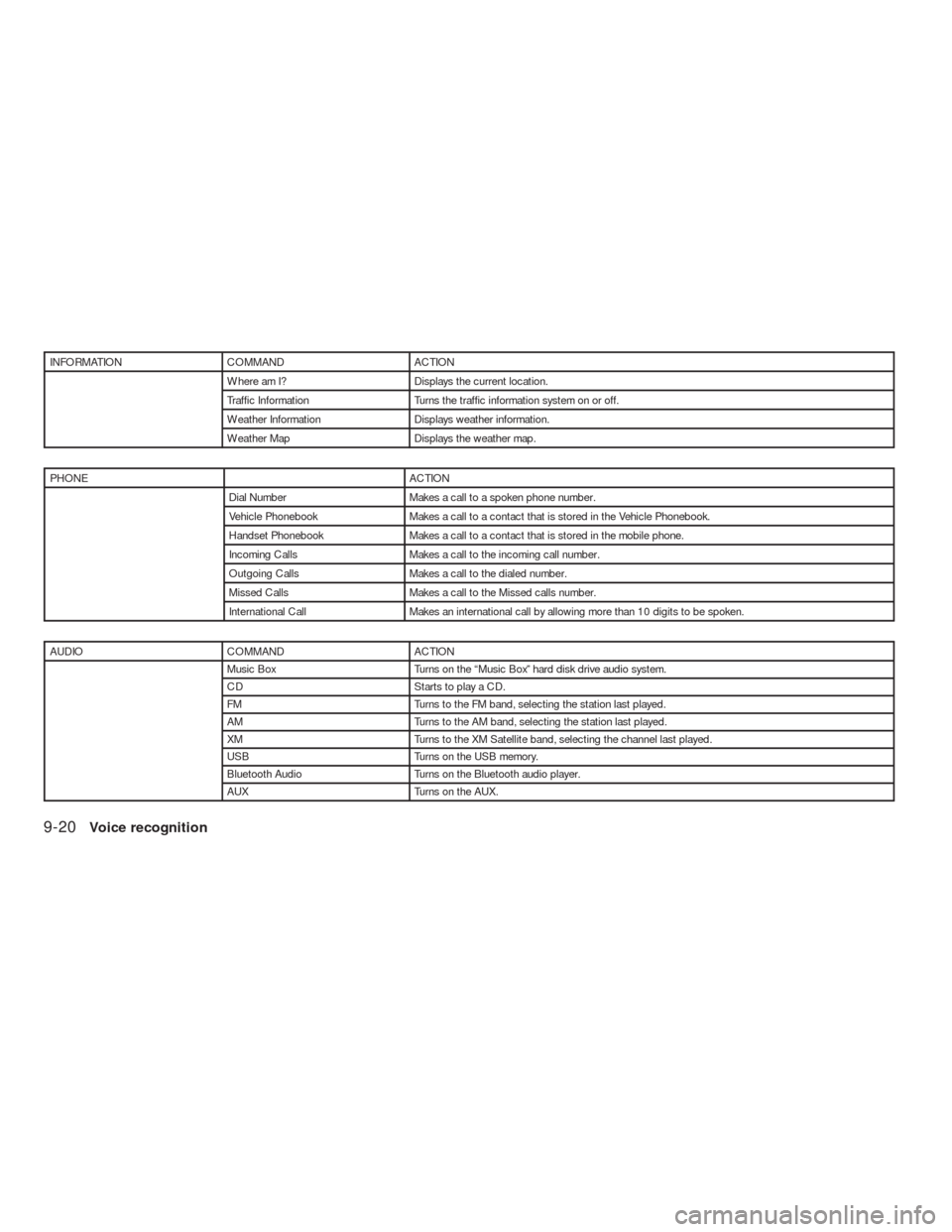
INFORMATION COMMAND ACTION
Where am I? Displays the current location.
Traffic Information Turns the traffic information system on or off.
Weather Information Displays weather information.
Weather Map Displays the weather map.
PHONE ACTION
Dial Number Makes a call to a spoken phone number.
Vehicle Phonebook Makes a call to a contact that is stored in the Vehicle Phonebook.
Handset Phonebook Makes a call to a contact that is stored in the mobile phone.
Incoming Calls Makes a call to the incoming call number.
Outgoing Calls Makes a call to the dialed number.
Missed Calls Makes a call to the Missed calls number.
International Call Makes an international call by allowing more than 10 digits to be spoken.
AUDIO COMMAND ACTION
Music Box Turns on the “Music Box” hard disk drive audio system.
CD Starts to play a CD.
FM Turns to the FM band, selecting the station last played.
AM Turns to the AM band, selecting the station last played.
XM Turns to the XM Satellite band, selecting the channel last played.
USB Turns on the USB memory.
Bluetooth Audio Turns on the Bluetooth audio player.
AUX Turns on the AUX.
9-20Voice recognition