Page 376 of 714
Features and controls
3-265
3
Tw oEnglish Two -
Spanish Dos -
French Deux -
ThreeEnglish Three -
Spanish Tres -
French Trois -
FourEnglish Four -
Spanish Cuatro -
French Quatre -
FiveEnglish Five -
Spanish Cinco -
French Cinq -
SixEnglish Six -
Spanish Seis -
French Six -
SevenEnglish Seven -
Spanish Siete -
French Sept -
EightEnglish Eight -
Spanish Ocho -
French Huit -Command
Language
Primary
Command
Alternative
Commands
NineEnglish Nine -
Spanish Nueve -
French Neuf -
StarEnglish Star (*) -
Spanish Estrella (*) Asterisco (*)
French Étoile (*) -
PoundEnglish Pound (#) -
Spanish Número (#)Signo de
Número (#)
French Dièse (#) -
VOICE
TRAININGEnglish Voice training -
SpanishAprendizaje de
voz-
FrenchEntraînement à
la parole-
PASSCODEEnglish Passcode -
Spanish Contraseña -
French NIP -
RETRAINEnglish Retrain -
Spanish Volver a educar -
FrenchRefaire l’entraî-
nement-Command
Language
Primary
Command
Alternative
Commands
BK0115300US.book 265 ページ 2009年7月16日 木曜日 午前9時13分
Page 377 of 714

3-266 Features and controls
3
ENABLEEnglish Enable -
Spanish Activar -
French Activer l’activer
DISABLEEnglish Disable -
Spanish Desactivar -
French Désactiver -
SWAP CALLSEnglish Swap Calls -
SpanishIntercambiar
llamadas-
FrenchPasser à l’autre
appel-
JOIN CALLSEnglish Join Calls -
Spanish Unir llamadas -
French Intégrer l’appel -
ENGLISHEnglish English -
Spanish Inglés -
French Anglais l’anglais
SPANISHEnglish Spanish -
Spanish Español -
French Espagnol l’espagnolCommand
Language
Primary
Command
Alternative
Commands
FRENCHEnglish French -
Spanish Francés -
French Français -
SELECT
MUSIC
PLAYEREnglishSelect Music
Player-
SpanishSeleccionar
Reproductor de
Música-
FrenchSélectionner le
Lecteur Musical-
IMPORT
CONTACTEnglish Import Contact Import
SpanishImportar
ContactoImportar
FrenchImporter un
ContactImporter
EDIT NAMEEnglish Edit Name -
Spanish Editar nombre -
French Modifier un nom -
EDIT
NUMBEREnglish Edit Number -
Spanish Editar número -
FrenchModifier un
numéro-Command
Language
Primary
Command
Alternative
Commands
BK0115300US.book 266 ページ 2009年7月16日 木曜日 午前9時13分
Page 378 of 714
Features and controls
3-267
3 USB input terminal
(if so equipped)
N00566700015
You can connect your USB memory device or iPod* to play
music files stored in the USB memory device or iPod.
The following explains how to connect and remove a USB
memory device or iPod.
Refer to the following sections for details on how to play music
files:
Refer to “To play tracks from USB device” on page 5-97.
*: “iPod” is a registered trademark of Apple Inc. in the United
States and other countries.
SINGLE
ENTRYEnglish Single Entry -
Spanish Entrada única -
French Entrée unique -
ALL
CONTACTSEnglish All Contacts -
SpanishTodos los
contactos-
French Tous les contacts -Command
Language
Primary
Command
Alternative
Commands
BK0115300US.book 267 ページ 2009年7月16日 木曜日 午前9時13分
Page 533 of 714
5-106 Comfort controls
5
6. After the voice guide says “Playing ,” the system
creates an index for the genre.NOTE�
If the confirmation function is active, the voice guide con-
firms if the genre is correct. If the genre is correct, say
“Yes”. If not, say “No”. After the voice guide says “Genre
not found, please try again,” the system returns to step 2.
Refer to “Confirmation function setting” on page 3-240.
7. The system exits the voice recognition mode and starts
playback.
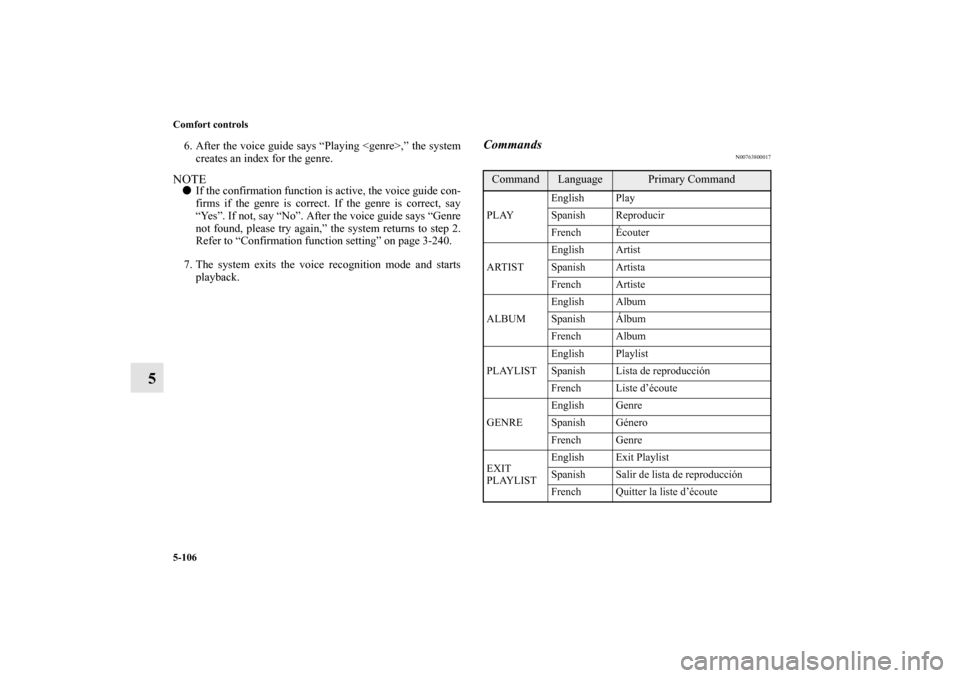
Commands
N00763800017
Command
Language
Primary Command
PLAYEnglish Play
Spanish Reproducir
French Écouter
ARTISTEnglish Artist
Spanish Artista
French Artiste
ALBUMEnglish Album
Spanish Álbum
French Album
PLAYLISTEnglish Playlist
Spanish Lista de reproducción
French Liste d’écoute
GENREEnglish Genre
Spanish Género
French Genre
EXIT
PLAYLISTEnglish Exit Playlist
Spanish Salir de lista de reproducción
French Quitter la liste d’écoute
BK0115300US.book 106 ページ 2009年7月16日 木曜日 午前9時13分
Page:
< prev 1-8 9-16 17-24