Page 7 of 658
Overview
Center panel
N00100700112
Audio (if so equipped) P.5-27, 5-55
Digital clock (if so equipped) P.5-99
Mitsubishi Multi-Communication System (if so equipped)
Refer to the separate “Mitsubishi Multi-Communication System owner’s manual”
Hazard warning flasher
switch P.3-229Front passenger seat belt
warning light P.2-21
Cigarette lighter (if so equipped) P.3-276
12 V power outlet (if so equipped) P.3-277Electric rear window defogger
switch P.3-240
Air conditioning
P.5-6, 5-16 Passenger’s airbag off
indicator P.2-45
Auxiliary Audio connector (RCA)
(if so equipped) P.5-85
Auxiliary Video connector (RCA)
(if so equipped) P.5-85
Ashtray P.3-275
BK0103001US.book 5 ページ 2009年8月20日 木曜日 午前10時45分
Page 8 of 658
Overview
Audio (if so equipped) P.5-27, 5-55
Digital clock (if so equipped) P.5-99
Mitsubishi Multi-Communication System (if so equipped)
Refer to the separate “Mitsubishi Multi-Communication System owner’s manual”
Hazard warning flasher
switch P.3-229Front passenger seat belt
warning light P.2-21
12 V power outlet
P. 3 - 2 7 7Electric rear window defogger switch
P. 3 - 2 4 0
Air conditioning
P.5-6, 5-16 Passenger’s airbag off
indicator P.2-45
Front console box (Upper box)
P. 3 - 2 8 6
Front console box (Lower box)
P.3-286Auxiliary Audio connector (RCA)
(if so equipped) P.5-85
Auxiliary Video connector (RCA)
(if so equipped) P.5-85
BK0103001US.book 6 ページ 2009年8月20日 木曜日 午前10時45分
Page 381 of 658
3-286 Features and controls
3
Front console boxes
(if so equipped)
N00546400045
To open, push the lid.Upper boxNOTE�
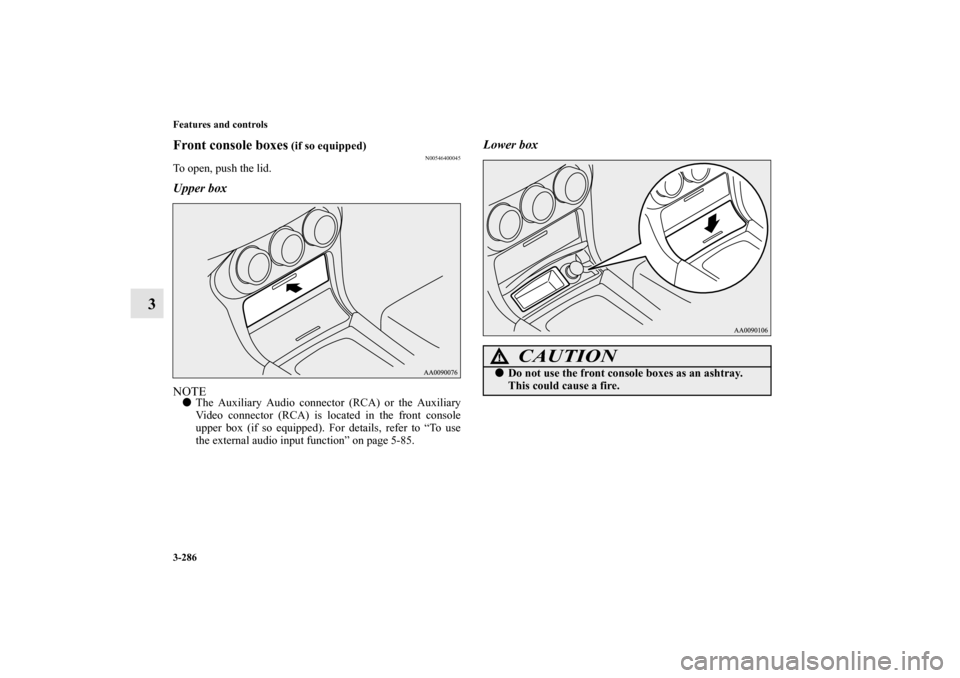
The Auxiliary Audio connector (RCA) or the Auxiliary
Video connector (RCA) is located in the front console
upper box (if so equipped). For details, refer to “To use
the external audio input function” on page 5-85.
Lower box
CAUTION
!�
Do not use the front console boxes as an ashtray.
This could cause a fire.
BK0103001US.book 286 ページ 2009年8月20日 木曜日 午前10時45分
Page 492 of 658
Comfort controls
5-85
5
ID3 tag information
The autochanger can display ID3 tag information for files that
have been recorded with ID3 tag information.
1. Press the DISP button (7) for 2 seconds or longer to
switch to the ID3 tag information. “TAG” indicator will
appear on the display.
2. Press the DISP button repeatedly to make selections in the
following sequence: album name → track name → artist
name → normal display mode.NOTE�
To return from ID3 tag information to the folder name,
press the DISP button (7) again for 2 seconds or longer.
�
When there is no title information to be displayed, the dis-
play shows “NO TITLE”.
�
The display can show up to 12 characters. If a folder
name, track name, or item of ID3 tag information has
more than 12 characters, press the PAGE button (6) to
view the next 12 characters.
�
Folder names and track names can each be displayed up to
a length of 32 characters. Items of ID3 tag information
can each be displayed up to a length of 30 characters.
�
Characters that the autochanger cannot display are shown
as “”.
To use the external audio input function
(if
so equipped)
N00702200120
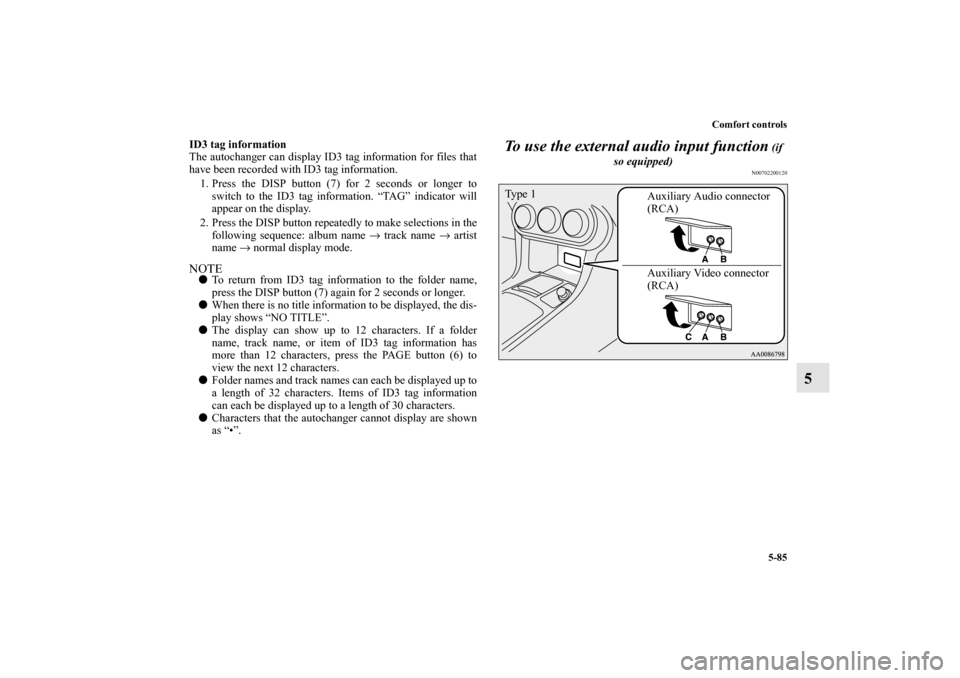
Auxiliary Audio connector
(RCA)
Auxiliary Video connector
(RCA) Ty p e 1
BK0103001US.book 85 ページ 2009年8月20日 木曜日 午前10時45分
Page 493 of 658
5-86 Comfort controls
5
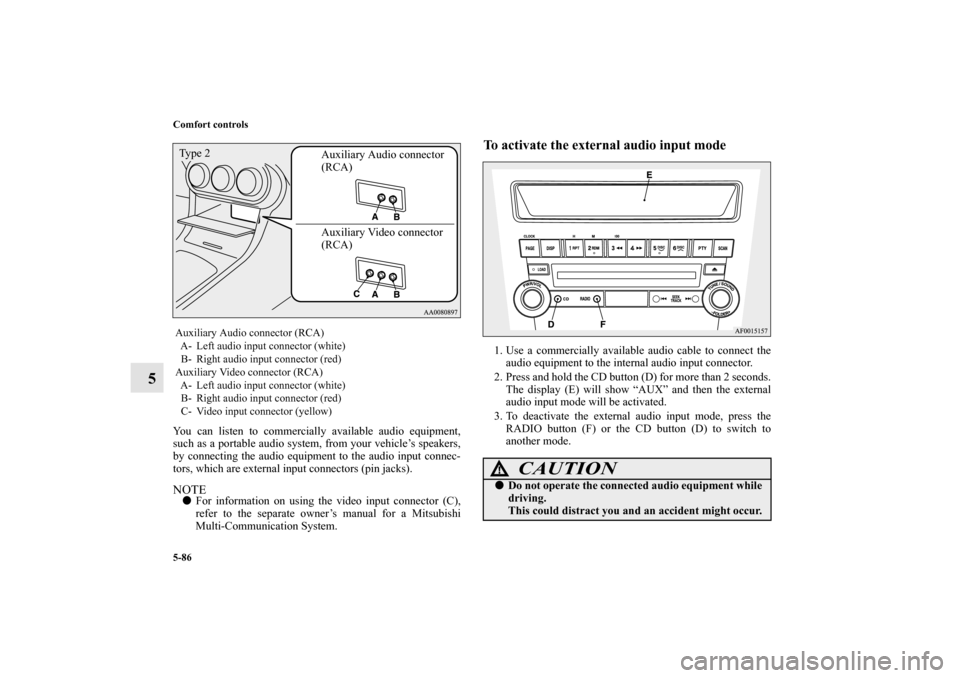
You can listen to commercially available audio equipment,
such as a portable audio system, from your vehicle’s speakers,
by connecting the audio equipment to the audio input connec-
tors, which are external input connectors (pin jacks).NOTE�
For information on using the video input connector (C),
refer to the separate owner’s manual for a Mitsubishi
Multi-Communication System.
To activate the external audio input mode1. Use a commercially available audio cable to connect the
audio equipment to the internal audio input connector.
2. Press and hold the CD button (D) for more than 2 seconds.
The display (E) will show “AUX” and then the external
audio input mode will be activated.
3. To deactivate the external audio input mode, press the
RADIO button (F) or the CD button (D) to switch to
another mode.
Auxiliary Audio connector (RCA)
A- Left audio input connector (white)
B- Right audio input connector (red)
Auxiliary Video connector (RCA)
A- Left audio input connector (white)
B- Right audio input connector (red)
C- Video input connector (yellow)
Auxiliary Audio connector
(RCA)
Auxiliary Video connector
(RCA) Ty p e 2
CAUTION
!�
Do not operate the connected audio equipment while
driving.
This could distract you and an accident might occur.
BK0103001US.book 86 ページ 2009年8月20日 木曜日 午前10時45分
Page 650 of 658
Alphabetical index
1
A
Accessory (installation) 1-8
ACD (Active center differential system) 3-127
Active stability control (ASC) 3-139
Air cleaner filter 7-14
Air conditioning
Automatic air conditioning 5-6
,5-16
Important air conditioning operating tips 5-26
Air purifier 5-27
All-wheel drive system 3-125
Antenna
Roof antenna 5-97
,5-98
Anti-lock braking system 3-135
Warning light / display 3-136
,3-137
Arm rest 2-8
Ashtray 3-275
Assist grip 3-292
Audio
AM/FM electronically tuned radio with CD player 5-27
AM/FM electronically tuned radio with 6 CD autochanger 5-
55
Error codes 5-90
,5-92
Handling of compact discs 5-94
Steering wheel audio remote control switch 5-87
Automatic air conditioning 5-6
,5-16
Auxiliary audio connector (RCA) 5-85
Auxiliary video connector (RCA) 5-85
B
Back-up lights
Bulb capacity 7-58
replacement 7-84
Ball joint, steering linkage seals and drive shaft boots 7-44
Battery 7-23
Charging system warning light 3-216
Disconnection and connection 7-27
During cold weather 7-27
Specification 9-9
Bottle holder 3-289
Brake
Anti-lock braking system 3-135
Braking 4-6
Fluid 7-21
,9-10
Hose 7-44
Parking brake 3-74
Parking brake lever stroke 7-40
Pedal 3-131
Pedal free play 7-39
Power brakes 3-131
Service brake 3-131
Break-in recommendations 3-2
Bulb capacity 7-58
C
California Perchlorate Materials Requirements 1-10
Capacities 9-10
BK0103001US.book 1 ページ 2009年8月20日 木曜日 午前10時45分