Page 411 of 670
5-22 Comfort controls
5Manual air conditioning without MAX A/C
mode
(if so equipped)
N00730300269
The air conditioning can only be used while the engine is run-
ning.Control panel
N00730500229
Blower speed selection dial
N00736500133
When the ignition switch is in the “ON” position, select the
blower speed by turning the blower speed selection dial.
Turning the dial clockwise will increase the blower speed;
turning the dial counterclockwise will decrease it. When the
dial is set to the “OFF” position, all fan-driven airflow will
stop.
1- Temperature control dial
2- Air selection switch
3- Blower speed selection dial
4- Air conditioning switch
5- Mode selection dial
6- Electric rear window defogger switch → P.3-235
BK0102103US.book 22 ページ 2009年10月26日 月曜日 午後1時38分
Page 421 of 670
5-32 Comfort controls
5
Blower speed selection dial
N00736900094
When the ignition switch is in the “ON” position, select the
blower speed by turning the blower speed selection dial.
Turning the dial clockwise will increase the blower speed;
turning the dial counterclockwise will decrease it. When the
dial is set to the “OFF” position, all fan-driven airflow will
stop.
Temperature control dial
N00737000265
Use this dial to adjust the temperature in the passenger com-
partment. Turn the temperature control dial clockwise to make
the air warmer. Turn it counterclockwise to make the air cooler.
BK0102103US.book 32 ページ 2009年10月26日 月曜日 午後1時38分
Page 431 of 670
5-42 Comfort controls
5
Blower speed selection dial
N00736900111
When the ignition switch is in the “ON” position, select the
blower speed by turning the blower speed selection dial.
Turning the dial clockwise will increase the blower speed;
turning the dial counterclockwise will decrease it. When the
dial is set to the “OFF” position, all fan-driven airflow will
stop.
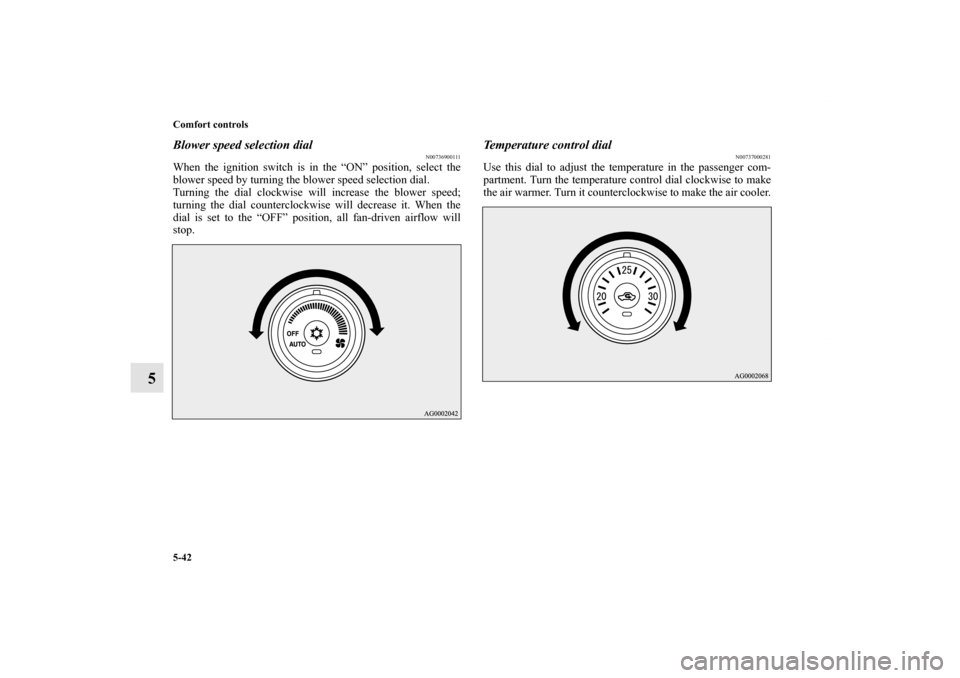
Temperature control dial
N00737000281
Use this dial to adjust the temperature in the passenger com-
partment. Turn the temperature control dial clockwise to make
the air warmer. Turn it counterclockwise to make the air cooler.
BK0102103US.book 42 ページ 2009年10月26日 月曜日 午後1時38分
Page 441 of 670

5-52 Comfort controls
5Air purifier
N00733800151
The air conditioning system is equipped with an air filter to
remove pollen and dust.
The air filter’s ability to collect pollen and dirt is reduced as it
becomes dirty, so replace it periodically. For the maintenance
interval, refer to the “WARRANTY AND MAINTENANCE
MANUAL”.NOTE�Operation in certain conditions such as driving on a dusty
road and frequent use of the air conditioning can lead to
reduction of service life of the filter. When you feel that
the air flow is lower than normal or when the windshield
or windows start to fog up easily, replace the air filter.
Contact your Mitsubishi Motors dealer or a repair facility
of your choice for assistance.
AM/FM electronically tuned radio with CD
player (RBDS and MP3 compatible)
(if so equipped)
N00734300919
The audio system can only be used when the ignition switch is
in the “ON” or “ACC” position.NOTE�To listen to the audio system while the engine is not run-
ning, turn the ignition switch to the “ACC” position.
If the ignition switch is left in the “ACC” position, the
accessory power will automatically turn off after a certain
period of time and you will no longer be able to use the
audio system. The accessory power comes on again if the
ignition switch is turned from the “ACC” position. Refer
to “ACC power auto-cutout function” on page 3-82.
�If a cellular phone is used inside the vehicle, it may create
noise in the audio equipment. This does not mean that
anything is wrong with your audio equipment. In such a
case, use the cellular phone at a place as far as possible
from the audio equipment.
�If foreign objects or water get into the audio equipment, or
if smoke or a strange odor comes from it, immediately
turn off the audio system and have it checked at an autho-
rized Mitsubishi Motors dealer or a repair facility of your
choice. Never try to repair it yourself. Avoid using the
audio system until it is inspected by a qualified person.
�If the audio system is damaged by foreign objects, water,
or fire, have the system checked by a qualified Mitsubishi
Motors technician.
BK0102103US.book 52 ページ 2009年10月26日 月曜日 午後1時38分
Page 469 of 670

5-80 Comfort controls
5
ID3 tag information
The CD player can display ID3 tag information for files that
have been recorded with ID3 tag information.
1. Press the DISP button (5) for 2 seconds or longer to
switch to the ID3 tag information. “TAG” indicator will
appear on the display.
2. Press the DISP button (5) repeatedly to make selections in
the following sequence: album name → track name →
artist name → normal display mode.NOTE�To return from ID3 tag information to the folder name,
press the DISP button (5) again for 2 seconds or longer.
�When there is no title information to be displayed, the dis-
play shows “NO TITLE”.
�The display can show up to 12 characters. If a folder
name, track name, or item of ID3 tag information has
more than 12 characters, press the PAGE button (4) to
view the next 12 characters.
�Folder names and track names can each be displayed up to
a length of 32 characters. Items of ID3 tag information
can each be displayed up to a length of 30 characters.
�Characters that the CD player cannot display are shown as
“•”.
AM/FM electronically tuned radio with 6
CD autochanger
(RBDS and MP3 compatible)
(if so equipped)
N00734300935
The audio system can only be used when the ignition switch is
in the “ON” or “ACC” position.NOTE�To listen to the audio system while the engine is not run-
ning, turn the ignition switch to the “ACC” position.
If the ignition switch is left in the “ACC” position, the
accessory power will automatically turn off after a certain
period of time and you will no longer be able to use the
audio system. The accessory power comes on again if the
ignition switch is turned from the “ACC” position. Refer
to “ACC power auto-cutout function” on page 3-82.
�If a cellular phone is used inside the vehicle, it may create
noise in the audio equipment. This does not mean that
anything is wrong with your audio equipment. In such a
case, use the cellular phone at a place as far as possible
from the audio equipment.
�If foreign objects or water get into the audio equipment, or
if smoke or a strange odor comes from it, immediately
turn off the audio system and have it checked at an autho-
rized Mitsubishi Motors dealer or a repair facility of your
choice. Never try to repair it yourself. Avoid using the
audio system until it is inspected by a qualified person.
�If the audio system is damaged by foreign objects, water,
or fire, have the system checked by a qualified Mitsubishi
Motors technician.
BK0102103US.book 80 ページ 2009年10月26日 月曜日 午後1時38分
Page 501 of 670

5-112 Comfort controls
5
NOTE�The connected audio equipment cannot be operated with
the vehicle’s audio system.
�Depending on the connected audio equipment, it may pro-
duce noise from the speakers.
�Use the connected audio equipment’s own power source,
such as its battery.
Noise may be produced from the speakers if the connected
audio equipment is used while charging it using the 12 V
power outlet of the vehicle.
�Do not activate the external audio input mode when no
audio equipment is connected.
Otherwise, noise may be produced from the speakers.
�Connect audio equipment when the external audio input
mode is deactivated or lower the vehicle’s speaker volume
before connecting it.
Noise may be produced from the speakers if audio equip-
ment is connected after the external audio input mode is
activated.
�For information on how to connect and operate the audio
equipment, refer to the owner’s manual for the equipment.
Steering wheel audio remote control switch
(if so equipped)
N00714800396
The remote control switch is located on the left side of the
steering wheel.
The switch can be operated when the ignition switch is in
either the “ON” or “ACC” position.Type 1
BK0102103US.book 112 ページ 2009年10月26日 月曜日 午後1時38分
Page 513 of 670

5-124 Comfort controls
5Digital clock
N00755000065
The time is displayed when the ignition switch is in the “ON”
or “ACC” position.To set the time1. Press and hold the CLOCK button and the clock display
flashes.
2. Press the various buttons to adjust.3. When the time is set, press the DISP button to stop the
clock display from flashing. After time signal setting,
however, the clock display automatically stops flashing.
NOTE�Reset the time after the battery terminals are disconnected
and reconnected.
�Seconds do not appear in the clock display, but after
adjusting the “Minutes” setting and time signal setting,
the clock begins to operate from 0 seconds.
H — “Hour” setting
Press this button to fast-forward the “hours”.
M — “Minutes” setting
Press this button to fast-forward the “minutes”.
CLOCK DISP H M :00
:00 — Time signal setting
At the same time the button is pressed, the fol-
lowing modifications are made.
10:00 - 10:29 ......Change to 10:00
10:30 - 10:59 ......Change to 11:00
BK0102103US.book 124 ページ 2009年10月26日 月曜日 午後1時38分
Page 520 of 670

For emergencies
6-3
6
3. You could be injured if the vehicles move. Set the parking
brake firmly on each vehicle. Put an automatic transaxle,
CVT or Twin Clutch SST in “P” (PARK) or a manual
transaxle in “N” (Neutral). Turn the ignition key to the
“LOCK” position. NOTE�Turn off all lights, heater, and other electrical loads. This
will avoid sparks and help save both batteries.
4. Make sure your battery electrolyte is at the proper level.
(Refer to “Checking battery electrolyte level” on page 7-
26.)5. For vehicles equipped with turbocharger, remove the air
duct and then the battery upper cover.
(Refer to “Removing and installing the battery upper
cover” on page 7-23.)
6. Connect one end of one jumper cable to the positive (+)
terminal of the discharged battery (A), and the other end
to the positive (+) terminal of the booster battery (B).
NOTE�Open the terminal cover before connecting the jumper
cable to the positive terminal of the battery.
(Refer to “Disconnection and connection” on page 7-27.)
�Use the proper cables suitable for the battery size.
Otherwise heat damage to the cables could result.
�Check the jumper cables for damage and corrosion before
use.
WARNING
!�Turn the ignition key to the “LOCK” position on
both vehicles. Make sure that the cables or your
clothes cannot be caught by the fan or drive belt.
Personal injury could result.
WARNING
!�If the electrolyte fluid is not visible, or looks frozen,
DO NOT ATTEMPT JUMP STARTING!!
The battery might split open or explode if the tem-
perature is below the freezing point or if it is not
filled to the proper level.
BK0102103US.book 3 ページ 2009年10月26日 月曜日 午後1時38分