Page 320 of 670

Features and controls
3-229
3
To adjust intermittent intervalsWith the lever in the “INT” (speed sensitive intermittent opera-
tion) position, the intermittent intervals can be adjusted by
turning the knob (A). NOTE�The speed-sensitive-operation function of the windshield
wipers can be deactivated.
For further information, please contact your authorized
Mitsubishi Motors dealer or a repair facility of your
choice. On vehicles equipped with Mitsubishi Multi-
Communication System, screen operations can be used to
make the adjustment. Refer to separate owner’s manual
for details.
Misting function The misting function can be used when the ignition switch is in
the “ON” or “ACC” position.
The wipers will operate once if the wiper lever is raised to the
“MIST” position and released. This operation is useful when it
is drizzling, etc. The wipers will continue to operate while the
lever is held in the “MIST” position.
1- Fast
2- Slow
A
BK0102103US.book 229 ページ 2009年10月26日 月曜日 午後1時38分
Page 321 of 670
3-230 Features and controls
3
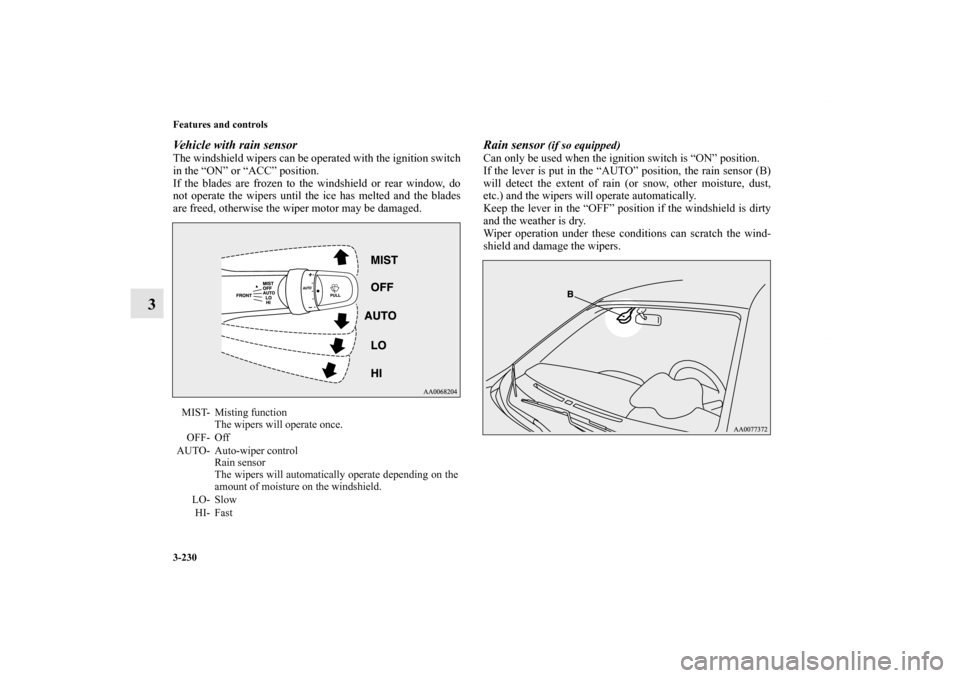
Vehicle with rain sensorThe windshield wipers can be operated with the ignition switch
in the “ON” or “ACC” position.
If the blades are frozen to the windshield or rear window, do
not operate the wipers until the ice has melted and the blades
are freed, otherwise the wiper motor may be damaged.
Rain sensor
(if so equipped)
Can only be used when the ignition switch is “ON” position.
If the lever is put in the “AUTO” position, the rain sensor (B)
will detect the extent of rain (or snow, other moisture, dust,
etc.) and the wipers will operate automatically.
Keep the lever in the “OFF” position if the windshield is dirty
and the weather is dry.
Wiper operation under these conditions can scratch the wind-
shield and damage the wipers.
MIST- Misting function
The wipers will operate once.
OFF- Off
AUTO- Auto-wiper control
Rain sensor
The wipers will automatically operate depending on the
amount of moisture on the windshield.
LO- Slow
HI- Fast
BK0102103US.book 230 ページ 2009年10月26日 月曜日 午後1時38分
Page 322 of 670

Features and controls
3-231
3
NOTE�To protect the rubber parts of the wipers, this operation of
the wipers does not take place when the vehicle is station-
ary and the ambient temperature is about 32 °F (0 °C) or
lower.
�Do not cover the sensor by affixing a sticker or label to the
windshield. Also, do not put any water-repellent coating
on the windshield. The rain sensor would not be able to
detect the extent of rain, and the wipers might stop work-
ing normally.
�In the following cases, the rain sensor may be malfunc-
tioning. Have the vehicle checked at an authorized
Mitsubishi Motors dealer or a repair facility of your
choice.
• When the wipers operate at a constant interval despite
changes in the extent of rain.
• When the wipers do not operate even though it is rain-
ing.
�The wipers may automatically operate when things such
as rain, dust, mud, insects, tree sap, oil or salt are affixed
to the windshield on top of the rain sensor or when the
windshield is frozen. (operation may also occur due to
strong electromagnetic waves, etc.) Objects affixed to the
windshield will stop the wipers when the wipers cannot
remove them.
To make the wipers operate again, move the lever to the
“LO” or “HI” position.
�Contact an authorized Mitsubishi Motors dealer or a
repair facility of your choice when replacing the wind-
shield glass.
CAUTION
!�With the ignition switch in the “ON” position and
the lever in the “AUTO” position, the wipers may
automatically operate in the situations described
below.
• When cleaning the outside surface of the wind-
shield, if you touch the rain sensor.
• When cleaning the outside surface of the wind-
shield, if you wipe with a cloth the rain sensor.
• When using an automatic car wash.
• A physical shock is applied to the windshield.
• A physical shock is applied to the rain sensor.If your hands get trapped, you could suffer injuries
or the wipers could malfunction. To deactivate the
rain sensor, place the lever in the “OFF” position.
BK0102103US.book 231 ページ 2009年10月26日 月曜日 午後1時38分
Page 324 of 670
Features and controls
3-233
3
Misting function Move the lever in the direction of the arrow and release, to
operate the wipers once.
Use this function when you are driving in mist or drizzle.
The wipers will operate once if the lever is raised to the
“MIST” position and released when the ignition switch is in
the “ON” or “ACC” position. The wipers will continue to oper-
ate while the lever is held in the “MIST” position.The wipers will operate once if the lever is moved to the
“AUTO” position and the knob (D) is turned in the “+” direc-
tion when the ignition switch is “ON” position.
D
BK0102103US.book 233 ページ 2009年10月26日 月曜日 午後1時38分
Page 328 of 670

Features and controls
3-237
3 Hands-free Bluetooth
® cellular phone
interface system with voice recognition
(if so equipped)
N00506400072
The Hands-free Bluetooth
® cellular phone interface system
with voice recognition uses a wireless communication technol-
ogy known as Bluetooth
® to allow you to make hands-free
calls in your vehicle using your Bluetooth
® compatible cellular
phone with Hands-free profile.
The system is equipped with a voice recognition function,
which lets you make hands-free calls by simple switch opera-
tions and voice command operations using a defined voice tree.
The Hands-free Bluetooth
® cellular phone interface system
with voice recognition can be used when the ignition switch is
in the “ON” or “ACC” position.
To use the Hands-free Bluetooth
® cellular phone interface sys-
tem with voice recognition, you should first connect your
Bluetooth
® compatible cellular phone to the Hands-free
Bluetooth® cellular phone interface system with voice recogni-
tion. Refer to “Pairing a cellular phone” on page 3-246.
Bluetooth® is a registered trademark of BLUETOOTH SIG,
INC.
Type 2
BK0102103US.book 237 ページ 2009年10月26日 月曜日 午後1時38分
Page 329 of 670

3-238 Features and controls
3
NOTE�If the ignition switch is left in the “ACC” position, the
accessory power will automatically turn off after a certain
period of time and you will no longer be able to use the
Hands-free Bluetooth
® cellular phone interface system
with voice recognition. The accessory power comes on
again if the ignition switch is turned from the “ACC”
position. Refer to “ACC power auto-cutout function” on
page 3-82.
�You cannot use the Hands-free Bluetooth
® cellular phone
interface system with voice recognition if your cellular
phone has a dead battery or is turned off.
�Hands-free calls will not be possible in areas outside your
cellular phone service area or locations where a signal
cannot reach your phone.
Steering control switch
N00506500044
WARNING
!�Although the Hands-free Bluetooth
® cellular phone
interface system with voice recognition allows you to
make hands-free calls, if you choose to use the cellu-
lar phone while driving, you must not allow that
usage to distract you in the safe operation of your
vehicle. Anything, including cellular phone usage,
that distracts you from the safe operation of your
vehicle increases your risk of an accident. Refer to
and follow all state and local laws in your area
regarding cellular phone usage while driving.
Type 1
BK0102103US.book 238 ページ 2009年10月26日 月曜日 午後1時38分
Page 343 of 670
3-252 Features and controls
3
Receiving calls
N00508200045
If an incoming phone call is received while the ignition switch
is in the “ACC” or “ON” position, the audio system will be
automatically turned on and Incoming Call will be played,
even when the audio system was originally off.
The voice guide announcement for the incoming call will be
output from the front passenger’s seat speaker.
If the CD player or radio was playing when the incoming call
was received, the audio system will mute the sound from the
CD player or radio and output only the Incoming Call.
To receive the call, press the PICK-UP button on the steering
wheel control switch.
When the call is over, the audio system will return to its previ-
ous state.
Phonebook function
N00508300017
The Hands-free Bluetooth
® cellular phone interface system
with voice recognition has its own phonebook separate from
the phonebook on the cellular phone.
This phonebook is used when making calls with the voice rec-
ognition function.
You can register up to 32 names for each language in the
phonebook.
Also, each entry has 4 locations associated with: HOME,
WORK, MOBILE and PAGER. You can register one telephone
number for each location.
The Phonebook Main menu is used to register or edit informa-
tion in the phonebook.
Use the following procedure to call up the Phonebook Main
menu.
1. Press the SPEECH button.
2. Say “Phonebook.”
3. The voice guide will say “Select one of the following:
new entry, edit, list names, delete or erase all, or say can-
cel to return to main menu” and will wait for your com-
mand.
NOTE�Disconnecting the battery cable will not delete informa-
tion registered in the phonebook.
BK0102103US.book 252 ページ 2009年10月26日 月曜日 午後1時38分
Page 362 of 670

Features and controls
3-271
3 Cigarette lighter
(if so equipped)
N00524900213
The cigarette lighter can only be used when the ignition switch
is in either the “ON” or “ACC” position.
To use the cigarette lighter, push it all the way into the socket
until it clicks. It will pop out automatically when it is ready for
use.NOTE�Keep the cigarette lighter in its socket when not in use.
This will prevent the socket from becoming clogged and
short circuiting.
CAUTION
!�Do not touch the heating element or lighter housing.
Hold the lighter by the knob only.�Do not allow children to use or play with the ciga-
rette lighter because they could be burned.�The cigarette lighter should pop back out about 30
seconds after pushing it in. If it does not pop out by
itself, pull it out and have it fixed at an authorized
Mitsubishi Motors dealer or a repair facility of your
choice. Leaving the cigarette lighter pushed in for a
long time could cause a fire.�Do not leave the cigarette lighter pushed in. Do not
use a cigarette lighter from another vehicle in this
socket. If you do, the lighter may overheat and cause
a fire.�It is recommended that only the lighter be inserted
in this socket. Using “plug-in” type accessories may
damage the socket and loosen the lighter.�When the cigarette lighter socket is used as a power
source for electronic equipment, be sure that the
equipment runs at 12 V and at 120 W or less. �When using cigarette lighter and 12 V power outlet
simultaneously, make sure that the total power con-
sumption of these does not exceed 120 W at 12 V.�Be aware that using electronic equipment with the
engine not running may run the battery down.
BK0102103US.book 271 ページ 2009年10月26日 月曜日 午後1時38分
