Page 453 of 594
5-84 Comfort controls
5
NOTE�
The connected audio equipment cannot be operated with
the vehicle’s audio system.
�
Depending on the connected audio equipment, it may pro-
duce noise from the speakers.
�
Use the connected audio equipment’s own power source,
such as its battery.
Noise may be produced from the speakers if the connected
audio equipment is used while charging it using the 12 V
power outlet of the vehicle.
�
Do not activate the external audio input mode when no
audio equipment is connected.
Otherwise, noise may be produced from the speakers.
�
Connect audio equipment when the external audio input
mode is deactivated or lower the vehicle’s speaker volume
before connecting it.
Noise may be produced from the speakers if audio equip-
ment is connected after the external audio input mode is
activated.
�
For information on how to connect and operate the audio
equipment, refer to the owner’s manual for the equipment.
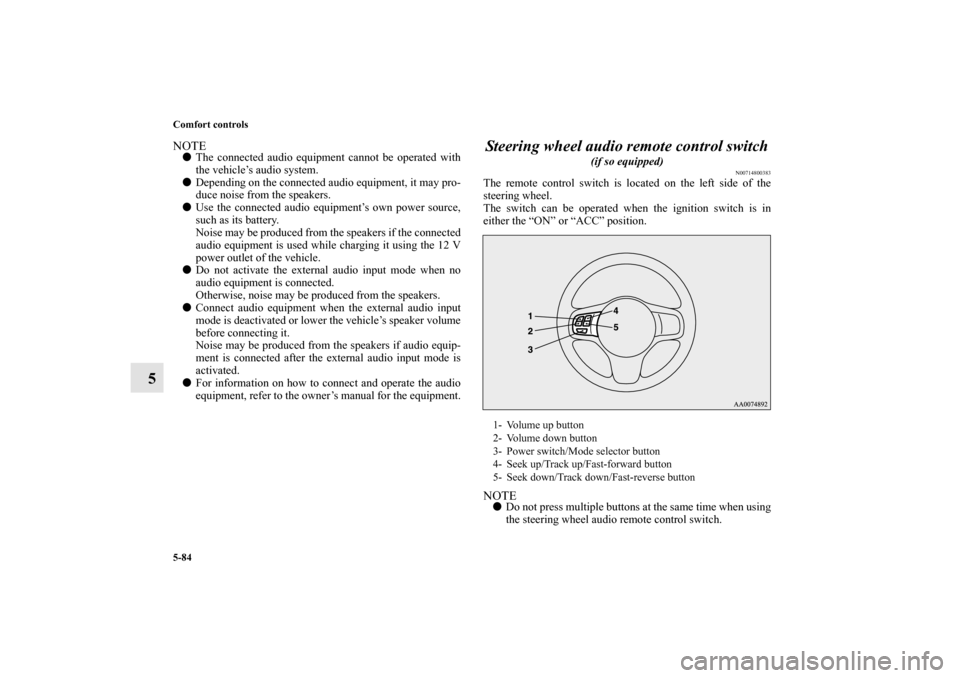
Steering wheel audio remote control switch
(if so equipped)
N00714800383
The remote control switch is located on the left side of the
steering wheel.
The switch can be operated when the ignition switch is in
either the “ON” or “ACC” position.NOTE�
Do not press multiple buttons at the same time when using
the steering wheel audio remote control switch.
1- Volume up button
2- Volume down button
3- Power switch/Mode selector button
4- Seek up/Track up/Fast-forward button
5- Seek down/Track down/Fast-reverse button
BK0105501US.book 84 ページ 2009年8月10日 月曜日 午前10時32分
Page 454 of 594
Comfort controls
5-85
5
To turn on the powerPress the power switch (3) to turn on the power. When the
power is turned on, the last mode used before turning off is dis-
played. To turn off the power, press and hold down the power
switch (3) for about 2 seconds until you hear a beep.Vo l u m e c o n t r o lVolume up button - 1While the button is pressed, the volume will continue to
increase.Volume down button - 2While the button is pressed, the volume will continue to
decrease.Mode selectionPress the mode selector button (3) to select the desired mode.
The mode changes in the following order.
AM → FM1 → FM2 → (SAT1 → SAT2 → SAT3 → SAT4) →
CD → (RSES) → AMTo listen to the radioPress the mode selector button (3) and select AM or FM mode.Automatic tuningSeek up button - 4 / Seek down button - 5
After pressing one of these buttons, a receivable station will be
automatically selected and reception of the station will begin.
Channel selection / Category selection (Vehicles with
satellite radio)Seek up button - 4 / Seek down button - 5
Press the button to select the desired channel.
Pressing down the button for 2 seconds or longer will change
the system to category selection mode. While the button is
pressed, the category will change in order. When you reach the
desired category, release the button.To listen to a CDPress the mode change button (3) and select CD mode.To fast forward/reverse the discTo fast forward or fast reverse the disc, press the fast-forward
button (4) or the fast-reverse button (5).
Fast forward
You can fast forward the disc by holding down the fast-forward
button (4). While the button is kept pressed, the disc will be
fast-forwarded.
Fast reverse
You can fast reverse the disc by holding down the fast-reverse
button (5). While the button is kept pressed, the disc will be
fast-reversed.NOTE�
With an MP3 CD, you can fast forward and fast reverse
tracks in the same folder.
To select a desired trackYou can select your desired track by using the track up button
(4) or the track down button (5).
BK0105501US.book 85 ページ 2009年8月10日 月曜日 午前10時32分
Page 465 of 594

5-96 Comfort controls
5Digital clock
(if so equipped)
N00755000049
The time is displayed when the ignition switch is in the “ON”
or “ACC” position.To set the time1. Press and hold the CLOCK button and the clock display
flashes.
2. Press the various buttons to adjust.3. When the time is set, press the DISP button to stop the
clock display from flashing. After time signal setting,
however, the clock display automatically stops flashing.
NOTE�
Reset the time after the battery terminals are disconnected
and reconnected.
�
Seconds do not appear in the clock display, but after
adjusting the “Minutes” setting and time signal setting,
the clock begins to operate from 0 seconds.
H — “Hour” setting
Press this button to fast-forward the “hours”.
M — “Minutes” setting
Press this button to fast-forward the “minutes”.
CLOCK DISP H M :00
:00 — Time signal setting
At the same time the button is pressed, the fol-
lowing modifications are made.
10:00 - 10:29 ......Change to 10:00
10:30 - 10:59 ......Change to 11:00
BK0105501US.book 96 ページ 2009年8月10日 月曜日 午前10時32分