2010 MITSUBISHI L200 air conditioning
[x] Cancel search: air conditioningPage 185 of 369

Ventilators
E007001003441- Centre ventilators
2-
Side ventilators
Air flow and direction adjustments E00700200749
Centre ventilators
Adjust
the direction of the air flow by moving the
knob (A). Side ventilators
The
ventilator can be opened and closed with the di-
al (B).
( )
- Open
( )
- Close
Adjust the direction of the air flow by moving the
knob (C). NOTE
l On
air conditioned vehicles, the cool air
from the ventilators may appear as a mist.
This is due to moist air being suddenly
cooled by the air conditioning. This will
clear after a few moments.
Changing the mode selection E00700301008
To change the position and amount of air flowing
from
the ventilators, turn the mode selection dial.
(Refer to “Mode selection dial” on pages 5-04,
5-09.) These symbols are used in the next several illustra-
tions
to demonstrate the quantity of air coming
from the ventilators. : Small amount of air from the ventilators
: Medium amount of air from the ventilators
: Large amount of air from the ventilators
Face position
Air
flows only to the upper part of the passenger
compartment. Foot/Face position
Air
flows to the upper part of the passenger com-
partment, and flows to the leg area.
: Optional equipment For pleasant driving
5-02
5 LHD RHD
OCRE12E1
Page 186 of 369

NOTE
l With
the mode selection dial between the
“ ”
and “ ” positions, air flows mainly to
the upper part of the passenger compartment.
With the mode selection dial between the
“ ”
and “ ” positions, air flows mainly to
the leg area.
Foot position
Air flows mainly to the leg area.
: Optional equipment Foot/Demister position
Air
flows to the leg area, the windscreen and the
door windows.
: Optional equipment NOTE
l With
the mode selection dial between the
“ ”
and “ ” positions, air flows mainly to
the leg area. With the mode selection dial be-
tween the “ ”
and “ ” positions, air
flows mainly to the windscreen and door win-
dows.
Demister position
Air flows mainly to the windscreen and the door
windows. Heater/Manual air conditioning*
E00700500410
The
heater/air conditioning can only be used while
the engine is running.
Control panel E00700600512 1- Mode selection dial
2-
Rear window demister switch ® p. 3-40
3-
Blower speed selection dial
4- Air conditioning switch*
5- Temperature control dial
6- Air selection lever For pleasant driving
5-03 5 LHD RHD
OCRE12E1
Page 188 of 369
CAUTION
l
Normally, use the “ ” (outside) posi-
tion to keep the windscreen and side win-
dows clear and quickly remove fog or
frost from the windscreen.
If high cooling performance is desired, or
if the outside air is dusty or otherwise con-
taminated, use the “ ”
(recirculation)
position. Set the air selection lever to the
“ ”
(outside) position periodically to in-
crease ventilation so that the windows do
not become fogged up.
l Use of the “ ”
(recirculation) position
for extended time may cause the windows
to fog up.
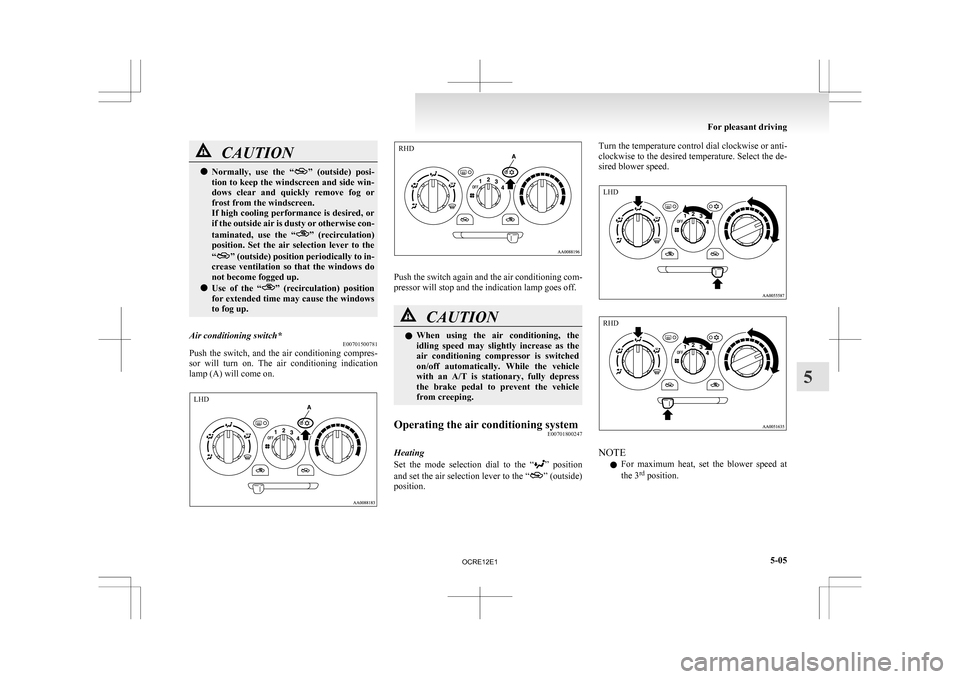
Air conditioning switch* E00701500781
Push the switch, and the air conditioning compres-
sor
will turn on. The air conditioning indication
lamp (A) will come on. Push the switch again and the air conditioning com-
pressor will stop and the indication lamp goes off.
CAUTION
l
When
using the air conditioning, the
idling speed may slightly increase as the
air conditioning compressor is switched
on/off automatically. While the vehicle
with an A/T is stationary, fully depress
the brake pedal to prevent the vehicle
from creeping.
Operating the air conditioning system E00701800247
Heating
Set
the mode selection dial to the “ ”
position
and set the air selection lever to the “ ” (outside)
position. Turn the temperature control dial clockwise or anti-
clockwise
to the desired temperature. Select the de-
sired blower speed. NOTE
l For
maximum heat, set the blower speed at
the 3 rd
position. For pleasant driving
5-05 5 LHD RHD LHD RHD
OCRE12E1
Page 189 of 369
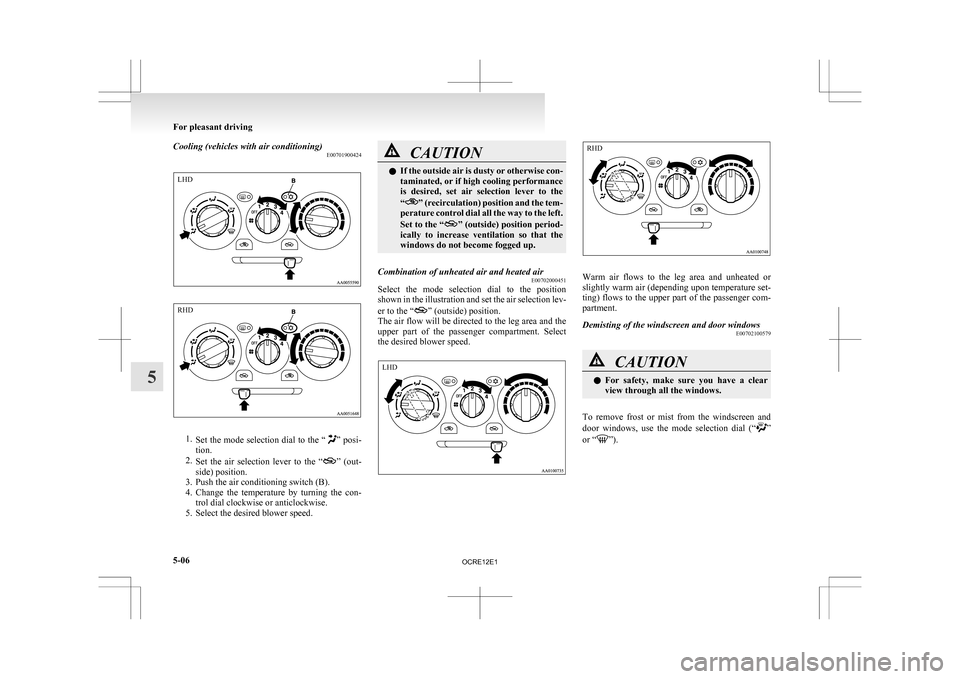
Cooling (vehicles with air conditioning)
E007019004241.
Set the mode selection dial to the “ ” posi-
tion.
2. Set the air selection lever to the “ ”
(out-
side) position.
3. Push the air conditioning switch (B).
4. Change the temperature by turning the con- trol dial clockwise or anticlockwise.
5. Select the desired blower speed. CAUTION
l
If
the outside air is dusty or otherwise con-
taminated, or if high cooling performance
is desired, set air selection lever to the
“ ”
(recirculation) position and the tem-
perature control dial all the way to the left.
Set to the “ ”
(outside) position period-
ically to increase ventilation so that the
windows do not become fogged up.
Combination of unheated air and heated air E00702000451
Select the mode selection dial to the position
shown
in the illustration and set the air selection lev-
er to the “ ” (outside) position.
The
air flow will be directed to the leg area and the
upper part of the passenger compartment. Select
the desired blower speed. Warm air flows to the leg area and unheated or
slightly
warm air (depending upon temperature set-
ting) flows to the upper part of the passenger com-
partment.
Demisting of the windscreen and door windows E00702100579 CAUTION
l
For
safety, make sure you have a clear
view through all the windows.
To remove frost or mist from the windscreen and
door
windows, use the mode selection dial (“ ”
or “ ”).For pleasant driving
5-06
5LHD RHD LHD RHD
OCRE12E1
Page 190 of 369
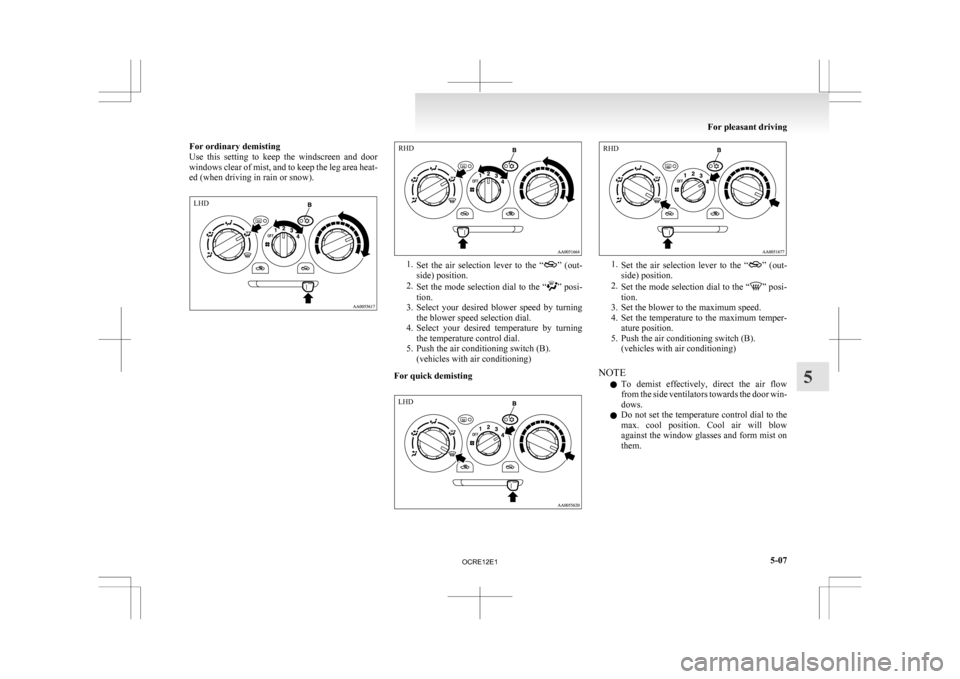
For ordinary demisting
Use
this setting to keep the windscreen and door
windows clear of mist, and to keep the leg area heat-
ed (when driving in rain or snow). 1.
Set
the air selection lever to the “ ” (out-
side) position.
2. Set the mode selection dial to the “ ”
posi-
tion.
3. Select your desired blower speed by turning the blower speed selection dial.
4. Select your desired temperature by turning the temperature control dial.
5. Push the air conditioning switch (B). (vehicles with air conditioning)
For quick demisting 1.
Set
the air selection lever to the “ ” (out-
side) position.
2. Set the mode selection dial to the “ ” posi-
tion.
3.
Set the blower to the maximum speed.
4. Set the temperature to the maximum temper- ature position.
5. Push the air conditioning switch (B). (vehicles with air conditioning)
NOTE l To demist effectively, direct the air flow
from the side ventilators towards the door win-
dows.
l Do not set the temperature control dial to the
max. cool position. Cool air will blow
against the window glasses and form mist on
them. For pleasant driving
5-07 5LHD RHD LHD RHD
OCRE12E1
Page 191 of 369
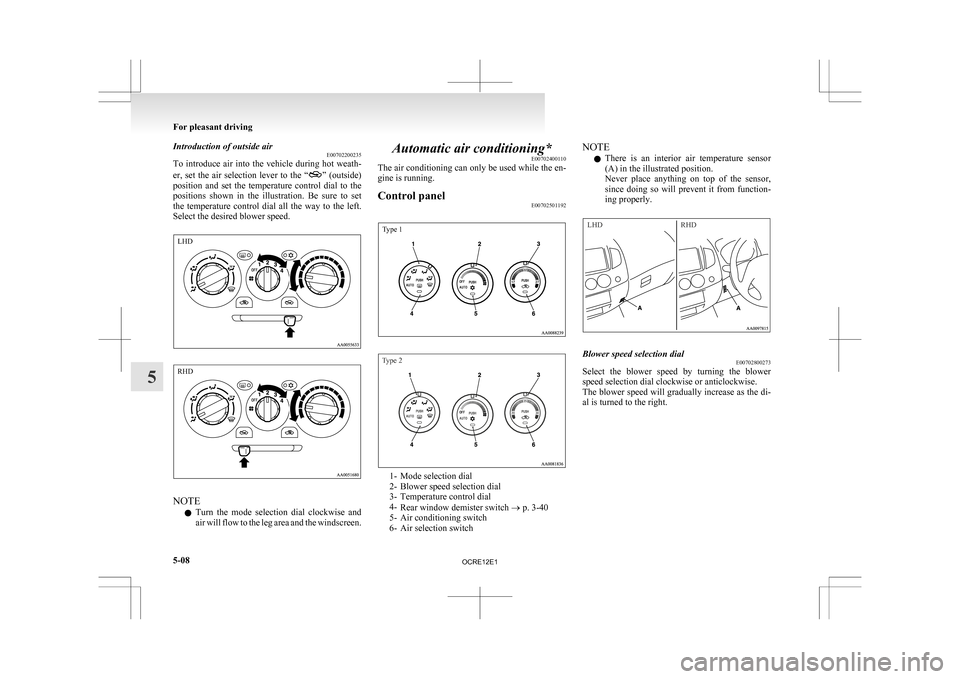
Introduction of outside air
E00702200235
To
introduce air into the vehicle during hot weath-
er, set the air selection lever to the “ ”
(outside)
position and set the temperature control dial to the
positions shown in the illustration. Be sure to set
the temperature control dial all the way to the left.
Select the desired blower speed. NOTE
l Turn
the mode selection dial clockwise and
air will flow to the leg area and the windscreen. Automatic air conditioning*
E00702400110
The
air conditioning can only be used while the en-
gine is running.
Control panel E00702501192
Type 1
Type 2 1- Mode selection dial
2-
Blower speed selection dial
3- Temperature control dial
4- Rear window demister switch ® p. 3-40
5- Air conditioning switch
6- Air selection switch NOTE
l There
is an interior air temperature sensor
(A) in the illustrated position.
Never place anything on top of the sensor,
since doing so will prevent it from function-
ing properly.
LHD RHD Blower speed selection dial
E00702800273
Select the blower speed by turning the blower
speed selection dial clockwise or anticlockwise.
The
blower speed will gradually increase as the di-
al is turned to the right. For pleasant driving
5-08
5 LHD RHD
OCRE12E1
Page 193 of 369
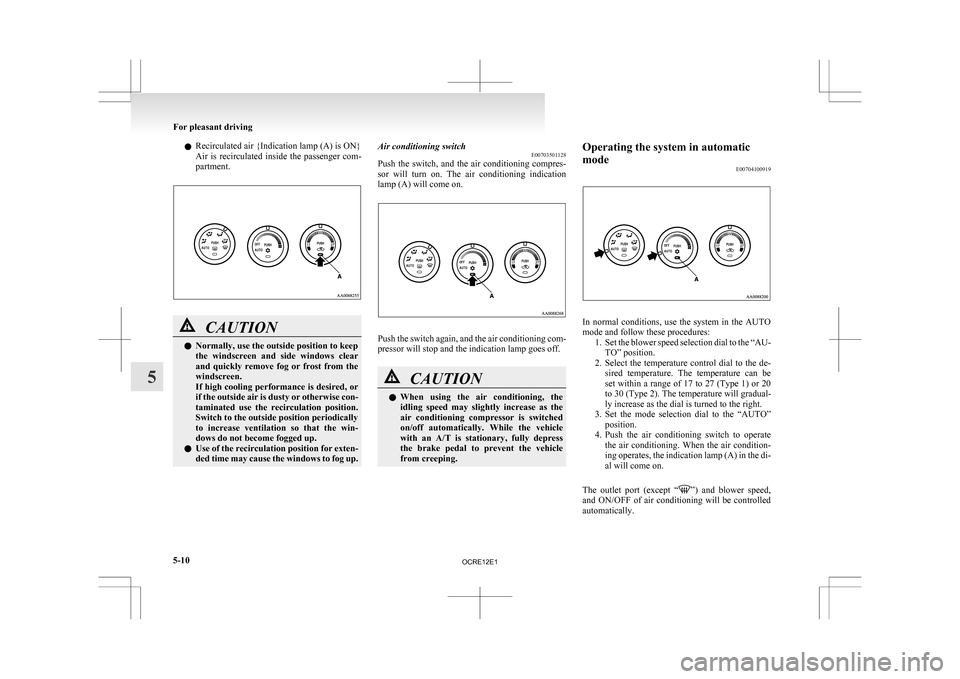
l
Recirculated air {Indication lamp (A) is ON}
Air
is recirculated inside the passenger com-
partment. CAUTION
l
Normally, use the outside position to keep
the
windscreen and side windows clear
and quickly remove fog or frost from the
windscreen.
If high cooling performance is desired, or
if the outside air is dusty or otherwise con-
taminated use the recirculation position.
Switch to the outside position periodically
to increase ventilation so that the win-
dows do not become fogged up.
l Use of the recirculation position for exten-
ded time may cause the windows to fog up. Air conditioning switch
E00703501128
Push
the switch, and the air conditioning compres-
sor will turn on. The air conditioning indication
lamp (A) will come on. Push the switch again, and the air conditioning com-
pressor will stop and the indication lamp goes off.
CAUTION
l
When
using the air conditioning, the
idling speed may slightly increase as the
air conditioning compressor is switched
on/off automatically. While the vehicle
with an A/T is stationary, fully depress
the brake pedal to prevent the vehicle
from creeping. Operating the system in automatic
mode
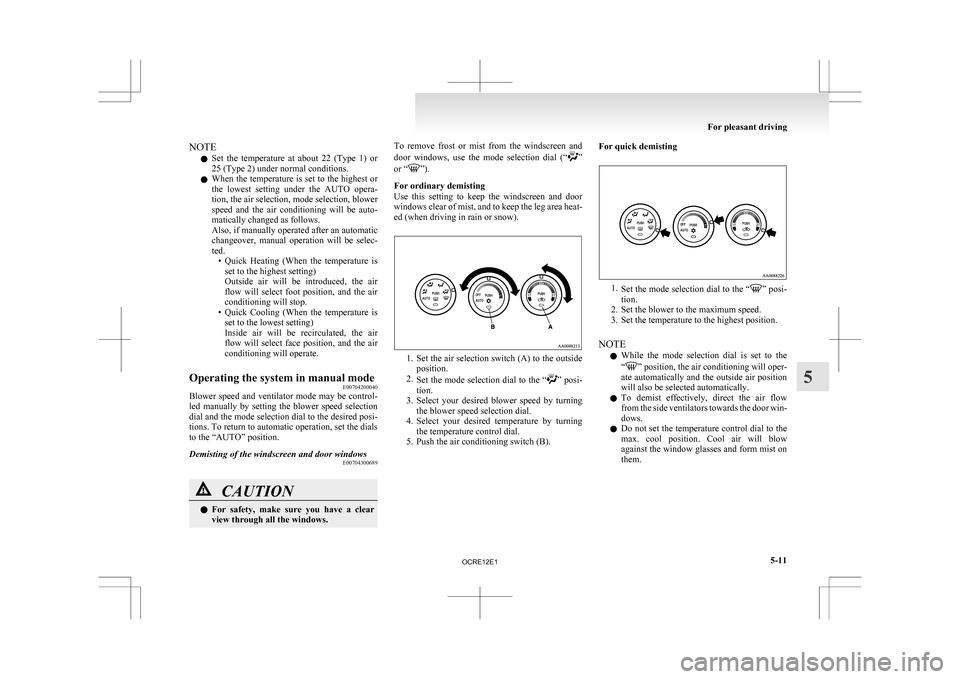
E00704100919 In normal conditions, use the system in the AUTO
mode and follow these procedures:
1. Set
the blower speed selection dial to the “AU-
TO” position.
2. Select the temperature control dial to the de- sired temperature. The temperature can be
set within a range of 17 to 27 (Type 1) or 20
to 30 (Type 2). The temperature will gradual-
ly increase as the dial is turned to the right.
3. Set the mode selection dial to the “AUTO” position.
4. Push the air conditioning switch to operate the air conditioning. When the air condition-
ing operates, the indication lamp (A) in the di-
al will come on.
The outlet port (except “ ”)
and blower speed,
and ON/OFF of air conditioning will be controlled
automatically. For pleasant driving
5-10
5
OCRE12E1
Page 194 of 369
NOTE
l Set
the temperature at about 22 (Type 1) or
25 (Type 2) under normal conditions.
l When the temperature is set to the highest or
the lowest setting under the AUTO opera-
tion, the air selection, mode selection, blower
speed and the air conditioning will be auto-
matically changed as follows.
Also, if manually operated after an automatic
changeover, manual operation will be selec-
ted.
• Quick Heating (When the temperature isset to the highest setting)
Outside air will be introduced, the air
flow will select foot position, and the air
conditioning will stop.
• Quick Cooling (When the temperature is set to the lowest setting)
Inside air will be recirculated, the air
flow will select face position, and the air
conditioning will operate.
Operating the system in manual mode E00704200040
Blower speed and ventilator mode may be control-
led
manually by setting the blower speed selection
dial and the mode selection dial to the desired posi-
tions. To return to automatic operation, set the dials
to the “AUTO” position.
Demisting of the windscreen and door windows E00704300689CAUTION
l
For
safety, make sure you have a clear
view through all the windows. To remove frost or mist from the windscreen and
door
windows, use the mode selection dial (“ ”
or “ ”).
For ordinary demisting
Use
this setting to keep the windscreen and door
windows clear of mist, and to keep the leg area heat-
ed (when driving in rain or snow). 1. Set
the air selection switch (A) to the outside
position.
2. Set the mode selection dial to the “ ”
posi-
tion.
3. Select your desired blower speed by turning the blower speed selection dial.
4. Select your desired temperature by turning the temperature control dial.
5. Push the air conditioning switch (B). For quick demisting
1.
Set
the mode selection dial to the “ ” posi-
tion.
2.
Set the blower to the maximum speed.
3. Set the temperature to the highest position.
NOTE l While the mode selection dial is set to the
“ ”
position, the air conditioning will oper-
ate automatically and the outside air position
will also be selected automatically.
l To demist effectively, direct the air flow
from the side ventilators towards the door win-
dows.
l Do not set the temperature control dial to the
max. cool position. Cool air will blow
against the window glasses and form mist on
them. For pleasant driving
5-11 5
OCRE12E1