2010 MINI Hardtop 2 Door seat adjustment
[x] Cancel search: seat adjustmentPage 44 of 230

Adjustments
42
Adjustments
Sitting safely
The ideal sitting position can make a vital contri-
bution to relaxed, fatigue-free driving. In con-
junction with the safety belts, the head restraints
and the airbags, the seated position has a major
influence on your safety in the event of an acci-
dent. To ensure that the safety systems operate
with optimal efficiency, we strongly urge you to
observe the instructions contained in the follow-
ing section.
For additional information on transporting chil-
dren safely, refer to page48.
Airbags
Always maintain an adequate distance
between yourself and the airbags. Always
grip the steering wheel on the rim, with your
hands in the 3 o'clock and 9 o'clock positions, to
minimize the risk of injury to the hands or arms
in the event of the airbag being triggered off.
No one and nothing should come between the
airbags and the seat occupant.
Do not use the cover of the front airbag on the
front passenger side as a storage area. Ensure
that the front passenger is correctly seated, e.g.
that no feet or legs are propped against the
dashboard. Otherwise, leg injury could result if
the front airbag suddenly deployed.
Make sure that passengers keep their heads
away from the side airbag and do not lean
against the cover of the head airbag in the MINI;
otherwise, serious injuries can result if the airbag
deploys. <
Even if you follow all the instructions, injuries
resulting from contact with airbags cannot be
fully excluded, depending on the circumstances.
The ignition and inflation noise may provoke a
mild hearing loss in extremely sensitive individ-
uals. This effect is usually only temporary.
For airbag locations and additional information
on airbags, refer to page84.
Head restraint
A correctly adjusted head restraint reduces the
risk of neck injury in the event of an accident.
Adjust the head restraint in such a way
that its center is at approx. ear level. Oth-
erwise, there is an increased risk of injury in the
event of an accident.<
Head restraints, refer to page44.
Safety belt
Before every drive, make sure that all occupants
wear their safety belts. Airbags complement the
safety belt as an additional safety device, but
they do not represent a substitute.
Never allow more than one person
to wear a single safety belt. Never
allow infants or small children to ride in a pas-
senger's lap.
Make sure that the belt in the lap area sits low
across the hips and does not press against the
abdomen. The safety belt must not rest against
the throat, run across sharp edges, pass over
hard or fragile objects or be pinched. Fasten the
safety belt so that it is pulled taut across the lap
and shoulder, fitting the body snugly without
any twists. Otherwise, the belt could slide over
the hips in the event of a frontal collision and
injure the abdomen. Avoid wearing bulky cloth-
ing and regularly pull the belt in the upper-body
area taut; otherwise, its restraining effect could
be impaired.<
Safety belts, refer to page45.
Seats
Note before adjusting
Never attempt to adjust your seat while
the vehicle is moving. The seat could
respond with unexpected movement, and the
ensuing loss of vehicle control could lead to an
accident.
Page 45 of 230

MOBILITYAT A GLANCE CONTROLS DRIVING TIPS ENTERTAINMENT
43
NAVIGATION REFERENCE
On the front passenger seat as well, do not
incline the backrest too far to the rear while the
vehicle is being driven; otherwise, there is a dan-
ger in the event of an accident of sliding under
the safety belt, eliminating the protection nor-
mally provided by the belt.<
Comply with the instructions on head restraint
height on page44 and on damaged safety belts
on page46.
Seat adjustment
Observe the instructions on page42 to
ensure the best possible personal pro-
tection.<
Longitudinal adjustment
Pull the lever, arrow 1, and slide the seat to the
desired position, arrows 2.
After releasing the lever, move the seat gently
forward or back to make sure it engages
properly.
Height
Pull up or push down the lever repeatedly,
arrows 1, until the desired height is reached,
arrows 2.
Backrest
Pull the lever, arrow 1, and apply your weight to
the backrest or lift it off, as necessary, arrows 2.
Lumbar support*
You can also adjust the contour of the backrest
to obtain additional support in the lumbar
region.
The upper hips and spinal column receive sup-
plementary support to help you maintain a
relaxed, upright sitting position.
Turn the wheel to increase or decrease the cur-
vature.
Entry to the rear
Easy entry on the driver's side
The easy entry feature includes a mechanical
memory function for the longitudinal adjust-
ment and backrest angle.
Page 46 of 230
Adjustments
44
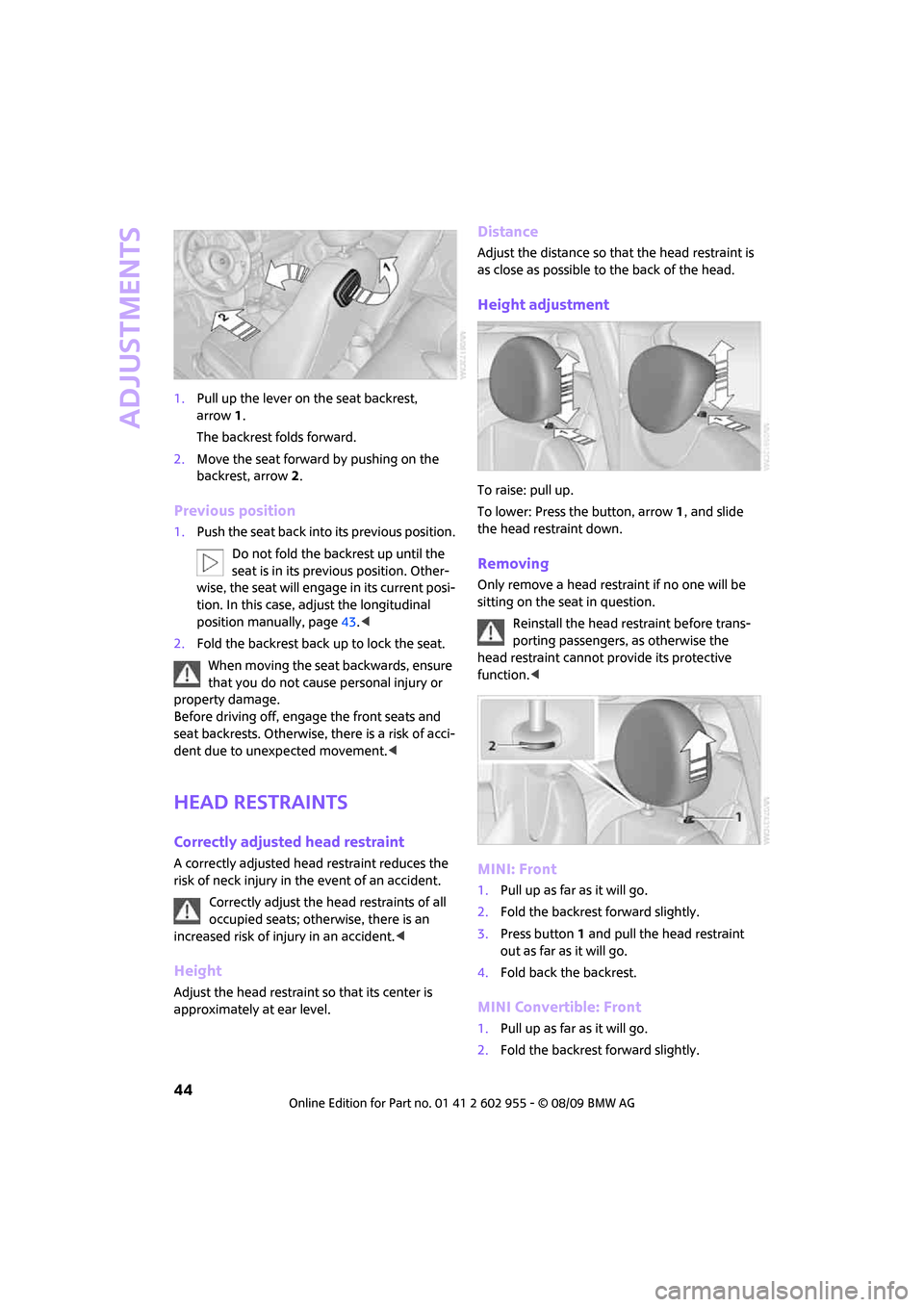
1.Pull up the lever on the seat backrest,
arrow1.
The backrest folds forward.
2.Move the seat forward by pushing on the
backrest, arrow2.
Previous position
1.Push the seat back into its previous position.
Do not fold the backrest up until the
seat is in its previous position. Other-
wise, the seat will engage in its current posi-
tion. In this case, adjust the longitudinal
position manually, page43.<
2.Fold the backrest back up to lock the seat.
When moving the seat backwards, ensure
that you do not cause personal injury or
property damage.
Before driving off, engage the front seats and
seat backrests. Otherwise, there is a risk of acci-
dent due to unexpected movement.<
Head restraints
Correctly adjusted head restraint
A correctly adjusted head restraint reduces the
risk of neck injury in the event of an accident.
Correctly adjust the head restraints of all
occupied seats; otherwise, there is an
increased risk of injury in an accident.<
Height
Adjust the head restraint so that its center is
approximately at ear level.
Distance
Adjust the distance so that the head restraint is
as close as possible to the back of the head.
Height adjustment
To raise: pull up.
To lower: Press the button, arrow1, and slide
the head restraint down.
Removing
Only remove a head restraint if no one will be
sitting on the seat in question.
Reinstall the head restraint before trans-
porting passengers, as otherwise the
head restraint cannot provide its protective
function.<
MINI: Front
1.Pull up as far as it will go.
2.Fold the backrest forward slightly.
3.Press button1 and pull the head restraint
out as far as it will go.
4.Fold back the backrest.
MINI Convertible: Front
1.Pull up as far as it will go.
2.Fold the backrest forward slightly.
Page 48 of 230

Adjustments
46
Seat belt reminder
Front seats
The indicator lamps come on and an
acoustic signal sounds. In addition, a
message appears on the Control Dis-
play. Check whether the safety belt has
been fastened correctly. The "Fasten safety
belts" reminder is issued when the driver's
safety belt has not been fastened. The "Fasten
safety belts" reminder is also activated at road
speeds above approx. 5 mph or 8 km/h if the
front passenger's safety belt has not been fas-
tened, if objects are placed on the front passen-
ger seat, or if driver or front passenger unfasten
their safety belts.
Damage to safety belts
If the safety belts are damaged or stressed
in an accident: have the safety belt system
and its seat-belt tensioners replaced and the
belt anchors checked. Have this work carried out
only by a MINI dealer or by a workshop that has
specially trained personnel working in accor-
dance with the specifications of the MINI manu-
facturer; otherwise, correct operation of these
safety systems is not ensured.<
Mirrors
Exterior mirrors
The front passenger's mirror is more con-
vex than the driver's mirror. The objects
seen in the mirror are closer than they appear.
Do not gauge your distance from traffic behind
you on the basis of what you see in the mirror;
otherwise, there is an increased risk of an
accident.<1Adjusting the left or right exterior mirror
2Folding mirrors in and out
*
Manual adjustment
The mirrors can also be adjusted manually: press
the edge of the glass.
Folding mirrors in and out*
Turn the knob beyond the pressure point in
direction 2. The mirrors can be folded in at road
speeds up to approx. 20 mph/30 km/h.
This can be beneficial in narrow streets, for
example, or for moving mirrors that were folded
in by hand back out into their correct positions.
Automatic heating*
At outside temperatures below a certain limit,
both exterior mirrors are automatically heated
while the engine is running or the ignition
switched on.
Interior rearview mirror
To reduce glare from vehicles behind you when
you are driving at night:
Turn the knob.
Page 49 of 230

MOBILITYAT A GLANCE CONTROLS DRIVING TIPS ENTERTAINMENT
47
NAVIGATION REFERENCE
Interior mirror, automatic dimming*
The automatic dimming feature of the interior
rearview mirror
* is controlled by two photo cells
in the mirror. One photo cell is in the mirror
frame, arrow; the other is on the back of the
mirror.
In order to ensure that the system functions cor-
rectly, keep the photo cells clean, do not cover
the area between the interior rearview mirror
and windshield, and do not affix adhesive labels
or stickers of any kind to the windshield directly
in front of the mirror.
Steering wheel
Adjustments
Do not adjust the steering wheel position
while the car is in motion; otherwise, there
is a risk of accident due to an unexpected
movement.<
1.Fold the lever down.
2.Move the steering wheel to the preferred
distance and angle to suit your seated
position.
3.Swing the lever back up.Do not use force to swing the lever
back up; otherwise, the mechanism
will be damaged.<
Page 219 of 230

217
MOBILITYAT A GLANCE CONTROLS DRIVING TIPS ENTERTAINMENT NAVIGATION REFERENCE
Front seat adjustment42
Frost on windows, refer to
Defrosting windows93
"FTM"81
FTM, refer to Flat Tire
Monitor78
Fuel163
– gauge61
– high-quality brands163
– quality163
– specifications163
– tank capacity206
Fuel clock, refer to Fuel
gauge61
Fuel display, refer to Fuel
gauge61
Fuel filler flap162
– releasing in the event of
electrical malfunction162
Fuses195
G
Garage door opener, refer to
Integrated universal remote
control94
Gasoline
– refer to Average
consumption61
Gasoline display, refer to Fuel
gauge61
Gasoline, refer to Required
fuel163
Gear indicator
– automatic transmission with
Steptronic53
Gear shifting
– automatic transmission53
– manual transmission53
Gearshift lever
– automatic transmission with
Steptronic53
– manual transmission53
General driving notes102
Glass sunroof, electric35
– convenient operation28,30
– opening, closing35
– raising35
– remote control28Glove compartment95
GPS navigation, refer to
Navigation system112
Grills91
Gross vehicle weight, refer to
Weights205
H
Halogen lamps
– replacing bulb186
Handbrake, refer to Parking
brake52
Hands-free system14
Hazard warning flashers14
"HD radio"144
HD radio, refer to High
Definition Radio144
Head airbags84
Head restraints44
– sitting safely42
Headlamp control,
automatic87
Headlamp flasher55
– indicator lamp11,13
Headlamps
– replacing bulb186
Headlamps, care182
Heated
– mirrors46
– rear window93
– seats45
Heating
– mirrors46
– rear window93
– seats45
Heavy loads, refer to Stowing
cargo106
Height adjustment
– seats43
– steering wheel47
Height, refer to
Dimensions203
High beams88
– headlamp flasher88
– indicator lamp13
– replacing bulb186
High Definition Radio, refer to
HD Radio144High water, refer to Driving
through water103
Highways, refer to Route
criteria124
Hill Assist78
Hills103
Holders for cups97
Home address123
"Home address" in
navigation124
Homepage4
Horn10
Hot exhaust system102
"Hour memo"69
"House number" in
destination entry117
Hydroplaning102
I
IBOC, refer to HD Radio144
Ice warning60
Icy roads, refer to Outside
temperature warning60
ID3 tag, refer to Information
about the track150
Ignition51
– switched off51
– switched on51
Ignition key position 1, refer to
Radio readiness51
Ignition key position 2, refer to
Ignition on51
Ignition key, refer to
Integrated key/remote
control26
Ignition lock51
Imprint2
Indicator and warning
lamps13
– Tire Pressure Monitor TPM82
Indicator lighting, refer to
Instrument lighting89
Individual settings, refer to
Personal Profile26
Inflation pressure monitoring,
refer to Tire Pressure Monitor
TPM80
Page 223 of 230

221
MOBILITYAT A GLANCE CONTROLS DRIVING TIPS ENTERTAINMENT NAVIGATION REFERENCE
Rear fog lamp89
– indicator lamp13
– replacing bulb189
Rear lamps
– bulb replacement189
Rear lamps, refer to Tail
lamps188
Rear luggage rack107
Rear seat backrest, folding104
Rear seats
– folding the backrests104
Rear window heating93
Rearview mirror, refer to
Mirrors46
Receiving level of mobile
phone, refer to Status
information20
Reception
– radio station144
Recirculated-air mode92
Recirculation of air, refer to
Recirculated-air mode92
Reclining seat, refer to
Backrest43
Recording times, refer to
Stopwatch73
Refueling162
Releasing
– bonnet176
Remote control26
– battery renewal35
– Comfort Access33
– garage door opener94
– malfunctions29,34
– service data179
– tailgate29
"Repeat directory" for audio
mode152
"Repeat track" for audio
mode152
Replacement remote
control26
Replacing bulbs, refer to
Lamps and bulbs185
Replacing tires, refer to New
wheels and tires174
Reporting safety defects6Reserve warning, refer to Fuel
gauge61
Reservoir for washer
systems58
"Reset"79
"Reset" for stopwatch73
"Reset" for tone settings140
Reset, refer to Resetting tone
settings140
Restraint systems
– for children48
– refer to Safety belts45
Reverse
– CD changer152
– CD player152
Reverse gear
– automatic transmission with
Steptronic54
– manual transmission53
Road map127
Roadside Assistance196
Roadside parking lamps88
– replacing bulb187
Roadworthiness test, refer to
Service requirements65
Roof load capacity205
Roof-mounted luggage
rack107
Rope, refer to Tow-starting,
towing away198
Route124
– changing124,130
– display127
– displaying arrow view127
– displaying map view127
– displaying town129
– list129
– selecting124
– selecting criteria124
– taking detours130
Route selection124
RSC Runflat System
Component, refer to Run-flat
tires174
Rubber parts, care183
Runflat System Component
RSC, refer to Run-flat
tires174Run-flat tires174
– flat tire79
– new tires174
– tire inflation pressure164
– winter tires175
Runflat Tyres, refer to Run-flat
tires174
S
Safety belts45
– damage46
– indicator lamp46
– reminder46
– sitting safely42
Safety belts, care184
Safety systems
– airbags84
– Antilock Brake System
ABS76
– Dynamic Stability Control
DSC76
– safety belts45
Safety tires, refer to Run-flat
tires174
"SAT" on the radio138,146
Satellite radio146
– enabling channel146
– selecting channel146
– storing channel146
Scale for navigation,
changing128
"Scan"
– sampling radio stations142
Scan
– CD changer151
– CD player151
– radio142
"Scan all" for audio mode151
"Scan directory" for audio
mode151
Screen, refer to Onboard
monitor controls16
Screw thread for tow
fitting198
SDARS, refer to Satellite
radio146
Seat adjustment
– mechanical43