2010 MERCEDES-BENZ SLK300 Controls
[x] Cancel search: ControlsPage 2 of 312
Symbols
Trademarks:
R Bluetooth ®
is a registered trademark of
Bluetooth SIG Inc.
R ESP ®
is a registered trademark of Daimler.
R HomeLink ®
is a registered trademark of
Prince, a Johnson Controls Company.
R iPod ®
and iTunes ®
are registered
trademarks of Apple Inc., registered in the
U.S.A. and other countries.
R Logic 7 ®
is a registered trademark of
Harman International Industries,
Incorporated.
R Microsoft ®
is a registered trademark of
Microsoft Corporation in the U.S.A. and
other countries.
R SIRIUS and related marks are trademarks
of SIRIUS XM Radio Inc.
R Windows media ®
is a registered trademark
of Microsoft Corporation in the U.S.A. and
other countries.
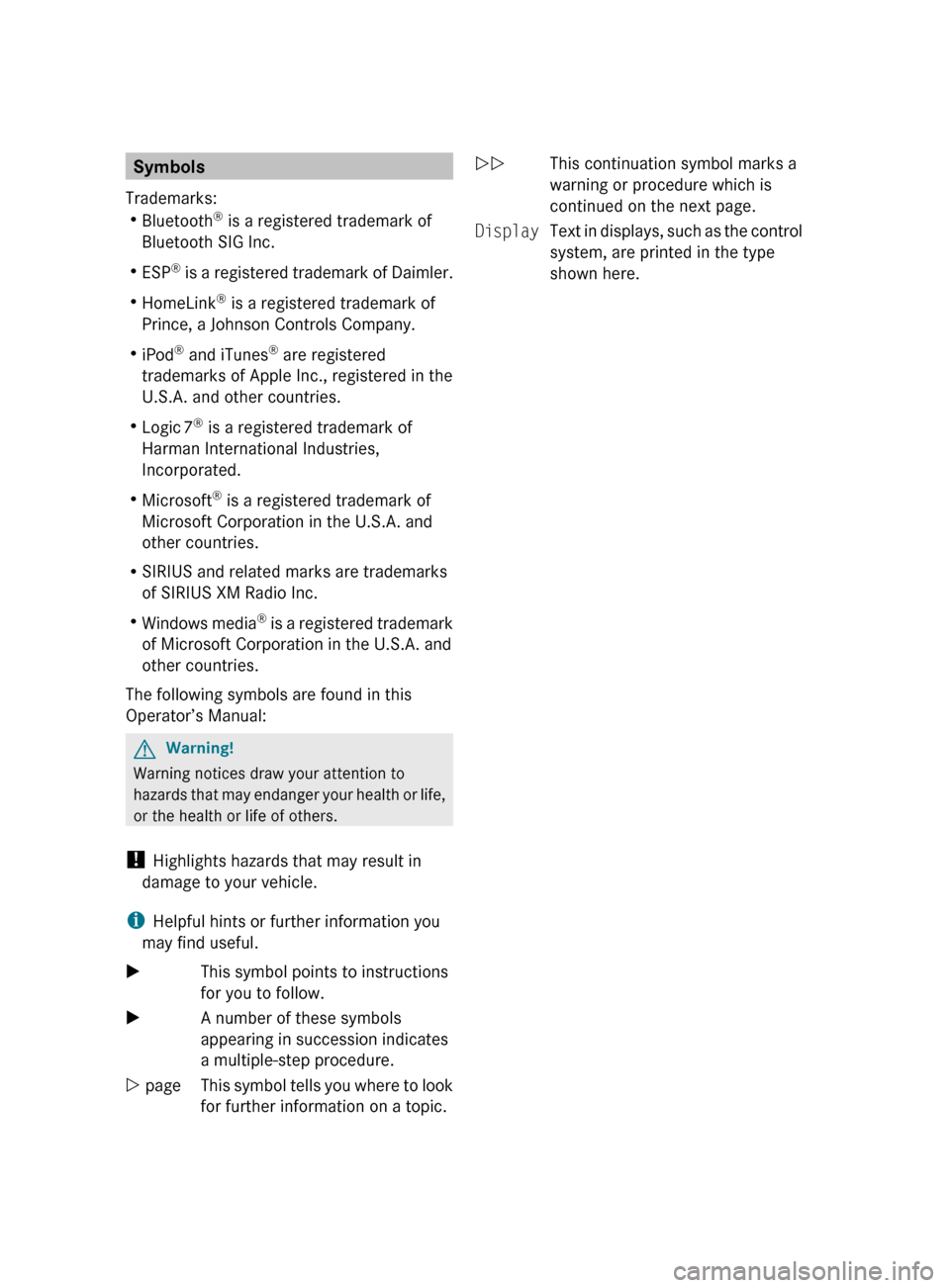
The following symbols are found in this
Operator’s Manual: G
Warning!
Warning notices draw your attention to
hazards
that may endanger your health or life,
or the health or life of others.
! Highlights hazards that may result in
damage to your vehicle.
i Helpful hints or further information you
may find useful.
X This symbol points to instructions
for you to follow.
X A number of these symbols
appearing in succession indicates
a multiple-step procedure.
Y page This symbol tells you where to look
for further information on a topic. YY
This continuation symbol marks a
warning or procedure which is
continued on the next page.
Display Text in displays, such as the control
system, are printed in the type
shown here.
171_AKB; 3; 60, en-US
d2ureepe,
Version: 2.11.8.1 2009-05-11T16:00:23+02:00 - Seite 2
Page 5 of 312

Index
....................................................... 4Introduction .........................................
18 At a glance
........................................... 23 Safety and security
.............................31 Controls in detail
................................. 55 Operation ...........................................
189 Practical hints ...................................
233 Technical data ...................................
291 Contents
3171_AKB; 3; 60, en-US
d2ureepe,
Version: 2.11.8.1 2009-05-11T16:00:23+02:00 - Seite 3
Page 11 of 312

Glove box
........................................... 174
Gross Axle Weight Rating see GAWR
Gross Vehicle Weight
see GVW
Gross Vehicle Weight Rating
see GVWR
GVW (Gross Vehicle Weight) ............218
GVWR (Gross Vehicle Weight
Rating) ................................................ 218H
Halogen headlamps see Headlamps
Hard plastic trim items, cleaning ....231
Hazard warning flasher ....................... 74
Headlamp cleaning system ................ 74
Headlamps
Active Bi-Xenon headlamps ............. 71
Automatic headlamp mode .............. 71
Bi-Xenon .................................. 71, 269
Cleaning lenses ............................. 229
Cleaning system .............................. 74
Daytime running lamp mode ............72
Delayed shut-off ............................ 107
Halogen ......................................... 269
High-beam flasher ............................ 74
High-beam headlamps .....................74
Low-beam headlamps ...................... 71
Replacing bulbs ............................. 267
Switch .............................................. 71
Headliner, cleaning and care of .......231
Head restraints .................................... 62
Adjustment ...................................... 62
Head-thorax air bags ........................... 36
Heated steering wheel ........................67
Height adjustment
Seats ............................................... 62
High-beam flasher ............................... 74
High-beam headlamps ................74, 269
Indicator lamp .................................. 26
High-performance brake system .....223
Hood ................................................... 192
Messages in the multifunction
display ........................................... 245
Horn ...................................................... 25
Hydroplaning ..................................... 224 I
Identification labels ..........................292
Identification number, vehicle
(VIN) ................................................... 293
Ignition ........................................... 61, 80
Immobilizer .......................................... 51
Infant and child restraint systems see Children in the vehicle
Inflation pressure
see Tires, Inflation pressure
Inside door handle ........................30, 58
Instrument cluster ........................26, 92
Illumination ...................................... 93
Lamps ............................................ 256
Multifunction display .......................95
Instrument lighting
see Instrument cluster, Illumination
Instrument panel
see Instrument cluster
Instruments and controls
see Cockpit
Interfere with radio reception .......... 141
Interior lighting ................................... 75
Delayed shut-off ............................ 107
Emergency lighting .......................... 76
Reading lamps ................................. 75
Interior rear view mirror .....................68
Auto-dimming rear view mirrors ....... 69
Interior storage spaces
see Storage compartments
Intermittent wiping ............................. 76
Rain sensor ...................................... 76
iPod ®
(media interface) ....................139 J
Jack ..................................................... 235
Jump starting ..................................... 283 K
Key, Mechanical
Loss of ............................................. 58
Replacing
......................................... 58 Index
9 171_AKB; 3; 60, en-US
d2ureepe,
Version: 2.11.8.1 2009-05-11T16:00:23+02:00 - Seite 9
Page 35 of 312
could result in serious or fatal injury. The SRS
might also deploy unexpectedly and
unnecessarily
which could also result in injury
as well.
In addition, improper work on the SRS creates
a risk of rendering the SRS inoperative or
causing unintended air bag deployment. Work
on the SRS must therefore only be performed
by qualified technicians. Contact an
authorized Mercedes-Benz Center.
If it is necessary to modify an air bag system
to accommodate a person with disabilities,
contact an authorized Mercedes-Benz Center.
USA only: Call our Customer Assistance
Center at 1-800-FOR-MERCedes
(1-800-367-6372) for details. Air bags
G
Warning!
Air bags are designed to reduce the potential
of injury and fatality in certain
R frontal impacts (front air bags and knee
bags)
R side impacts (head-thorax air bags)
However, no system available today can
completely eliminate injuries and fatalities.
Deployment of the air bags temporarily
releases a small amount of dust from the air
bags. This dust, however, is neither harmful
to
your health, nor does it indicate a fire in the
vehicle. The dust might cause some
temporary breathing difficulty for people with
asthma or other breathing trouble. To avoid
this, you may wish to get out of the vehicle as
soon as it is safe to do so. If you have any
breathing difficulty but cannot get out of the
vehicle after the air bag inflates, then get fresh
air by opening a window or door. G
Warning!
To reduce the risk of injury when the front air
bags
inflate, it is very important for the driver and passenger to always be in a properly
seated position and to wear their seat belts.
For maximum protection in the event of a
collision always be in normal seated position
with your back against the seat backrest.
Fasten your seat belt and make sure it is
properly positioned on your body.
Since the air bag inflates with considerable
speed and force, a proper seating position
and correct positioning of the hands on the
steering
wheel will help to keep you at a safe
distance from the air bag. Occupants who are
not wearing their seat belt, are not seated
properly or are too close to the air bag can be
seriously injured or killed by an air bag as it
inflates with great force instantaneously:
R Sit with the seat belt properly fastened in a
position that is as upright as possible with
your back against the seat backrest.
R Move the driver’s seat as far back as
possible, still permitting proper operation
of vehicle controls. The distance from the
center of the driver’s chest to the center of
the air bag cover on the steering wheel
must be at least 10 inches (25 cm) or more.
You should be able to accomplish this by
adjusting the seat and steering wheel. If
you have any difficulties, please contact an
authorized Mercedes-Benz Center.
R Do not lean your head or chest close to the
steering wheel or dashboard.
R Keep hands on the outside of the steering
wheel rim. Placing hands and arms inside
the rim can increase the risk and potential
severity of hand/arm injury when the driver
front air bag inflates.
R Adjust the passenger seat as far as possible
rearward from the dashboard when the
seat is occupied.
R Occupants, especially children, should
never place their bodies or lean their heads
in the area of the door where the head-
thorax air bag inflates. This could result in
serious injuries or death should the head- Occupant safety
33
Safety and security
171_AKB; 3; 60, en-US
d2ureepe, Version: 2.11.8.1 2009-05-11T16:00:23+02:00 - Seite 33 Z
Page 46 of 312

R
rear view mirror adjustment
R fastening of seat belts Steering wheel
G
Observe Safety notes, see page 66.
X Position steering wheel : properly. See
(Y page 66) for manual adjustment and
(Y page 66) for electrical adjustment.
Make sure:
R You can reach the steering wheel with your
arms slightly bent at the elbows.
R You can move your legs freely.
R All displays (including malfunction and
indicator lamps) on the instrument cluster
are clearly visible.
Seat belt G
Observe Safety notes, see page 40.
X Fasten and position your seat belt ;
correctly (Y page 42). Make sure:
R
The seat belt is always fitted snugly.
R Adjust the seat belt so that the shoulder
section is located as close as possible to
the middle of the shoulder.
R Place the lap portion of the seat belt as low
as possible on your hips.
Seat and head restraint G
Observe Safety notes, see page 62.
X Position seat = and head restraint
properly. See ( Y page 63) for seat and
head restraint adjustment.
Observe the following points:
R Always be in a properly seated position.
R The position should be as far rearward from
the front air bag in the steering wheel as
possible, while still permitting proper
operation of vehicle controls.
R Adjust the seat to a comfortable seating
position that still allows you to reach the
accelerator/brake pedal safely.
R The seat must be adjusted so that you can
correctly fasten and position your seat belt.
R The seat backrest must be in a position that
is as nearly upright as possible.
R Adjust the seat cushion so that the front
edge of the seat cushion lightly supports
your legs.
R Adjust the head restraint so that it is as
close to the head as possible and the
center of the head restraint supports the
back of the head at eye level.
R Never place hands under the seat or near
any moving parts while the seat is being
adjusted. 44
Occupant safetySafety and security
171_AKB; 3; 60, en-US
d2ureepe,
Version: 2.11.8.1 2009-05-11T16:00:23+02:00 - Seite 44
Page 57 of 312

Vehicle equipment ..............................
56
Locking and unlocking .......................56
Starter switch positions ..................... 61
Seats .................................................... 62
Multifunction steering wheel .............66
Mirrors ................................................. 68
Memory function ................................. 70
Lighting ................................................ 70
Wipers .................................................. 76
Power windows ................................... 78
Driving and parking ............................ 79
Manual transmission .......................... 84
Automatic transmission ..................... 85
Instrument cluster ..............................92
Control system .................................... 93
Audio system .................................... 112
Driving systems ................................ 159
Climate control system ....................162
Rear window defroster ..................... 170
Retractable hardtop .........................170
Loading and storing ..........................174
Useful features ................................. 176 55Controls in detail
171_AKB; 3; 60, en-US
d2ureepe,
Version: 2.11.8.1 2009-05-11T16:00:23+02:00 - Seite 55
Page 58 of 312
Vehicle equipment
i This Operator’s Manual describes all
features, standard or optional, potentially
available for your vehicle at the time of
purchase. Please be aware that your
vehicle might not be equipped with all
features described in this manual. Locking and unlocking
Notes
G
Observe Safety notes, see page 45.
When unlocking or locking the vehicle with
the SmartKey an acoustic signal sounds. The
acoustic signal is activated at the factory. If
you wish to deactivate the feature, or adjust
its signal volume, contact an authorized
Mercedes-Benz Center.
When unlocking the vehicle, all turn signal
lamps flash once. An acoustic signal sounds
once, and the locking knobs in the doors
move up. The anti-theft alarm system is
disarmed.
When locking the vehicle, all turn signal lamps
flash three times. An acoustic signal sounds
three times, and the locking knobs in the
doors move down. The anti-theft alarm
system is armed.
All doors and the trunk must be closed.
If you cannot lock or unlock the vehicle with
the SmartKey, the batteries in the SmartKey
are discharged, the SmartKey is
malfunctioning, or the vehicle battery is
drained.
X Check the batteries in the SmartKey
(Y page 57) and replace them if
necessary.
X Use the mechanical key to unlock the
driver’s door and the trunk (Y page 264). X
Use the mechanical key to lock the vehicle
(Y page 265).
X Have the vehicle battery and the vehicle
battery connections checked at an
authorized Mercedes-Benz Center.
If the SmartKey is malfunctioning, contact
Roadside Assistance or an authorized
Mercedes-Benz Center. SmartKey
Your vehicle comes supplied with two
SmartKeys, each with remote control and a
removable mechanical key.
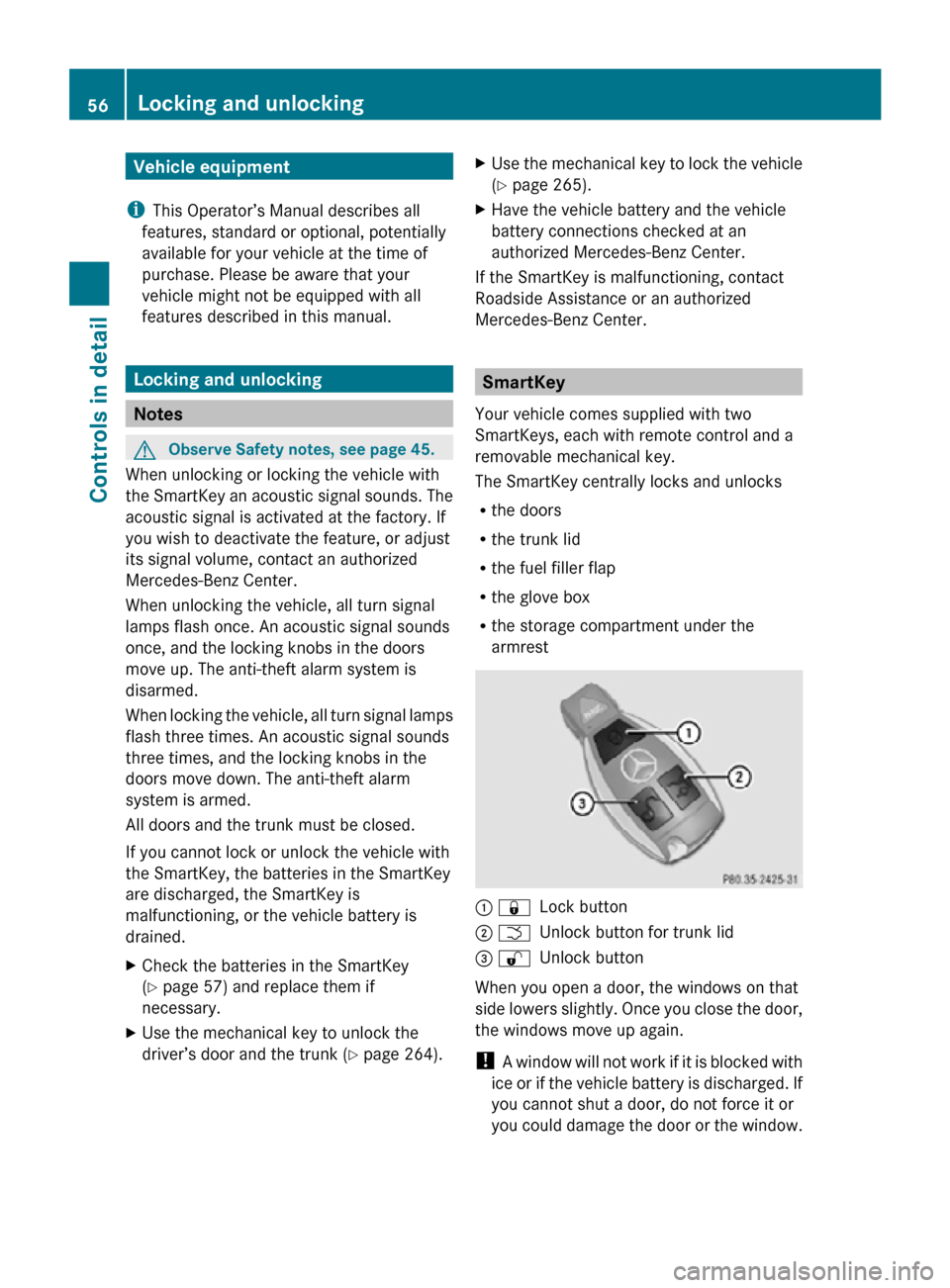
The SmartKey centrally locks and unlocks
R the doors
R the trunk lid
R the fuel filler flap
R the glove box
R the storage compartment under the
armrest : &
Lock button
; F Unlock button for trunk lid
= % Unlock button
When you open a door, the windows on that
side lowers slightly. Once you close the door,
the windows move up again.
! A window will not work if it is blocked with
ice or if the vehicle battery is discharged. If
you cannot shut a door, do not force it or
you could damage the door or the window. 56
Locking and unlockingControls in detail
171_AKB; 3; 60, en-US
d2ureepe,
Version: 2.11.8.1 2009-05-11T16:00:23+02:00 - Seite 56
Page 59 of 312
Fix whatever is affecting the window before
trying to shut the door.
i Without the antenna on the left rear side
of the vehicle installed, the SmartKey
signaling range is considerably reduced.
Hold the SmartKey in close proximity
towards the antenna base when locking or
unlocking the vehicle.
i USA only:
This device complies with Part 15 of the
FCC Rules. Operation is subject to the
following two conditions:
1. This device may not cause harmful interference, and
2. this device must accept any interference received, including
interference that may cause undesired
operation.
Any unauthorized modification to this
device could void the user’s authority to
operate the equipment.
i Canada only:
This device complies with RSS-210 of
Industry Canada. Operation is subject to
the following two conditions:
1. This device may not cause interference, and
2. this device must accept any interference received, including
interference that may cause undesired
operation of the device.
Any unauthorized modification to this
device could void the user’s authority to
operate the equipment.
Factory setting X
Global unlocking: Press button %. Unless you open a door or the trunk within
approximately 40 seconds after unlocking
the vehicle:
R
The vehicle will be locked again.
R The anti-theft alarm system will be
rearmed.
X Global locking: Press button &.
Selective setting If you frequently travel alone, you may wish
to reprogramm the SmartKey. Pressing
button
% will then only unlock the driver’s
door, interior lockable storage
compartments, and the fuel filler flap.
X Switching on/off: Press and hold buttons
% and & simultaneously for
approximately 6 seconds until the battery
check lamp (Y page 57) flashes twice.
The SmartKey will then function as follows:
X Unlocking driver’s door and fuel filler
flap: Press button % once.
X Global unlocking: Press button %
twice.
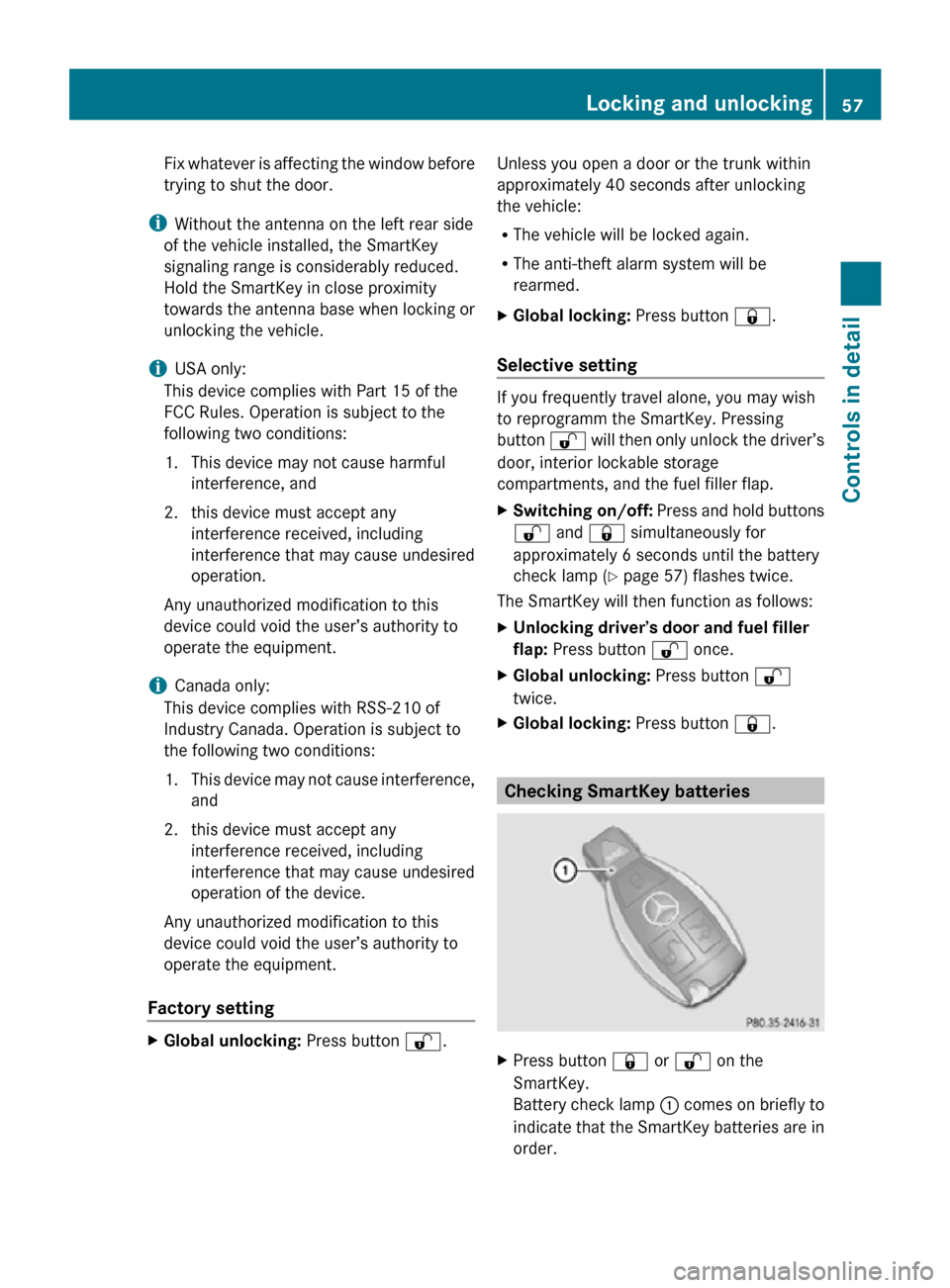
X Global locking: Press button &. Checking SmartKey batteries
X
Press button & or % on the
SmartKey.
Battery check lamp : comes on briefly to
indicate that the SmartKey batteries are in
order. Locking and unlocking
57Controls in detail
171_AKB; 3; 60, en-US
d2ureepe, Version: 2.11.8.1 2009-05-11T16:00:23+02:00 - Seite 57 Z