2010 MERCEDES-BENZ ML350 Trip odometer
[x] Cancel search: Trip odometerPage 20 of 368

Messages in the multifunction
display ................................... 281, 296
MOExtended .................................. 352
Ply composition and material
used ............................................... 241
Problems under-/overinflation ......221
Retreads ........................................ 218
Rims and tires (technical data) ......352
Rotation ......................................... 234
Service life ..................................... 232
Sizes .............................................. 352
Snow chains .................................. 243
Speed rating .......................... 237, 241
Storing ........................................... 233
Temperature .......................... 220, 234
Terminology ................................... 239
TIREFIT (tire repair kit) ...................320
Tire Identification Number .............241
Tire pressure loss warning system . 222
TPMS low tire pressure/
malfunction telltale ........................304
Traction ................................. 233, 241
Tread ............................................. 242
Tread depth ........................... 232, 242
Treadwear ...................................... 233
Treadwear indicators .............232, 242
Vehicle maximum load on ..............242
Wear pattern .................................. 234
Winter tires ............................ 242, 352
Tire speed rating ....................... 237, 241
Tongue Weight Rating see TWR
Top tether
see Children in the vehicle
Total load limit ................................... 241
Towing
Towing eye bolt .............................. 339
Trailer .................................... 113, 254
Vehicle ........................................... 338
Towing eye bolt ................................. 339
Traction ...................................... 233, 241
Trailer towing ............................ 113, 254
Coupling a trailer ........................... 255
Decoupling ..................................... 257
Electrical connections .................... 254
Towing ........................................... 256
Trailer hitch ................................... 254
Weights and ratings .......................254Transfer case ..................................... 117
Transmission see Automatic transmission
Transmission fluid level .................... 216
Transmission gear selector lever see Gear selector lever
Transmission positions .................... 112
Traveling abroad ............................... 257
Tread (tires) ....................................... 242
Tread depth (tires) .................... 232, 242
Treadwear .......................................... 233
Treadwear indicators (tires) .... 232, 242
Trip computer menu ......................... 138
Trip odometer, resetting ................... 118
Turning off the engine ...................... 108
Turn signals ......................................... 95
Cleaning lenses ............................. 263
Indicator lamps ................................ 28
Messages in the multifunction
display ........................................... 296
TWR (Tongue Weight Rating) ........... 242
U
Uniform Tire Quality Grading
Standards .................................. 233, 242
Units
Selecting digital speedometer
display mode ................................. 131
Selecting speedometer/
odometer display mode .................131
Unleaded gasoline, premium ........... 360
Unlocking the vehicle
KEYLESS-GO .................................... 71
Manually ........................................ 306
SmartKey ......................................... 70
Upholstery, cleaning ......................... 265
Useful features .................................. 194
V
Vehicle
Battery ........................................... 334
Care ............................................... 260
Control system .............................. 119
Identification Number (VIN) ...........346
Locking/unlocking ........................... 70
Lowering (wheel change) ...............329
18Index164_AKB; 7; 31, en-USd2ureepe,Version: 2.11.8.12009-09-11T12:07:36+02:00 - Seite 18
Page 30 of 368

Instrument clusterFunctionPage:# Left turn signal
indicator lamp
;To dim instrument cluster
illumination118
=Reset button for: Trip odometer118Settings129?To brighten instrument
cluster illumination118
A! Right turn signal
indicator lamp
BClock 132CSpeedometer with: ! Antilock Brake
System (ABS) indicator
lamp 298
È Variable speed limiter
indicator lamp2FunctionPage$ Brake warning lamp,
USA only 299
d ESP® warning lamp 301· Distance warning
lamp3302
J Brake warning lamp,
Canada only299
h Combination low tire
pressure/TPMS
malfunction telltale, USA
only
223,
304
2Lamp without function. It illuminates when the ignition is on. It should go out when the engine is running.3Vehicles without Distronic: Warning lamp without function. It illuminates when the ignition is on. It shouldgo out when the engine is running.
28Instrument clusterAt a glance
164_AKB; 7; 31, en-USd2ureepe,Version: 2.11.8.12009-09-11T12:07:36+02:00 - Seite 28
Page 31 of 368

FunctionPageDMultifunction display with:Trip odometer118Main odometer121ETachometer with: 7 Seat belt telltale 51,
300
% Preglow indicator
lamp, diesel engine only 104
oré Recuperative Brake
System (RBS) warning
lamp, ML 450 HYBRID only4
+ Supplemental
Restraint System (SRS)
indicator lamp
36,
301
L Low-beam headlamp
indicator lamp 93
; Engine malfunction
indicator lamp, Canada only303
! Engine malfunction
indicator lamp, USA only 303
K High-beam headlamp
indicator lamp 96
FunctionPageFuel gauge with: Fuel tank
reserve warning lamp 303
8 Fuel filler flap
indicator: The fuel filler flap
is located on the rear right-
hand side.
GMultifunction display with:Outside temperature
indicator or digital
speedometer (depending
on selected setting in the
control system)
123,
131
Transmission position
indicator112
Gear range indicator114Automatic transmission
program mode indicator114
Rear window wiper
indicator100
Downhill Speed Regulator
(DSR) indicator153
Off-road driving program
indicator1554See separate HYBRID Supplemental Operating Instructions.Instrument cluster29At a glance164_AKB; 7; 31, en-USd2ureepe,Version: 2.11.8.12009-09-11T12:07:36+02:00 - Seite 29Z
Page 120 of 368

GWarning!
No messages will be displayed if either the
instrument cluster or the multifunction
display is inoperative.
As a result, you will not be able to see
information about your driving conditions,
such as
Rspeed
Routside temperature
Rwarning/indicator lamps
Rmalfunction/warning messages
Rfailure of any systems
Driving characteristics may be impaired.
If you must continue to drive, do so with added
caution. Contact an authorized Mercedes-
Benz Center as soon as possible.
GWarning!
HYBRID vehicles: It is imperative that you read
the HYBRID Supplemental Operating
Instructions included in your vehicle literature
portfolio. You may otherwise not recognize
potential danger.
:To dim instrument cluster illumination;Reset button =To brighten instrument cluster
illumination
For information on changing the instrument
cluster settings, e.g. the language, see
(Y page 130).
Activating the instrument cluster
The instrument cluster is activated when you
Ropen the driver’s door
Rswitch on the ignition
Rpress button :, ; or =
iOpening the driver’s door or pressing
button :, ; or = without switching on
the ignition activates the instrument
cluster illumination only for 30 seconds.
Adjusting the instrument cluster
illumination
XTo brighten illumination: Press and hold
button = until the desired level of
illumination is reached.
XTo dim illumination: Press and hold
button : until the desired level of
illumination is reached.
iThe instrument cluster illumination is
dimmed or brightened automatically to suit
ambient light conditions.
The instrument cluster illumination will also
be adjusted automatically when you switch
on the vehicle’s exterior lamps.
iWith the exterior lighting switched on, the
brightness of the switches in the center
console will also be adjusted when using
button : or =.
Resetting trip odometer
XMake sure you are viewing the standard
display (Y page 122) in the multifunction
display.
XPress and hold the reset button in the
instrument cluster (Y page 117) until the
trip odometer is reset.
118Instrument clusterControls in detail
164_AKB; 7; 31, en-USd2ureepe,Version: 2.11.8.12009-09-11T12:07:36+02:00 - Seite 118
Page 123 of 368
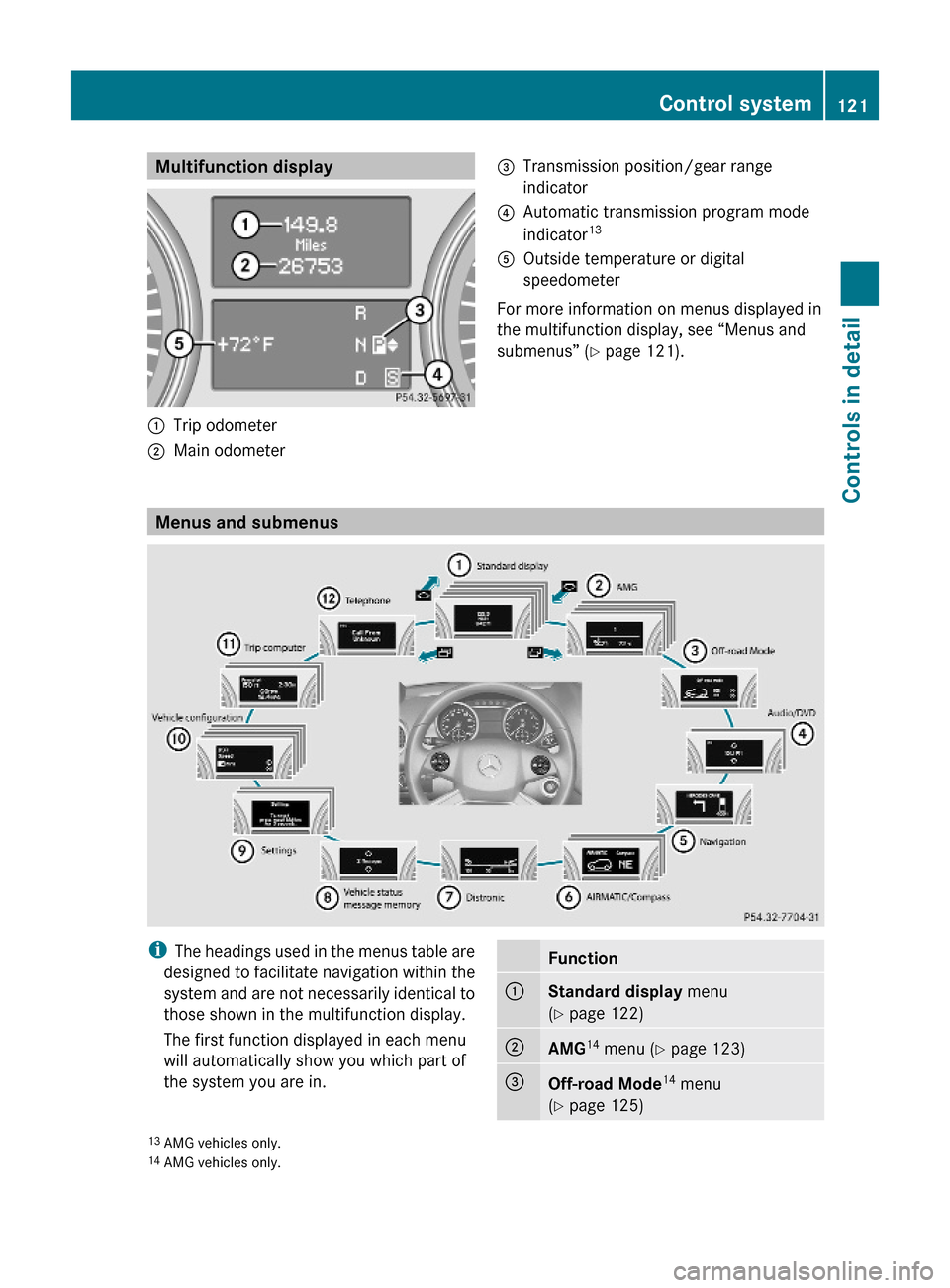
Multifunction display:Trip odometer;Main odometer =Transmission position/gear range
indicator
?Automatic transmission program mode
indicator13AOutside temperature or digital
speedometer
For more information on menus displayed in
the multifunction display, see “Menus and
submenus” (Y page 121).
Menus and submenus
iThe headings used in the menus table are
designed to facilitate navigation within the
system and are not necessarily identical to
those shown in the multifunction display.
The first function displayed in each menu
will automatically show you which part of
the system you are in.
Function:Standard display menu
(Y page 122)
;AMG14 menu (Y page 123)=Off-road Mode14 menu
(Y page 125)13AMG vehicles only.14AMG vehicles only.
Control system121Controls in detail164_AKB; 7; 31, en-USd2ureepe,Version: 2.11.8.12009-09-11T12:07:36+02:00 - Seite 121Z
Page 124 of 368

Function?Audio/DVD menu (Y page 126)ANavigation menu (Y page 127)BAIRMATIC/Compass menu
(Y page 127)
CDistronic menu (Y page 128)DVehicle status message
memory15 menu (Y page 128)
ESettings menu (Y page 129)FVehicle configuration menu
(Y page 137)
GTrip computer menu (Y page 138)HTelephone menu (Y page 139)
Standard display menu
Standard display
In the standard display, trip odometer : and
main odometer ; appear in the
multifunction display.
XIf you see another display, press button
V or U repeatedly until the standard
display appears.
XPress button & or * to select the
functions in the Standard display menu.
The following functions are available:
RRestarting the tire pressure loss warning
system (Y page 223) (Canada only)
RChecking tire inflation pressure with the
Advanced TPMS (Y page 223) (USA only)
RChecking coolant temperature
(Y page 122)
RCalling up digital speedometer or outside
temperature (Y page 123)
RCalling up maintenance service indicator
display (Y page 259)
Checking coolant temperature
GWarning!
Driving when your engine is overheated can
cause some fluids which may have leaked into
the engine compartment to catch fire. You
could be seriously burned.
Steam from an overheated engine can cause
serious burns which can occur just by opening
the engine hood. Stay away from the engine
if you see or hear steam coming from it.
Stop the vehicle in a safe location away from
other traffic. Turn off the engine, get out of the
vehicle and do not stand near the vehicle until
the engine has cooled down.
XPress button & or * repeatedly until
the coolant temperature appears in the
multifunction display.
During severe operating conditions, e.g. stop-
and-go traffic, the coolant temperature may
rise close to 248‡ (120†).
! Excessive coolant temperature triggers a
warning in the multifunction display.
15The vehicle status message memory menu is only displayed if there is a message stored.122Control systemControls in detail
164_AKB; 7; 31, en-USd2ureepe,Version: 2.11.8.12009-09-11T12:07:36+02:00 - Seite 122