2010 MERCEDES-BENZ ML350 Miles km
[x] Cancel search: Miles kmPage 3 of 368

Our company and staff congratulate you on
the purchase of your new Mercedes-Benz.
Your selection of our product is a
demonstration of your trust in our company
name. Furthermore, it exemplifies your desire
to own an automobile that will be as easy as
possible to operate and will provide years of
service.
Your Mercedes-Benz represents the efforts of
many skilled engineers and craftsmen. To
help assure your driving pleasure, and also
the safety of you and your passengers, we ask
you to make a small investment of time:
R Please read this manual carefully, then
return it to your vehicle where it will be
handy for your reference.
R Please follow the recommendations
contained in this manual. They are
designed to acquaint you with the
operation of your Mercedes-Benz.
R Please pay attention to the warnings and
cautions contained in this manual. They are
designed to help improve the safety of the
vehicle operator and occupants.
We extend our best wishes for many miles of
safe, pleasurable driving.
Mercedes-Benz USA, LLC
A Daimler Company1645841383 É1645841383}ËÍ
164_AKB; 7; 31, en-USd2ureepe,Version: 2.11.8.12009-09-11T12:07:36+02:00 - Seite 1
Page 23 of 368
Rhode Island, and Vermont Emission
Control System Warranty 1
R State Warranty Enforcement Laws (Lemon
Laws)
Important notice for California retail
buyers and lessees of Mercedes-Benz
automobiles
Under California law you may be entitled to a
replacement of your vehicle or a refund of the
purchase price or lease price, if after a
reasonable number of repair attempts
Mercedes-Benz USA, LLC and/or its
authorized repair or service facilities fail to fix
one or more substantial defects or
malfunctions in the vehicle that are covered
by its express warranty. During the period of
18 months from original delivery of the
vehicle or the accumulation of 18 000 miles
(approximately 29 000 km) on the odometer
of the vehicle, whichever occurs first, a
reasonable number of repair attempts is
presumed for a retail buyer or lessee if one or
more of the following occurs:
(1)the same substantial defect or
malfunction results in a condition that is
likely to cause death or serious bodily
injury if the vehicle is driven, that defect
or malfunction has been subject to repair
two or more times, and you have directly
notified Mercedes-Benz USA, LLC in
writing of the need for its repair,(2)the same substantial defect or
malfunction of a less serious nature than
category (1) has been subject to repair
four or more times and you have directly
notified us in writing of the need for its
repair, or(3)the vehicle is out of service by reason of
repair of the same or different substantial
defects or malfunctions for a cumulative
total of more than 30 calendar days.Written notification should not be sent to a
dealer, it should be addressed to
Mercedes-Benz USA, LLC
Customer Assistance Center
One Mercedes Drive
Montvale, NJ 07645-0350
Maintenance
The Maintenance Booklet describes all the
necessary maintenance work which should
be performed at regular intervals.
Always have the Maintenance Booklet with
you when you take the vehicle to an
authorized Mercedes-Benz Center for
service. The service advisor will record each
service in the booklet for you.
Roadside Assistance
The Mercedes-Benz Roadside Assistance
Program provides factory-trained technical
help in the event of a breakdown. Calls to the
toll-free Roadside Assistance number
1-800-FOR-MERCedes (in the USA)
1-800-387-0100 (in Canada)
will be answered by Mercedes-Benz
Customer Assistance Representatives
24 hours a day, 365 days a year.
Roadside Assistance will be provided in
accordance with standard program
guidelines which include providing service to
the vehicle up to a reasonable distance from
a paved roadway. We will make every effort
to assist in a breakdown situation, however,
the accessibility of your vehicle will be
determined by our authorized Mercedes-Benz
Center technician or the tow service provider
on a case-by-case basis and may be a factor
in our ability to respond.
Additional charges may be applicable for a
breakdown location determined not to be a
reasonably accessible roadside location as
1 Applicable to vehicles with gasoline engine only.Introduction21164_AKB; 7; 31, en-USd2ureepe,Version: 2.11.8.12009-09-11T12:07:36+02:00 - Seite 21Z
Page 133 of 368

RSelecting language (Y page 131)
RSelecting display (digital speedometer or
outside temperature) for status indicator
(Y page 131)
Selecting speedometer/odometer
display mode (Canada only)
XPress button V or U repeatedly until
the Settings menu appears in the
multifunction display.
XPress button &.XMove the selection marker with button
W or X to the Instrument
Cluster submenu.
XPress button & or * repeatedly until
the message Display Unit
Speedometer/Odometer appears in the
multifunction display.
The selection marker is on the current
setting.
XPress button W or X to set
speedometer/odometer unit to Km or
Miles.
Selecting digital speedometer display
mode
XPress button V or U repeatedly until
the Settings menu appears in the
multifunction display.
XPress button &.XMove the selection marker with button
W or X to the Instrument
Cluster submenu.
XPress button & or * repeatedly until
the message Display Unit Digital
Speedometer appears in the multifunction
display.
The selection marker is on the current
setting.
XPress button W or X to set digital
speedometer unit to Km or Miles.
Selecting language
XPress button V or U repeatedly until
the Settings menu appears in the
multifunction display.
XPress button &.XMove the selection marker with button
W or X to the Instrument
Cluster submenu.
XPress button & or * repeatedly until
the message Language appears in the
multifunction display.
The selection marker is on the current
setting.
XPress button W or X to select the
language to be used for the multifunction
display messages.
Selecting display (digital speedometer or
outside temperature) for status indicator
XPress button V or U repeatedly until
the Settings menu appears in the
multifunction display.
XPress button &.Control system131Controls in detail164_AKB; 7; 31, en-USd2ureepe,Version: 2.11.8.12009-09-11T12:07:36+02:00 - Seite 131Z
Page 141 of 368

:Distance driven since last reset;Time elapsed since last reset=Average speed since last reset?Average fuel consumption since last reset
Resetting fuel consumption statistics
XPress button U or V repeatedly until
the message From Start appears in the
multifunction display.
XPress button & or * repeatedly until
the reading that you want to reset appears
in the multifunction display.
XPress and hold the reset button in the
instrument cluster until the respective
values are reset to 0.
The fuel consumption statistics reset
automatically to 0 after 99 999 miles or
9 999 hours, whichever occurs first.
Distance to empty
XPress button U or V repeatedly until
the message From Start appears in the
multifunction display.
XPress button & or * repeatedly until
the message Range: appears in the
multifunction display.
The calculated remaining driving range
based on the current fuel tank level
appears in the multifunction display.
If only very little fuel is left in the tank, a
vehicle at the fuel pump C appears
instead of the remaining driving range.Current fuel consumption
XPress button U or V repeatedly until
the message From Start appears in the
multifunction display.
XPress button & or * repeatedly until
the message Consumption appears in the
multifunction display.
The current fuel consumption appears in
the multifunction display.
Telephone menu
GWarning!
A driver’s attention to the road must always
be his/her primary focus when driving. For
your safety and the safety of others, we
recommend that you pull over to a safe
location and stop before placing or taking a
telephone call. If you choose to use the
telephone while driving, please use the hands-
free device and only use the telephone when
weather, road and traffic conditions permit.
Some jurisdictions prohibit the driver from
using a mobile phone while driving a vehicle.
Bear in mind that at a speed of just 30 mph
(approximately 50 km/h), your vehicle is
covering a distance of 44 feet (approximately
14 m) every second.
You can connect your telephone to the
COMAND system via Bluetooth®, see
Control system139Controls in detail164_AKB; 7; 31, en-USd2ureepe,Version: 2.11.8.12009-09-11T12:07:36+02:00 - Seite 139Z
Page 143 of 368

Redialing
The control system stores the most recently
dialed phone numbers. This eliminates the
need to search through your entire phone
book.
XPress button U or V repeatedly until
the message TEL appears in the
multifunction display.XPress button 6.
The first number in the redial memory
appears in the multifunction display.XPress button & or * repeatedly until
the desired number or name appears in the
multifunction display.XPress button 6.
The control system dials the selected
phone number.
Driving systems
Introduction
This section describes the following driving
systems of your vehicle:
R Cruise control
R Distronic
R Distance warning function (only available
with Distronic)
R Hill-start assist system
R Downhill Speed Regulation (DSR)
R Off-road driving program
R Air suspension program (Adaptive
Damping System (ADS) and vehicle level
control)
R All-wheel drive (4MATIC)
R Parktronic system
R Rear view camera
The driving safety systems ABS, BAS, EBP,
ESP ®
and 4-ETS are described in the “Safety
and security” section ( Y page 61).
Cruise control
The cruise control maintains the speed you
set for your vehicle automatically.
The use of the cruise control is recommended
for driving at a constant speed for extended
periods of time.
The currently set speed or last set speed
(“Resume” function) appears in the status
indicator of the multifunction display:
R USA only: e.g. Cruise 55 Miles
R Canada only: e.g. ¯ 90 Km/h
i The cruise control should not be activated
during off-road driving.GWarning!
The cruise control is a convenience system
designed to assist the driver during vehicle
operation. The driver is and must always
remain responsible for the vehicle’s speed
and for safe brake operation.
Only use the cruise control if the road, traffic,
and weather conditions make it advisable to
travel at a constant speed.
R The use of the cruise control can be
dangerous on winding roads or in heavy
traffic because conditions do not allow safe
driving at a constant speed.
R The use of the cruise control can be
dangerous on slippery roads. Rapid
changes in tire traction can result in wheel
spin and loss of control.
R Deactivate the cruise control when driving
in fog.
The “Resume” function should only be
operated if the driver is fully aware of the
previously set speed and wishes to resume
this particular preset speed.
Driving systems141Controls in detail164_AKB; 7; 31, en-USd2ureepe,Version: 2.11.8.12009-09-11T12:07:36+02:00 - Seite 141Z
Page 149 of 368
Distronic menu in the control system
Use the DISTRONIC menu to display the
current settings for your Distronic system.
The information shown in the multifunction
display depends on whether the Distronic
system and/or the distance warning function
are activated or deactivated.
iTo activate or deactivate the Distronic
system, see (Y page 147) or see
(Y page 149).
To activate or deactivate the Distance
warning function, see (Y page 137).
XPress button V or U repeatedly until
one of the following two displays appears
in the multifunction display.
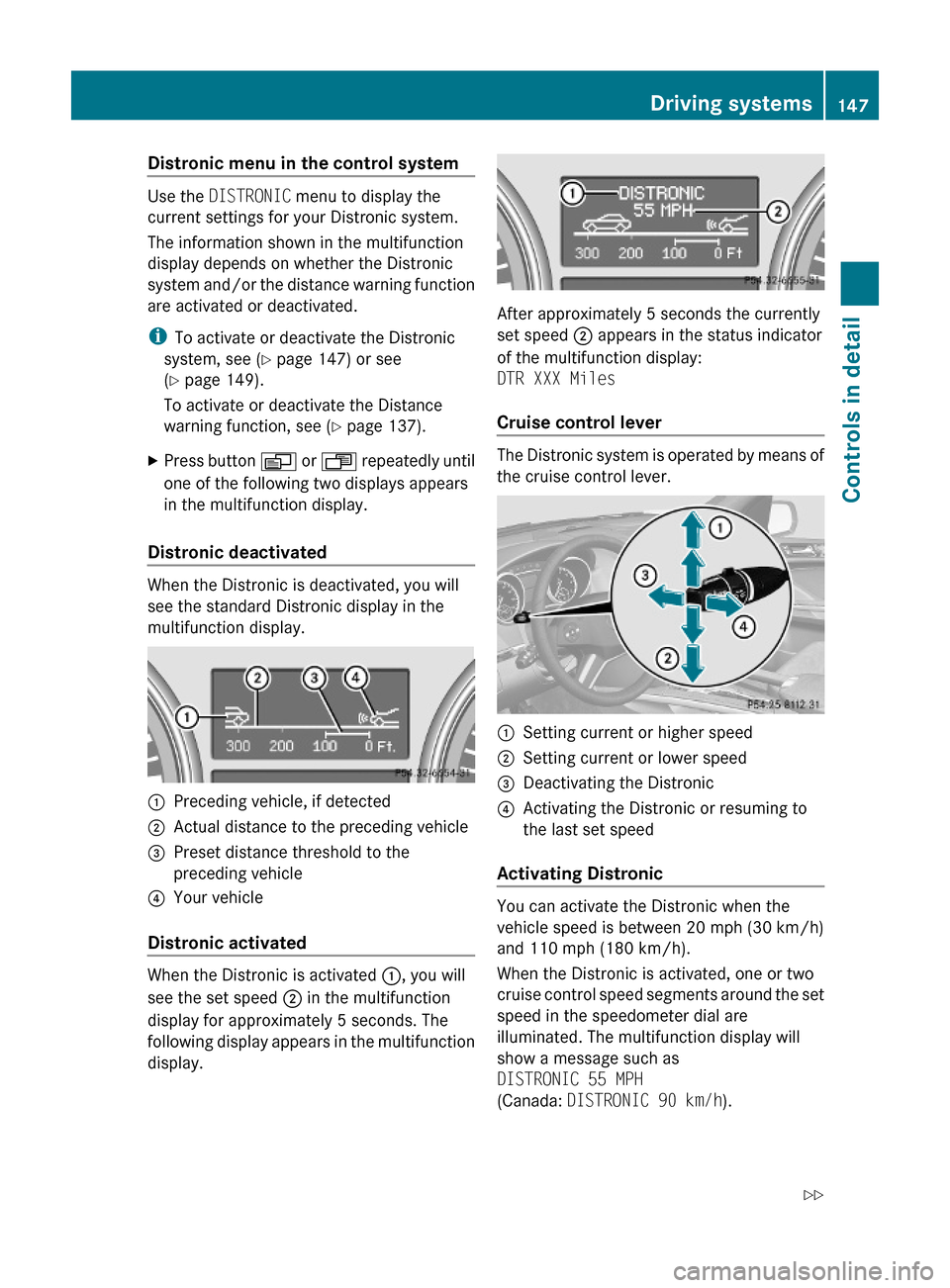
Distronic deactivated
When the Distronic is deactivated, you will
see the standard Distronic display in the
multifunction display.
:Preceding vehicle, if detected;Actual distance to the preceding vehicle=Preset distance threshold to the
preceding vehicle
?Your vehicle
Distronic activated
When the Distronic is activated :, you will
see the set speed ; in the multifunction
display for approximately 5 seconds. The
following display appears in the multifunction
display.
After approximately 5 seconds the currently
set speed ; appears in the status indicator
of the multifunction display:
DTR XXX Miles
Cruise control lever
The Distronic system is operated by means of
the cruise control lever.
:Setting current or higher speed;Setting current or lower speed=Deactivating the Distronic?Activating the Distronic or resuming to
the last set speed
Activating Distronic
You can activate the Distronic when the
vehicle speed is between 20 mph (30 km/h)
and 110 mph (180 km/h).
When the Distronic is activated, one or two
cruise control speed segments around the set
speed in the speedometer dial are
illuminated. The multifunction display will
show a message such as
DISTRONIC 55 MPH
(Canada: DISTRONIC 90 km/h).
Driving systems147Controls in detail164_AKB; 7; 31, en-USd2ureepe,Version: 2.11.8.12009-09-11T12:07:36+02:00 - Seite 147Z
Page 150 of 368

After approximately 5 seconds the currently
set speed appears in the status indicator of
the multifunction display:
R USA only: e.g. DTR 55 Miles
R Canada only: e.g. DTR 90 km/h
If the Distronic is not activated after the
cruise control lever is pulled in direction of
arrow ? (Y page 147), you will see the
message DISTRONIC Off in the
multifunction display.
In the following cases you cannot activate the
Distronic:
R up to 2 minutes after starting the engine
R when you brake
R when you have engaged the parking brake
R when the automatic transmission is in park
position P, reverse gear R, or neutral
position N
R when the ESP ®
is switched off or has
switched off due to a malfunction
The vehicle speed displayed on the
speedometer can briefly vary from the speed
setting on the Distronic system.
Setting the current speedXAccelerate or decelerate to the desired
speed.XBriefly lift the cruise control lever in
direction of arrow : or depress in
direction of arrow ; (Y page 147).XRemove your foot from the accelerator
pedal.
i If you do not take your foot off of the
accelerator pedal and continue to
accelerate past the set speed, the following
message will appear in the multifunction
display:
DISTRONIC Override
The distance to a slower moving vehicle in
front of you will not be set. Your vehicle
speed will then be determined only by the
accelerator pedal position.
Changing the set speedGWarning!
Keep in mind that it may take a brief moment
until the vehicle has made the necessary
adjustments.
Increase or decrease the set vehicle speed to
a value that the prevailing road conditions and
legal speed limits permit. Otherwise, sudden
and unexpected acceleration or deceleration
of the vehicle could cause an accident and/
or serious injury to you and others.
You can increase or decrease the set speed
in 1 mph (Canada: 1 km/h) increments or in
5 mph (Canada: 10 km/h) increments.
When you use the cruise control lever to
decelerate, the brake system will brake the
vehicle automatically if the engine’s braking
power does not brake the vehicle sufficiently.
Adjustment in 1 mph (Canada:
1 km/h) increments
i The set speed value is increased or
decreased in 1 mph (Canada: 1 km/h)
increments each time you lift or press the
cruise control lever up or down to the
resistance point.
XIncreasing: Briefly lift the cruise control
lever up to the resistance point in direction
of arrow : (Y page 147).XDecreasing: Briefly press the cruise
control lever down to the resistance point
in direction of arrow ; (Y page 147).XRelease the cruise control lever.
The new speed is set and the vehicle will
accelerate or decelerate.
Adjustment in 5 mph (Canada:
10 km/h) increments
i The set speed value is increased or
decreased in 5 mph (Canada: 10 km/h)
increments each time you lift or press the
cruise control lever up or down past the
resistance point.
148Driving systemsControls in detail
164_AKB; 7; 31, en-USd2ureepe,Version: 2.11.8.12009-09-11T12:07:36+02:00 - Seite 148
Page 211 of 368

Vehicle equipment ............................210
The first 1000 miles (1500 km) .......210
At the gas station .............................210
Engine compartment ........................212
Tires and wheels ...............................218
Winter driving ...................................242
Driving instructions ..........................244
Maintenance ......................................258
Vehicle care .......................................260
209Operation164_AKB; 7; 31, en-USd2ureepe,Version: 2.11.8.12009-09-11T12:07:36+02:00 - Seite 209