2010 MERCEDES-BENZ E350 Windows
[x] Cancel search: WindowsPage 77 of 372
Vehicle equipment ..............................76
Locking and unlocking .......................76
Starter switch positions .....................85
Seats ....................................................87
Multifunction steering wheel .............93
Mirrors .................................................94
Memory function .................................96
Lighting ................................................97
Wipers ................................................104
Power windows .................................105
Driving and parking ..........................109
Automatic transmission ...................114
Transfer case ....................................124
Instrument cluster ............................125
Control system ..................................126
Driving systems ................................146
Climate control system ....................180
Rear window defroster .....................191
Power tilt/sliding sunroof ...............192
Panorama roof with power tilt/
sliding panel ......................................194
Loading and storing ..........................197
Useful features .................................203
75Controls in detail212_AKB; 2; 41, en-USd2ureepe,Version: 2.11.8.12009-07-17T09:14:21+02:00 - Seite 75
Page 107 of 372

! If you have set intermittent wiping, dirt on
the surface of the rain sensor or optical
effects may cause the windshield wipers to
wipe in an undesired fashion. This could
then damage the windshield wiper blades
or scratch the windshield. You should
therefore switch off the windshield wipers
when weather conditions are dry.XTurn the combination switch to position
Ä or Å .
After the initial wipe, pauses between
wipes are controlled by the rain sensor
automatically.
Intermittent wiping is interrupted when the
vehicle is at a standstill and a front door is
opened. This protects persons getting into or
out of the vehicle from being sprayed.
Intermittent wiping will be continued when all
doors are closed and
R the automatic transmission is in drive
position D or reverse gear R
or
R the wiper setting is changed using the
combination switch
Single wipe
XPress the combination switch briefly in
direction of arrow B to the resistance
point.
The windshield wipers wipe one time
without washer fluid.
Wiping with washer fluid
XPress the combination switch in direction
of arrow B past the resistance point.
The windshield wipers operate with washer
fluid.
i To prevent smears on the windshield or
noisy/chattering wiper blades, wipe with
washer fluid every now and then even when
it is raining.
For information on filling up the washer
reservoir, see “Washer system and headlamp
cleaning system” ( Y page 227).
For information on cleaning the headlamps
with washer fluid, see “Headlamp cleaning
system” ( Y page 102).
Problems with wipers
! If anything blocks the windshield wipers
(leaves, snow, etc.), switch them off
immediately.
For safety reasons, do the following before
attempting to remove any blockage:
R Stop the vehicle in a safe location.
R Remove the SmartKey from the starter
switch.
or
R Turn off the engine by pressing the
KEYLESS-GO start/stop button and
open the driver’s door (with the driver’s
door open, starter switch is in position
0 , same as with SmartKey removed from
starter switch).
R Engage the parking brake.
R Remove blockage.
R Turn the windshield wipers on again.
If the windshield wipers fail to function at
all with the combination switch in position
Ä or Å ,
R set the combination switch to the next
higher wiper speed
R have the windshield wipers checked at
the nearest authorized Mercedes-Benz
Center
Power windows
Opening and closing
The door windows are opened and closed
electrically. The switches for all door windows
are located on the driver’s door control panel.
Power windows105Controls in detail212_AKB; 2; 41, en-USd2ureepe,Version: 2.11.8.12009-07-17T09:14:21+02:00 - Seite 105Z
Page 108 of 372

The switches for the respective door windows
are located on the front passenger door and
on the rear doors.
i Operating the rear door windows from
the rear is not possible when you activate
the override switch (Y page 60).
GObserve Safety notes, see page 56.GWarning!
When opening or closing the door windows,
make sure there is no danger of anyone being
harmed by the opening/closing procedure.
The door windows are equipped with the
express operation and automatic reversal
function. If in express operation mode a door
window encounters an obstruction that
blocks its path, the automatic reversal
function will stop the door window and open
it slightly.
The door windows operate differently when
the switch is pulled and held. See the “Closing
when a door window is blocked” section in
this chapter for details.
The closing of the door windows can be
immediately halted by releasing the switch or,
if the switch was pulled past the resistance
point and released, by either pressing or
pulling the respective switch.
If a door window encounters an obstruction
that blocks its path in a circumstance where
you are closing the door windows by pressing
and holding button & on the SmartKey or
by touching and holding the sensor surface
(vehicles with KEYLESS-GO) on an outside
door handle, the automatic reversal function
will not operate.
Activate the override switch when children
are riding in the back seats of the vehicle. The
children may otherwise injure themselves,
e.g. by becoming trapped in the door window
opening.
GWarning!
Do not keep any part of your body up against
the window pane when opening a window. The
downward motion of the pane may pull that
part of your body down between the window
pane and the door frame and trap it there. If
there is a risk of entrapment, release the
switch and pull it to close the window.
iYou can also open or close the door
windows using the SmartKey, see
“Summer opening feature” (Y page 107)
and “Convenience closing feature”
(Y page 108).
iAfter switching off the ignition or
removing the SmartKey from the starter
switch, you can operate the door windows
until you open the driver’s or front
passenger door. If no door was opened you
can operate the door windows for up to
5 minutes.
XSwitch on the ignition.XOpening/closing: Press or pull and hold
switch : to ? to the resistance point.
The corresponding door window moves
downward or upward until you release the
switch.
XExpress operation: Press or pull
switch : to ? past the resistance point
and release.
The corresponding door window opens or
closes completely.
XStopping during express operation:
Press or pull the respective switch again.
106Power windowsControls in detail
212_AKB; 2; 41, en-USd2ureepe,Version: 2.11.8.12009-07-17T09:14:21+02:00 - Seite 106
Page 109 of 372
Closing when a door window is blockedGWarning!
Make sure that nobody can become trapped
and be seriously or even fatally injured when
closing a door window with greater force or
without automatic reversal function.
If the upward movement of a door window is
blocked during the closing procedure, the
door window will stop and open slightly.
XImmediately after the door window has
stopped because it was blocked, pull and
hold the respective switch upward until the
door window is fully closed.
The door window closes with greater force.
If the door window is blocked again and opens
slightly:
XImmediately after the door window was
blocked, pull and hold the respective
switch upward until the door window is fully
closed.
The door window closes without automatic
reversal function.GWarning!
Pulling and holding the switch to close the
door window immediately after it had been
blocked two times will cause the door window
to close without any reversal function for as
long as you hold the switch.
Synchronizing door windows
The door windows must be synchronized if
they cannot be fully closed (express
operation).
Each door window must be synchronized
separately.
XClose all doors.XSwitch on the ignition.XPull and hold switch :, ; , = or ?
( Y page 106) until the respective door
window is closed.
The door window opens again slightly.XPull and hold the respective switch once
more immediately until the door window is
closed completely.XHold the respective switch for
approximately 1 second.
The door window is synchronized.
Summer opening feature
When the weather is warm, you can ventilate
the vehicle before driving off by
simultaneously
R opening the door windows
R opening the tilt/sliding sunroof
R opening the panorama roof with power tilt/
sliding panel and roller sunblinds
R switching on the seat ventilation for the
driver’s seat
The summer opening feature can only be
activated via the remote control of the
SmartKey. The SmartKey must be in close
proximity to the driver’s outside door handle.
XAim the transmitter eye of the SmartKey at
the driver’s outside door handle.XPress button % on the SmartKey to
unlock the vehicle.
Keep button % pressed until the door
windows and the tilt/sliding panel of the
panorama roof or the tilt/sliding sunroof
have reached the desired position.
Vehicles with panorama roof with
power tilt/sliding panel: When the roller
sunblinds of the panorama roof with power
tilt/sliding panel are closed, the roller
sunblinds will open first.XPress button % once more until the tilt/
sliding panel of the panorama roof has
reached the desired position.XRelease button % on the SmartKey to
interrupt the opening procedure.Power windows107Controls in detail212_AKB; 2; 41, en-USd2ureepe,Version: 2.11.8.12009-07-17T09:14:21+02:00 - Seite 107Z
Page 110 of 372

Convenience closing feature
When locking the vehicle, you can
simultaneously close
Rthe door windows
Rthe tilt/sliding sunroof
Rthe panorama roof with power tilt/sliding
panel
Afterward, you can extend the roller
sunblinds of the panorama roof with power
tilt/sliding panel.
GWarning!
When closing the door windows and the tilt/
sliding sunroof or panorama roof with power
tilt/sliding panel, make sure there is no
danger of anyone being harmed by the closing
procedure.
If potential danger exists, proceed as follows:
RRelease button & to stop the closing
procedure. To open, press and hold button
%. To continue the closing procedure
after making sure that there is no danger of
anyone being harmed by the closing
procedure, press and hold button &.
Vehicles with KEYLESS-GO:
RRelease the sensor surface on the outside
door handle to stop the closing procedure.
RImmediately pull on the same outside door
handle and hold firmly. The door windows
and the tilt/sliding sunroof or panorama
roof with power tilt/sliding panel will open
for as long as the door handle is held but
the door not opened.
With SmartKey
The SmartKey must be in close proximity to
the driver’s outside door handle.
XAim transmitter eye of the SmartKey at the
driver’s outside door handle.
XPress and hold button & on the
SmartKey until the door windows and the
tilt/sliding sunroof or panorama roof with
power tilt/sliding panel are closed
completely.
XRelease button & on the SmartKey to
interrupt the closing procedure.
XVehicles with panorama roof with
power tilt/sliding panel: Press and hold
button & on the SmartKey once more.
The roller sunblinds extend.
XRelease button & on the SmartKey to
interrupt the extending procedure.
With KEYLESS-GO
The SmartKey with KEYLESS-GO must be
located outside the vehicle within
approximately 3 ft (1 m) of a door.
XClose all doors.XTouch and hold sensor surface : on an
outside door handle (Y page 79) until the
door windows and the tilt/sliding sunroof
or panorama roof with power tilt/sliding
panel are closed completely.
iMake sure you are only touching sensor
surface :.
XRelease sensor surface : on the outside
door handle to interrupt the closing
procedure.
XVehicles with panorama roof with
power tilt/sliding panel: Touch and hold
108Power windowsControls in detail
212_AKB; 2; 41, en-USd2ureepe,Version: 2.11.8.12009-07-17T09:14:21+02:00 - Seite 108
Page 183 of 372
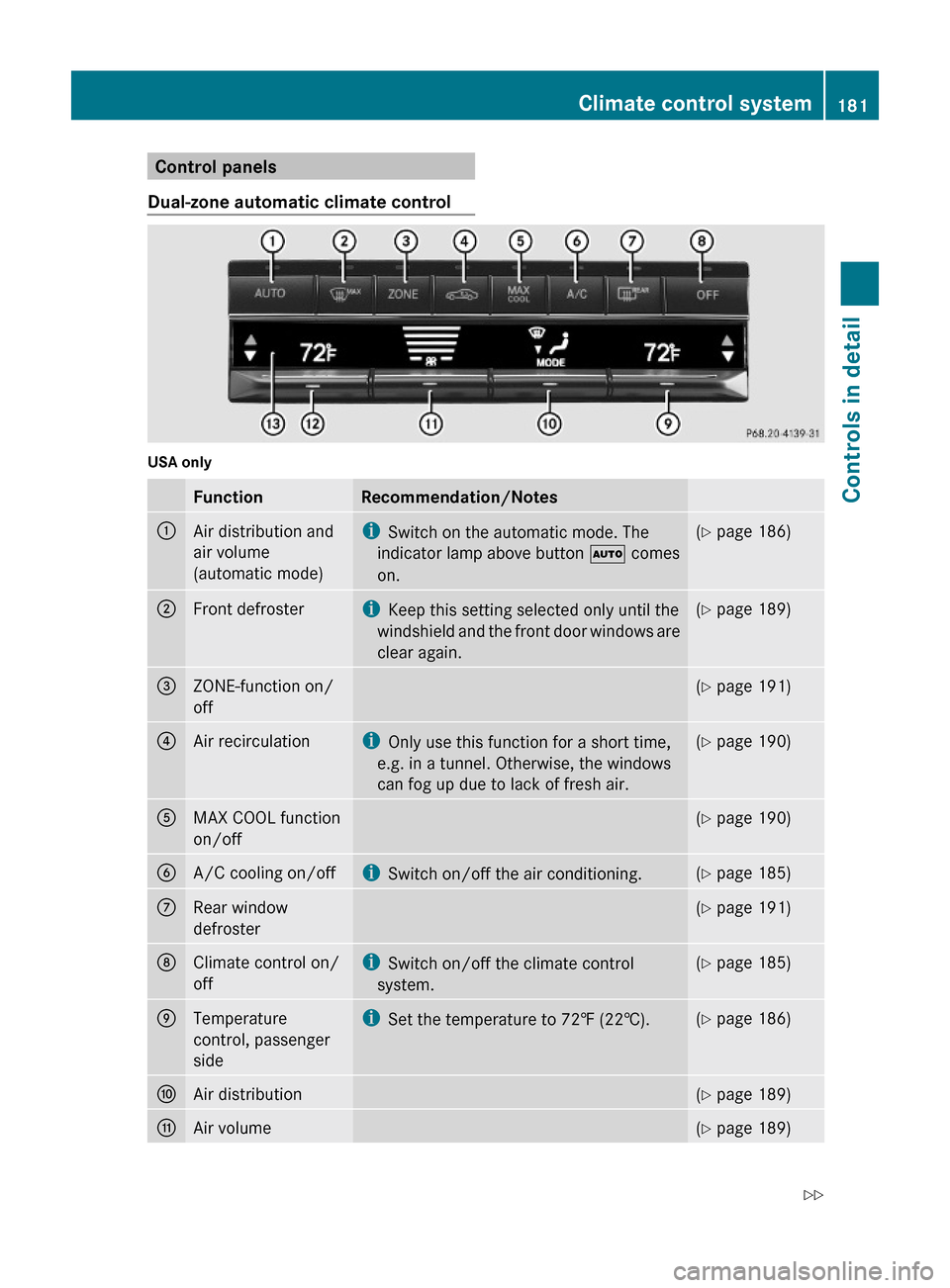
Control panels
Dual-zone automatic climate control
USA only
FunctionRecommendation/Notes:Air distribution and
air volume
(automatic mode)
iSwitch on the automatic mode. The
indicator lamp above button à comes
on.
(Y page 186);Front defrosteriKeep this setting selected only until the
windshield and the front door windows are
clear again.
(Y page 189)=ZONE-function on/
off
(Y page 191)?Air recirculationiOnly use this function for a short time,
e.g. in a tunnel. Otherwise, the windows
can fog up due to lack of fresh air.
(Y page 190)AMAX COOL function
on/off
(Y page 190)BA/C cooling on/offiSwitch on/off the air conditioning.(Y page 185)CRear window
defroster
(Y page 191)DClimate control on/
off
iSwitch on/off the climate control
system.
(Y page 185)ETemperature
control, passenger
side
iSet the temperature to 72‡ (22†).(Y page 186)FAir distribution(Y page 189)GAir volume(Y page 189)Climate control system181Controls in detail212_AKB; 2; 41, en-USd2ureepe,Version: 2.11.8.12009-07-17T09:14:21+02:00 - Seite 181Z
Page 184 of 372
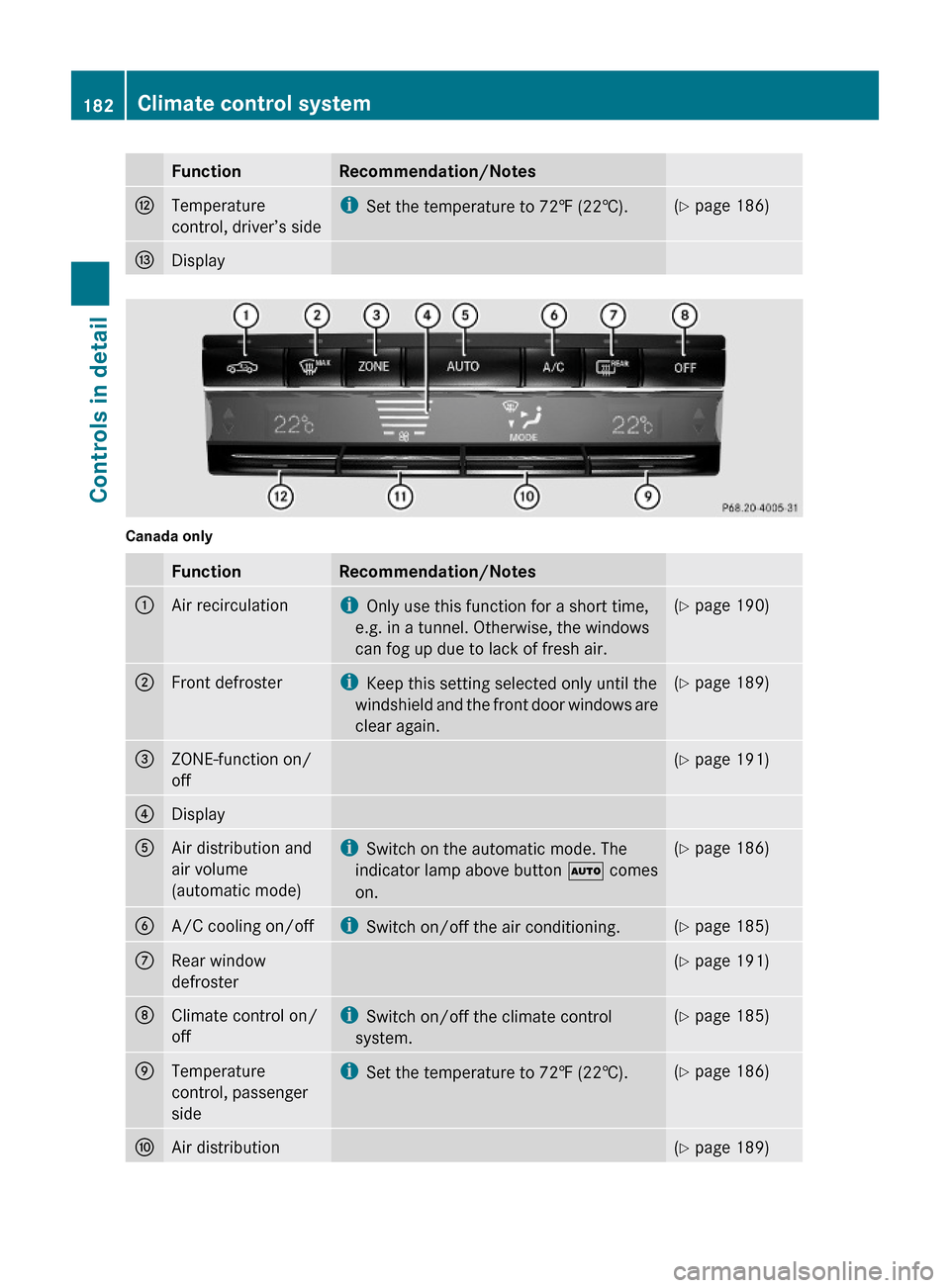
FunctionRecommendation/NotesHTemperature
control, driver’s side
iSet the temperature to 72‡ (22†).(Y page 186)IDisplay
Canada only
FunctionRecommendation/Notes:Air recirculationiOnly use this function for a short time,
e.g. in a tunnel. Otherwise, the windows
can fog up due to lack of fresh air.
(Y page 190);Front defrosteriKeep this setting selected only until the
windshield and the front door windows are
clear again.
(Y page 189)=ZONE-function on/
off
(Y page 191)?DisplayAAir distribution and
air volume
(automatic mode)
iSwitch on the automatic mode. The
indicator lamp above button à comes
on.
(Y page 186)BA/C cooling on/offiSwitch on/off the air conditioning.(Y page 185)CRear window
defroster
(Y page 191)DClimate control on/
off
iSwitch on/off the climate control
system.
(Y page 185)ETemperature
control, passenger
side
iSet the temperature to 72‡ (22†).(Y page 186)FAir distribution(Y page 189)182Climate control systemControls in detail
212_AKB; 2; 41, en-USd2ureepe,Version: 2.11.8.12009-07-17T09:14:21+02:00 - Seite 182
Page 185 of 372
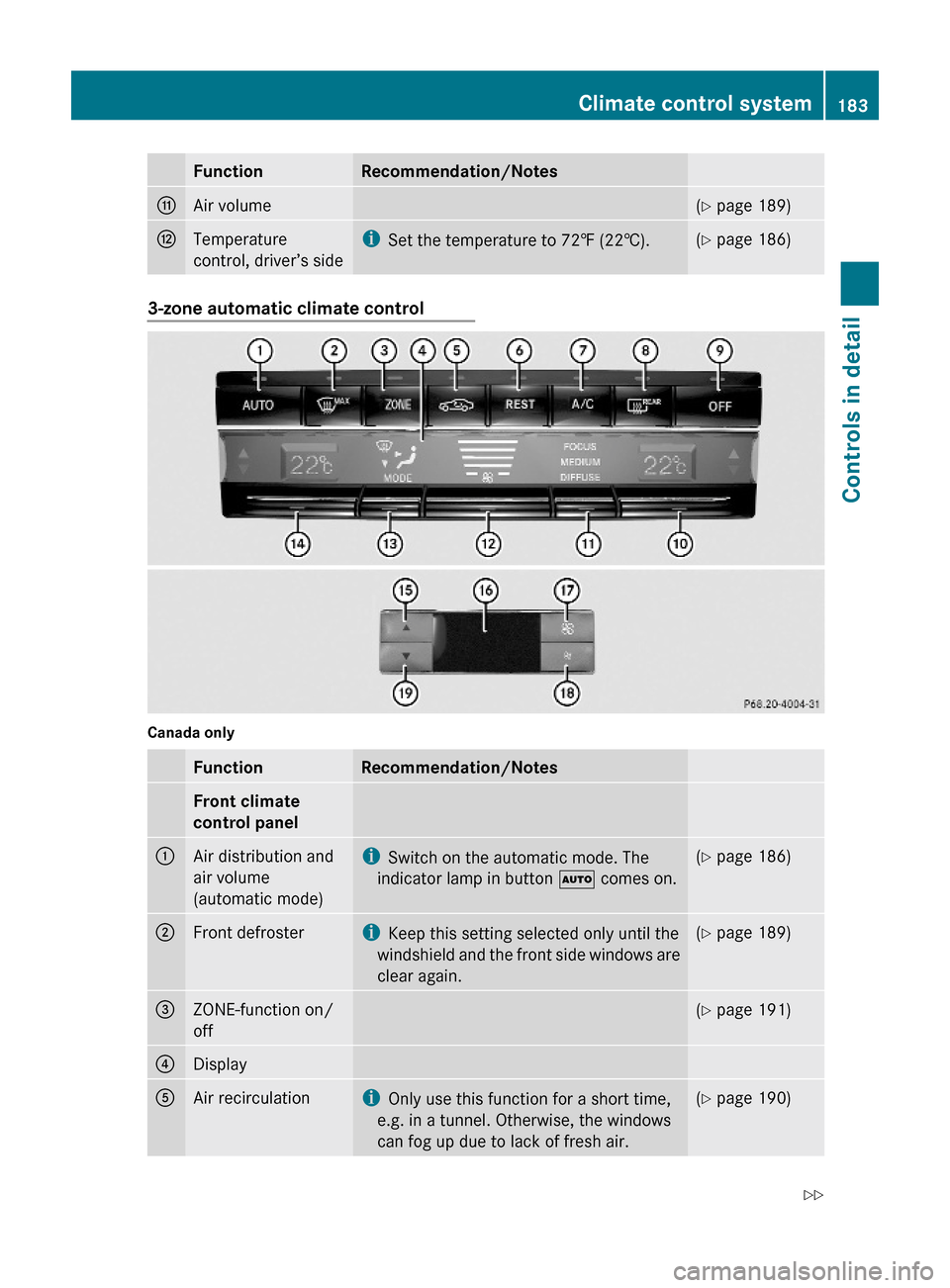
FunctionRecommendation/NotesGAir volume(Y page 189)HTemperature
control, driver’s side
iSet the temperature to 72‡ (22†).(Y page 186)3-zone automatic climate control
Canada only
FunctionRecommendation/NotesFront climate
control panel
:Air distribution and
air volume
(automatic mode)
iSwitch on the automatic mode. The
indicator lamp in button à comes on.
(Y page 186);Front defrosteriKeep this setting selected only until the
windshield and the front side windows are
clear again.
(Y page 189)=ZONE-function on/
off
(Y page 191)?DisplayAAir recirculationiOnly use this function for a short time,
e.g. in a tunnel. Otherwise, the windows
can fog up due to lack of fresh air.
(Y page 190)Climate control system183Controls in detail212_AKB; 2; 41, en-USd2ureepe,Version: 2.11.8.12009-07-17T09:14:21+02:00 - Seite 183Z