2010 MERCEDES-BENZ E-CLASS CABRIOLET Electric
[x] Cancel search: ElectricPage 12 of 333

Engine electronics
.............................310
Ma lfunction ...... ............................. .140
En gine number .................................. 313
En gine oil
Checking the oil level ...... ............... 260
Disp laym essage ............................ 223
Fil ling capacity ............................... 315
Lubrican tadditiv es........................ 316
Note sabout oil grades ...... ............. 315
Topping up ..................................... 261
Viscosity ........................................ 316
En vironmental protection
Note ................................................ .18
Retur ningan end-of-life vehicl e....... 18
ESP ®
(Electronic Stability Program)
Activating/deactivating ...................58
Activating/deactivating (on-
bo ardc omputer )............................ 203
Display message ............................ 211
Important safety gu idelines ............. 57
Traile rstabilisatio n.......................... 58
Warn ingl am p................................. 238
ETS (Electroni cTraction Support) ...... 57
Exhaus ttail pipe (cleanin ginstruc-
tions) .................................................. 268
Exterio rlighting
see Lights
Exterior mirrors
Adjustin g....................................... 101
Anti-dazzle mod e(automatic) ........102
Fol ding in/ou t(automatically )....... 102
Fol ding in/ou t(electrically) ...........101
Fol ding in whe nlocki ng(on-board
computer) ...................................... 209
Ou tofp osition ............................... 102
Parking positio n............................. 102
Resetting ....................................... 102
Storing settings (memory func-
tion) ............................................... 103
Exterio rview ........................................ 22 F
Fatigue Assist see ATTENTION ASSIST
Fau ltmes sage
see Display message
Fire extinguisher ............................... 274First-aid kit
......................................... 274
Fitting/removing the AIRCAP
draught stop ........................................ 85
Flat tyre Changing awheel/fitting the
spare wheel ................................... 280
MOExtende drun-flat sy stem......... 284
Pre paring th evehicle ..................... 275
Rais ingt he vehicle ......................... 281
TIREFIT kit ...................................... 276
Floormat ............................................ .254
Frequencies Mobile phone ................................. 311
Tw o-way radio ................................ 311
Fron tfoglam p(display message) ....219
Fuel Note s............................................. 313
Note sabout consum ption ............. 314
Refuellin g....................................... 148
Specifications ................................ 314
Tank content/reserve fuel .............314
Tro ubleshoot ing............................. 152
Fue lc onsumpti on
Current (on-board computer) .........197
se eT echnical data
Fuel filler fla pOpening/closing .......150
Fue lfilter (whi tedisplay message) .224
Fue llevel
Calling up the range (on-board
computer) ...................................... 197
Gaug e.............................................. 24
Fue ltank
Fil ling capacity ............................... 314
Fuses
Dashboard fus ebox....................... 293
Fus eallocat ion chart ..................... 293
Fus ebox in the boot ...................... 294
Fus ebox in the engin ecompart-
men t.............................................. 294
Note s............................................. 293 G
Gear lever ........................................... 141
Genuine Mercedes-Benz parts .........310
Genuine wood trim and trim strips
(cleanin ginstructions) ...................... 269
Glove compartment ..........................244 Index
9 BA 207 ECE ÄJ 2010/1a; 1; 2, en-GB
mkalafa
Version: 3.0.2.11 2010-01-26T13:03:22+01:00-Seite 9
Page 17 of 333

Roo
floa d( maximum) ........................ 317
Route seeR oute guidance (on-board
computer)
Route guidance (on-board com-
puter) ................................................. .198 S
Safety Children in the vehicle .....................44
Ch ildr estra ints ystems .................... 44
Safety systems
seeD riving safety sy stems
Seat backrest
Folding forwards/back ....................96
Seat be lt
Adjusting the driver's and front-
passenger sea tbelt ......................... 42
Bel tforc elimiter .............................. 43
Bel ttensioner .................................. 43
Clean ing. ........................................ 270
Disp laym essage ............................ 211
Fasten ing. ........................................ 41
Important safety gu idelines ............. 40
Rea rseat belt status indicator .........43
Releasing ......................................... 42
Switch ingb elta djustment on/off
(on-board computer) ......................209
Warn ingl am p(function) ................... 42
Seat be lts
Warn ingl am p................................. 236
Seats
Adjusting (electrically )..................... 94
Adjusting (manually and el ectri-
cally) ................................................ 93
Adjusting the 4-way lumba rsup-
port .................................................. 97
Adjusting the head restraint............ 94
Clean ingt he cover ......................... 269
Correct driver's se at position ........... 92
Important safety instructions ...........93
Mu lticontour sea t............................ 96
Storing settings (memory func-
tion) ............................................... 103
Switch ingA IRSCAR Fon/off ............ 98Switch
ings eat heating on/off .........97
Switch ingt he seat ventilation on/
off .................................................... 98
Seat ve ntilation
Malfunction indicator lamp ..............98
Se nsors (cleaning instructions) .......267
Service indicator seeA SSYST PLUS service interval
display
Serv icem enu (on-board computer) .204
Service products Brake fluid ..................................... 316
Co olan t(engine) ............................ 317
Engine oi l....................................... 315
Fue l................................................ 313
Important safety note s.................. 313
Note s............................................. 313
Settings
Factory (on-bo ardc omputer )......... 209
On-bo ardc omputer ....................... 204
Shift rang es....................................... 145
Shift rec ommendation ...................... 142
Sho wing th edistance displa y(on-
bo ard computer) ............................... 202
Sidebag ................................................ 36
Side window Important safety informatio n........... 73
Side windo ws
Convenience closing ........................75
Convenience opening ......................75
Opening/closing .............................. 74
Tro ubleshoot ing............................... 76
Side windo ws(Cabriolet)
Opening/closing al l......................... 75
Sl iding sunroof
Important safety information ...........87
Tro ubleshoot ing............................... 89
se eP anorama sliding sunroof
Sno wchains ...................................... 157
So cket ................................................ 253
Cockpi t.......................................... 253
Rea rcompartmen t......................... 253
Soft top
AIRCAP ............................................ 84
Clean ing. ........................................ 265
Closing manually in an emergency ... 78
Disp laym essage ............................ 23314
Index BA 207 ECE ÄJ 2010/1a; 1; 2, en-GB
mkalafa
Version: 3.0.2.11 2010-01-26T13:03:22+01:00-Seite 14
Page 18 of 333

Drau
ghts top .................................... 83
Fitting/removing the AIRCAP
draug ht stop.................................... 85
Important safety informatio n........... 76
Opening/closing (with key ).............. 78
Opening/closing (with soft-top
switch) ............................................. 77
Re- locking ........................................ 83
Tro ubleshoot ing............................... 87
Soft-top switch .................................... 77
Spar ew heel
Notes/d ata. ................................... 306
Storage locatio n............................ 275
se eE mergenc yspare wheel
Speed Limi tAssist ............................ 182
Activating/deactivating message
function (on-bo ardc omputer )........ 202
Displaying (on-bo ardc omputer )..... 202
Disp laym essage ............................ 224
Spe ed limi ter
SPEEDTRONIC ............................... 169
Spe edometer
Digita lspeedometer (on-board
computer) ...................................... 197
Segment s...................................... 193
Setting the uni t(on-board com-
puter) ............................................ .204
Switch inga dditional speedome-
ter on/of f(on-board computer) .....204
Spe edtronic ....................................... 169
Display message ............................ 229
Permanen t..................................... 171
Variabl e......................................... 170
SRS (Supplemental Restrain tSyst em)
Disp laym essage ............................ 213
Introduction ..................................... 33
Warn ingl am p................................. 240
Warning lamp (function) ................... 33
Standard display (on-board com-
puter) ................................................. .197
Startin gthe en gine
Important safety instructions ...... ...1 36
Station
seeR adio
Statu sindicator (on-board com-
puter) ................................................. .194
Ste ering (display message) ..............233Ste
ering wheel
Adjustin g(electrically )................... 100
Adjusting (manually )........................ 99
Buttons (on-bo ardc omputer )......... 193
Important safety instructions ...........99
Memory function (storing set-
tings) ............................................. 100
Storing settings (memory func-
tion) ............................................... 103
Ste ering wheel gearshift paddles ....145
Sto wage compartments
Armrest (under) ............................. 245
Centre consol e.............................. 245
Cu ph older ..................................... 249
Glove comp artment ....................... 244
Sto wage sp ace
Important safety informatio n......... 244
Sto wage well
Boot floo r(under neath) ................. 248
Submen u(on-boa rd computer)
Convenience .................................. 208
Factory settin g............................... 209
Instrument cluster .........................204
Lig hts. ............................................ 205
Standard di splay. ........................... 197
Time/Date ..................................... 205
Veh icle ........................................... 207
Summer opening
see Convenience opening feature
Sun visor ............................................ 250
Supplemental Restrain tSyst em
se eS RS
Surround lighting (on-board com-
puter) ................................................. .207
Switchi ngoff the alarm (ATA) ............61 T
Tail lamp (di splay message) .............219
Tail light
see Tai llamp
Technical data
E200 CGI BlueEFFICIENCY ...........317
E2 20 CDI BlueEFFICIENC Y........... 320
E2 50 CDI BlueEFFICIENC Y........... 321
E2 50 CG IBlueEFFICIENCY ...........318
E3 50 ............................................. 318
E3 50 CDI BlueEFFICIENC Y........... 322 Index
15 BA 207 ECE ÄJ 2010/1a; 1; 2, en-GB
mkalafa
Version: 3.0.2.11 2010-01-26T13:03:22+01:00-Seite 15
Page 33 of 333

Door control panel
Function Page
:
r4
5=
Stores se ttingsfor the seat,
exterior mirrors and steer-
ing wheel 103
;
Adjusts the seat electrically 94
=
%&
Locks/unlocks
the vehicle 70
?
Opens the door 70
A
7Zª\
Adjusts and folds the exte-
rior mirrors in/out electri-
cally
101
B
W
Opens/closes the
side windows 74
C
n
Activates/deacti-
vates the override feature
for the side windows in the
rear compartment 54
D
o
Opens the boot lid 7330
Doo
rcontrol panelAt ag lance
BA 20 7ECE ÄJ 2010/1a; 1; 2, en-GB
mkalaf aV ersion: 3.0.2.11
2010-01-26T13:03:22+01:00
-Seite 30
Page 95 of 333
Vehicl
eequipment
i Thismanua ldesc ribe sallthe standard
and optional equipment of your vehicle
which wa savailable at th etime of pur-
chase. Countr y-specif ic differences are
possible. Bear in mind tha tyour vehicle
ma ynot featur eall function sdescribed
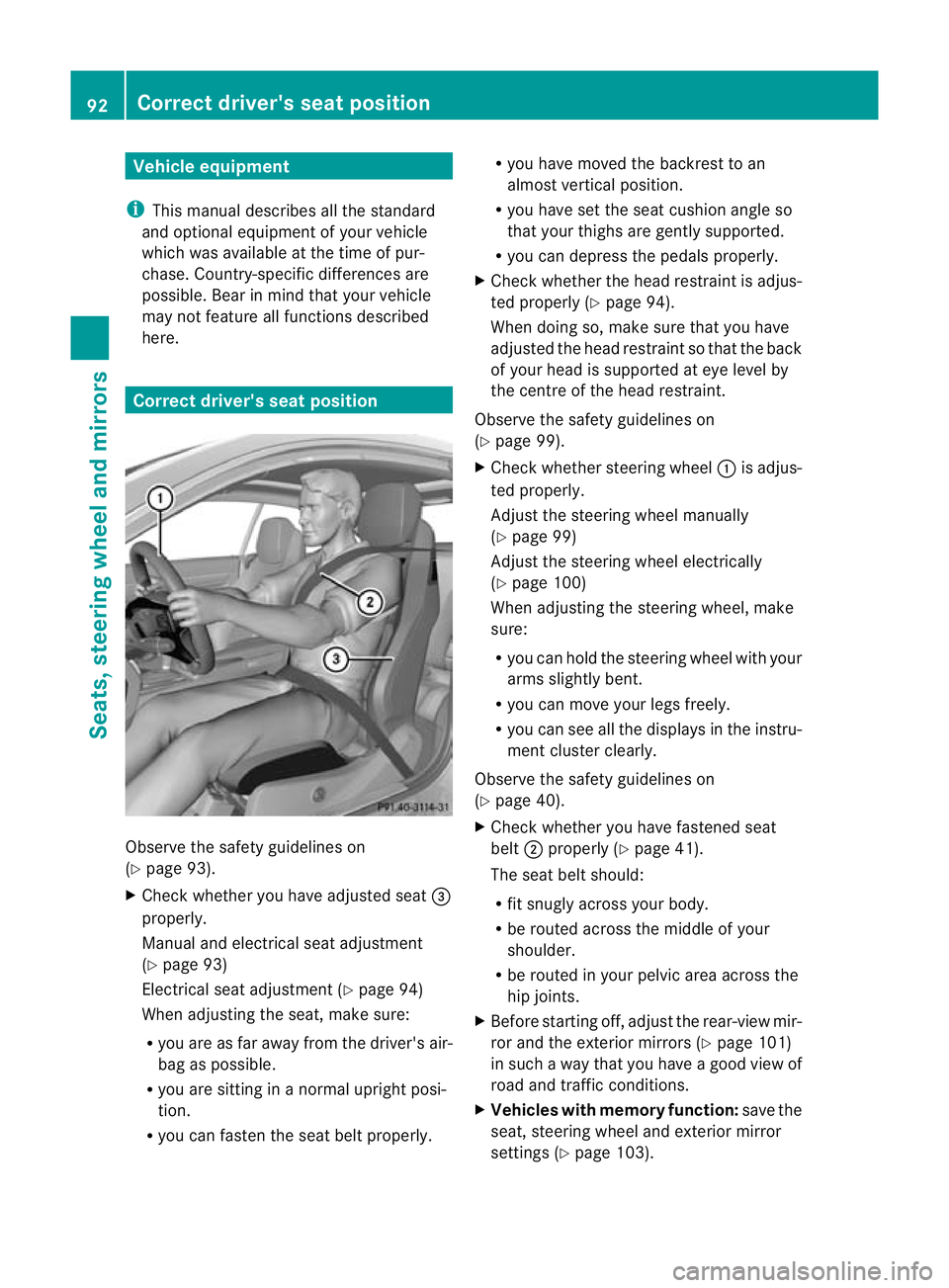
here. Correct driver'
sseat position Observe the safety guidelines on
(Y
page 93).
X Check whether you have adjusted seat =
properly.
Manual and electrical seat adjustment
(Y page 93)
Electrical seat adjustment (Y page 94)
When adjustin gthe seat, make sure:
R you ar easfar away from the driver' sair-
bag as possible.
R you are sitting in anormal upright posi-
tion.
R you can fasten the seat belt properly. R
you have moved the back rest to an
almost ver tical position.
R you have se tthe seat cushion angl eso
that your thighs are gently supported.
R you can depress the pedals properly.
X Check whether the head restraint is adjus-
ted properly (Y page 94).
Whe ndoing so, make sure that you have
adjusted the head restraint so that the back
of your head is supported at eye leve lby
the centr eofthe head restraint.
Observ ethe safety guidelines on
(Y page 99).
X Chec kwhether steering wheel :is adjus-
ted properly.
Adjust the steering wheel manually
(Y page 99)
Adjust the steering wheel electrically
(Y page 10 0)
When adjustin gthe steering wheel, make
sure:
R you can hold the steering wheel with your
arms slightl ybent.
R you can mov eyour legs freely.
R you can see all the display sint he instru-
men tcluster clearly.
Observe the safety guidelines on
(Y page 40).
X Check whether you have fastened seat
belt ;properly (Y page 41).
The seat belt should:
R fit snugly across your body.
R be routed across the middle of your
shoulder.
R be routed in your pelvic area across the
hip joints.
X Befor estarting off, adjust the rear-view mir-
ror and the exterior mirror s(Ypage 10 1)
in such away that you have agood view of
roa dand traffic conditions.
X Vehicles with memory function: save the
seat, steering wheel and exterior mirror
settings (Y page103). 92
Correct driver's seat positionSeats, steering wheel an
dmirrors
BA 207ECE ÄJ 2010/1a; 1; 2, en-GB
mkalafa Version:3.0.2.11
2010-01-26T13:03:22+01:0
0-Seite 92
Page 96 of 333

Seats
Important safety notes
G
Ris
kofi njury
The seats can still be adjusted when there is
no key in the ignition lock. For this reason,
children should never be left unsupervised in
the vehicle. They could adjust the seats and
becom etrapped. G
Ris
kofa ccident
Only adjust the driver' sseat when the vehicle
is stationary .You will otherwise be distracted
from the road and traffic condition sand you
could los econtrol of the vehicle as aresult of
the seat moving. This could cause an acci-
dent. G
Risk of injury
Make sure that nobody can becom etrapped
when adjustin gthe seats.
Observ ethe note sonairbags.
Secur echildren as recommended; see the
"Childre ninthe vehicle" section. G
Risk of injury
Make sur ethat the bac kofyour head is sup-
ported at eye level by the cen tralarea of the
head restraint. If your head is not supported
correctly by th ehead restraint ,you coul dsuf-
fer asever eneck injury in the event of an
accident .Never driv eifthe head rest raints are
not engaged and set correctly.
! To avoid damage to the seats and the seat
heating, observe the following information:
R do not spill any liquids on the seats. If
liquid is spilled on the seats, dry them as
soon as possible.
R if the seat cover sare damp or wet, do not
switc hont he seat heating. The seat
heating should also not to be used to dry
the seats. R
clea nthe seat cover sasrecommended;
see the "In terior care" section.
R do not transport heav yloads on the
seats. Do not plac eshar pobjects on the
seat cushions ,e.g. knives, nails or tools.
Th es eats should only be occupied by
passengers, if possible.
R when the seat heatin gisinoperation ,do
not cover the seats with insulating mate-
rials, e.g. blanke ts,c oats, bags, seat cov-
ers, child seats or booster seats.
! When you mov ethe seats, make sur ethat
ther eare no objects in th efootwell or
behind the seats. Otherwise, you could
damage the seats and the objects.
i The head restraint sinthe fron tseats are
fit tedw ith the NECK -PRO system
(Y page 39). For this reason, it is not pos-
sibl etor emov ethe head restraint sfrom
th ef ront seats.
Please contact aMercedes-Ben zService
Cent refor more info rmation.
i Related topics:
R Through-loading feature in the rear
bench seat 19
(folding the rear bench seat
forwards) Adjusting the seats manually and
electrically
:
Backrest angle
; Seat height
19 Only in the Coupé. Seats
93Seats,steering wheel and mirrors
BA 207 ECE ÄJ 201 0/1a; 1; 2, en-GB
mkalafa Version: 3.0.2.11 2010-01-26T13:03:22+01:00-Seite 93 Z
Page 97 of 333

=
Sea tcushion angle
? Sea tfore-and-aft adjustment
i Adjust the sea tcushion angle so that your
thighs ar elightly supported.
Seat fore-and-af tadjustment X
Lift handle ?and slide the seat forwards
or backwards.
Seat cushio nangle X
Tur nhandwheel =in the desired direction. Adjusting the seat electrically
:
Head restraint height
; Seat cushion angle
= Seat height
? Seat fore-and-aft adjustment
A Backrest angle
i Vehicles with memory function: if PRE-
SAFE ®
has been triggered, the front-
passenger seat will be moved to abetter
position if it was previously in an unfavour-
able position.
i You can store the seat settings using the
memory function (Y page 103).
i Vehicles with the through-loading feature
and memory function: if you fold down a
rear seat backrest ,the respective front
seat is moved forwards slightl yifneces-
sary. i
Vehicles with memory function: when the
seat is moved forwards or backwards, the
headrest is moved up or down automati-
cally. Adjusting the hea
drestraints
Adjusting the head restraints manually Adjusting the head restraint height
X
To raise: pull the head restraint up to the
desired position.
X To lower: press release catch :and push
the head restraint down to the desired posi-
tion.
Adjusting the head restraints electri-
cally X
To adjust the head restraint height: slide
the switch for head restraint adjustment
(Y page 94) up or down in the direction of
the arrow. 94
SeatsSeats, steering wheel and mirrors
BA 20
7ECE ÄJ 2010 /1a; 1; 2, en-GB
mkalafa Version: 3.0.2.11 2010-01-26T13:03:22+01:00 -Seite 94
Page 99 of 333

Folding th
efront seat backrests
forward/back G
Ris
kofi njury
Mak esure that the back rest engage sfully. If
the back rest is no tengaged ,the message:
Front right seat backrest no tlocked
or Front lef tseatb ackrest not
locked appears in th emultif unctio ndisplay.
Stop the vehicle as soon as road and traffic
condition spermit and rem ove anyobjects
that are blocking the backrest. G
Risk of injury
Make sure that nobody can becom etrapped
when movin gthe seat. If there is arisk of
someon ebecoming trapped, press the seat
adjustmen tswitc honthe door.
With the EASY-EN TRY feature, the seat moves
forward sifyou have folde dthe seat bac krest
forwards and th eseat is in th erear half of the
adjustment range. This makes it convenient
for passengers to get in and out of th erear
compartment.
The head restrai ntalso lowers on vehicles
with electric seat adjustment. Example: Coupé Folding th
ebackres tforwards X
Vehicles withou tmemor yfunction:
rel ease the hea drestra intifn ecessary and
push it down.
X Pull seat release handle :forwards and
fold the backrest forwards, until the seat
backrest engages.
X Push the seat as far forwards as it will go.
X Vehicles with memory function: pull seat
releas ehandle :forwards and fold the
backrest forwards as far as it will go.
The seat moves automatically to the fore-
most position.
Folding back the backrest X
Vehicles without memory function:
push the seat backrest back horizontally
until the seat reaches the position that was
previously set.
X Swing back the seat backrest evenly below
release handle :until it engages ,doing so
in as mooth manner.
X After th eseat back rest has been folded
back, chec kthe position of the head
restraint and set it to the correc tposition.
X Vehicles with memory function: swing
back the seat backrest.
The seat moves automatically to the stored
position. Adjusting th
emulticontour seat
Yo uc an adjust the contour of the front seats
individually so as to provide optimum support
for your back and sides. 96
SeatsSeats
,steering whee land mirrors
BA 20 7ECE ÄJ 2010 /1a;1;2,e n-GB
mkalafa Version: 3.0.2.11 2010-01-26T13:03:22+01:00-Seite 96