Page 131 of 430

Blocked sensor
If a message regarding a blocked
sensor is displayed, the radar signals
from the sensor have been
obstructed. The sensor is located
behind a fascia cover near the driver
side of the lower grille. When the
radar signals are obstructed, a
vehicle ahead cannot be detected
and the ACC will not function. The
following table lists possible causes
and actions for this message being displayed.
Cause Action
The surface of the radar in the
grille is dirty or obstructed in
some wayClean the grille surface in front of
the radar or remove the object
causing the obstruction
The surface of the radar in the
grille is clean but the message
remains in the displayWait a short time. It may take
several minutes for the radar to
detect that it is no longer
obstructed
Heavy rain or snow is interfering
with the radar signalsDo not use ACC in these
conditions because it may not
detect, warn, or respond to
potential collisions.
Swirling water, or snow or ice on
the surface of the road may
interfere with the radar signalsDo not use ACC in these
conditions because it may not
detect, warn, or respond to
potential collisions.
WARNING:Do not use ACC when towing a trailer with brake
controls. Aftermarket trailer brakes will not function properly
when ACC is activated because the brakes are electronically controlled.
Failing to do so may result in loss of vehicle control, which could result
in serious injury.
Driver Controls
131
2010 MKT(mkt)
Owners Guide, 1st Printing
USA(fus)
Page 135 of 430

HomeLink�
Car2U�Home Automation
System
HomeLink�Wireless Control System (if equipped)
The HomeLink�Wireless Control
System, located on the driver’s visor,
provides a convenient way to
replace up to three hand-held
transmitters with a single built-in
device. This feature will learn the
radio frequency codes of most
transmitters to operate garage
doors, entry gate operators, security systems, entry door locks, and
home or office lighting.
WARNING:When programming your HomeLink�Wireless
Control System to a garage door or gate, be sure that people and
objects are out of the way to prevent potential injury or damage.
Do not use the HomeLink�Wireless Control System with any garage
door opener that lacks safety stop and reverse features as required by
U.S. federal safety standards (this includes any garage door opener
model manufactured before April 1, 1982). A garage door which cannot
detect an object, signaling the door to stop and reverse, does not meet
current U.S. federal safety standards. For more information, contact
HomeLink�at:www.homelink.comor1–800–355–3515.
Driver Controls
135
2010 MKT(mkt)
Owners Guide, 1st Printing
USA(fus)
Page 138 of 430

Operating the HomeLink�Wireless Control System
To operate, simply press and release
the appropriate HomeLink�button.
Activation will now occur for the
trained product (garage door, gate
operator, security system, entry
door lock, or home or office lighting
etc.). For convenience, the
hand-held transmitter of the device
may also be used at any time. In the event that there are still
programming difficulties, contact HomeLink�atwww.homelink.comor
1–800–355–3515.
Erasing HomeLink�buttons
To erase the three programmed
buttons (individual buttons cannot
be erased):
•Press and hold the two outer
HomeLink�buttons until the
indicator light begins to
flash-after 20 seconds. Release
both buttons. Do not hold for
longer that 30 seconds.
HomeLink�is now in the train (or learning) mode and can be
programmed at any time beginning with Step 1 in theProgramming
section.
Reprogramming a single HomeLink�button
To program a device to HomeLink�using a HomeLink�button previously
trained, follow these steps:
1. Press and hold the desired HomeLink�button.Do NOTrelease the
button.
2. The indicator light will begin to flash after 20 seconds. Without
releasing the HomeLink�button, follow Step 1 in theProgramming
section.
For questions or comments, contact HomeLink�atwww.homelink.com
or1–800–355–3515.
Driver Controls
138
2010 MKT(mkt)
Owners Guide, 1st Printing
USA(fus)
Page 146 of 430

To power open or close the
liftgate from the instrument
panel:
Press the button, located to the left
of the steering column, once to
power open or close the liftgate.
To power open or close the liftgate with the remote entry
transmitter:
Press
twice within three seconds to power open or close the liftgate.
Refer toRemote entry systemin theLocks and Securitychapter.
To power open the liftgate with
outside liftgate control button:
1. To open, unlock the liftgate with
the remote entry transmitter or
power door unlock control.
2. To open the liftgate, press the
control button located on the
surface above the license plate.
Note:For the best performance
allow the power system to open the
liftgate after pressing the control. Manually pushing or pulling the liftgate
may activate the system’s obstacle detection feature and stop the power
operation.
To power close the liftgate with
the rear cargo area control
button:
Press and release the control on the
left rear quarter panel to close the
liftgate.
Note:The rear cargo area control
button is disabled when the liftgate
is latched.
WARNING:Keep clear of the liftgate when activating the rear
switch.
Driver Controls
146
2010 MKT(mkt)
Owners Guide, 1st Printing
USA(fus)
Page 150 of 430
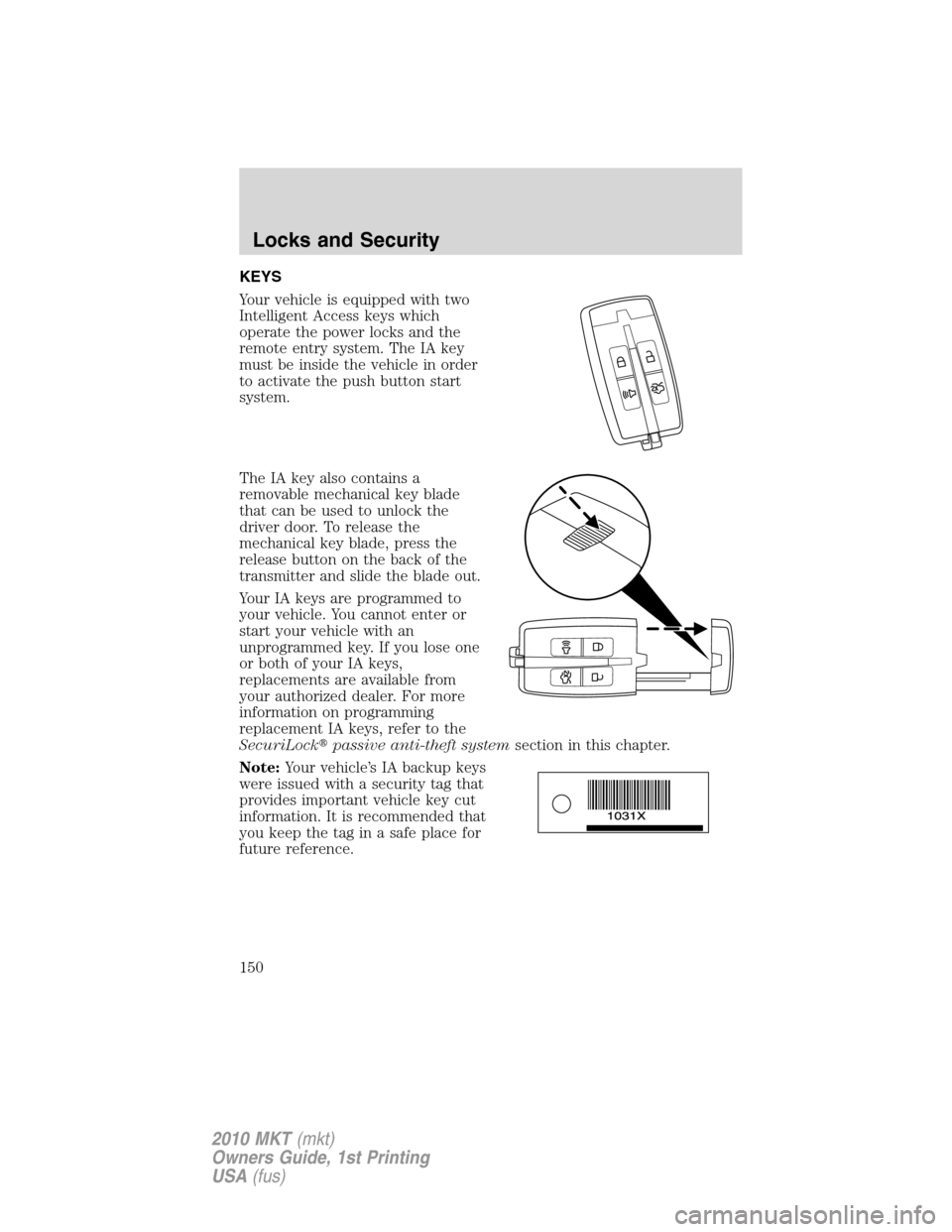
KEYS
Your vehicle is equipped with two
Intelligent Access keys which
operate the power locks and the
remote entry system. The IA key
must be inside the vehicle in order
to activate the push button start
system.
The IA key also contains a
removable mechanical key blade
that can be used to unlock the
driver door. To release the
mechanical key blade, press the
release button on the back of the
transmitter and slide the blade out.
Your IA keys are programmed to
your vehicle. You cannot enter or
start your vehicle with an
unprogrammed key. If you lose one
or both of your IA keys,
replacements are available from
your authorized dealer. For more
information on programming
replacement IA keys, refer to the
SecuriLock�passive anti-theft systemsection in this chapter.
Note:Your vehicle’s IA backup keys
were issued with a security tag that
provides important vehicle key cut
information. It is recommended that
you keep the tag in a safe place for
future reference.
Locks and Security
150
2010 MKT(mkt)
Owners Guide, 1st Printing
USA(fus)
Page 151 of 430

POWER DOOR LOCKS
•Press the
control to unlock all
doors.
•Press the
control to lock all
doors.
Smart unlocks
The smart unlock feature is intended to prevent you from unintentionally
locking your IA key inside your vehicle’s passenger compartment.
When you lock your vehicle using the driver or passenger power door
lock control (with the door open), after you close the door the vehicle
will search for an IA key in the passenger compartment. If an IA key is
found inside the vehicle, all of the doors will immediately unlock and the
horn will chirp, indicating that the IA key is inside.
In order to override the smart unlock feature and intentionally lock the
IA key inside the vehicle, you can lock your vehicle using your keyless
entry keypad or using the
control on another IA key. Refer toKeyless
entry systemin this chapter for more information on keyless entry
keypad operation.
Global open/close windows
You can open and close the vehicle’s windows by using the
and
controls on the transmitter. Refer toPower windowsin theDriver
Controlschapter for more information.
Central locking/Two-stage unlocking
When unlocking the driver door with the key, turn it once toward the
rear of the vehicle to unlock that door only, if the two-stage unlocking is
enabled. Turn the key a second time to unlock all doors. When locking,
turn the key toward the front of the vehicle to lock all doors.
Two-stage unlocking may be disabled and re-enabled (to allow all vehicle
doors to unlock simultaneously) by simultaneously pressing
the
andcontrols on the transmitter for four seconds.
Note:The turn lamps will flash twice to confirm that a change to the
feature has occurred.
Locks and Security
151
2010 MKT(mkt)
Owners Guide, 1st Printing
USA(fus)
Page 152 of 430

Autolock feature
The autolock feature will lock all the doors when:
•all the doors are closed,
•the ignition is on,
•you shift into any gear putting the vehicle in motion, and
•the vehicle attains a speed greater than 12 mph (20 km/h).
The autolock feature repeats when:
•any door is opened then closed while the ignition is on and the vehicle
speed is 9 mph (15 km/h) or lower, and
•the vehicle then attains a speed greater than 12 mph (20 km/h).
Deactivating/activating autolock feature
Your vehicle comes with the autolock features activated; there are four
methods to enable/disable this feature:
•Through your authorized dealer,
•by using a power door unlock/lock procedure,
•using a keypad procedure, or
•by using the instrument cluster message center. Refer toMessage
centerin theInstrument Clusterchapter.
Note:The autolock feature can be activated/deactivated independently
of the autounlock feature.
Power door lock switch autolock enable/disable procedure
Before starting, ensure the ignition is off and all vehicle doors are closed.
You must complete Steps 1–5 within 30 seconds or the procedure will
have to be repeated. If the procedure needs to be repeated, wait a
minimum of 30 seconds before beginning again.
1. Turn the ignition on.
2. Press the power door unlock
control on the door panel three
times.
3. Turn the ignition off.
4. Press the power door unlock
control on the door panel three
times.
5. Turn the ignition back on. The horn will chirp one time to confirm
programming mode has been entered and is active.
Locks and Security
152
2010 MKT(mkt)
Owners Guide, 1st Printing
USA(fus)
Page 153 of 430

6. To enable/disable the autolock feature, press the unlock control, then
press the lock control. The horn will chirp once if autolock was
deactivated or twice (one short and one long chirp) if autolock was
activated.
7. Turn the ignition off. The horn will chirp once to confirm the
procedure is complete.
Keyless entry keypad autolock enable/disable procedure
1. Turn the ignition off.
2. Close all the doors.
3. Enter factory–set 5–digit entry
code.
4. Press and hold the 3•4. While
holding the 3•4pressthe7•8.
5. Release the 7•8.
6. Release the 3•4.
The user will receive ahorn chirpto indicate the system has been
disabled or a chirp followed by a honk to indicate the system has been
enabled.
Autounlock feature
The autounlock feature will unlock all the doors when:
•the ignition is on, all the doors are closed, and the vehicle has been in
motion at a speed greater than 12 mph (20 km/h);
•the vehicle has then come to a stop and the ignition is turned off or to
accessory; and
•the driver door is opened within 10 minutes of the ignition being
turned off or to accessory.
Note:The doors will not autounlock if the vehicle has been
electronically locked before the driver door is opened.
Locks and Security
153
2010 MKT(mkt)
Owners Guide, 1st Printing
USA(fus)