2010 Lexus ES350 wheel
[x] Cancel search: wheelPage 4 of 543

TABLE OF CONTENTSIndex
ES350_U
2
1-1. Key informationKeys ...................................................... 24
1-2. Opening, closing and locking the doors and trunk
Smart access system with push-button start .......................... 26
Wireless remote control ............. 38
Doors..................................................... 41
Trunk..................................................... 45
1-3. Adjustable components (seats, mirrors,
steering wheel)
Front seats .......................................... 49
Driving position memory (driver’s seat) ................................ 50
Seat position memory (front passenger’s seat) ............. 54
Head restraints................................. 56
Seat belts ........................................... 58
Steering wheel.................................. 64
Anti-glare inside rear view mirror ................................................ 65
Outside rear view mirrors ........... 66
1-4. Opening and closing the windows and moon roof
Power windows................................ 68
Moon roof ............................................ 71 1-5. Refueling
Opening the fuel tank cap........... 75
1-6. Theft deterrent system Engine immobilizer system ......... 78
Alarm................................................... 80
Theft prevention labels (for USA) ......................................... 82
1-7. Safety information Correct driving posture ............... 83
SRS airbags ...................................... 85
Front passenger occupant classification system .................... 96
Child restraint systems ................ 101
Installing child restraints ............. 105
2-1. Driving procedures Driving the vehicle .......................... 116
Engine (ignition) switch .............. 124
Automatic Transmission ............ 128
Turn signal lever............................... 131
Parking brake ................................. 132
Horn.................................................... 133
1Before driving
2When driving
Page 5 of 543

1
2
3
4
5
6
7
ES350_U
3
2-2. Instrument clusterGauges and meters ..................... 134
Indicators and warning lights ... 136
Multi-information display........... 140
2-3. Operating the lights and windshield wipers
Headlight switch ............................ 145
Fog light switch .............................. 148
Windshield wipers and washer............................................. 149
2-4. Using other driving systems Cruise control ................................ 152
Dynamic radar cruise control............................................. 155
Intuitive parking assist ................. 165
Driving assist systems.................... 171
PCS (Pre-Collision System)..... 176
2-5. Driving information Cargo and luggage ...................... 180
Vehicle load limits ......................... 183
Winter driving tips ........................ 184
Trailer towing .................................. 190
Dinghy towing ................................ 197 3-1. Using the air conditioning
system and defogger
Automatic air conditioning system ........................................... 200
Rear window and outside rear view mirror
defoggers ..................................... 207
3-2. Using the audio system Audio system type ...................... 208
Using the radio................................. 211
Using the CD player.................... 218
Playing back MP3 and WMA discs.................................. 226
Operating an iPod
®................... 233
Operating a USB memory........ 241
Optimal use of the audio system ........................................... 250
Using the AUX adapter............ 252
Using the steering wheel audio switches ............................ 253
3Interior features
Page 7 of 543

1
2
3
4
5
6
7
ES350_U
5
4-1. Maintenance and careCleaning and protecting the vehicle exterior................... 354
Cleaning and protecting the vehicle interior .................... 357
4-2. Maintenance Maintenance requirements .... 360
General maintenance ................ 362
Emission inspection and maintenance (I/M)
programs ...................................... 365
4-3. Do-it-yourself maintenance Do-it-yourself service precautions .................................. 366
Hood.................................................. 370
Positioning a floor jack................ 371
Engine compartment.................. 373
Tires ................................................... 387
Tire inflation pressure................. 396
Wheels............................................. 400
Air conditioning filter.................. 402
Electronic key battery ................ 404
Checking and replacing fuses ................................................ 406
Headlight aim ................................. 415
Light bulbs ........................................ 417 5-1. Essential information
Emergency flashers .................... 428
If your vehicle needs to be towed ....................................... 429
If you think something is wrong ......................................... 435
Fuel pump shut off system ........ 436
Event data recorder.................... 437
5-2. Steps to take in an emergency If a warning light turns on or a warning buzzer
sounds... ........................................ 439
If a warning message is displayed....................................... 449
If you have a flat tire...................... 461
If the engine will not start ............ 471
If the shift lever cannot be shifted from P .............................. 473
If you lose your keys .................... 474
If the electronic key does not operate properly ............... 475
If the vehicle battery is discharged ................................... 477
If your vehicle overheats .......... 480
If the vehicle becomes stuck............................................... 483
4Maintenance and care5When trouble arises
Page 25 of 543

Before driving1
23
ES350_U
1-1. Key informationKeys ............................................... 24
1-2. Opening, closing and locking the doors and
trunk
Smart access system with push-button start .................... 26
Wireless remote control ........ 38
Doors ............................................. 41
Trunk ............................................. 45
1-3. Adjustable components (seats, mirrors,
steering wheel)
Front seats ................................... 49
Driving position memory (driver’s seat) .......................... 50
Seat position memory (front passenger’s seat) ........ 54
Head restraints .......................... 56
Seat belts .................................... 58
Steering wheel........................... 64
Anti-glare inside rear view mirror ......................................... 65
Outside rear view mirrors ...... 66 1-4. Opening and closing the
windows and moon roof
Power windows .......................... 68
Moon roof .................................... 71
1-5. Refueling Opening the fuel tank cap ..... 75
1-6. Theft deterrent system Engine immobilizer system.... 78
Alarm............................................ 80
Theft prevention labels (for USA) .................................. 82
1-7. Safety information Correct driving posture ......... 83
SRS airbags ................................ 85
Front passenger occupant classification system.............. 96
Child restraint systems .......... 101
Installing child restraints....... 105
Page 51 of 543
49
1
Before driving
ES350_U
1-3. Adjustable components (seats, mirrors, steering wheel)
Front seats
CAUTION
■Seat adjustment
Do not recline the seat more than necessary when the vehicle is in motion to reduce
the risk of sliding under the lap belt.
If the seat is too reclined, the lap belt may slide past the hips and apply restraint
forces directly to the abdomen or your neck may contact the shoulder belt, increas-
ing the risk of death or serious injury in the event of an accident.
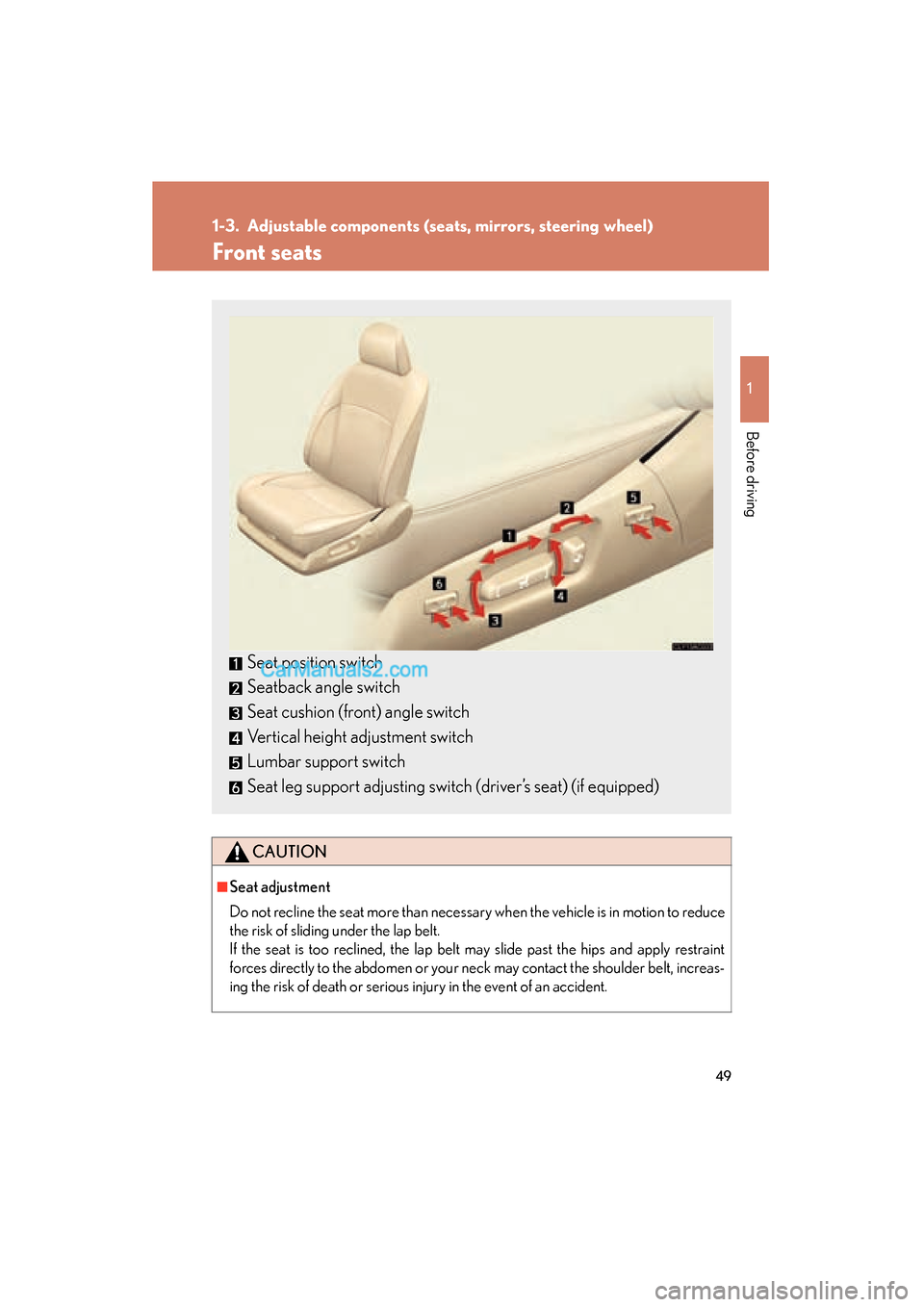
Seat position switch
Seatback angle switch
Seat cushion (front) angle switch
Vertical height adjustment switch
Lumbar support switch
Seat leg support adjusting switch (driver’s seat) (if equipped)
Page 52 of 543

50
1-3. Adjustable components (seats, mirrors, steering wheel)
ES350_U
Driving position memory (driver’s seat)∗
Your preferred driving position (the position of the driver's seat, steering
wheel and outside rear view mirrors) can be memorized and recalled with
the touch of a button. It is also possible to set this function to activate auto-
matically when the doors are unlocked.
Two different driving positions can be entered into memory.
■ Entering a position to memory
Turn the “ENGINE START STOP” switch to IGNITION ON
mode.
Adjust the driver’s seat, steering wheel, and outside rear view
mirrors to the desired positions.
Push the “SET” button, then
within 3 seconds push button 1
or 2 until the signal beeps.
If the selected button has
already been preset, the previ-
ously recorded position will be
overwritten.
STEP1
STEP2
STEP3
∗: If equipped
Page 53 of 543

51
1-3. Adjustable components (seats, mirrors, steering wheel)
1
Before driving
ES350_U
Linking driving position memory with door unlock operation
Record your driving position to button 1 or 2 before performing the fol-
lowing. Using the wireless remote control Turn the “ENGINE START STOP” switch OFF and close the
driver's door.
While pressing the desired button
(1 or 2), press on the wire-
less remote control until the signal
beeps.
The driving position is recalled
when the driver's door is unlocked
using the entry function or wireless
remote control and the driver’s
door is opened.
■Recalling the memorized position
Check that the shift lever is set in P.
Turn the “ENGINE START STOP” switch to IGNITION ON
mode. Push button 1 or 2 to recall the
memorized position.
STEP1
STEP2
STEP1
STEP2
Page 54 of 543

52
1-3. Adjustable components (seats, mirrors, steering wheel)
ES350_UOpen one of the doors.
If a door is not opened within 60 seconds after is pressed, the
doors will be locked again and the alarm will automatically be set.
In case that the alarm is triggered, immediately stop the alarm.
( o P. 8 0 )
Using the door lock switch
Carry only the key to which you want to link the driving position. If 2 or
more keys are in the vehicle, the driving position cannot be linked
properly.
Close the driver's door and turn the “ENGINE START STOP”
switch OFF. While pressing the desired button
(1 or 2), press the lock or unlock
side on the driver’s door lock
switch until the signal beeps.
The driving position is recalled
when the driver's door is unlocked
using the entry function or wireless
remote control and the driver's
door is opened.
STEP3
STEP1
STEP2