Page 5 of 543

1
2
3
4
5
6
7
ES350_U
3
2-2. Instrument clusterGauges and meters ..................... 134
Indicators and warning lights ... 136
Multi-information display........... 140
2-3. Operating the lights and windshield wipers
Headlight switch ............................ 145
Fog light switch .............................. 148
Windshield wipers and washer............................................. 149
2-4. Using other driving systems Cruise control ................................ 152
Dynamic radar cruise control............................................. 155
Intuitive parking assist ................. 165
Driving assist systems.................... 171
PCS (Pre-Collision System)..... 176
2-5. Driving information Cargo and luggage ...................... 180
Vehicle load limits ......................... 183
Winter driving tips ........................ 184
Trailer towing .................................. 190
Dinghy towing ................................ 197 3-1. Using the air conditioning
system and defogger
Automatic air conditioning system ........................................... 200
Rear window and outside rear view mirror
defoggers ..................................... 207
3-2. Using the audio system Audio system type ...................... 208
Using the radio................................. 211
Using the CD player.................... 218
Playing back MP3 and WMA discs.................................. 226
Operating an iPod
®................... 233
Operating a USB memory........ 241
Optimal use of the audio system ........................................... 250
Using the AUX adapter............ 252
Using the steering wheel audio switches ............................ 253
3Interior features
Page 12 of 543
ES350_U
10
A
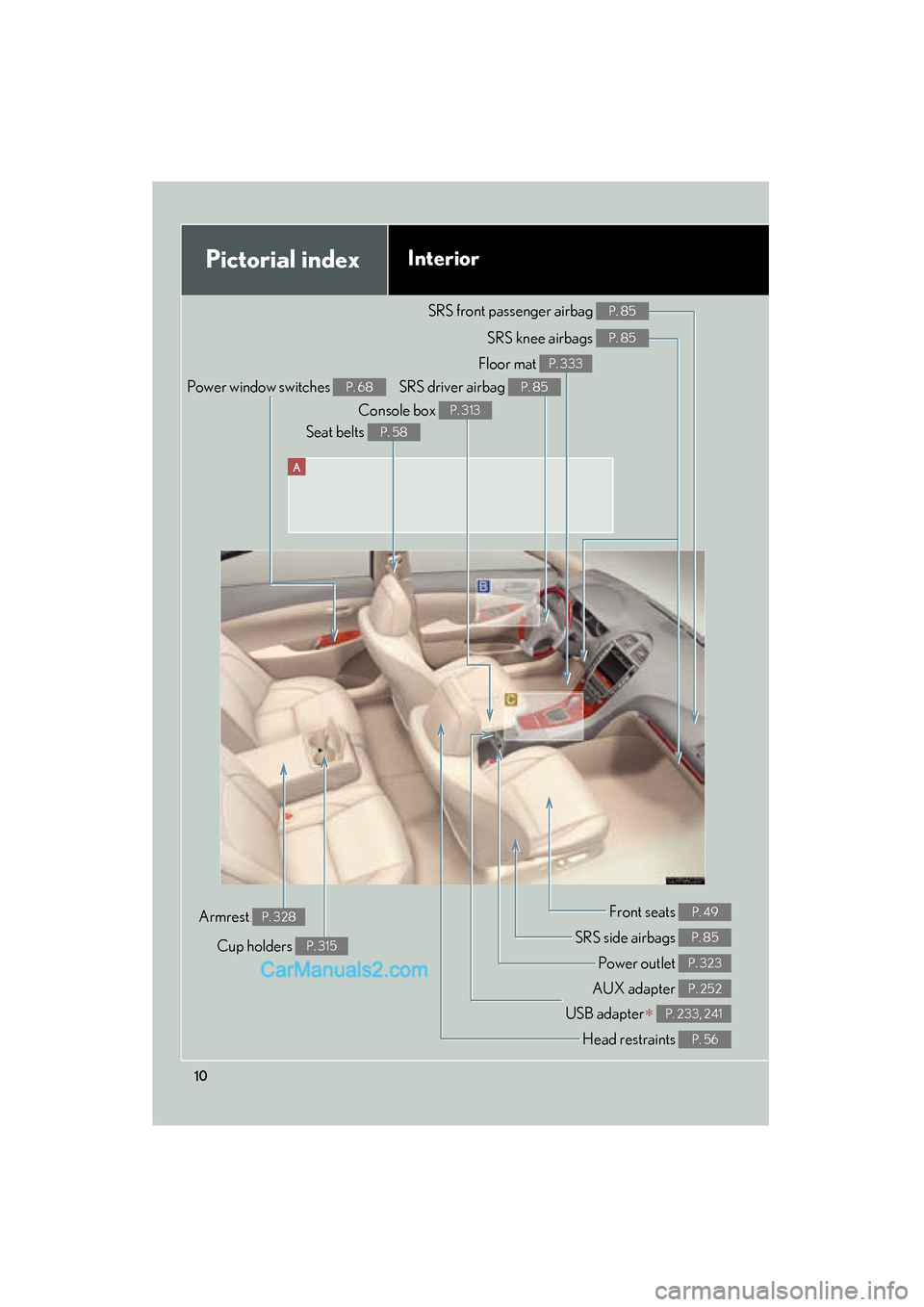
Pictorial indexInterior
Power window switches P. 68
SRS front passenger airbag P. 85
SRS knee airbags P. 85
SRS driver airbag P. 85
Floor mat P. 333
Console box P. 313
Seat belts P. 58
Front seats P. 49
SRS side airbags P. 85
Power outlet P. 323
AUX adapter P. 252
USB adapter∗ P. 233, 241
Cup holders P. 315
Armrest P. 328
Head restraints P. 56
Page 200 of 543
198
ES350_U
3-1. Using the air conditioning system and defogger
Automatic air conditioning system ..................................... 200
Rear window and outside rear view mirror
defoggers .............................. 207
3-2. Using the audio system Audio system type ................. 208
Using the radio ......................... 211
Using the CD player .............. 218
Playing back MP3 and WMA discs ........................... 226
Operating an iPod
®.............. 233
Operating a USB memory................................... 241
Optimal use of the audio system ..................................... 250
Using the AUX adapter....... 252
Using the steering wheel audio switches...................... 253
Page 211 of 543
209
3-2. Using the audio system
3
Interior features
ES350_U
■Using mobile phones
Interference may be heard through the audio system’s speakers if a mobile phone is
being used inside or close to the vehicle while the audio system is operating.
Ti t l ePa g e
Using the radioP. 2 1 1
Using the CD playerP. 2 1 8
Playing back MP3 and WMA discsP. 2 2 6
Operating an iPod® playerP. 2 3 3
Operating a USB memory playerP. 2 4 1
Optimal use of the audio systemP. 2 5 0
Using the AUX adapterP. 2 5 2
Using the steering wheel audio switchesP. 2 5 3
Page 243 of 543
241
3-2. Using the audio system
3
Interior features
ES350_U
Operating a USB memory∗
Connecting a USB memory enables you to enjoy music from the vehicle
speakers.
■Connecting a USB memory
Connect a USB memory.
Press .
STEP1
STEP2
∗: If equipped
Page 247 of 543
245
3-2. Using the audio system
3
Interior features
ES350_U
■USB memory functions
Depending on the USB memory that is connected to the system, certain functions
may not be available. Disconnecting the device and reconnecting it once again may
resolve some malfunctions.
■Display
oP. 2 2 2
■Error messages
“ERROR”: This indicates a problem in the USB memory or its connection.
“NO MUSIC”: This indicates that no MP3 /WMA files are included in the USB
m e m o r y.
Page 248 of 543
246
3-2. Using the audio system
ES350_U
■USB memory
●Compatible devices
USB memory that can be used for MP3 and WMA playback
●Compatible device formats
The following device formats can be used:
• USB communication formats: USB2.0 FS (12mbps)
• File formats: FAT16 /32 (Windows)
• Correspondence class: Mass storage class
MP3 and WMA files written in any format other than those listed above may not
play correctly, and their file names and folder names may not be displayed cor-
re ct l y.
Items related to standards and limitations are as follows:
• Maximum directory hierarchy: 8 levels
• Maximum number of folders in a device: 999 (including the root)
• Maximum number of files in a device: 65025
• Maximum number of files per folder: 255
●MP3 and WMA files
MP3 (MPEG Audio LAYER 3) is a standard audio compression format.
Files can be compressed to approximately 1 /10 of their original size using MP3
compression.
WMA (Windows Media
TM Audio) is a Microsoft audio compression format.
This format compresses audio data to a size smaller than that of the MP3 format.
There is a limit to the MP3 and WMA file standards that can be used and to the
media/formats on which the files are recorded.
Page 250 of 543
248
3-2. Using the audio system
ES350_U
●MP3 and WMA playback
• When a USB memory containing MP3 or WMA files is connected, all files in the USB memory are checked. Once the file check is finished, the first
MP3 or WMA file is played. To make the file check finish more quickly, we
recommend that you do not include any files other than MP3 or WMA files
or create any unnecessary folders.
• When the USB memory is connected and the audio source is changed to USB memory mode, the USB memory will start playing the first file in the
first folder. If the same USB memory is removed and reinserted (and the
contents have not been changed), the USB memory will resume play from
the same point in which it was last used.
●Extensions
If the file extensions .mp3 and .wma are used for files other than MP3 and WMA
files, they will be skipped (not played).
●Playback
• To play MP3 files with steady sound quality, we recommend a fixed bit rate of at least 128 kbps and a sampling frequency of 44.1 kHz.
• There is a wide variety of freeware and other encoding software for MP3 and WMA files on the market, and depending on the status of the encoding
and the file format, poor sound quality or noise at the start of playback may
result. In some cases, playback may not be possible at all.
• Microsoft, Windows, and Windows Media are registered trademarks of Microsoft Corporation in the U.S.A. and other countries.
CAUTION
■Caution while driving
Do not connect
USB memory or operate the controls.