Page 145 of 543
143
2-2. Instrument cluster
2
When driving
ES350_U■
Eco Driving Indicator Zone Display
o P. 1 4 4
■ Eco Driving Indicator Light customization
■ Average vehicle speed
■ Elapsed time
Eco Driving Indicator Light can be disabled. This cus-
tomization can only be performed when the vehicle
is stopped.
Eco Driving Indicator Light can be enabled or disabled
by pressing the “DISP” switch for longer than 1 second
when Eco Driving Indicator Light customization screen
is displayed.
Displays the average vehicle speed since the engine
was started or the function was reset.
Displays the elapsed time since the engine was
started.
■System check display
After switching the “ENGINE START STOP” switch to IGNITION ON mode,
is displayed while system operation is checked. When the system check is
complete, is displayed before returning to the normal screen.
Page 149 of 543

147
2-3. Operating the lights and windshield wipers
2
When driving
ES350_U
■Automatic light off system
●When the headlights come on: The headlights and tail lights turn off 30 seconds
after all doors are closed with the “ENGINE START STOP” switch switched to
ACCESSORY mode or turned OFF. (The light turns off immediately if
the button on the key is pressed after all doors are locked.)
●When only the tail lights come on: The tail lights turn off automatically if the
“ENGINE START STOP” switch is switched to ACCESSORY mode or turned
OFF and driver’s door is opened.
To turn the lights on again, switch to IGNITION ON mode, or turn the light switch
OFF once and then back to the
or position.
■Automatic headlight leveling system (vehicles with discharge headlights)
The level of the headlights is automatically adjusted according to the number of
passengers and the loading condition of the vehicle to ensure that the headlights do
not interfere with other road users.
■If the indicator flashes... (vehicles with discharge headlights)
It may indicate a malfunction in the system. Contact your Lexus dealer.
■Customization that can be configured at Lexus dealer
Settings (e.g. light sensor sensitivity) can be changed.
(Customizable features oP. 5 1 1 )
NOTICE
■To prevent battery discharge
Do not leave the lights on longer than necessary when the engine is not running.
Page 153 of 543
151
2-3. Operating the lights and windshield wipers
2
When driving
ES350_U
CAUTION
■Caution regarding the use of windshield wipers in AUTO mode
The windshield wipers may operate unexpectedly if the sensor is touched or the
windshield is subjected to vibration in AUTO mode. Take care that your fingers or
anything else do not become caught in the windshield wipers.
NOTICE
■When the windshield is dry
Do not use the wipers, as they may damage the windshield.
■When there is no washer fluid spray from the nozzle
Damage to the washer fluid pump may be caused if the lever is pulled toward you
and held continually.
Page 158 of 543
156
2-4. Using other driving systems
ES350_U
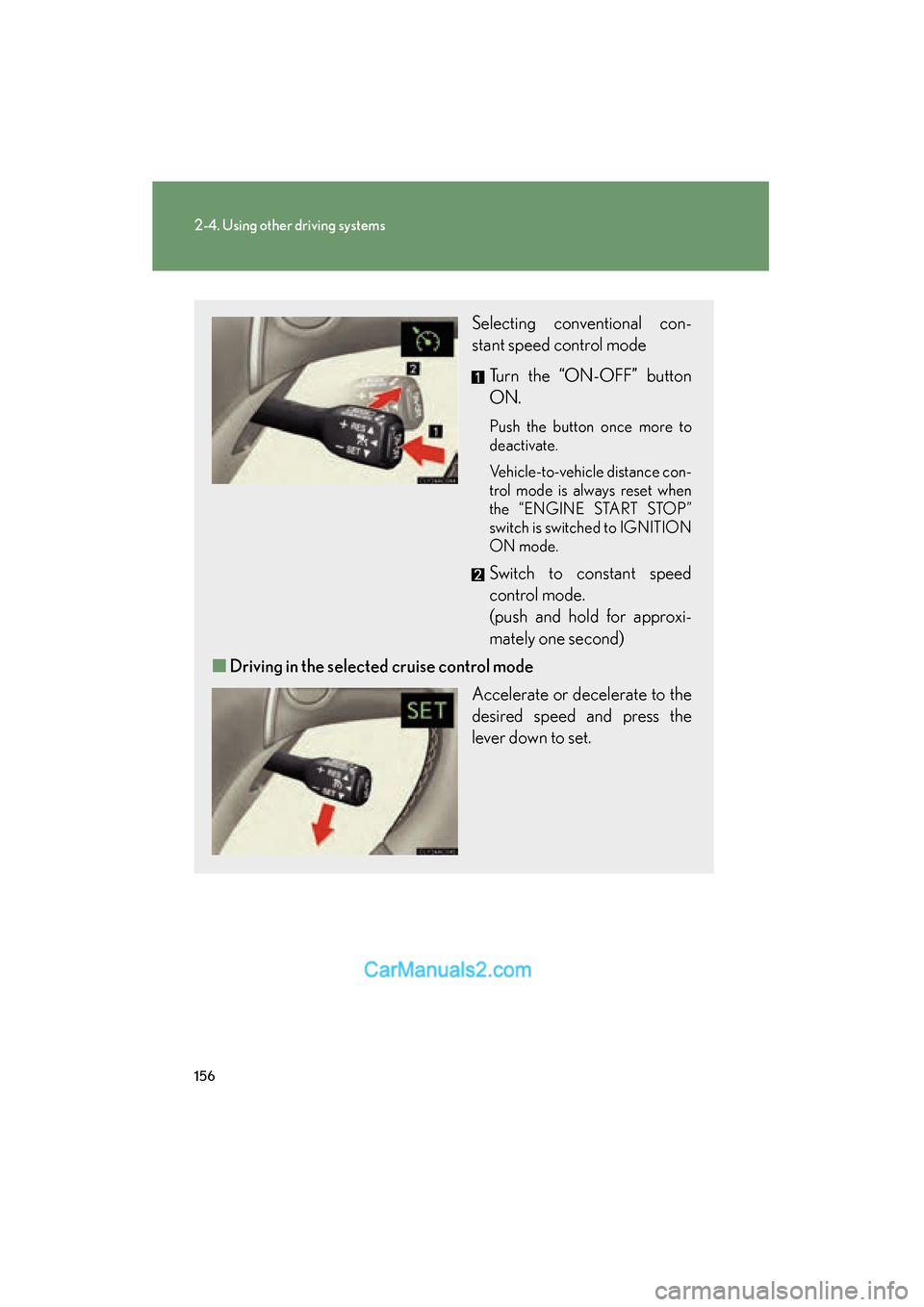
Selecting conventional con-
stant speed control mode Turn the “ON-OFF” button
ON.
Push the button once more to
deactivate.
Vehicle-to-vehicle distance con-
trol mode is always reset when
the “ENGINE START STOP”
switch is switched to IGNITION
ON mode.
Switch to constant speed
control mode.
(push and hold for approxi-
mately one second)
■ Driving in the selected cruise control mode
Accelerate or decelerate to the
desired speed and press the
lever down to set.
Page 232 of 543
230
3-2. Using the audio system
ES350_U
■MP3 and WMA files
MP3 (MPEG Audio LAYER 3) is a standard audio compression format.
Files can be compressed to approximately 1 /10 of their original size by using MP3
compression.
WMA (Windows Media
TMAudio) is a Microsoft audio compression format.
This format compresses audio data to a size smaller than that of the MP3 format.
There is a limit to the MP3 and WMA file standards and to the media/formats
recorded by them that can be used.
●MP3 file compatibility
• Compatible standards MP3 (MPEG1 LAYER3, MPEG2 LSF LAYER3)
• Compatible sampling frequencies MPEG1 LAYER3: 32, 44.1, 48 (kHz)
MPEG2 LSF LAYER3: 16, 22.05, 24 (kHz)
• Compatible bit rates MPEG1 LAYER3: 64, 80, 96, 112, 128, 160, 192, 224, 256, 320 (kbps)
MPEG2 LSF LAYER3: 64, 80, 96, 112, 128, 144, 160 (kbps)
* Compatible with VBR
• Compatible channel modes: stereo, joint stereo, dual channel and monaural
●WMA file compatibility
• Compatible standards WMA Ver. 7, 8, 9
• Compatible sampling frequencies 32, 44.1, 48 (kHz)
• Compatible bit rates Ver. 7, 8: CBR 48, 64, 80, 96, 128, 160, 192 (kbps)
Ver. 9: CBR 48, 64, 80, 96, 128, 160, 192, 256, 320 (kbps)
*Only compatible with 2-channel playback
●Compatible media
Media that can be used for MP3 and WMA playback are CD-Rs and CD-RWs.
Playback in some instances may not be possible, depending on the status of the
CD-R or CD-RW. Playback may not be possible or the audio may jump if the disc
is scratched or marked with fingerprints.
Page 233 of 543
231
3-2. Using the audio system
3
Interior features
ES350_U
●Compatible disc formats
The following disc formats can be used.
• Disc formats: CD-ROM Mode 1 and Mode 2CD-ROM XA Mode 2, Form 1 and Form 2
• File formats: ISO9660 Level 1, Level 2, (Romeo, Joliet) MP3 and WMA files written in any format other than those listed above may
not play correctly, and their file names and folder names may not be dis-
played correctly.
Items related to standards and limitations are as follows.
• Maximum directory hierarchy: 8 levels
• Maximum length of folder names/file names: 32 characters
• Maximum number of folders: 192 (including the root)
• Maximum number of files per disc: 255
●File names
The only files that can be recognized as MP3/WMA and played are those with
the extension .mp3 or .wma.
●Multi-sessions
As the audio system is compatible with multi-sessions, it is possible to play discs
that contain MP3 and WMA files. However, only the first session can be played.
●ID3 and WMA tags
ID3 tags can be added to MP3 files, making it possible to record the track title
and artist name, etc.
The system is compatible with ID3 Ver. 1.0, 1.1, and Ver. 2.2, 2.3 ID3 tags. (The
number of characters is based on ID3 Ver. 1.0 and 1.1.)
WMA tags can be added to WMA files, making it possible to record the track
title and artist name in the same way as with ID3 tags.
Page 238 of 543
236
3-2. Using the audio system
ES350_U■
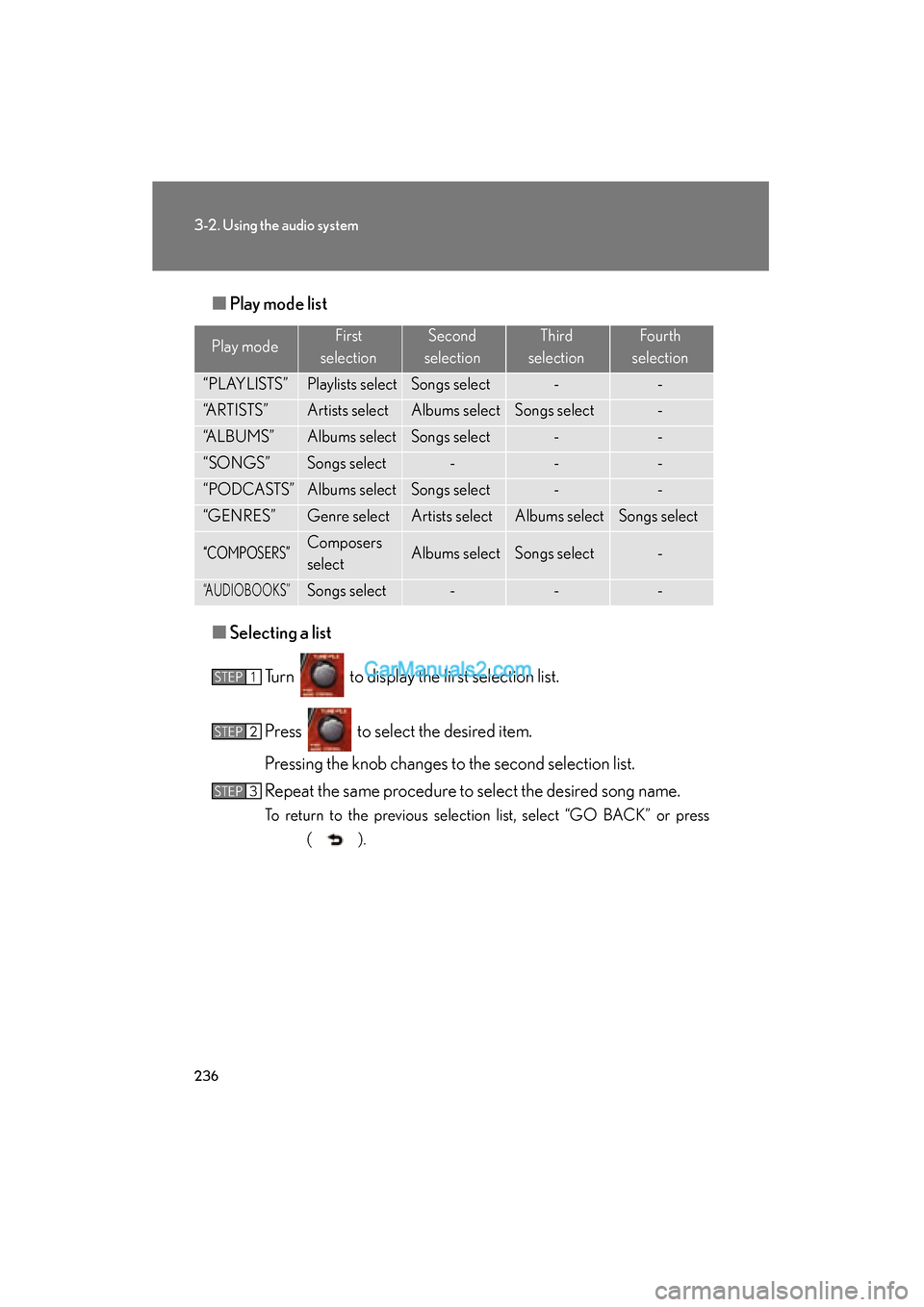
Play mode list
■ Selecting a list
Turn to display the first selection list.
Press to select the desired item.
Pressing the knob changes to the second selection list.
Repeat the same procedure to select the desired song name.
To return to the previous selection list, select “GO BACK” or press ( ).
Play modeFirst
selectionSecond
selectionThird
selectionFourth
selection
“PLAYLISTS”Playlists selectSongs select--
“ARTISTS”Artists selectAlbums selectSongs select-
“ALBUMS”Albums selectSongs select--
“SONGS”Songs select---
“PODCASTS”Albums selectSongs select--
“GENRES”Genre selectArtists selectAlbums selectSongs select
“COMPOSERS”Composers
selectAlbums selectSongs select-
“AUDIOBOOKS”Songs select---
STEP1
STEP2
STEP3
Page 240 of 543
238
3-2. Using the audio system
ES350_U
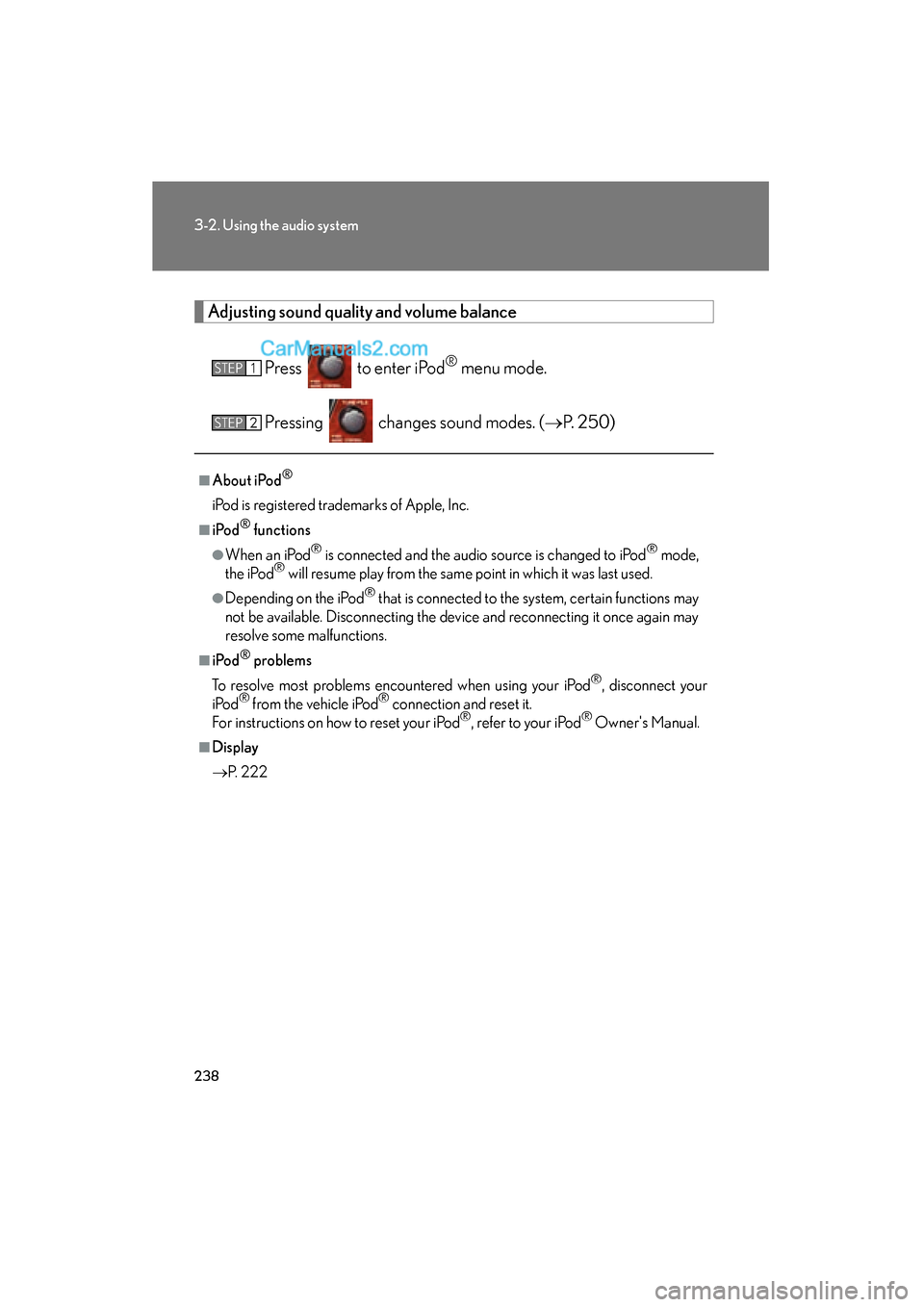
Adjusting sound quality and volume balancePress to enter iPod
® menu mode.
Pressing changes sound modes. ( oP. 2 5 0 )
■About iPod®
iPod is registered trademarks of Apple, Inc.
■i Po d® functions
●When an iPod® is connected and the audio source is changed to iPod® mode,
the iPod® will resume play from the same point in which it was last used.
●Depending on the iPod® that is connected to the system, certain functions may
not be available. Disconnecting the device and reconnecting it once again may
resolve some malfunctions.
■i Po d® problems
To resolve most problems encountered when using your iPod
®, disconnect your
iPod® from the vehicle iPod® connection and reset it.
For instructions on how to reset your iPod®, refer to your iPod® Owner's Manual.
■Display
o P. 222
STEP1
STEP2