Page 105 of 371
Knowing your vehicle
96
3
1
2
3
4
5
6
7
8
9
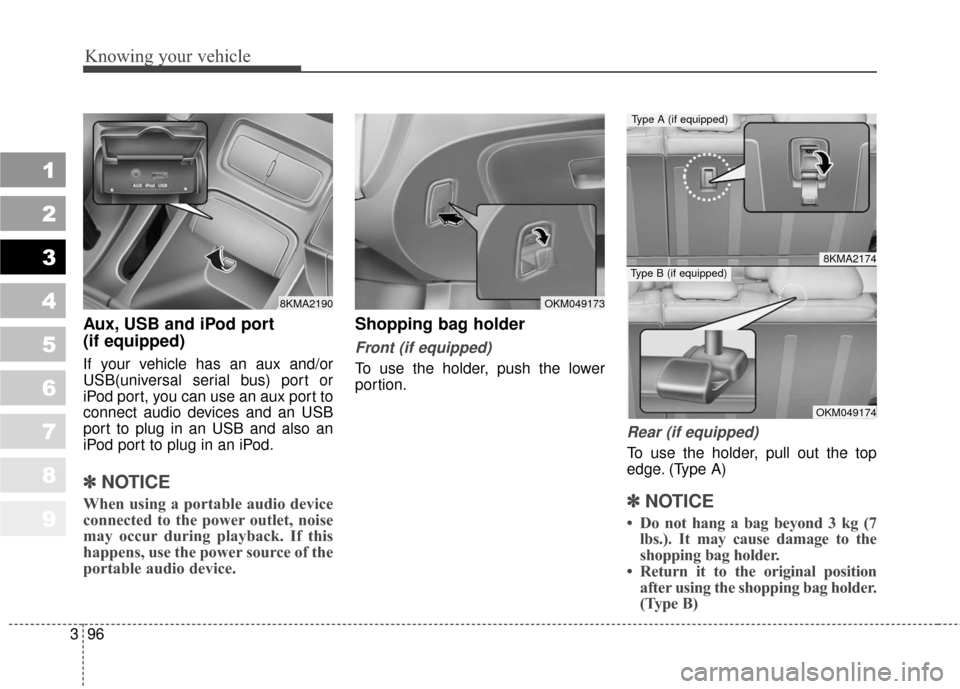
Aux, USB and iPod port
(if equipped)
If your vehicle has an aux and/or
USB(universal serial bus) port or
iPod port, you can use an aux port to
connect audio devices and an USB
port to plug in an USB and also an
iPod port to plug in an iPod.
✽ ✽
NOTICE
When using a portable audio device
connected to the power outlet, noise
may occur during playback. If this
happens, use the power source of the
portable audio device.
Shopping bag holder
Front (if equipped)
To use the holder, push the lower
portion.
Rear (if equipped)
To use the holder, pull out the top
edge. (Type A)
✽ ✽NOTICE
• Do not hang a bag beyond 3 kg (7
lbs.). It may cause damage to the
shopping bag holder.
• Return it to the original position after using the shopping bag holder.
(Type B)
8KMA2190OKM049173
8KMA2174
OKM049174
Type A (if equipped)
Type B (if equipped)
Page 123 of 371
Knowing your vehicle
114
3
1
2
3
4
5
6
7
8
9
9. RANDOM Selection Button
Turns on/off the randomization of the
play list of files in the currently played
DISC.
To cancel the mode, press the key
once again.
10. SCAN Selection Button
Plays first 10 seconds of each song
in the DISC.
To cancel the mode, press the key
once again.
CAUTION- Using USB
device
• To use the external USB device, make sure the deviceis not mounted when startingup the vehicle and mount thedevice after starting up.
If you start the vehicle when the USB device is mounted, itmay damage the USB device.(USB is not ESA)
If the vehicle is started up or turned off while the externalUSB device is connected, theexternal USB device may notwork.
It may not play inauthentic MP3 or WMA files.
1) It can only play MP3 files with the compression ratebetween 8Kbps~320Kbps.
2) It can only play WMA music files with the compressionrate between 8Kbps~320Kbps.
(Continued)
(Continued)
Take cautions for static elec- tricity when mounting or dis-mounting the external USBdevice.
Encoded MP3 PLAYER is not recognizable.
Depending on the condition of the external USB device, theconnected external USBdevice can be unrecognizable.
When the formatted byte/sec- tor setting of External USBdevices is not either 512BYTEor 2048BYTE, then the devicewill not be recognized.
Only the USB device format- ted to FAT 12/16/32.
USB device without USB IF authentication may not be rec-ognizable.
Make sure the USB connection terminal does not come incontact with human body orany object.
(Continued)
Page 124 of 371
3115
Knowing your vehicle
1
2
3
4
5
6
7
8
9
(Continued) If you repeat mounting or dis- mounting USB device in ashort period of time, it maybreak the device.
You might hear strange noise when mounting or dismount-ing a USB device.
If you dismount the external USB device during playback inUSB mode, the external USBdevice can be damaged or mal-function. Therefore, mount theexternal USB device when theengine is turned off or inanother mode.
Depending on the type and capacity of the external USBdevice or the type of the filesstored in the device, there is adifference in the time taken forrecognition of the device, butthis is not a trouble and youonly have to wait.
(Continued)(Continued) Do not use the USB device for other purposes than playingmusic files.
Use of USB accessories such as the recharger or heaterusing USB I/F may lower theperformance or cause trouble.
If you use devices such as the USB hub you purchased sepa-rately, the vehicle’s audio sys-tem may not recognize theUSB device. Connect the USBdevice directly to the multime-dia terminal of the vehicle.
Page 125 of 371
Knowing your vehicle
116
3
1
2
3
4
5
6
7
8
9
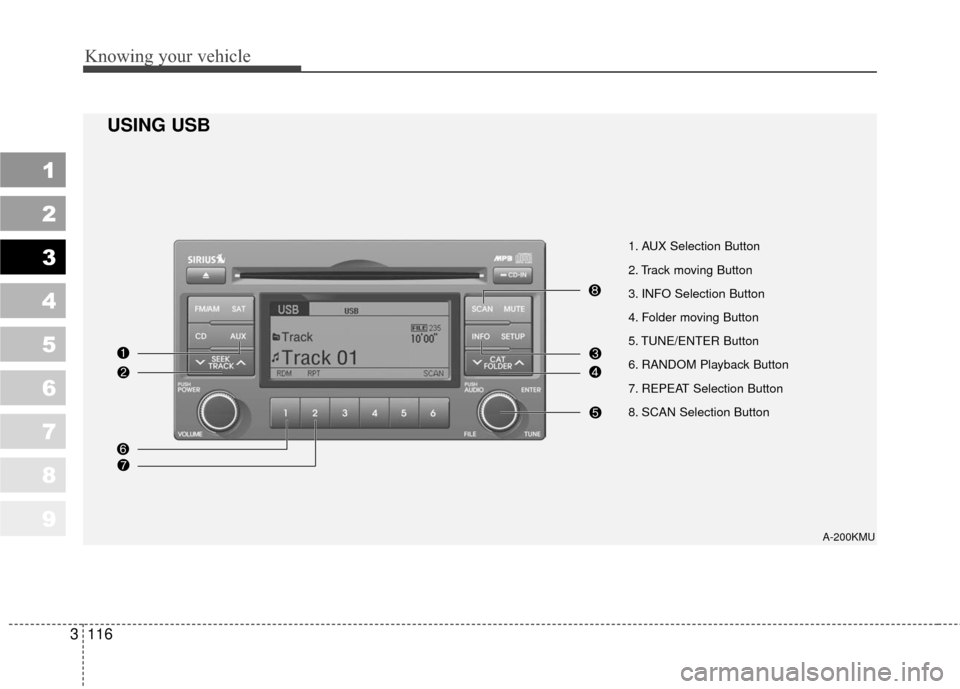
1. AUX Selection Button
2. Track moving Button
3. INFO Selection Button
4. Folder moving Button
5. TUNE/ENTER Button
6. RANDOM Playback Button
7. REPEAT Selection Button
8. SCAN Selection Button
A-200KMU
USING USB
Page 126 of 371
3117
Knowing your vehicle
1
2
3
4
5
6
7
8
9
In case USB is connected to the mul-
tiple terminal inside the console on
the right hand side of the driver’s
seat. When USB is connected, the
‘USB’ icon will be displayed on the
top right corner of the display screen.
1.AUX Selection Button
If USB is not connected, it switches
to the USB mode from the Radio and
CD mode to play the song files
stored in the USB.
If AUX is not connected, it is invalid
key.
2. Track Moving Button
Press the [SEEK ] button forless than 0.8 second to play from
the beginning of the song currently
played.
Press the button for less than 0.8
second and press it again within 1
second to move to and play the pre-
vious track.
Press the button for 0.8 second or
longer to play the song in reverse
direction in fast speed. Press the [SEEK ] button for
less
than 0.8 second to move to the
next track.
Press the button for 0.8 second or
longer to play the song in forward
direction in fast speed.
3. INFO Selection Button
Displays the information of the file
currently played in the order of FILE
NAME
➟TITLE➟ARTIST➟ALBUM➟
FOLDER➟TOTAL FILE➟FILE NAME
➟… (Displays no information if the
file has no song information.)
4. Folder moving Button
Moves [FLDR ] button child fold- er of the current folder and displays
the first song in the folder. Press
TUNE/ENTER button to move to
the folder displayed. It will play the
first song in the folder.
Moves [FLDR ] button parent folder and displays the first song in
the folder. Press TUNE/ENTER
button to move to the folder dis-
played. It will play the first song in
the folder.
5. TUNE/ENTER Button
Turn this button clockwise to display
the songs next to the currently
played song.
Turn the button counterclockwise to
display the songs before the current-
ly played song.
Press the button to skip to and play
the selected song.
Page 127 of 371
Knowing your vehicle
118
3
1
2
3
4
5
6
7
8
9
6. RANDOM Playback Button
Press the button for less than 0.8
second to start or stop the random
playback of the songs in the current
folder.
Press the button for more than 0.8
second to randomly play the entire
songs in the USB device.
Press the button again to cancel the
mode.
7. REPEAT Selection Button
Press the button for less than 0.8
second to repeat the song currently
played.
Press the button for more than 0.8
second to repeat the entire songs in
the USB device.
8. SCAN Selection Button
Plays 10 seconds of each song in the
USB device.
Press the button once again to can-
cel scanning.
Page 136 of 371
3127
Knowing your vehicle
1
2
3
4
5
6
7
8
9
8. TUNE/ENTER Button
Turn this button clockwise to display
songs after current song.
Also, turn this button counterclock-
wise to display songs before current
song.
To listen to the displayed song, press
the button to skip to the song and
play.
9. REPEAT Selection Button
Repeats current song when the but-
ton is pressed for less than 0.8 sec-
ond.
Repeats the entire DISC when the
button is pressed for 0.8 second or
longer.
10. RANDOM Selection Button
Turns on/off the randomization of the
play list of files in the currently played
DISC.
To cancel the mode, press the key
once again.
11. DISC Selection Button
[DISC ] Change Button Changes disc to the previous disc.
[DISC ] Change Button Changes disc to the next disc.
12. SCAN Selection Button
Plays first 10 seconds of each song
in the DISC.
To cancel the mode, press the key
once again.
CAUTION- Using USB
device
To use the external USB device, make sure the deviceis not mounted when startingup the vehicle and mount thedevice after starting up.
If you start the vehicle when the USB device is mounted, itmay damage the USB device.(USB is not ESA)
If the vehicle is started up or turned off while the externalUSB device is connected, theexternal USB device may notwork.
It may not play inauthentic MP3 or WMA files.
1) It can only play MP3 files with the compression ratebetween 8Kbps~320Kbps.
2) It can only play WMA music files with the compressionrate between 8Kbps~320Kbps.
(Continued)
Page 137 of 371
Knowing your vehicle
128
3
1
2
3
4
5
6
7
8
9
(Continued)
Take cautions for static elec- tricity when mounting or dis-mounting the external USBdevice.
Encoded MP3 PLAYER is not recognizable.
Depending on the condition of the external USB device, theconnected external USBdevice can be unrecognizable.
When the formatted byte/sec- tor setting of External USBdevices is not either 512BYTEor 2048BYTE, then the devicewill not be recognized.
Only the USB device format- ted to FAT 12/16/32.
USB device without USB IF authentication may not be rec-ognizable.
Make sure the USB connection terminal does not come incontact with human body orany object.
(Continued)(Continued) If you repeat mounting or dis- mounting USB device in ashort period of time, it maybreak the device.
You might hear strange noise when mounting or dismount-ing a USB device.
If you dismount the external USB device during playback inUSB mode, the external USBdevice can be damaged or mal-function. Therefore, mount theexternal USB device when theengine is turned off or inanother mode.
Depending on the type and capacity of the external USBdevice or the type of the filesstored in the device, there is adifference in the time taken forrecognition of the device, butthis is not a trouble and youonly have to wait.
(Continued)(Continued) Do not use the USB device for other purposes than playingmusic files.
Use of USB accessories such as the recharger or heaterusing USB I/F may lower theperformance or cause trouble.
If you use devices such as the USB hub you purchased sepa-rately, the vehicle’s audio sys-tem may not recognize theUSB device. Connect the USBdevice directly to the multime-dia terminal of the vehicle.