2010 KIA Sportage light
[x] Cancel search: lightPage 208 of 371

461
Driving your vehicle
1
2
3
4
5
6
7
8
9
Rear window wiper and wash-
er switch (if equipped)
The rear window wiper and washer
switch is located at the end of the
wiper and washer switch lever. Turn
the switch to desired position to
operate the rear wiper and washer.
If the rear hatch window is open
( ), the rear wiper will not oper-
ate. Check the rear hatch window
warning light in the instrument clus-
ter, and make sure the rear hatch
window is closed completely.- Spraying washer fluid and wip-ing
OFF - Wiper is not in operation
INT - Intermittent wiper operation (if equipped)
ON - Normal wiper opertion - Spraying washer fluid and wip-ing The defroster heats the window to
remove frost, fog and thin ice from
the interior and exterior of the rear
window, while engine is running.
✽ ✽
NOTICE
• To prevent damage to the conduc-
tors bonded to the inside surface
of the rear window, never use
sharp instruments or window
cleaners containing abrasives to
clean the window.
• To prevent the battery from being discharged, the rear window
defroster will only operate when
the engine is running.
• If you want to defrost and defog on the front windshield, refer to
“Windshield Defrosting and
Defogging” in this section.
To activate the rear window
defroster, press the rear window
defroster button located in the center
console switch panel. The indicator
on the rear window defroster button
illuminates when the defroster is ON.
If there is heavy accumulation of
snow on the rear window, brush it off
before operating the rear defroster.
OKM049126 OKM049125
Type A
Type B
DEFROSTER (IF EQUIPPED)
Page 209 of 371
Driving your vehicle
62
4
1
2
3
4
5
6
7
8
9
The rear window defroster automati-
cally turns off after 20 minutes or
when the ignition switch is turned off.
To turn off the defroster, press the
rear window defroster button again.
Outside mirror heater
(if equipped)
There is no control button for the out-
side mirror heater, instead the out-
side mirror heater automatically
turns on when the rear window
defroster is turned on.
Front windshield deicer(if equipped)
There is no control button for the
front windshield deicer, instead the
front windshield deicer automatically
turns on when the rear window
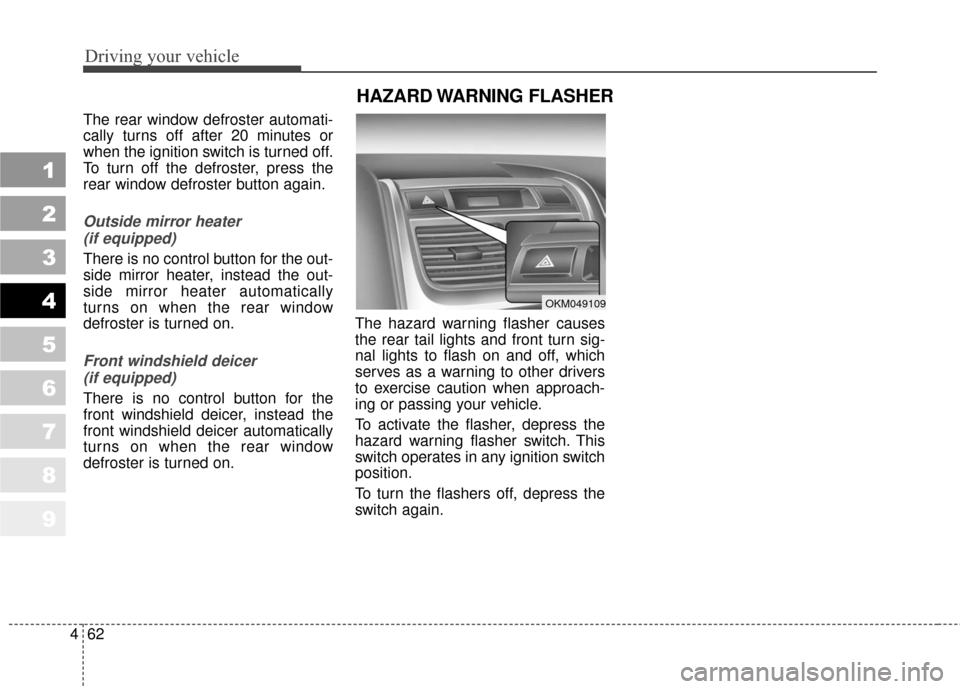
defroster is turned on. The hazard warning flasher causes
the rear tail lights and front turn sig-
nal lights to flash on and off, which
serves as a warning to other drivers
to exercise caution when approach-
ing or passing your vehicle.
To activate the flasher, depress the
hazard warning flasher switch. This
switch operates in any ignition switch
position.
To turn the flashers off, depress the
switch again.
HAZARD WARNING FLASHER
OKM049109
Page 213 of 371
Driving your vehicle
66
4
1
2
3
4
5
6
7
8
9
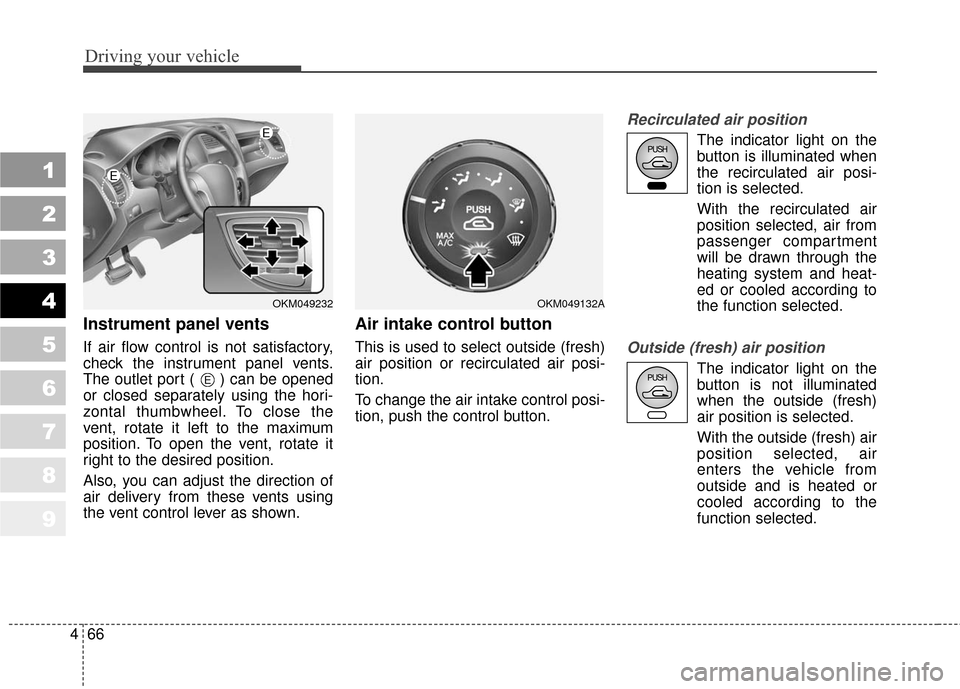
Instrument panel vents
If air flow control is not satisfactory,
check the instrument panel vents.
The outlet port ( ) can be opened
or closed separately using the hori-
zontal thumbwheel. To close the
vent, rotate it left to the maximum
position. To open the vent, rotate it
right to the desired position.
Also, you can adjust the direction of
air delivery from these vents using
the vent control lever as shown.
Air intake control button
This is used to select outside (fresh)
air position or recirculated air posi-
tion.
To change the air intake control posi-
tion, push the control button.
Recirculated air position
The indicator light on the
button is illuminated when
the recirculated air posi-
tion is selected.
With the recirculated air
position selected, air from
passenger compartment
will be drawn through the
heating system and heat-
ed or cooled according to
the function selected.
Outside (fresh) air position
The indicator light on the
button is not illuminated
when the outside (fresh)
air position is selected.
With the outside (fresh) air
position selected, air
enters the vehicle from
outside and is heated or
cooled according to the
function selected.E
OKM049232
E
E
OKM049132A
Page 214 of 371
467
Driving your vehicle
1
2
3
4
5
6
7
8
9
It should be noted that prolonged
operation of the heating in recir-
culated air position will cause fog-
ging of the windshield and side
windows and the air within the
passenger compartment will
become stale.
In addition, prolonged use of the
air conditioning with the “recircu-
lated air position” selected, will
result in excessively dry air in the
passenger compartment.
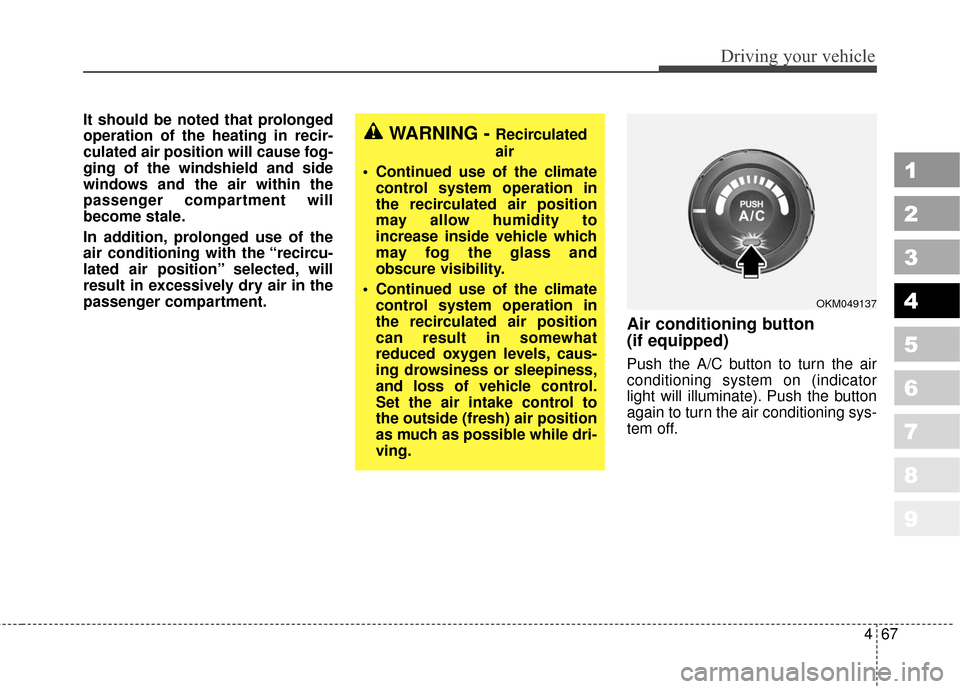
Air conditioning button
(if equipped)
Push the A/C button to turn the air
conditioning system on (indicator
light will illuminate). Push the button
again to turn the air conditioning sys-
tem off.
WARNING - Recirculated
air
Continued use of the climate control system operation in
the recirculated air position
may allow humidity to
increase inside vehicle which
may fog the glass and
obscure visibility.
Continued use of the climate control system operation in
the recirculated air position
can result in somewhat
reduced oxygen levels, caus-
ing drowsiness or sleepiness,
and loss of vehicle control.
Set the air intake control to
the outside (fresh) air position
as much as possible while dri-
ving.
OKM049137
Page 216 of 371

469
Driving your vehicle
1
2
3
4
5
6
7
8
9
When maximum cooling is desired,set the temperature control to the
extreme left position, set the air
intake control to the recirculated air
position, then set the fan speed
control to the highest speed.
✽ ✽ NOTICE
• When using the air conditioning
system, monitor the temperature
gauge closely while driving up
hills or in heavy traffic when out-
side temperatures are high. Air
conditioning system operation
may cause engine overheating.
Continue to use the blower fan but
turn the air conditioning system
off if the temperature gauge indi-
cates engine overheating.
• When opening the windows in humid weather air conditioning
may create water droplets inside
the vehicle. Since excessive water
droplets may cause damage to
electrical equipment, air condi-
tioning should only be run with
the windows closed.
Air conditioning system oper-
ation tips
If the vehicle has been parked in
direct sunlight during hot weather,
open the windows for a short time
to let the hot air inside the vehicle
escape.
To help reduce moisture inside of windows on rainy humid days,
decrease the humidity inside the
vehicle by operating the air condi-
tioning system.
During air conditioning system operation, you may occasionally
notice a slight change in engine
speed at idle as the air condition-
ing compressor cycles on. This is a
normal system operation charac-
teristics.
Use the air conditioning system every month if only for a few min-
utes to ensure maximum system
performance.
When using the air conditioning system, you may notice clear water
dripping (or even pudding) on the
ground under the passenger side
of the vehicle. This is a normal sys-
tem operation characteristic. The air conditioning system
includes a function that automati-
cally turns the air conditioning
compressor off if engine coolant
temperature approaches an over
heating level. The air conditioning
compressor operation will resume
once engine coolant temperature
returns to the normal range. Also,
the air conditioning compressor is
automatically turned off for a few
seconds when the accelerator is
fully depressed (wide open throt-
tle).
When operating the air condition- ing system use the outside (fresh)
air position.
Operating the air conditioning sys- tem in the recirculated air position
does provide maximum cooling,
however, continual operation in this
mode may cause the air inside the
vehicle to become stale.
Page 224 of 371
477
Driving your vehicle
1
2
3
4
5
6
7
8
9
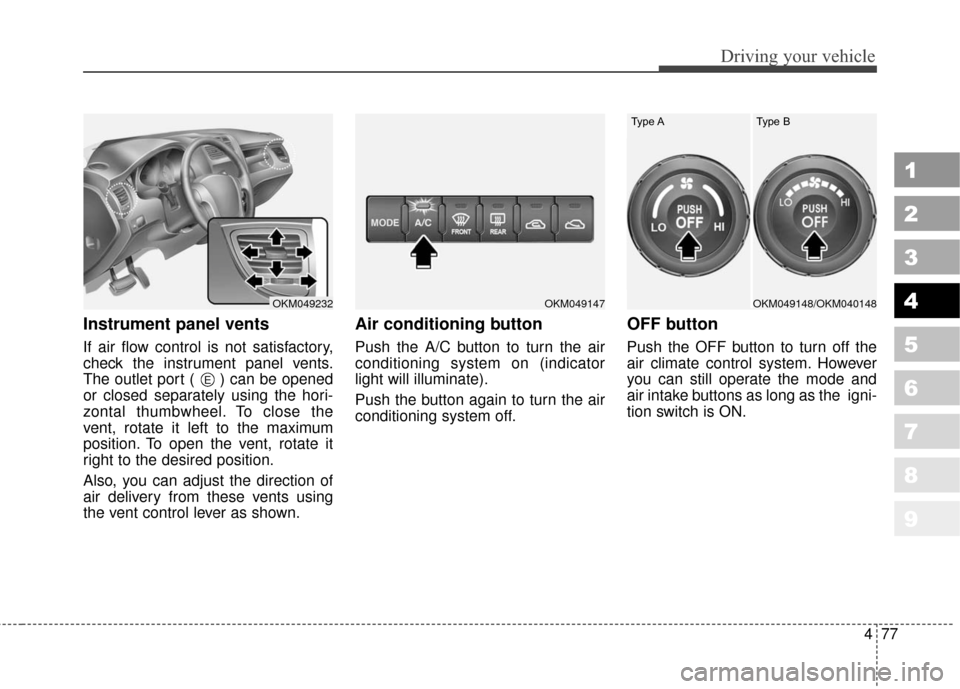
Instrument panel vents
If air flow control is not satisfactory,
check the instrument panel vents.
The outlet port ( ) can be opened
or closed separately using the hori-
zontal thumbwheel. To close the
vent, rotate it left to the maximum
position. To open the vent, rotate it
right to the desired position.
Also, you can adjust the direction of
air delivery from these vents using
the vent control lever as shown.
Air conditioning button
Push the A/C button to turn the air
conditioning system on (indicator
light will illuminate).
Push the button again to turn the air
conditioning system off.
OFF button
Push the OFF button to turn off the
air climate control system. However
you can still operate the mode and
air intake buttons as long as the igni-
tion switch is ON.
OKM049232OKM049147
E
OKM049148/OKM040148
Type A Type B
Page 226 of 371
479
Driving your vehicle
1
2
3
4
5
6
7
8
9
Air conditioning
All Kia Air Conditioning Systems are
filled with environmentally friendly
R-134a refrigerant which is not dam-
aging to the ozone layer.
1. Start the engine. Push the air con-ditioning button.
2. Set the mode to the position.
3. Set the air intake control to the outside air or recirculated air posi-
tion.
4. Set the temperature control to the desired position.
5. Set the fan speed control to the desired speed.
6. Adjust the fan speed control and temperature control to maintain
maximum comfort.
level for bi-level operation, set the
mode to the position and
adjust the temperature control to
maintain maximum comfort.
maximum cooling is desired, set the temperature con-
trol to the minimum (Lo) and set
the air intake to the recirculated
air position, then set the fan
speed control to the highest
speed.
✽ ✽NOTICE
When using the air conditioning sys-
tem, monitor the temperature gauge
closely while driving up hills or in
heavy traffic when outside tempera-
tures are high. Air conditioning sys-
tem operation may cause engine
overheating. Continue to use the
blower fan but turn the air condi-
tioning system off if the temperature
gauge indicates engine overheating.
Air conditioning system oper-
ation tips
If the vehicle has been parked in
direct sunlight during hot weather,
open the windows for a short time
to let the hot air inside the vehicle
escape.
To help reduce moisture inside of windows on rainy humid days,
decrease the humidity inside the
vehicle by operating the air condi-
tioning system.
During air conditioning system operation, you may occasionally
notice a slight change in engine
speed at idle as the air condition-
ing compressor cycles on. This is a
normal system operating charac-
teristic.
Use the air conditioning system every month if only for a few min-
utes to ensure maximum system
performance.
When using the air conditioning system, you may notice clear water
dripping (or even pudding) on the
ground under the passenger side
of the vehicle. This is a normal sys-
tem operating characteristic.
Page 231 of 371
Driving your vehicle
84
4
1
2
3
4
5
6
7
8
9
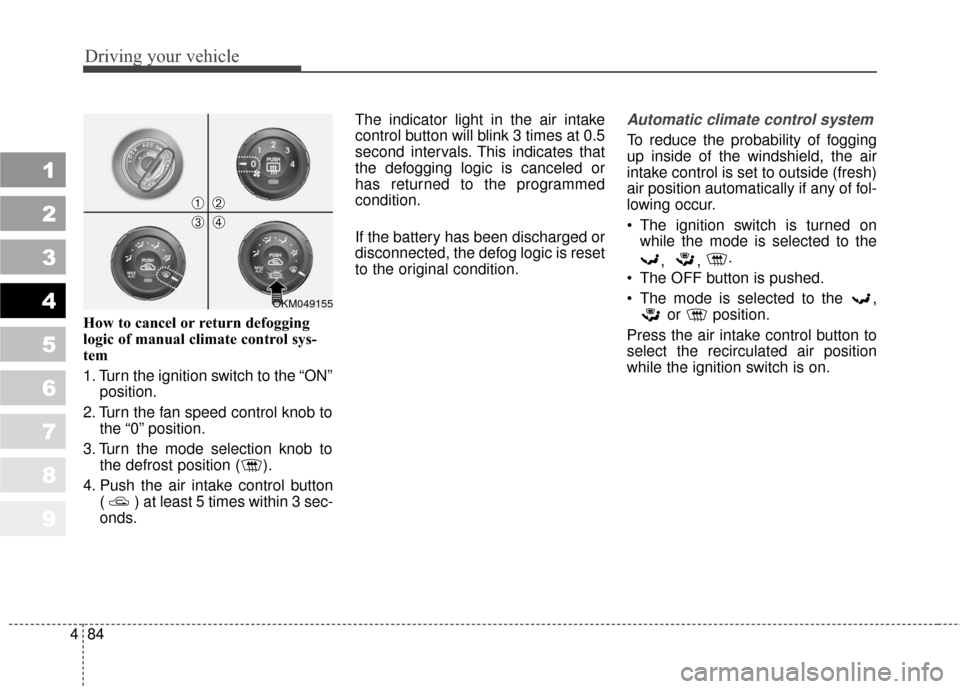
How to cancel or return defogging
logic of manual climate control sys-
tem
1. Turn the ignition switch to the “ON”
position.
2. Turn the fan speed control knob to the “0” position.
3. Turn the mode selection knob to the defrost position ( ).
4. Push the air intake control button ( ) at least 5 times within 3 sec-
onds. The indicator light in the air intake
control button will blink 3 times at 0.5
second intervals. This indicates that
the defogging logic is canceled or
has returned to the programmed
condition.
If the battery has been discharged or
disconnected, the defog logic is reset
to the original condition.
Automatic climate control system
To reduce the probability of fogging
up inside of the windshield, the air
intake control is set to outside (fresh)
air position automatically if any of fol-
lowing occur.
The ignition switch is turned on
while the mode is selected to the
, , .
The OFF button is pushed.
The mode is selected to the , or position.
Press the air intake control button to
select the recirculated air position
while the ignition switch is on.
OKM049155
➀➁
➂➃