Page 338 of 522
4. Start the engine.
5. Rotate the steering wheel one-half turn to the left.
6. Press the “ESC Off” button located in the lower switch
bank below the climate control four times within twenty
seconds. The “ESC Off Indicator Light” should turn on
and turn off two times.
7. Rotate the steering wheel back to center and then an
additional one-half turn to the right.
8. Turn the ignition switch to the OFF position and then
back to the ON position. If the sequence was completed
properly, the “ESC Off Indicator Light” will blink several
times to confirm HSA is disabled.
9. Repeat these steps if you want to return this feature to
its previous setting.Hill Descent Control (HDC) — If Equipped
HDC is only intended for low speed off-road driving.
HDC maintains vehicle speed while descending hills in
off-road driving conditions by applying the brakes when
necessary.
When enabled, HDC senses the terrain and activates
when the vehicle is descending a hill. HDC speed may be
adjusted by the driver to suit the driving conditions. The
speed corresponds to the transmission gear selected.
GearApproximate HDC Set
Speed
1st 1 mph (1.5 km/h)
2nd 3 mph (4.5 km/h)
DRIVE 7.5 mph (12 km/h)
REVERSE 1 mph (1.5 km/h)
NEUTRAL 3 mph (4.5 km/h)
However, the driver can override HDC operation by
applying the brake to slow the vehicle down below the5
STARTING AND OPERATING 337
Page 339 of 522
HDC control speed. If more speed is desired during HDC
control, the accelerator pedal will increase vehicle speed
in the usual manner. When either the brake or the
accelerator is released, HDC will control the vehicle at the
original set speed.
NOTE:HDC is available on vehicles equipped with the
MP1522 transfer case.
•The transfer case must be in 4WD LOW range to
enable HDC.
•HDC is enabled only when the “Hill Descent Control
Indicator Light” in the instrument cluster is on solid.
•HDC will NOT activate when the automatic transmis-
sion is in PARK.
•HDC will NOT activate on level ground.
•HDC will NOT activate at vehicle speeds above
30 mph (50 km/h). The “Hill Descent” button is located in the lower switch
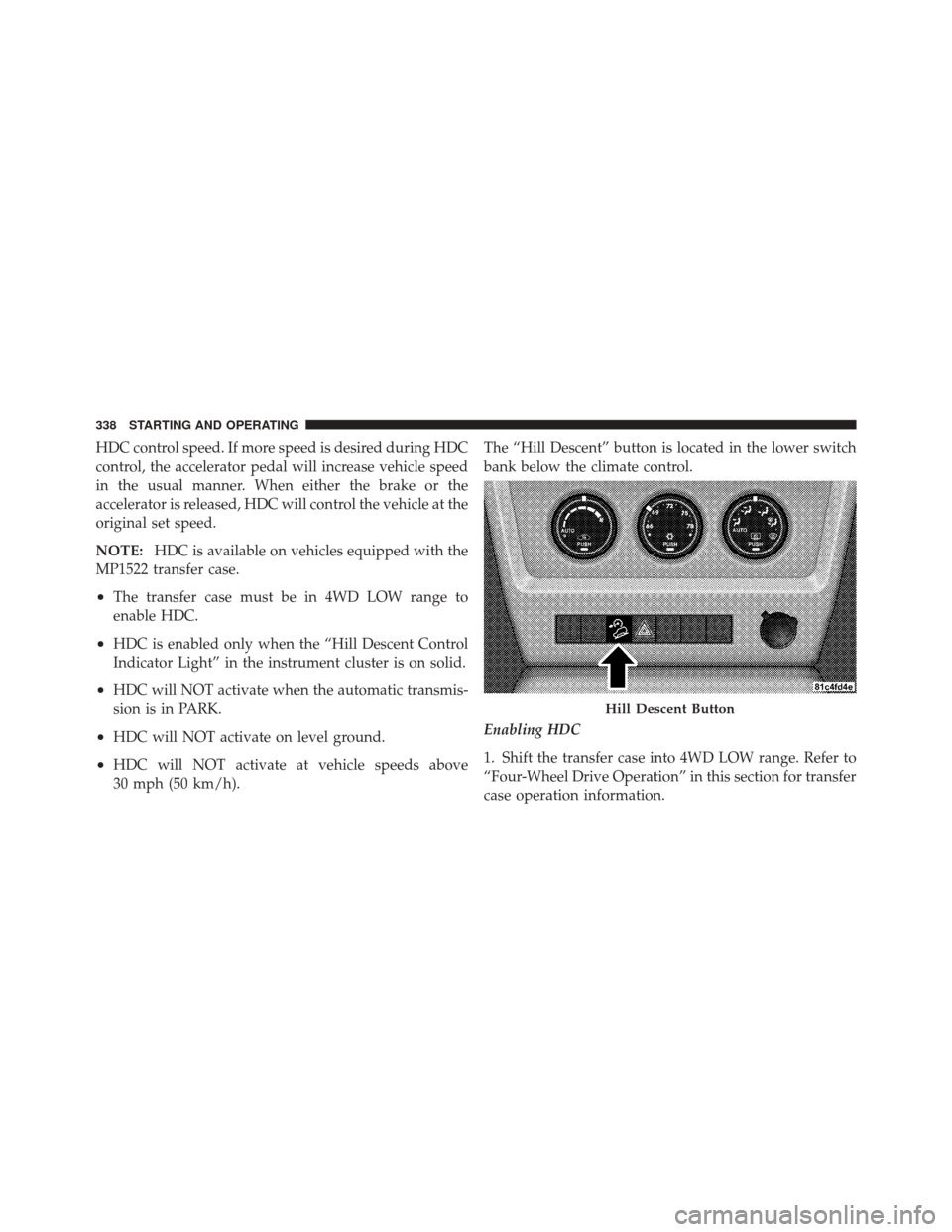
bank below the climate control.
Enabling HDC
1. Shift the transfer case into 4WD LOW range. Refer to
“Four-Wheel Drive Operation” in this section for transfer
case operation information.
Hill Descent Button
338 STARTING AND OPERATING
Page 340 of 522
2. Press the “Hill Descent” button. The “Hill Descent
Control Indicator Light” in the instrument cluster will
turn on solid.
NOTE:If the transfer case is not in 4WD LOW range,
the “Hill Descent Control Indicator Light” will flash for
five seconds and HDC will not be enabled.
Disabling HDC
1. Press the “Hill Descent” button or shift the transfer
case out of 4WD LOW range. The “Hill Descent Control
Indicator” light in the instrument cluster will turn off.
Electronic Stability Control (ESC)
This system enhances directional control and stability of
the vehicle under various driving conditions. ESC cor-
rects for over-steering and under-steering the vehicle by
applying the brake of the appropriate wheel. Engine
power may also be reduced to help the vehicle maintain
the desired path. The ESC uses sensors in the vehicle to determine the path
that the driver intends to steer the vehicle and compares
it to the actual path of the vehicle. When the actual path
does not match the intended path, the ESC applies the
brake of the appropriate wheel to assist in counteracting
the condition of over-steer or under-steer.
•Oversteer - when the vehicle is turning more than
appropriate for the steering wheel position.
•Understeer - when the vehicle is turning less than
appropriate for the steering wheel position.
ESC Off Indicator Light
The “ESC Off Indicator Light” (located in the
instrument cluster) starts to flash as soon as the
tires lose traction and the ESC system becomes
active. The “ESC Off Indicator Light” also
flashes when TCS is active. If the “ESC Off Indicator
Light” begins to flash during acceleration, ease up on the
5
STARTING AND OPERATING 339
Page 383 of 522
Improper weight distributions can have an adverse affect
on the way your vehicle steers and handles, and the way
the brakes operate.
CAUTION!
Do not load your vehicle any heavier than the GVWR
or the maximum front and rear GAWR. If you do,
parts on your vehicle can break, or it can change the
way your vehicle handles. This could cause you to
lose control. Also, overloading can shorten the life of
your vehicle.
TRAILER TOWING
In this section, you will find safety tips and information
on limits to the type of towing you can reasonably do
with your vehicle. Before towing a trailer, carefully
review this information to tow your load as efficiently
and safely as possible.To maintain warranty coverage, follow the requirements
and recommendations in this manual concerning ve-
hicles used for trailer towing.
Common Towing Definitions
The following trailer towing related definitions will assist
you in understanding the following information:
Gross Vehicle Weight Rating (GVWR)
The GVWR is the total allowable weight of your vehicle.
This includes driver, passengers, cargo, and tongue
weight. The total load must be limited so that you do not
exceed the GVWR.
Gross Trailer Weight (GTW)
The GTW is the weight of the trailer plus the weight of all
cargo, consumables, and equipment (permanent or tem-
porary) loaded in or on the trailer in its
�loaded and
ready for operation� condition. The recommended way to
382 STARTING AND OPERATING
Page 385 of 522

Frontal Area
The frontal area is the maximum height and maximum
width of the front of a trailer.
Trailer Sway Control — Mechanical
The trailer sway control is a telescoping link that can be
installed between the hitch receiver and the trailer tongue
that typically provides adjustable friction associated with
the telescoping motion to dampen any unwanted trailer
swaying motions while traveling.
Weight-Carrying Hitch
A weight-carrying hitch supports the trailer tongue
weight, just as if it were luggage located at a hitch ball or
some other connecting point of the vehicle. These kinds
of hitches are the most popular on the market today and
they are commonly used to tow small- and medium-
sized trailers.
Weight-Distributing Hitch
A weight-distributing system works by applying lever-
age through spring (load) bars. They are typically used
for heavier loads, to distribute trailer tongue weight to
the tow vehicle’s front axle and the trailer axle(s). When
used in accordance with the manufacturers’ directions, it
provides for a more level ride, offering more consistent
steering and brake control thereby enhancing towing
safety. The addition of a friction/hydraulic sway control
also dampens sway caused by traffic and crosswinds and
contributes positively to tow vehicle and trailer stability.
Trailer sway control and a weight distributing (load
equalizing) hitch are recommended for heavier Tongue
Weights (TW) and may be required depending on Vehicle
and Trailer configuration/loading to comply with Gross
Axle Weight Rating (GAWR) requirements.
384 STARTING AND OPERATING
Page 386 of 522
WARNING!
•An improperly adjusted Weight Distributing
Hitch system may reduce handling, stability, brak-
ing performance, and could result in an accident.
•Weight Distributing Systems may not be compat-
ible with Surge Brake Couplers. Consult with your
hitch and trailer manufacturer or a reputable Rec-
reational Vehicle dealer for additional
information.
Without Weight Distributing Hitch (Incorrect)
5
STARTING AND OPERATING 385
Page 392 of 522
NOTE:Remember that everything put into or on the
trailer adds to the load on your vehicle. Also, additional
factory-installed options, or authorized dealer-installed
options, must be considered as part of the total load on
your vehicle. Refer to the “Tire and Loading Information”
placard for the maximum combined weight of occupants
and cargo for your vehicle.
Towing Requirements
To promote proper break-in of your new vehicle drive-
train components, the following guidelines are recom-
mended:
CAUTION!
•Avoid towing a trailer for the first 500 miles
(805 km) of vehicle operation. Doing so may dam-
age your vehicle.
•During the first 500 miles (805 km) of trailer
towing, limit your speed to 50 mph (80 km/h).
WARNING!
Improper towing can lead to an injury accident.
Follow these guidelines to make your trailer towing
as safe as possible:
•Make certain that the load is secured in the trailer
and that is will not shift during travel. When
trailering cargo that is not fully secured, dynamic
load shifts can occur that may be difficult for the
driver to control. You could lose control of your
vehicle and have an accident.
•When hauling cargo, or towing a trailer, do not
overload your vehicle or trailer. Overloading can
cause a loss of control, poor performance, or dam-
age to brakes, axle, engine, transmission, steering,
suspension, chassis structure, or tires.
(Continued)
5
STARTING AND OPERATING 391
Page 393 of 522
WARNING! (Continued)
•Safety chains must always be used between your
vehicle and trailer. Always connect the chains to
the frame or hook retainers of the vehicle hitch.
Cross the chains under the trailer tongue and
allow enough slack for turning corners.
•Vehicles with trailers should not be parked on a
grade. When parking, apply the parking brake on
the tow vehicle. Put the tow vehicle transmission
in PARK. Always, block or\bchock\bthe trailer
wheels.
•GCWR must not be exceeded.
•Total weight must be distributed between the tow
vehicle and the trailer such that the following four
ratings are not exceeded:
1. GVWR
2. GTW
(Continued)
WARNING! (Continued)
3. GAWR
4. Tongue weight rating for the trailer hitch utilized
(This requirement may limit the ability to always
achieve the 10% to 15% range of tongue weight as a
percentage of total trailer weight).
Towing Requirements — Tires
Do not attempt to tow a trailer while using a compact
spare tire.
Proper tire inflation pressures are essential to the safe
and satisfactory operation of your vehicle. Refer to
“Tires–General Information” in this section for infor-
mation on tire pressures and for proper tire inflation
procedures.
Check the trailer tires for proper tire inflation pres-
sures before trailer usage.
392 STARTING AND OPERATING