Page 149 of 522
CAUTION! (Continued)
•Lower the hood to approximately 6 in (15.2 cm)
above the closed position and drop the hood to
latch it.
•Never drive your vehicle unless the hood is fully
closed, with both latches engaged.
WARNING!
If the hood is not fully latched, it could fly up when
the vehicle is moving and block your forward vision.
Be sure all hood latches are fully latched before
driving.
LIGHTS
Multifunction Lever
The multifunction lever on the left side of the steering
column controls the operation of the headlights, parking
lights, turn signal lights, instrument panel lights, instru-
ment panel light dimming, interior lights and fog lights
(if equipped).
Multifunction Lever
148 UNDERSTANDING THE FEATURES OF YOUR VEHICLE
Page 154 of 522

light bulb. If an indicator fails to light when the lever is
moved, it would suggest that the indicator bulb is
defective.
Lane Change Assist
Tap the lever up or down once, without moving beyond
the detent, and the turn signal (right or left) will flash
three times then automatically turn off.
High/Low Beam Switch
Push the multifunction lever away from you to switch
the headlights to high beam. Pull the multifunction lever
toward you, to switch the headlights back to low beam.
Flash-To-Pass
You can signal another vehicle with your headlights by
lightly pulling the multifunction lever toward you. This
will turn on the high beam headlights until the lever is
released.NOTE:
If the multifunction lever is held in the flash-to-
pass position for more than 15 seconds, the high beams
will shut off. If this occurs, wait 30 seconds before
activating the flash-to-pass function again.
Instrument Panel Dimmer
Rotate the dimmer control to the extreme bottom position
to fully dim the instrument panel lights and prevent the
interior lights from illuminating when a door is opened.
Rotate the center portion of the lever up to increase the
brightness of the instrument panel lights when the park-
ing lights or headlights are on.
Rotate the center portion upward to the next detent
position to brighten the odometer and radio when the
parking lights or headlights are on.3
UNDERSTANDING THE FEATURES OF YOUR VEHICLE 153
Page 170 of 522
Enabling and Disabling ParkSense�
ParkSense�can be enabled and disabled with a switch
located in the switch bank of the instrument panel or
through the Customer-Programmable Features section of
the EVIC. The available choices are: OFF, Sound Only, or
Sound and Display. For details, refer to “Personal Set-
tings (Customer-Programmable Features)” under “Elec-
tronic Vehicle Information Center (EVIC)” in Section 4.
When the ParkSense� switch is pressed to
disable the system, the instrument cluster will
display the “PARK ASSIST DISABLED” mes-
sage for approximately five seconds. Refer to
“Electronic Vehicle Information Center (EVIC)”. When
the shift lever is moved to REVERSE and the system is
disabled, the EVIC will display the “PARK ASSIST DIS-
ABLED” message for as long as the vehicle is in RE-
VERSE. The ParkSense�
switch LED will be ON when Park-
Sense� is disabled or defective. The ParkSense� switch
LED will be OFF when the system is enabled.
Service the ParkSense� Rear Park Assist System
When the ParkSense�Rear Park Assist System is defec-
tive, the instrument cluster will actuate a single chime,
once per ignition cycle, and it will display the “SERVICE
PARK ASSIST SYSTEM” message. Refer to “Electronic
Vehicle Information Center (EVIC)”. When the shift lever
is moved to REVERSE and the system has detected a
faulted condition, the EVIC will display the “SERVICE
PARK ASSIST SYSTEM” message for as long as the
vehicle is in REVERSE. Under this condition ParkSense�
will not operate.3
UNDERSTANDING THE FEATURES OF YOUR VEHICLE 169
Page 190 of 522
ELECTRICAL POWER OUTLET
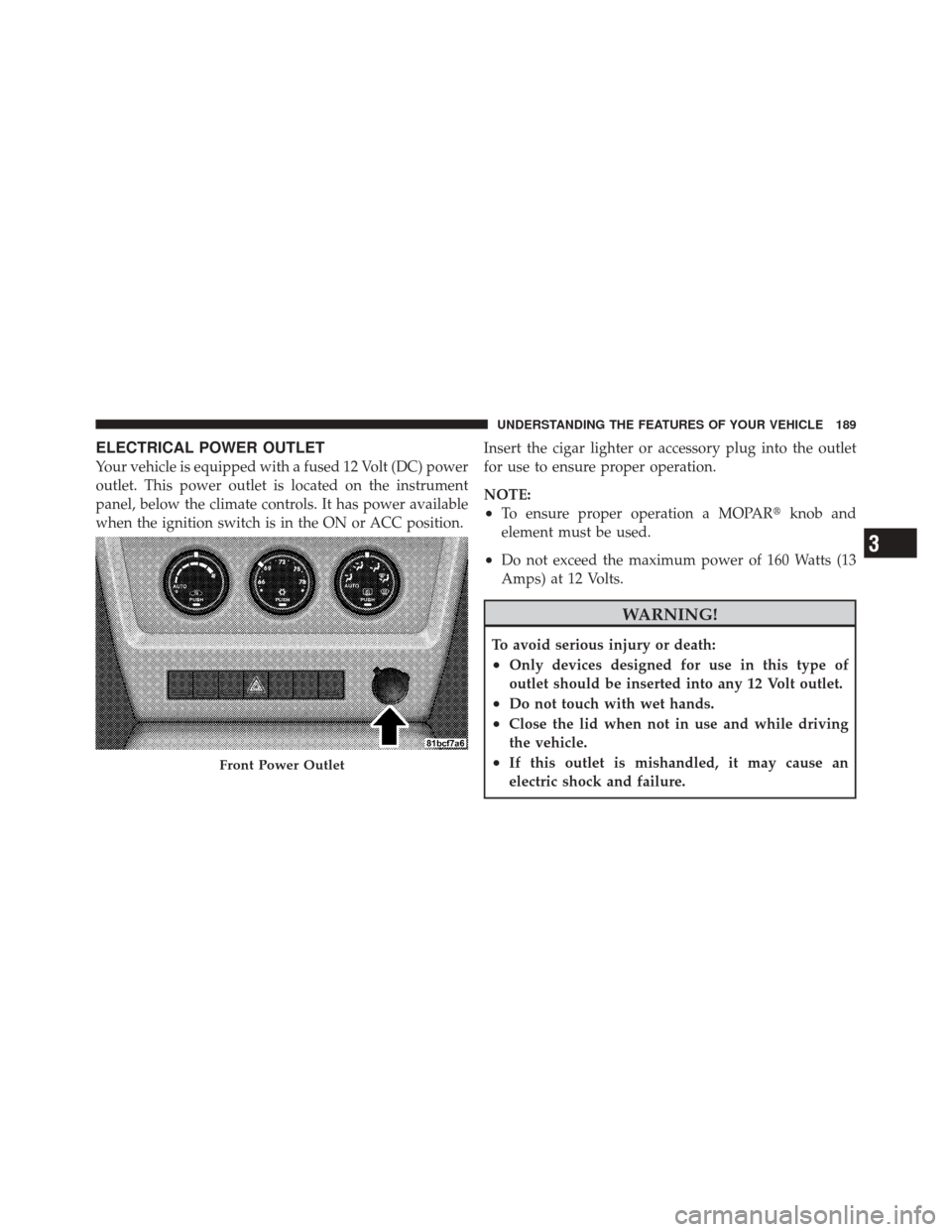
Your vehicle is equipped with a fused 12 Volt (DC) power
outlet. This power outlet is located on the instrument
panel, below the climate controls. It has power available
when the ignition switch is in the ON or ACC position.Insert the cigar lighter or accessory plug into the outlet
for use to ensure proper operation.
NOTE:
•To ensure proper operation a MOPAR�
knob and
element must be used.
•Do not exceed the maximum power of 160 Watts (13
Amps) at 12 Volts.
WARNING!
To avoid serious injury or death:
•Only devices designed for use in this type of
outlet should be inserted into any 12 Volt outlet.
•Do not touch with wet hands.
•Close the lid when not in use and while driving
the vehicle.
•If this outlet is mishandled, it may cause an
electric shock and failure.Front Power Outlet
3
UNDERSTANDING THE FEATURES OF YOUR VEHICLE 189
Page 193 of 522
STORAGE
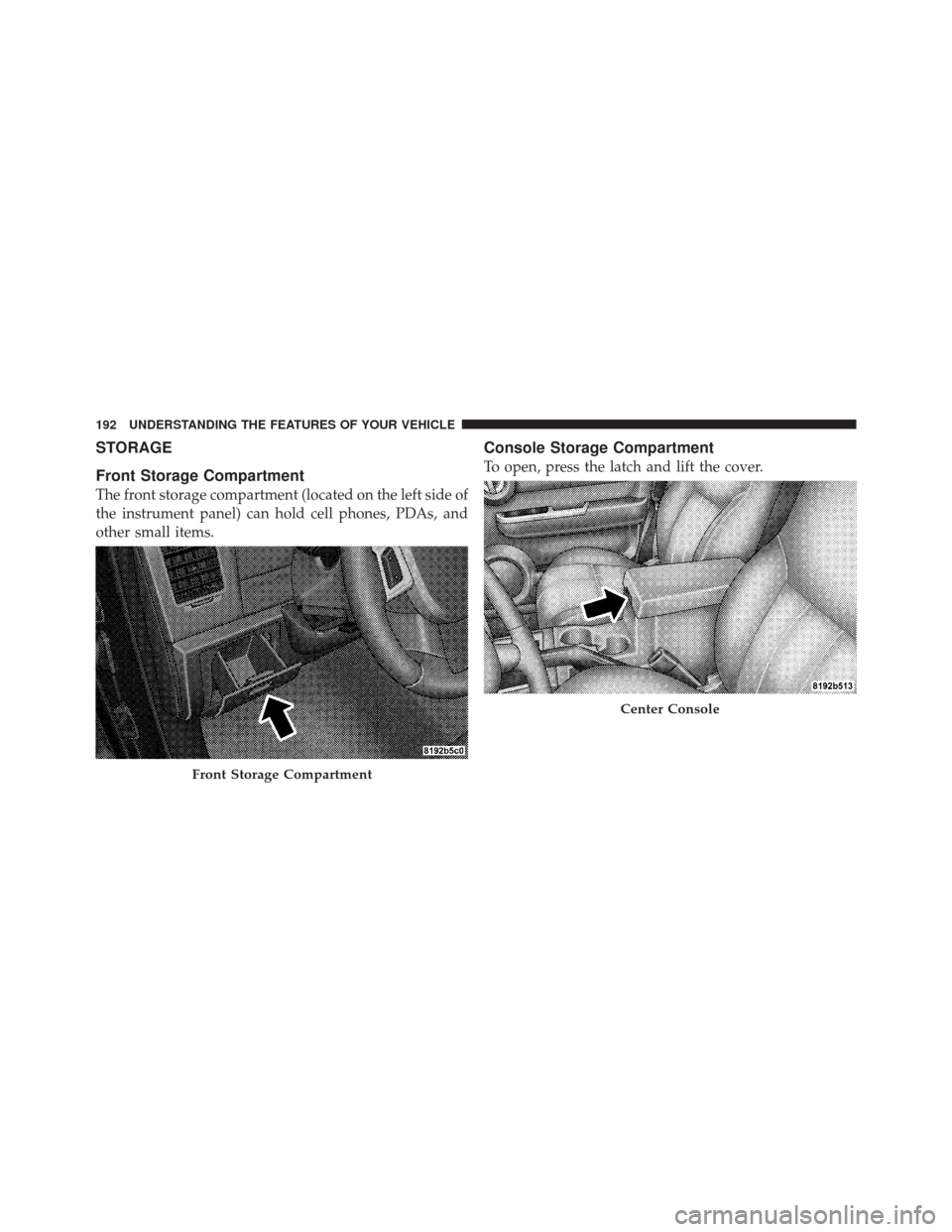
Front Storage Compartment
The front storage compartment (located on the left side of
the instrument panel) can hold cell phones, PDAs, and
other small items.
Console Storage Compartment
To open, press the latch and lift the cover.
Front Storage Compartment
Center Console
192 UNDERSTANDING THE FEATURES OF YOUR VEHICLE
Page 204 of 522
UNDERSTANDING YOUR INSTRUMENT PANEL
CONTENTS
�Instrument Panel Features ............... 206
� Instrument Cluster .................... 207
� Instrument Cluster Descriptions ........... 208
� Electronic Vehicle Information Center (EVIC) —
If Equipped .......................... 223
▫ Electronic Vehicle Information Center (EVIC)
Displays ........................... 225
▫ Oil Change Required .................. 226
▫ Trip Functions ...................... 227 ▫
Compass Display / ECO (Fuel Saver Mode)
— If Equipped ...................... 229
▫ Personal Settings
(Customer-Programmable Features) ....... 231
� Sales Code REQ — AM/FM Stereo Radio
And 6–Disc CD/DVD Changer
(MP3/WMA AUX Jack) .................. 235
▫ Operating Instructions - Radio Mode ...... 236
▫ Operation Instructions - (Disc Mode For CD
And MP3/WMA Audio Play, DVD-Video) . . . 243
▫ Notes On Playing MP3/WMA Files ....... 245
4
Page 205 of 522
▫List Button (Disc Mode For MP3/WMA Play). . 248
▫ Info Button (Disc Mode For MP3/WMA
Play) ............................. 248
� Sales Code (RER/REN) — AM/FM/CD/DVD
Radio – If Equipped .................... 250
▫ Operating Instructions — Voice Recognition
System (VR) — If Equipped ............. 251
▫ Operating Instructions — uconnect™ phone
— If Equipped ...................... 251
▫ Clock Setting Procedure ............... 251
� Sales Code RES — AM/FM Stereo Radio With
CD Player (MP3 AUX Jack) ............... 253
▫ Operating Instructions — Radio Mode ..... 253
▫ Operation Instructions — CD Mode For CD
And MP3 Audio Play ................. 256 ▫
Notes On Playing MP3 Files ............ 259
▫ Operation Instructions - Auxiliary Mode .... 261
� Sales Code RES/RSC — AM/FM Stereo Radio
With CD Player (MP3 AUX Jack) And Sirius
Radio ............................... 262
▫ Operating Instructions — Radio Mode ..... 262
▫ Operation Instructions — CD Mode For CD
And MP3 Audio Play ................. 267
▫ Notes On Playing MP3 Files ............ 270
▫ List Button (CD Mode For MP3 Play) ...... 272
▫ Info Button (CD Mode For MP3 Play) ...... 272
� uconnect™ studios (Satellite Radio) —
If Equipped (REN/REQ/RER/RES/REU
Radios Only) ......................... 273
▫ System Activation .................... 274
204 UNDERSTANDING YOUR INSTRUMENT PANEL
Page 206 of 522
▫Electronic Serial Number/Sirius
Identification Number (ESN/SID) ......... 274
▫ Selecting uconnect™ studios (Satellite)
Mode ............................. 275
▫ Satellite Antenna ..................... 275
▫ Reception Quality .................... 275
▫ Operating Instructions — uconnect™ studios
(Satellite) Mode ..................... 276
▫ Operating Instructions — uconnect™ phone
(If Equipped) ....................... 279
▫ Operating Instructions — Video
Entertainment System (VES)™
(If Equipped) ....................... 279 �
Remote Sound System Controls —
If Equipped .......................... 279
▫ Right-Hand Switch Functions ............ 279
▫ Left-Hand Switch Functions For Radio
Operation .......................... 280
▫ Left-Hand Switch Functions For Media
(i.e., CD) Operation ................... 280
� CD/DVD Maintenance ................. 280
� Climate Controls ...................... 281
▫ Manual Heating And Air Conditioning ..... 281
▫ Automatic Temperature Control (ATC) —
If Equipped ........................ 285
▫ Operating Tips ...................... 291
4
UNDERSTANDING YOUR INSTRUMENT PANEL 205