Page 174 of 522
WARNING! (Continued)
•Before using the ParkSense�Rear Park Assist
System, it is strongly recommended that the ball
mount and hitch ball assembly is disconnected
from the vehicle when the vehicle is not used for
towing. Failure to do so can result in injury or
damage to vehicles or obstacles because the hitch
ball will be much closer to the obstacle than the
rear fascia when the warning display turns on the
single flashing arc and sounds the continuous
tone. Also, the sensors could detect the ball mount
and hitch ball assembly, depending on its size and
shape, giving a false indication that an obstacle is
behind the vehicle.
GARAGE DOOR OPENER — IF EQUIPPED
HomeLink� replaces up to three remote controls (hand-
held transmitters) that operate devices such as garage door openers, motorized gates, lighting or home security
systems. The HomeLink�
unit operates off your vehicle’s
battery.
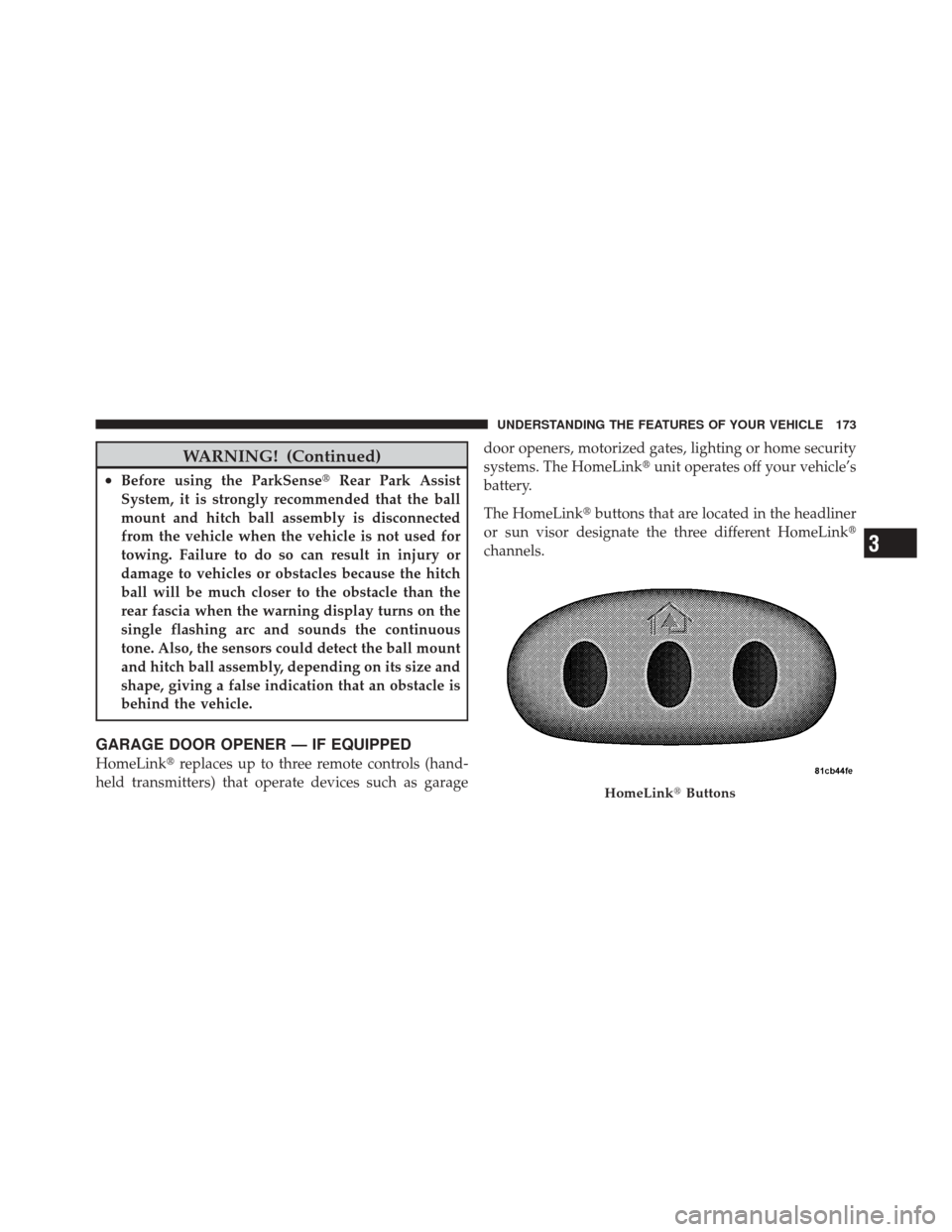
The HomeLink� buttons that are located in the headliner
or sun visor designate the three different HomeLink �
channels.
HomeLink� Buttons
3
UNDERSTANDING THE FEATURES OF YOUR VEHICLE 173
Page 204 of 522
UNDERSTANDING YOUR INSTRUMENT PANEL
CONTENTS
�Instrument Panel Features ............... 206
� Instrument Cluster .................... 207
� Instrument Cluster Descriptions ........... 208
� Electronic Vehicle Information Center (EVIC) —
If Equipped .......................... 223
▫ Electronic Vehicle Information Center (EVIC)
Displays ........................... 225
▫ Oil Change Required .................. 226
▫ Trip Functions ...................... 227 ▫
Compass Display / ECO (Fuel Saver Mode)
— If Equipped ...................... 229
▫ Personal Settings
(Customer-Programmable Features) ....... 231
� Sales Code REQ — AM/FM Stereo Radio
And 6–Disc CD/DVD Changer
(MP3/WMA AUX Jack) .................. 235
▫ Operating Instructions - Radio Mode ...... 236
▫ Operation Instructions - (Disc Mode For CD
And MP3/WMA Audio Play, DVD-Video) . . . 243
▫ Notes On Playing MP3/WMA Files ....... 245
4
Page 218 of 522

CAUTION!
Continuous driving with the Transmission Tempera-
ture Indicator illuminated will eventually cause se-
vere transmission damage or transmission failure.
WARNING!
In some circumstances a Transmission Temperature
Indicator, under continued operation, could cause the
fluid to boil over, come in contact with hot engine or
exhaust components and cause a fire.
25. Odometer / Trip Odometer / ECO (Fuel Saver
Indicator) Button
Changing the Display
Press this button to change the display from odometer to
either of the two trip odometer settings or the “ECO”
display. Trip A or Trip B will appear when in the trip odometer mode. On vehicles equipped with a Base
Cluster, press and release it once again to display the
outside temperature. On vehicles equipped with a Mid
Line Cluster, press and release it once again to display the
outside temperature and compass heading in the screen
below the speedometer. Refer to “Electronic Vehicle In-
formation Center (EVIC) — If Equipped” for details.
Resetting the Trip Odometer
Display the trip mileage that you want to reset, “Trip A”
or “Trip B.” Then push and hold the button (approxi-
mately two seconds) until the display resets to 0. The
odometer must be in Trip Mode to reset the trip odom-
eter.
26. 4WD Indicator — Vehicles Equipped with
Selec-Trac�
II
This light alerts the driver that the vehicle is in
the full-time four-wheel drive auto mode. In
this mode, the system operates with a normal
4
UNDERSTANDING YOUR INSTRUMENT PANEL 217
Page 219 of 522
torque split of 42% front axle and 58% rear axle. It can
redirect up to 100% of torque to the front or rear axle, if
necessary.
27. Odometer/Trip Odometer
The odometer shows the total distance the vehicle has
been driven. The trip odometer shows individual trip
mileage. Refer to “Trip Odometer button” for additional
information.
NOTE:U.S. Federal regulations require that upon trans-
fer of vehicle ownership, the seller certify to the pur-
chaser the correct mileage that the vehicle has been
driven. If your odometer needs to be repaired or serviced,
the repair technician should leave the odometer reading
the same as it was before the repair or service. If s/he
cannot do so, then the odometer must be set at zero, and
a sticker must be placed in the door jamb stating what the
mileage was before the repair or service. It is a good idea
for you to make a record of the odometer reading before the repair/service, so that you can be sure that it is
properly reset, or that the door jamb sticker is accurate if
the odometer must be reset at zero.
Vehicle Odometer Messages
When the appropriate conditions exist, the following
messages will display in the odometer:
ECO
...................... Fuel Saver Indicator
ECO-ON ................ Fuel Saver Indicator On
door ............................. Door Ajar
gATE ........................... Liftgate Ajar
gLASS ...................... Flipper Glass Ajar
LoW tirE ..................... LowTirePr essure
gASCAP ....................... Fuel Cap Fault
noFUSE .......................... Fuse Fault
CHAngE OIL ............... Oil Change Required
218 UNDERSTANDING YOUR INSTRUMENT PANEL
Page 220 of 522

On vehicles equipped with a Premium Instrument Clus-
ter, this display shows the Electronic Vehicle Information
Center (EVIC) messages when the appropriate conditions
exist. Refer to Electronic Vehicle Information Center
(EVIC) in this section for more information.
ECO / ECO-ON (Fuel Saver Indicator) — If Equipped
The ECO-ON indicator will illuminate when you are
driving in a fuel efficient manner and can be used to
modify driving habits in order to increase fuel economy.
The ECO display will toggle between ECO and ECO-ON
depending on driving habits and vehicle usage. Press the
Odometer / Trip Odometer / ECO (Fuel Saver Indicator)
button to change the display from odometer to either of
the two trip odometer settings or the “ECO” display.
LoW tirE
When the appropriate condition exists, the odometer
display will toggle between LoW and tirE for three
cycles.gASCAP Message
If the vehicle diagnostic system determines that the fuel
filler cap is loose, improperly installed, or damaged, the
words “gASCAP” will display in the odometer display
area. If this occurs, tighten the fuel filler cap properly and
press the odometer reset button to turn off the message.
If the problem continues, the message will appear the
next time the vehicle is started.
A loose, improperly installed, or damaged fuel filler cap
may also turn on the Malfunction Indicator Light (MIL).
noFUSE
If the vehicle diagnostic system determines that the
Ignition Off Draw (IOD) fuse is improperly installed, or
damaged, a “noFUSE” message will display in the odom-
eter display area. For more information on fuses and fuse
locations refer to “Fuses” in Section 7.
4
UNDERSTANDING YOUR INSTRUMENT PANEL 219
Page 221 of 522

CHAngE OIL Message (Base And Mid Line Clusters
Only)
Your vehicle is equipped with an engine oil change
indicator system. The “CHANgE OIL” message will flash
in the instrument cluster odometer for approximately
12 seconds after a single chime has sounded to indicate
the next scheduled oil change interval. The engine oil
change indicator system is duty cycle based, which
means the engine oil change interval may fluctuate
dependent upon your personal driving style.
Unless reset, this message will continue to display each
time you turn the ignition switch to the ON position. To
turn off the message temporarily, press and release the
Trip Odometer button on the instrument cluster. To reset
the oil change indicator system (after performing the
scheduled maintenance) perform the following proce-
dure:1. Turn the ignition switch to the ON position.
Do not
start the engine.
2. Fully depress the accelerator pedal slowly three
times within 10 seconds.
3. Turn the ignition switch to the LOCK position.
NOTE: If the indicator message illuminates when you
start the vehicle, the oil change indicator system did not
reset. If necessary, repeat this procedure.
28. Cruise Indicator — If Equipped This indicator lights when the electronic speed
control system is turned on.
29. Shift Lever Indicator
The Shift Lever Indicator is self-contained within the
instrument cluster. It displays the gear position of the
automatic transmission.
220 UNDERSTANDING YOUR INSTRUMENT PANEL
Page 224 of 522
turn on during starting, stays on, or turns on while
driving, have the system checked by an authorized
dealer.
34. Electronic Vehicle Information Center (EVIC) /
Compass Display — If Equipped
On vehicles equipped with a Premium Cluster, this
display shows the Electronic Vehicle Information Center
(EVIC) messages when the appropriate conditions exist.
Refer to “Electronic Vehicle Information Center (EVIC) —
If Equipped” in this Section for more information.
On vehicles equipped with a Mid Line Cluster, this
display shows the compass heading (N, S, E, W, NE, NW,
SE, and SW) and the outside temperature.
ELECTRONIC VEHICLE INFORMATION CENTER
(EVIC) — IF EQUIPPED
The Electronic Vehicle Information Center (EVIC) fea-
tures a driver-interactive display that is located in the
instrument cluster.This system conveniently allows the driver to select a
variety of useful information by pressing the switches
mounted on the steering wheel. The EVIC consists of the
following:•System Status
•Vehicle information warning message displays
Electronic Vehicle Information Center (EVIC)
4
UNDERSTANDING YOUR INSTRUMENT PANEL 223
Page 225 of 522
•Tire Pressure Monitor System (if equipped)
•Personal Settings (Customer-Programmable Features)
•Compass display
•Outside temperature display
•Trip computer functions
•Navigation system screens (if equipped)
•Audio mode display
The system allows the driver to select information by
pressing the following buttons mounted on the steering
wheel: Press and release the MENU button and the
mode displayed will change between Trip
Functions, Navigation (if equipped), System
Status, Personal Settings. Press the SCROLL button to scroll through Trip
Functions, Navigation (if equipped), System
Status Messages, and Personal Settings
(Customer-Programmable Features).
Press and release the COMPASS/
TEMPERATURE button to display one of eight
compass readings and the outside temperature.
Press the FUNCTION SELECT button to accept
a selection.
MENU
Button
SCROLL Button
FUNCTIONSELECT Button
224 UNDERSTANDING YOUR INSTRUMENT PANEL