Page 642 of 3039
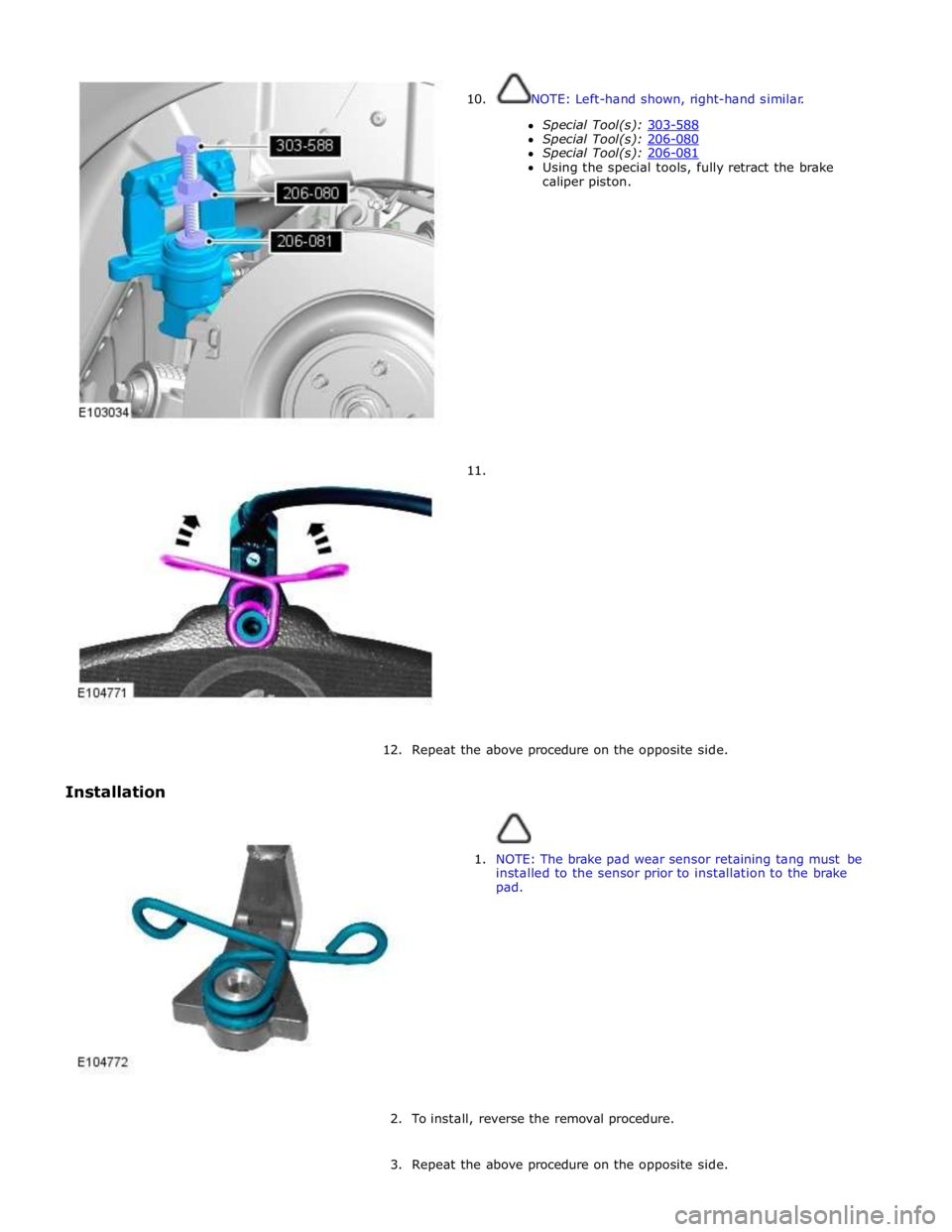
10.
11. NOTE: Left-hand shown, right-hand similar.
Special Tool(s): 303-588 Special Tool(s): 206-080 Special Tool(s): 206-081 Using the special tools, fully retract the brake
caliper piston.
12.
Repeat the above procedure on the opposite side.
Installation
1. NOTE: The brake pad wear sensor retaining tang must be
installed to the sensor prior to installation to the brake
pad.
2. To install, reverse the removal procedure.
3. Repeat the above procedure on the opposite side.
Page 657 of 3039
7. Connect the electrical connectors in the sequence shown.
8. Install the RH loadspace trim panel.
For additional information, refer to: Loadspace Trim Panel RH (501-05 Interior Trim and Ornamentation, Removal and Installation).
9. WARNING: Calibrate the electric park brake using Jaguar approved
diagnostic equipment. If Jaguar approved diagnostic equipment is not
available disconnect the battery for approximatly 30 seconds , the
vehicle will then prompt the driver to carry out the calibration procedure
as per the vehicle hand book on re-connection.
Calibrate the electric park brake.
Page 666 of 3039
7.
Installation
1. To install, reverse the removal procedure.
2. CAUTION: Make sure the wiring harness is correctly routed
to avoid contact with the halfshaft. Failure to follow this
instruction may result in damage to the component.
3. CAUTION: Calibrate the electric park brake using Jaguar approved
diagnostic system. If the Jaguar approved diagnostic system is not
available disconnect the battery for approximately 30 seconds, the
vehicle will then prompt the driver to carry out the calibration procedure
as per the vehicle hand book on re-connection.
Calibrate the electric parking brake (EPB) using the diagnostic tool.
Page 668 of 3039
Published: 11-May-2011
Hydraulic Brake Actuation - Hydraulic Brake Actuation - Component Location
Description and Operation
NOTE: RHD (right-hand drive) installation shown, LHD (left-hand drive) installation similar.
Component Location
Item Description 1 Brake master cylinder and fluid reservoir 2 Brake pedal 3 Brake pipes 4 Stoplamp switch 5 ABS (anti-lock brake system) module/ HCU (hydraulic control unit) 6 Brake booster
Page 673 of 3039
1 LH (left-hand) front brake 2 RH (right-hand) rear brake 3 LH rear brake 4 RH front brake 5 Primary circuit inlet port 6 Secondary circuit inlet port The ABS module is located in the passenger side, rear engine bay and incorporates the HCU. The HCU is a four channel unit that modulates the supply of hydraulic pressure to the brakes under control of the ABS module.
The primary and secondary outlets of the master cylinder are connected to the primary and secondary circuits within the HCU. The primary circuit in the HCU has separate outlet ports to the RH front and LH rear brakes. The secondary circuit in the HCU has separate outlet ports to the LH front and RH rear brakes.
Page 683 of 3039
Power Brake Actuation - Brake Booster - Component Location
Description and Operation
NOTE: RHD (right-hand drive) installation shown, LHD (left-hand drive) installation similar.
Component Location Published: 11-May-2011
Item Description 1 Output pushrod 2 Brake booster 3 Input pushrod 4 Vacuum pipe 5 Non return valve
Page 691 of 3039
Published: 02-Sep-2011
Anti-Lock Control - Stability Assist - Anti-Lock Control - Stability Assist - Component Location
Description and Operation
NOTE: RHD (right-hand drive) installation shown, LHD (left-hand drive) installation similar.
Component Location
Item Description 1 ABS (anti-lock brake system) module 2 RH (right-hand) front wheel speed sensor 3 Instrument cluster 4 Steering angle sensor 5 Yaw rate and lateral acceleration sensor 6 RH rear wheel speed sensor 7 LH (left-hand) rear wheel speed sensor 8 LH front wheel speed sensor
Page 708 of 3039

Published: 11-May-2011
Anti-Lock Control - Stability Assist - Hydraulic Control Unit (HCU)
Removal and Installation
Removal
All vehicles
1. Disconnect the battery ground cable.
For additional information, refer to: Battery Disconnect and Connect (414-01 Battery, Mounting and Cables, General Procedures).
Left-hand drive vehicles
2. Remove the secondary bulkhead RH panel.
For additional information, refer to: Secondary Bulkhead Panel RH - 3.0L NA V6 - AJ27 (501-02 Front End Body Panels, Removal and Installation).
Right-hand drive vehicles
3. Remove the secondary bulkhead LH panel.
For additional information, refer to: Secondary Bulkhead Panel LH - 3.0L NA V6 - AJ27 (501-02 Front End Body Panels, Removal and Installation).
All vehicles
4. WARNING: Do not work on or under a vehicle supported only by a
jack. Always support the vehicle on safety stands.
Raise and support the vehicle.
5. Connect brake bleed pipes and bottles to the left-hand front and the
left-hand rear brake caliper bleed nipples and loosen the brake caliper
bleed nipples.
6. NOTE: To prevent the loss of brake fluid, using the special tool
apply the brake pedal and set to 40mm ( 1.6 in ) below the rest
position.
Using the special tool, press and hold the brake pedal.
7. Remove the bleed pipes and bottles.
Tighten the left-hand front brake caliper bleed nipple. 1. For vehicles with supercharger: Tighten to 14Nm.
2. For vehicles without supercharger: Tighten to 8 Nm.
Tighten the left-hand rear brake caliper bleed nipple.
1. All vehicles: Tighten to 14 Nm.
Disconnect and remove the brake bleed pipes and bottles.
Install the bleed nipple dust caps. Brake pedal hold down tool
JDS9013 Special Tool(s)