2010 INFINITI M maintenance
[x] Cancel search: maintenancePage 91 of 445

orBrake warning
light
This light functions for both the parking brake
and the foot brake systems.
Parking brake indicator :
When the ignition switch is in the ON position,
the light comes on when the parking brake is
applied.
Low brake fluid warning light :
When the ignition switch is in the ON position,
the light warns of a low brake fluid level. If the
light comes on while the engine is running with
the parking brake not applied, stop the vehicle
and perform the following:
1. Check the brake fluid level. Add brakefluid as necessary. (See ªBRAKE FLUIDº in
the ª8. Maintenance and do-it-yourselfº
section.)
2. If the brake fluid level is correct, have the warning system checked by an INFINITI
retailer.
Anti-lock Braking System (ABS) warning indica-
tor :
When the parking brake is released and the
brake fluid level is sufficient, if both the brake
warning light and the Anti-lock Braking System (ABS) warning light illuminate, it may indicate
the ABS is not functioning properly. Have the
brake system checked, and if necessary re-
paired, by an INFINITI retailer promptly. (See
ªAnti-lock Braking System (ABS) warning lightº
earlier in this section.)
WARNING
c
Your brake system may not be working prop-
erly if the warning light is on. Driving could
be dangerous. If you judge it to be safe, drive
carefully to the nearest service station for
repairs. Otherwise, have your vehicle towed
because driving it could be dangerous.
c Pressing the brake pedal with the engine
stopped and/or low brake fluid level may
increase your stopping distance and braking
will require greater pedal effort as well as
pedal travel.
c If the brake fluid level is below the minimum
or MIN mark on the brake fluid reservoir, do
not drive until the brake system has been
checked at an INFINITI retailer.
Charge warning light
If the light comes on while the engine is run-
ning, it may indicate the charging system is not functioning properly. Turn the engine off and
check the alternator belt. If the belt is loose,
broken, missing or if the light remains on, see
an INFINITI retailer immediately.
CAUTION
Do not continue driving if the alternator belt is
loose, broken or missing.
Door open warning light
This light comes on when any of the doors are
not closed securely while the ignition switch is
in the ON position.
Engine oil pressure warning
light
This light warns of low engine oil pressure. If
the light flickers or comes on during normal
driving, pull off the road in a safe area, stop the
engine
immediately and call an INFINITI retailer
or other authorized repair shop.
The engine oil pressure warning light is not de-
signed to indicate a low oil level. Use the dip-
stick to check the oil level. (See ªENGINE OILº in
the ª8. Maintenance and do-it-yourselfº sec-
tion.)
2-14Instruments and controls
wÐ
Ð
05/14/09Ðpattie
X
Page 96 of 445

Intelligent Cruise Control
(ICC) system MAIN switch
indicator light (green; if so
equipped)
The light comes on when the Intelligent Cruise
Control (ICC) system MAIN switch is pushed.
The light goes out when the MAIN switch is
pushed again. While the MAIN switch indicator
light comes on, the ICC system is operational.
Lane Departure Prevention
(LDP) ON indicator light
(green; if so equipped)
The light comes on in green when the Lane
Departure Prevention (LDP) system is turned on.
The light turns off when the system is turned
off.
NOTE:
This light is common with the lane departure
warning light (orange). (See ªLane departure
warning lightº earlier in this section.)
For more details, see ªLANE DEPARTURE WARN-
ING (LDW) SYSTEM/LANE DEPARTURE PREVEN-
TION (LDP) SYSTEMº in the ª5. Starting and
drivingº section.
Malfunction Indicator Light
(MIL)
If the malfunction indicator light comes on
steady or blinks while the engine is running, it
may indicate a potential emission control mal-
function.
The malfunction indicator light may also come
on steady if the fuel-filler cap is loose or
missing, or if the vehicle runs out of fuel. Check
to make sure the fuel-filler cap is installed and
closed tightly, and that the vehicle has at least
3 US gallons (14 liters) of fuel in the fuel tank.
After a few driving trips, the
light should
turn off if no other potential emission control
system malfunction exists.
If this indicator light remains on for 20 seconds
and then blinks for 10 seconds when the engine
is not running, it indicates that the vehicle is
not ready for an emission control system
inspection/maintenance test. (See ªREADINESS
FOR INSPECTION/MAINTENANCE (I/M) TESTº in
the ª9. Technical and consumer informationº
section.)
Operation :
The malfunction indicator light will come on in
one of two ways: c
Malfunction indicator light on steady Ð An
emission control system malfunction has
been detected. Check the fuel-filler cap. If
the fuel-filler cap is loose or missing, tighten
or install the cap and continue to drive the
vehicle. The
light should turn off after
a few driving trips. If the
light does
not turn off after a few driving trips, have the
vehicle inspected by an INFINITI retailer. You
do not need to have your vehicle towed to
the retailer.
c Malfunction indicator light blinking Ð An
engine misfire has been detected which may
damage the emission control system.
To reduce or avoid emission control system
damage:
a) Do not drive at speeds above 45 MPH (72 km/h).
b) Avoid hard acceleration or deceleration.
c) Avoid steep uphill grades.
d) If possible, reduce the amount of cargo being hauled or towed.
The malfunction indicator light may stop
blinking and remain on.
Have the vehicle inspected by an INFINITI
retailer. You do not need to have your vehicle
towed to the retailer.
Instruments and controls2-19
wÐ
Ð
05/19/09Ðtbrooks
X
Page 101 of 445

10. Intelligent Key battery discharge
indicator
This indicator appears when the Intelligent Key
battery is running out of power.
If this indicator appears, replace the battery
with a new one. (See ªBATTERY REPLACEMENTº
in the ª8. Maintenance and do-it-yourselfº sec-
tion.)Your vehicle has two types of security systems,
as follows:
cVehicle security system
c INFINITI Vehicle Immobilizer System
The security condition will be shown by the
security indicator light.
VEHICLE SECURITY SYSTEM
The vehicle security system provides visual and
audio alarm signals if someone opens the
doors, hood, or trunk lid when the system is
armed. It is not, however, a motion detection
type system that activates when a vehicle is
moved or when a vibration occurs.
The system helps deter vehicle theft but cannot
prevent it, nor can it prevent the theft of interior
or exterior vehicle components in all situations.
Always secure your vehicle even if parking for a
brief period. Never leave your Intelligent Key(s)
in the vehicle, and always lock it when unat-
tended. Be aware of your surroundings, and
park in secure, well-lit areas whenever pos-
sible.
Many devices offering additional protection,
such as component locks, identification mark-
ers, and tracking systems, are available at auto
supply stores and specialty shops. Your INFINITI
retailer may also offer such equipment. Check
with your insurance company to see if you may
be eligible for discounts for various theft pro-
tection features.
SIC2132
SECURITY SYSTEMS
2-24Instruments and controls
wÐ
Ð
05/14/09Ðpattie
X
Page 138 of 445

cNever leave the Intelligent Key in the vehicle
when you leave the vehicle.
The Intelligent Key is always communicating
with the vehicle as it receives radio waves. The
Intelligent Key system transmits weak radio
waves. Environmental conditions may interfere
with the operation of the Intelligent Key system
under the following operating conditions.
c When operating near a location where strong
radio waves are transmitted, such as a TV
tower, power station and broadcasting sta-
tion.
c When in possession of wireless equipment,
such as a cellular telephone, transceiver,
and CB radio.
c When the Intelligent Key is in contact with or
covered by metallic materials.
c When any type of radio wave remote control
is used nearby.
c When the Intelligent Key is placed near an
electric appliance such as a personal com-
puter.
c When the vehicle is parked near a parking
meter. In such cases, correct the operating conditions
before using the Intelligent Key function or use
the mechanical key.
Although the life of the battery varies depend-
ing on the operating conditions, the battery's
life is approximately 2 years. If the battery is
discharged, replace it with a new one.
Since the Intelligent Key is continuously receiv-
ing radio waves, if the key is left near equip-
ment which transmits strong radio waves, such
as signals from a TV and personal computer, the
battery life may become shorter.
For information regarding replacement of a
battery, see ªBATTERY REPLACEMENTº in the
ª8. Maintenance and do-it-yourselfº section.
Because the steering wheel is locked electri-
cally, unlocking the steering wheel with the
ignition switch in the LOCK position is impos-
sible when the vehicle battery is completely
discharged. Pay special attention that the ve-
hicle battery is not completely discharged.
As many as 4 Intelligent Keys can be registered
and used with one vehicle. For information
about the purchase and use of additional Intel-
ligent Keys, contact an INFINITI retailer.CAUTION
c
Do not allow the Intelligent Key, which con-
tains electrical components, to come into
contact with water or salt water. This could
affect the system function.
c Do not drop the Intelligent Key.
c Do not strike the Intelligent Key sharply
against another object.
c Do not change or modify the Intelligent Key.
c Wetting may damage the Intelligent Key. If
the Intelligent Key gets wet, immediately
wipe until it is completely dry.
c Do not place the Intelligent Key for an ex-
tended period in an area where tempera-
tures exceed 140ÉF (60ÉC).
c Do not attach the Intelligent Key with a key
holder that contains a magnet.
c Do not place the Intelligent Key near equip-
ment that produces a magnetic field, such as
a TV, audio equipment, personal computers
or cellular phones.
Pre-driving checks and adjustments3-7
wÐ
Ð
05/19/09Ðtbrooks
X
Page 163 of 445

FM-AM-SAT radio with Compact Disc (CD)
player/changer................................ 4-43
CompactFlash (CF) player operation
(if so equipped) ............................... 4-47
iPodT player operation (if so equipped) .........4-48
Music box hard-disk drive audio system
(models with navigation system) ................4-50
CD/CF (CompactFlash) care and cleaning ........4-57
Steering-wheel-mounted controls for audio ......4-58
Rear control switches for audio
(if so equipped) ............................... 4-60
Antenna ...................................... 4-61
Auxiliary input jacks ........................... 4-61
INFINITI Mobile Entertainment System (MES)
(if so equipped) .................................. 4-62
Digital Versatile Disc (DVD) system
components .................................. 4-62
Before operating the DVD mobile
entertainment system .......................... 4-66
Playing a DVD ................................. 4-68
Care and maintenance ......................... 4-72
Car phone or CB radio ............................ 4-73BluetoothT
Hands-Free Phone System with
navigation system ................................ 4-74
Regulatory information ......................... 4-75
Voice commands .............................. 4-76
Control buttons ............................... 4-76
Pairing procedure ............................. 4-76
Phonebook registration ........................ 4-77
Making a call ................................. 4-79
Receiving a call ............................... 4-80
During a call .................................. 4-80
Phone setting ................................. 4-81
Troubleshooting guide ......................... 4-83
BluetoothT Hands-Free Phone System without
navigation system ................................ 4-84
Regulatory information ......................... 4-85
Initialization .................................. 4-85
Operating tips ................................ 4-85
Giving voice commands ........................ 4-86
Control buttons ............................... 4-87
Getting started ................................ 4-87
Choosing a language .......................... 4-87
wÐ
Ð
05/19/09Ðtbrooks
X
Page 168 of 445

Adjusting an item :
Touch the +
s1or2s2button to adjust the
settings.
Touch the UP
s3orDOWNs4button to move to
the previous or next page. Inputting characters :
Touch the letter or number
s1.
There are some options available when input-
ting characters.
c Uppercase:
Shows uppercase characters.
c Lowercase:
Shows lowercase characters.
c Space:
Inserts a space.
c Symbols:
Shows symbols such as the question mark
(?). c
Delete:
Deletes the last character that has been
input with one touch. Push and hold the
button to delete all of the characters.
c OK:
Completes character inputs.
Touch screen maintenance
If you clean the display screen, use a dry, soft
cloth. If additional cleaning is necessary, use a
small amount of neutral detergent with a soft
cloth. Never spray the screen with water or
detergent. Dampen the cloth first, and then
wipe the screen.
SAA1543SAA1617
Monitor, climate, audio, phone and voice recognition systems4-5
wÐ
Ð
05/14/09Ðpattie
X
Page 174 of 445
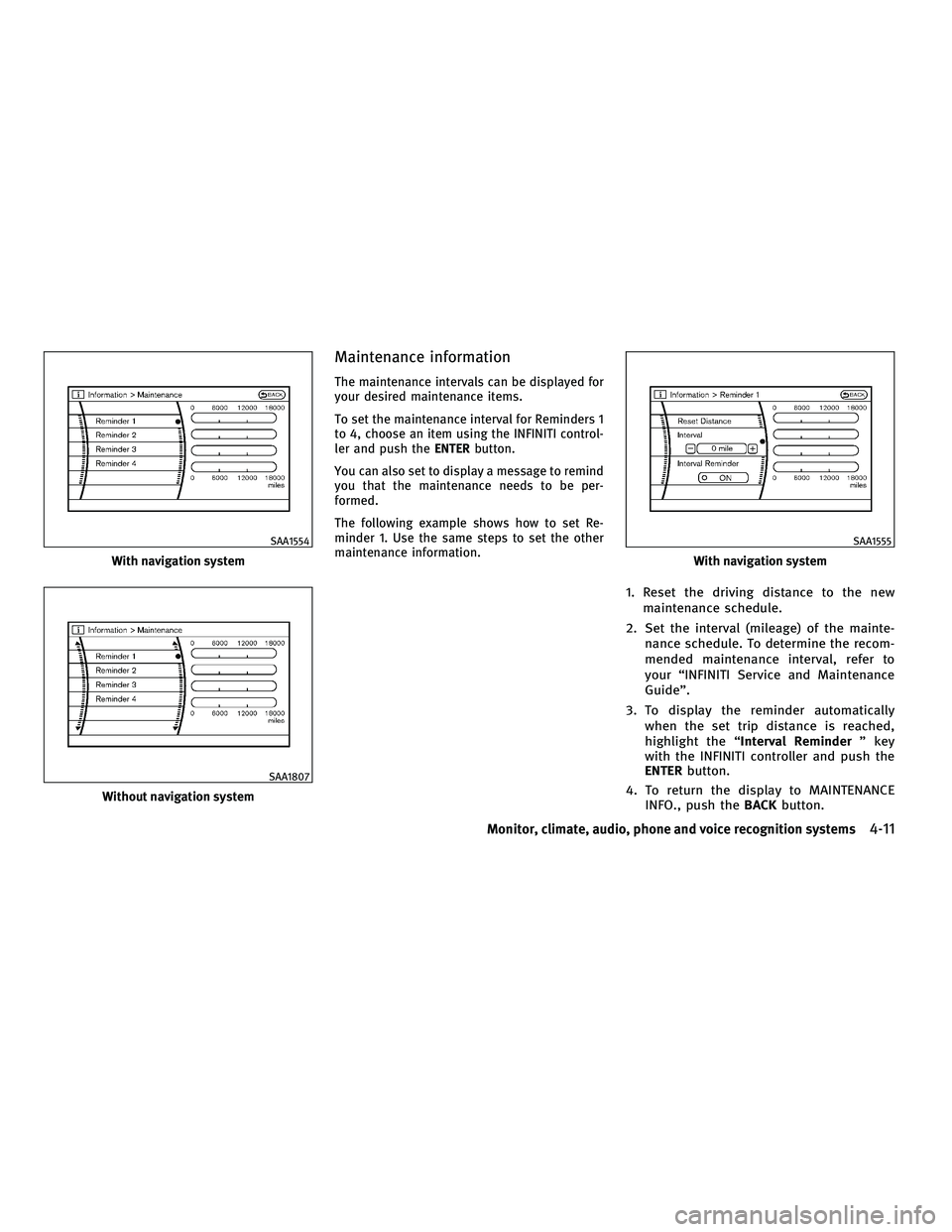
Maintenance information
The maintenance intervals can be displayed for
your desired maintenance items.
To set the maintenance interval for Reminders 1
to 4, choose an item using the INFINITI control-
ler and push theENTERbutton.
You can also set to display a message to remind
you that the maintenance needs to be per-
formed.
The following example shows how to set Re-
minder 1. Use the same steps to set the other
maintenance information.
1. Reset the driving distance to the new maintenance schedule.
2. Set the interval (mileage) of the mainte- nance schedule. To determine the recom-
mended maintenance interval, refer to
your ªINFINITI Service and Maintenance
Guideº.
3. To display the reminder automatically when the set trip distance is reached,
highlight the ª Interval Reminder º key
with the INFINITI controller and push the
ENTER button.
4. To return the display to MAINTENANCE INFO., push the BACKbutton.
With navigation system
SAA1554
Without navigation system
SAA1807
With navigation system
SAA1555
Monitor, climate, audio, phone and voice recognition systems4-11
wÐ
Ð
05/14/09Ðpattie
X
Page 175 of 445

Maintenance information display cannot be op-
erated when the vehicle is moving. Stop the
vehicle in a safe place to see the information.
The unit can be converted between ªUSº and
ªMetricº. (See ªHOW TO USE SETTING BUTTONº
later in this section.)The Reminder will be automatically displayed as
shown when both of the following conditions
are met:
cthe vehicle is driven the set distance and the
ignition switch is pushed to the LOCK posi-
tion.
c the ignition switch is pushed to the ACC or
ON position the next time you drive the
vehicle after the set value has been reached.
To return to the previous display after the
maintenance reminder screen is displayed,
push the BACKbutton. The maintenance reminder screen is displayed
each time the ignition switch is pushed to the
ON position unless one of the following opera-
tions is performed:
c
ªReset Distanceº is selected.
c ªInterval Reminderº is set to OFF.
c the maintenance interval is set again.
SAA1611
4-12Monitor, climate, audio, phone and voice recognition systems
wÐ
Ð
05/14/09Ðpattie
X