Page 71 of 284

1
FEATURES OF YOUR HYUNDAI
59
1. Tachometer
2. Turn Signal Indicator Lights
3. Low Oil Pressure Warning Light
4. Automatic Transaxle Position Indicator Light (If Installed)
5. Odometer/Trip Odometer
6. SRS (Airbag) Warning Light (If Installed)
7. Malfunction Indicator Light (MIL) (If Installed)
8. Speedometer
9. Fuel Filter Warning Light (Diesel only)
10. Diesel Pre-heat Indicator Light (Diesel only)
11. Passenger's Front Airbag OFF Indicator Light (If Installed)
12. Over Speed Warning Light (If Installed)
13. Door Ajar Warning Light 14. Charging System Warning Light
15. Parking Brake/Low Brake Fluid Level Warning Light
16. Seat Belt Warning Light
17. High Beam Indicator Light
18. Fuel Gauge
19. Engine Coolant Temperature Warning Light
20. Overdrive Off Indicator Light (Automatic Transaxle only)
21. Low Fuel Warning Light
22. Immobilizer Warning Light (If Installed)
23. Trunk Lid/Tail Gate Open Warning Light
24. Electronic Power Steering Warning Light (If Installed)
25. ABS Service Reminder Indicator Light (If Installed)
26. Electronic Stability Program (ESP) Indicator Lights
(If Installed)
Page 79 of 284

1
FEATURES OF YOUR HYUNDAI
67
B265C01NF-GAT
Electronic Stability Program Indicator Lights(If Installed)
The electronic stability program indica- tors change operation according to the ignition switch position and whether thesystem is in operation or not. They will illuminate when the ignition key is turned to the "ON" position, butshould go out after three seconds. If the ESP or ESP-OFF indicator stays on, take your car to your authorized Hyundaidealer and have the system checked. See section 2 for more information about the ESP.B260U01TB-GAT Immobilizer Warning Light (If Installed)
This indicator light comes on for some seconds after the ignition key is turnedto the "ON" position. At this time, you can start the engine. The light goes out after the engine is running. In case thislight goes out before you start the en- gine, you must turn to the "LOCK" position and restart the engine. In casethis light blinks for five seconds when the ignition key is turned to "ON" posi- tion, this indicates that the immobilizersystem is out of order. At this time, refer to the explanation of the Limp home procedure(See page 1-7) or con-sult to the Hyundai dealer.B260T01TB-GAT Electronic Power Steering (EPS) SystemWarning Light(If Installed)
This indicator light comes on about 4 seconds after the ignition key is turned to the "ON" position or after the engineis started, it will go out. This light also comes on when the EPS has some troubles. If it comes on whiledriving, have your vehicle inspected by an authorized Hyundai Dealer. NOTE: When you move the electronic power steering back-end and forth-end con- tinuously in stop position, steering wheel plays heavily to operate anti-overload system. It is normal condi- tion. It returns to be normal getting time.
Page 88 of 284

1FEATURES OF YOUR HYUNDAI
76
Parking Light Auto Cut
o The purpose of this feature is toprevent the battery from being dis- charged. The system automatically turns off the headlights and parking lights whenthe driver removes the ignition key and opens the driver- side door.
o With this feature, the parking light will be turned off automatically if thedriver parks on the side of road at night.If necessary, to keep the lights on when the ignition key is removed, perform the following :
1) Open the driver-side door.
2) Turn the parking lights OFF and ON again using the light switch on the steering column.
B340C04FC-GAT Headlight Switch
To operate the headlights, turn the bar- rel on the end of the multi-function switch. The first position turns on theparking lights, sidelights, tail lights and instrument panel lights. The second position turns on the headlights. NOTE: The ignition must be in the "ON" position to turn on the headlights.
OMC049601
B340B01A-AAT Lane Change Signal To indicate a lane change, move the lever up or down to a point where it begins flashing.The lever will automatically return to the center position when released.OMC049600
Page 91 of 284
1
FEATURES OF YOUR HYUNDAI
79
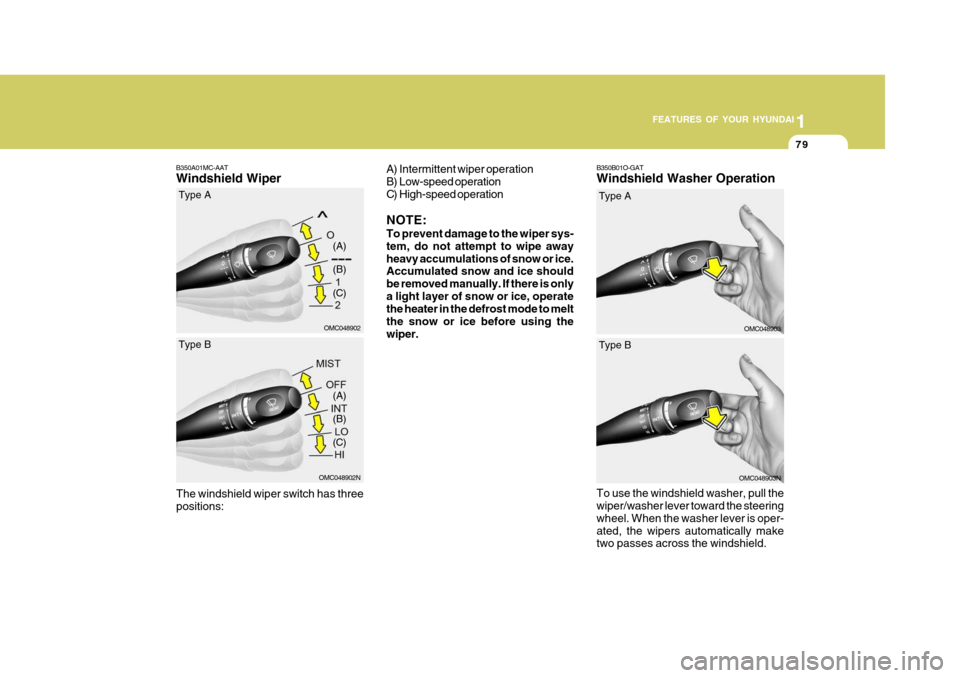
B350B01O-GAT Windshield Washer Operation
B350A01MC-AATWindshield Wiper
The windshield wiper switch has three positions:
OMC048902 (A) (B) (C)
Type A
OMC048902N
(A) (B) (C)
Type B
OMC048903
Type A
A) Intermittent wiper operation
B) Low-speed operation
C) High-speed operation NOTE: To prevent damage to the wiper sys- tem, do not attempt to wipe awayheavy accumulations of snow or ice. Accumulated snow and ice should be removed manually. If there is onlya light layer of snow or ice, operate the heater in the defrost mode to melt the snow or ice before using thewiper.
OMC048903N
Type B
To use the windshield washer, pull the wiper/washer lever toward the steering wheel. When the washer lever is oper-ated, the wipers automatically make two passes across the windshield.
Page 115 of 284

1
FEATURES OF YOUR HYUNDAI
103STEERING WHEEL
B580C01JM-AAT Sun Visor Extender (If Installed)
Your vehicle is equipped with sun visor extenders that may be used when the visor is in the side glass position.
B580C01MC
B500B01B-GAT Illuminated Vanity Mirror (If Installed) Opening the lid of the vanity mirror will automatically turn on the mirror light. OMC025100 Electronic Power Steering (If Installed) Power steering uses the motor to assist you in steering the vehicle. If the engineis off or if the power steering system becomes inoperative, the vehicle may still be steered, but it will require in-creased steering effort. The motor driven power steering is controlled by power steering controlunit which sense the steering wheel torque, steering wheel position and ve- hicle speed to command the motor.The steering wheel becomes heavier as the vehicle’s speed increases and becomes lighter as the vehicle’s speeddecreases for the better control of the steering wheel. Should you notice any change in theeffort required to steer during normal vehicle operation, have the power steer- ing checked by an authorized Hyundaidealer.
Page 116 of 284

1FEATURES OF YOUR HYUNDAI
104HORN
B610B01L-GAT
Press the pad on the steering wheel to sound the horn.
OMC025046
!
STEERING WHEEL TILT LEVER
B600A01A-AAT To Adjust the Steering Wheel:
1. Push the lever downward to unlock.
2. Raise or lower the steering wheel to
the desired position.
3. After adjustment, securely tighten the lever by pulling it upward.
WARNING:
Do not attempt to adjust the steering wheel while driving as this may re-sult in loss of control of the vehicle which may cause serious injury or death.
OMC025045
NOTE: The following symptoms may occur during normal vehicle operation:
o The EPS warning light does not
illuminate.
o The steering wheel becomes
heavier after turning the ignitionswitch on. This happens as the system performs the EPS system diagnostics. When the diagnos-tics is completed, the steering wheel will return to its normal condition.
o Click noise may be heard from the EPS relay after the ignition switchis turned to the ON or LOCK posi-tion.
o Motor noise may be heard when
the vehicle is at a stop or at a lowdriving speed.
o The steering effort can suddenly
increase, if the operation of EPSsystem is stopped to prevent seri- ous accidents when the malfunc- tion of EPS system is detected byself-diagnosis.
Page 166 of 284
2 DRIVING YOUR HYUNDAI
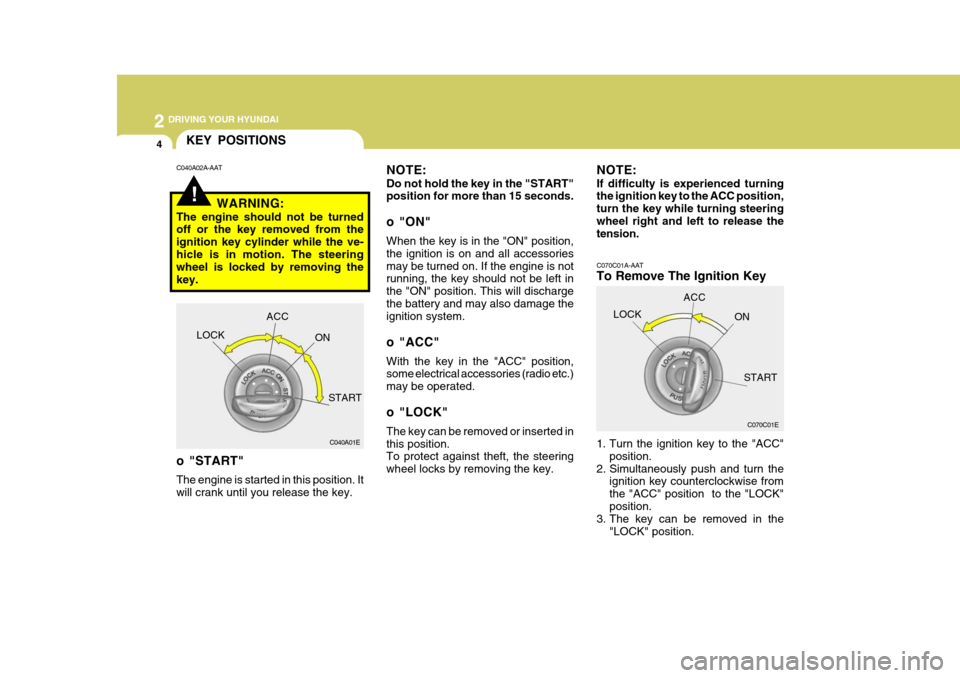
4
C070C01A-AAT
To Remove The Ignition Key
1. Turn the ignition key to the "ACC"position.
2. Simultaneously push and turn the ignition key counterclockwise from the "ACC" position to the "LOCK"position.
3. The key can be removed in the
"LOCK" position.
C070C01E
LOCK
ACC
ON
START
!
KEY POSITIONS
C040A01E
LOCK
ACC
ON
START
o "START" The engine is started in this position. It will crank until you release the key.
C040A02A-AAT
NOTE: Do not hold the key in the "START" position for more than 15 seconds.
o "ON" When the key is in the "ON" position, the ignition is on and all accessoriesmay be turned on. If the engine is not running, the key should not be left in the "ON" position. This will dischargethe battery and may also damage the ignition system.
o "ACC" With the key in the "ACC" position, some electrical accessories (radio etc.) may be operated.
o "LOCK" The key can be removed or inserted in this position. To protect against theft, the steering wheel locks by removing the key.
WARNING:
The engine should not be turned off or the key removed from the ignition key cylinder while the ve-hicle is in motion. The steering wheel is locked by removing the key. NOTE: If difficulty is experienced turning the ignition key to the ACC position, turn the key while turning steeringwheel right and left to release the tension.
Page 171 of 284

2
DRIVING YOUR HYUNDAI
9
2
DRIVING YOUR HYUNDAI
9
!
cially careful when braking, acceler- ating or shifting gears. On a slipperysurface, an abrupt change in ve- hicle speed can cause the drive wheels to lose traction and the ve-hicle to go out of control.
WARNING:
o Avoid high cornering speeds.
o Do not make quick steering wheel movements, such as sharp lanechanges or fast, sharp turns.
o Always wear your seat belts. In a collis ion crash, an unbelted person
is significantly more likely to diethan a person wearing a seatbelt.
o The risk of rollover is greatly in-
creased if you lose control ofyour vehicle at highway speeds.
o Loss of control often occurs if
two or more wheels drop off theroadway and the driver oversteers to reenter the roadway.
o In the event your vehicle leaves the roadway, do not steer sharply.Instead, slow down before pull- ing back into the travel lanes.
o Never exceed posted speed lim- its.
AUTOMATIC TRANSAXLE
OMC035014
C090A01A-GAT The highly efficient Hyundai automatic transaxle has four forward speeds and one reverse speed. It has a conven- tional shift pattern as shown in theillustration.
CAUTION:
Never shift into "R" or "P" positionwhile the vehicle is moving. NOTE:
Depress the brake pedal and push the button when shift- ing. Push the button when shifting. The selector lever can be shifted freely.
For optimum fuel economy, acceler-ate gradually. The transaxle will auto- matically shift to the second, third andoverdrive gears.
!