Page 325 of 526

�·�µ
The HomeLink
Universal
Transceiver built into your vehicle
canbeprogrammedtooperateupto
three remote controlled devices
around your home, such as garage
doors, lighting, or home security
systems.
Bef ore programming your
HomeLink to operate a garage door
opener, conf irm that the opener has
an external entrapment protection
system, such as an ‘‘electronic eye,’’
or other saf ety and reverse stop
f eatures.
If your garage door was
manuf actured bef ore April 1, 1982,
you may not be able to program
HomeLink to operate it. These units
do not have safety features that
cause the motor to stop and reverse
it if an obstacle is detected during
closing, increasing the risk of injury. Do not use HomeLink with any
garage door opener that lacks saf ety
stop and reverse f eatures.
Units manuf actured between April 1,
1982 and January 1, 1993 may be
equipped with saf ety stop and
reverse f eatures. If your unit does
not have an external entrapment
protection system, an easy test to
conf irm the f unction and
perf ormance of the saf ety stop and
reverse f eature is to lay a 2 4
under the closing door. The door
should stop and reverse upon
contacting the piece of wood.
As an additional safety feature,
garage door openers manuf actured
af ter January 1, 1993 are required to
have external entrapment protection
systems, such as an electronic eye,
which detect an object obstructing
the door.
Refer to the safety information thatcame with your garage door opener
to test that the safety features are
f unctioning properly. If you do not
have this information, contact the
manuf acturer of the equipment.
Bef ore programming HomeLink to a
garage door or gate opener, make
sure that people and objects are out
of thewayof thedevicetoprevent
potential injury or damage.
When programming a garage door
opener, park just outside the garage.
If you just
received your vehicle and have not
trained any of the buttons in
HomeLink bef ore, you should erase
any previously learned codes bef ore
training the first button. To do this,
press and hold the two outside
buttons on the HomeLink
transceiver for about 20 seconds,
until the red indicator f lashes.
Release the buttons, then proceed to
step 1.
On EX, EX-L and Touring models
HomeL inkUniversal Transceiver
General Inf ormation
Important Saf ety PrecautionsT raining HomeL ink
Bef ore you begin
322
�����—�����—�
���y�
������
������y���
�(�����������y���������y
2010 Odyssey
Page 331 of 526
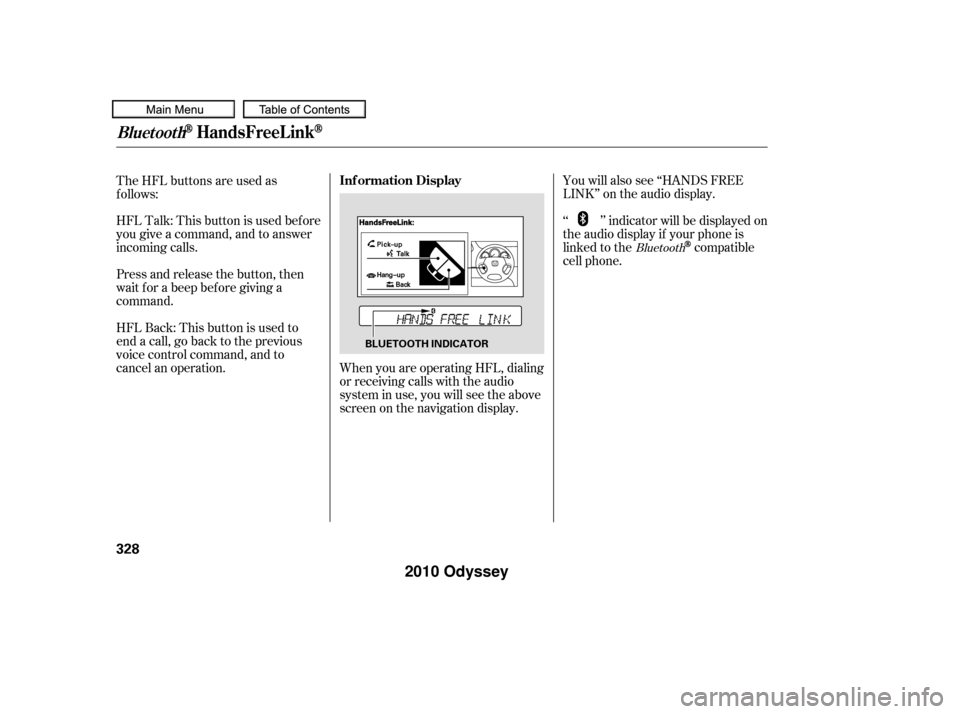
When you are operating HFL, dialing
or receiving calls with the audio
system in use, you will see the above
screen on the navigation display.You will also see ‘‘HANDS FREE
LINK’’ on the audio display.
‘‘ ’’ indicator will be displayed on
the audio display if your phone is
linked to the
compatible
cell phone.
HFLTalk:Thisbuttonisusedbefore
you give a command, and to answer
incoming calls.
HFLBack:Thisbuttonisusedto
end a call, go back to the previous
voice control command, and to
cancel an operation. The HFL buttons are used as
f ollows:
Press and release the button, then
wait f or a beep bef ore giving a
command.Bluetooth
BluetoothHandsFreeL ink
Inf ormation Display
328
BLUETOOTH INDICATOR
�����—�����—�
���y�
�������������y���
�(�����������y���������y
2010 Odyssey
Page 364 of 526

All obstacles may not always be
sensed. Even when the system is on,
you should look f or obstacles near
yourvehicletomakesureitissafeto
park.
Your vehicle has a parking sensor
system. The system lets you know
theapproximatedistancebetween
your vehicle and most obstacles
while you are parking. When the
system is on and your vehicle is
nearinganobstacle,youwillheara
beeper and see system messages on
the multi-information display.
To activate the system, push the
switch on the dashboard with the
ignition in the ON (II) position. The
indicator in the switch comes on
when the system is on. To turn the
system of f , push the switch again.The system has two front corner
sensors, two rear corner sensors,
and a rear center sensor.
The rear center sensors work when
the shif t lever is in reverse (R), and
the vehicle speed is less than 5 mph
(8 km/h).
The corner sensors work only when
the shif t lever is in any position other
than P and the vehicle speed is less
than 5 mph (8 km/h).
On Touring models
Parking Sensor System
Features
361
PARKING SENSOR SYSTEM SWITCH
�����—�����—�
���y�
�������������y���
�(�����������y���������y
2010 Odyssey
Page 365 of 526
Example shown: Obstacle is at the lef t f ront of the vehicle
When you turn the system on, all
indicators will appear on the multi-
inf ormation display, and a beeper
sounds once.
When the system senses an obstacle,
the appropriate indicator comes on,
and a beeper sounds as shown in the
f ollowing tables. Distance
BeeperAbout 16-20 in
(40-50 cm)
About 12-16 in
(30-40 cm)
Upper lef t
indicator stays on
Short beeps Continuous
beep
Very short beeps About 12 in
(30 cm) or less
Upper lef t
indicator stays on Upper lef t
indicator stays on
Indicator
Corner Sensor Operat ionMulti-Inf ormation Display
Messages and Beeper Operation
Parking Sensor System
362
�����—�����—�
���y�
���������
���y���
�(�����������y���������y
2010 Odyssey
Page 366 of 526
If the system develops a problem,
you will see a ‘‘CHECK PARKING
SENSOR SYSTEM’’ message on the
multi-inf ormation display, and a
beeper sounds continuously. Very
of ten, a sensor covered with mud, ice,
snow,etc.isthecauseof this
message. Check the sensors f irst. If
the message stays on or the beeper
does not stop, have the system
checked by your dealer.
Distance
Beeper Short beeps
Continuous
beeps
Very short beeps
Bottom
indicator stays on About 40-70 in
(1-1.8 m)
About 24-40 in
(0.6-1 m)
About 24 in
(0.6 m) or less
Bottom
indicator stays on Bottom
indicator stays on
Indicator
CONT INUED
Rear Cent er Sensor Operat ion
Parking Sensor System
Features
363
�����—�����—�����y�
�������������y���
�(�����������y���������y
2010 Odyssey
Page 371 of 526

Help assure your vehicle’s f uture
reliability and perf ormance by paying
extra attention to how you drive
during the f irst 600 miles (1,000 km).
During this period:Avoid full-throttle starts and rapid
acceleration.
Avoidhardbrakingforthefirst
200 miles (300 km).
Do not change the oil until the
scheduled maintenance time.
You should also f ollow these
recommendations with an
overhauled or exchanged engine, or
when the brakes are replaced. Do not tow a trailer.
In addition, in order to maintain good
perf ormance, f uel economy, and
emissions control, we strongly
recommend, in areas where it is
available, the use of gasoline that
does NOT contain manganese-based
f uel additives such as MMT. Your vehicle is designed to operate
on unleaded gasoline with a pump
octane number of 87 or higher. Use
of a lower octane gasoline can cause
a persistent, heavy, metallic rapping
noise that can lead to engine damage.
We recommend using quality
gasolines containing detergent
additives that help prevent fuel
system and engine deposits.
Use of gasoline with these additives
may adversely af f ect perf ormance,
and cause the Malfunction Indicator
Lamp on your instrument panel to
come on. If this happens, contact your dealer f or service.
Some gasoline today is blended with
oxygenates such as ethanol or
MTBE. Your vehicle is designed to
operate on oxygenated gasoline
containing up to 10% ethanol by
volume and up to 15% MTBE by
volume. Do not use gasoline
containing methanol.
If you notice any undesirable
operating symptoms, try another
service station or switch to another
brand of gasoline.
For f urther important f uel-related
inf ormation f or your vehicle, or
inf ormation on gasoline that does not
contain MMT, contact your dealer or
visit Owner Link at
. In Canada, visit
f or inf ormation about Top Tier
gasoline.
www.hondacars.
com www.honda.ca
Break-in Period Fuel Recommendation
Break-in Period, Fuel Recommendation
368
�����—�����—�
���y�
�����������
�y���
�(�����������y���������y
2010 Odyssey
Page 387 of 526
Youshoulddothefollowingchecks
and adjustments bef ore you drive
your vehicle.Make sure all windows, mirrors,
and outside lights are clean and
unobstructed. Remove f rost, snow,
or ice.
Check that the hood is f ully closed.
Check that any items you may be
carrying are stored properly or
f astened down securely. Check the seat adjustment (see
page ).
Check the adjustment of the
inside and outside mirrors (see
page ).
Check the steering wheel
adjustment (see page ).
Make sure the doors and the
tailgate are securely closed and
locked.
Visually check the tires. If a tire
looks low, use a gauge to check its
pressure (see page ). Fasten your seat belt. Check that
your passengers have f astened
their seat belts (see page ).
When you start the engine, check
the gauges and indicators in the
instrument panel, and the
messages on the inf ormation
display or multi-inf ormation
display (depending on models)
(seepages,,,and
).
3. 2.
1.
4. 5.
6.
7.
8. 9.
10. 15
65 66 77
87
169
190 141
451
Preparing to Drive
384
�����—�����—�
���y�
������
������y���
�(�����������y���������y
2010 Odyssey
Page 389 of 526
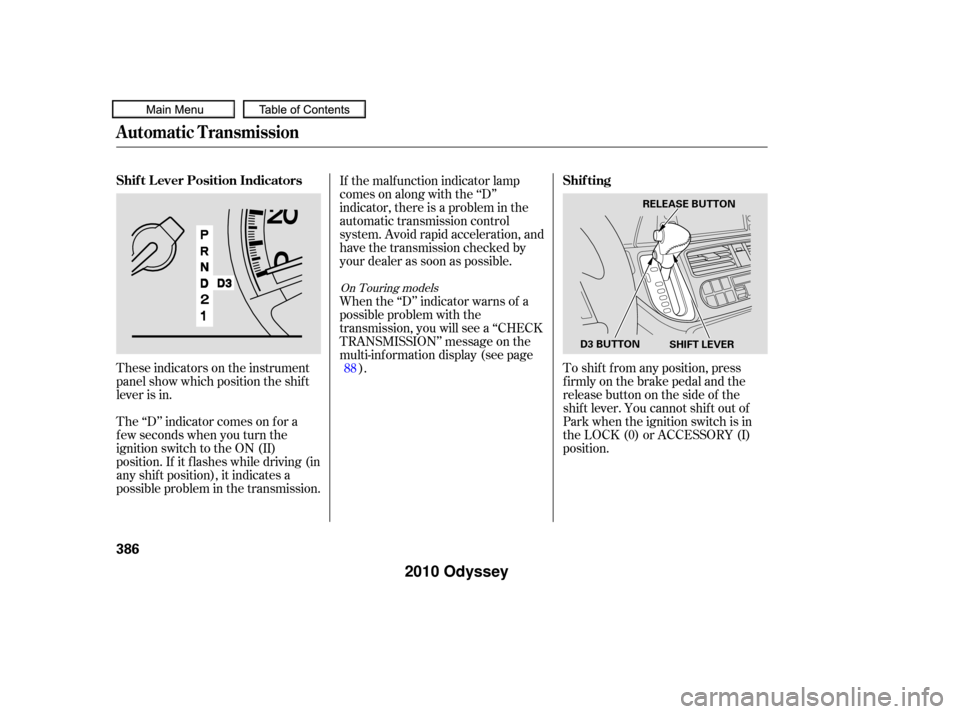
These indicators on the instrument
panel show which position the shif t
lever is in.
The ‘‘D’’ indicator comes on f or a
f ew seconds when you turn the
ignition switch to the ON (II)
position. If it f lashes while driving (in
any shif t position), it indicates a
possible problem in the transmission.If the malf unction indicator lamp
comes on along with the ‘‘D’’
indicator, there is a problem in the
automatic transmission control
system. Avoid rapid acceleration, and
have the transmission checked by
your dealer as soon as possible.
To shif t f rom any position, press
f irmly on the brake pedal and the
release button on the side of the
shiftlever.Youcannotshiftoutof
Park when the ignition switch is in
the LOCK (0) or ACCESSORY (I)
position.
When the ‘‘D’’ indicator warns of a
possible problem with the
transmission, you will see a ‘‘CHECK
TRANSMISSION’’ message on the
multi-inf ormation display (see page
).
88
On Touring models
Automatic Transmission
Shif t L ever Position Indicators Shif ting
386
SHIFT LEVER
RELEASE BUTTON
D3 BUTTON
�����—�����—�
���y�
������
������y���
�(�����������y�������
�y
2010 Odyssey