2010 HONDA ODYSSEY change
[x] Cancel search: changePage 50 of 155
50Navigation System
Viewing the Routes
Touching View Routes on the
Calculate route to screen allows you to
scroll through and view the various
routes (Direct, Easy, Maximize
Freeways, etc.) to your destination. If
you select View Routes , the display
changes to:
NOTE:
The selected route method is shown at the top of the screen.
It may take several minutes (the system displays an hourglass while it
is calculating) to show all route
methods, and it is not unusual for the
different methods to pick the same
route. Voice commands cannot be
used while the system is calculating. If the trip is greater than 100 miles,
then “Minimize Freeways” and
“Minimize Toll Roads” may be
grayed out. This is normal.
Zoom IN/OUT to view route details is not available on this screen. After you
choose a route method, you can then
zoom in or out on the map screen to
view your route in details.
Say or select Summary to display the
distance and time to go for each route.
Based on the route data, you can change
the routing by using the Next and Prev.
buttons. Once you confirm your
selection, say or select OK on the
screen.
NOTE:
Distances and times shown for each
method in the Summary are
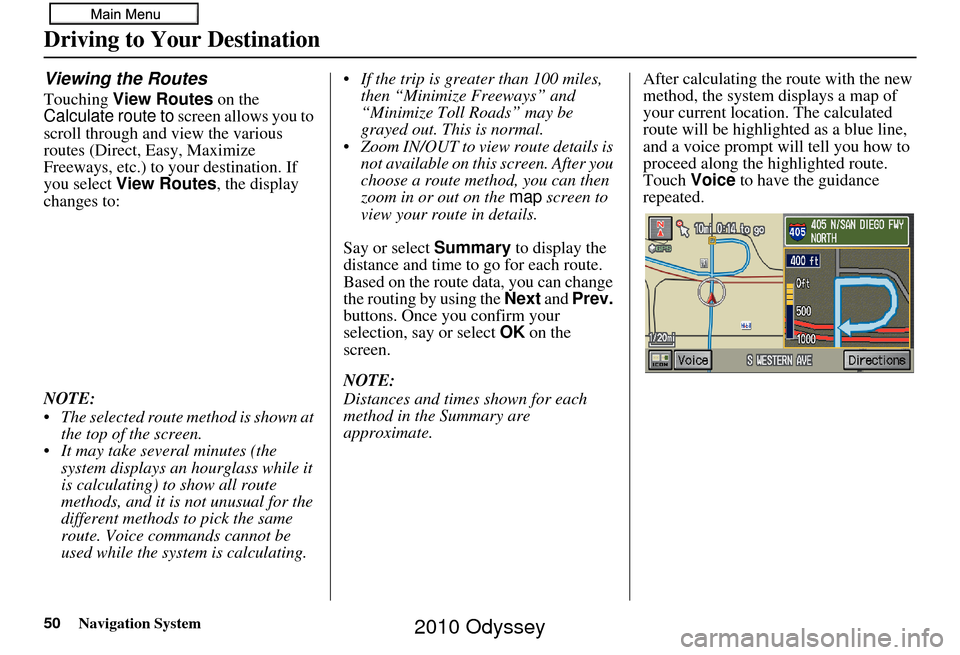
approximate. After calculating the route with the new
method, the system displays a map of
your current locatio
n. The calculated
route will be highlighted as a blue line,
and a voice prompt will tell you how to
proceed along the highlighted route.
Touch Voice to have the guidance
repeated.
Driving to Your Destination
2010 Odyssey
Page 51 of 155
Navigation System51
Driving to Your Destination
Viewing the Destination Map
Touching View Dest. Map displays a
map of the destination vicinity. Press the
CANCEL or NAVI BACK button to
return. You can view the destination
map anytime while en route by saying,
“Display destination map.”
Map Screen
When you select OK on the Calculate
route to screen, the map screen
appears, showing your highlighted route
in real time.
Route Line
When driving to a destination on
verified roads in a metropolitan area, the
route line is displayed as a blue line.
When driving in rural areas on
unverified streets (light brown color),
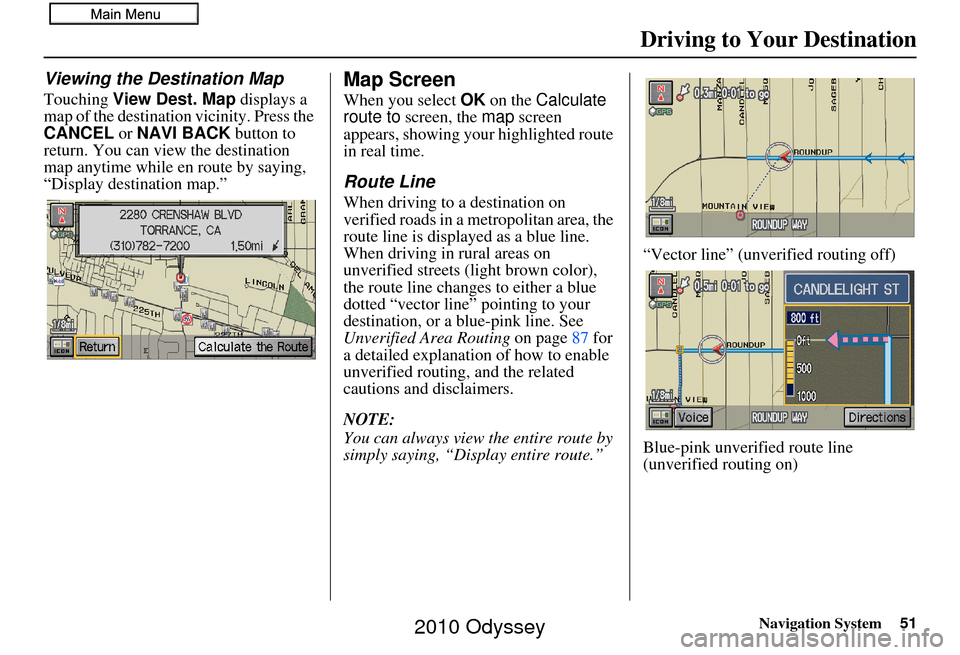
the route line changes to either a blue
dotted “vector line” pointing to your
destination, or a blue-pink line. See
Unverified Area Routing on page87 for
a detailed explanatio n of how to enable
unverified routing, and the related
cautions and disclaimers.
NOTE:
You can always view the entire route by
simply saying, “Display entire route.” “Vector line” (unverified routing off)
Blue-pink unverified route line
(unverified routing on)
2010 Odyssey
Page 55 of 155
Navigation System55
Driving to Your Destination
Distance and Time to
Destination
When you select a destination, the
distance to the destination is the actual
road distance of the calculated route,
and not “as the crow flies.” When
viewing a list of destinations (points of
interest), such as restaurants, the
distance is “as the crow flies” (see Sort
by Distance to Travel on page37).
The displayed time to the destination
may differ from the actual travel time
because the time is calculated based on
the posted road speed data and your
current speed. If part of your route
includes unverified roads, the “distance”
and “time to go” for that portion is
estimated using 25 mph as an average
speed.
Direction List
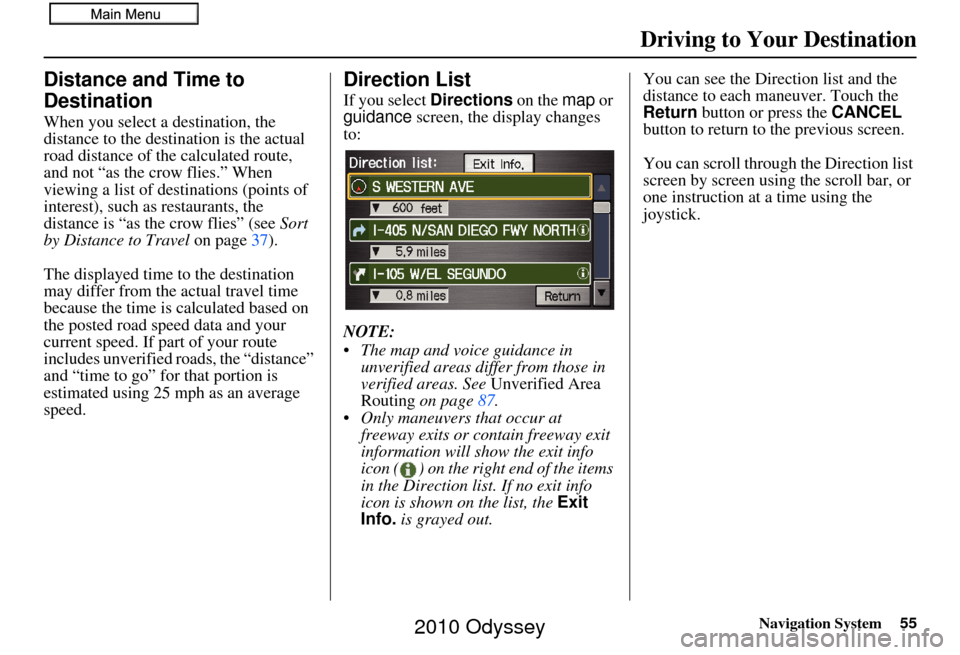
If you select Directions on the map or
guidance screen, the display changes
to:
NOTE:
The map and voice guidance in unverified areas differ from those in
verified areas. See Unverified Area
Routing on page 87.
Only maneuvers that occur at freeway exits or contain freeway exit
information will show the exit info
icon ( ) on the right end of the items
in the Direction list. If no exit info
icon is shown on the list, the Exit
Info. is grayed out. You can see the Direction list and the
distance to each maneuver. Touch the
Return
button or press the CANCEL
button to return to the previous screen.
You can scroll through the Direction list
screen by screen using the scroll bar, or
one instruction at a time using the
joystick.
2010 Odyssey
Page 56 of 155
56Navigation System
Exit Info. (Freeway Exit
Information)
You can search freeway exit
information and add new destinations or
waypoints to the calculated route as a
new destination or waypoint. The exit
info icon ( ) on the right end of the
items in the direction list indicates that
there is freeway exit information
available. Say or select Exit Info., and
choose the exit and place to set as a new
destination or waypoint.
On the map screen, you can display
freeway exit information using the
joystick. The exit info icon will only be
displayed on the map screen if there is
any freeway exit information available.
Choose the 1/4, 1/2, or 1 mile scale, then
move the crosshairs to the desired exit
info icon and click on it. Choose a place
from the list and set it as a new
destination or waypoint.
NOTE:
To turn on “Freeway exit information”
on the map screen, display the icon bar
and select the icon (see page 61).
Guidance Mode
When en route to a destination, you
have two display options: single-screen
mode (the factory default) and split-
screen mode.
Single-screen mode – A map is
displayed with occasional guidance
pop-up windows as you approach a
maneuver.
Split-screen mode – The map is always
displayed on the left of the screen, and
the maneuver or direction list is
displayed on the right-hand side of the
screen.
Guidance mode can be changed in either
Setup (see Guidance Mode on page 94),
or by accessing the icon bar
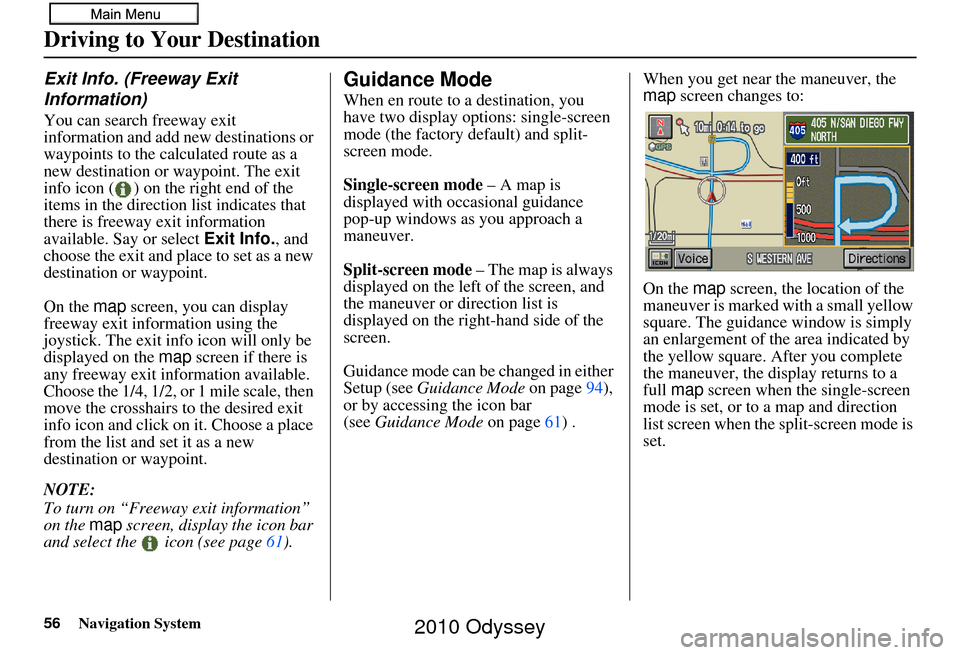
(see Guidance Mode on page 61) . When you get near the maneuver, the
map
screen changes to:
On the map screen, the location of the
maneuver is marked with a small yellow
square. The guidance window is simply
an enlargement of th e area indicated by
the yellow square. After you complete
the maneuver, the display returns to a
full map screen when the single-screen
mode is set, or to a map and direction
list screen when the split-screen mode is
set.
Driving to Your Destination
2010 Odyssey
Page 57 of 155

Navigation System57
Driving to Your Destination
Map Scale
Use the ZOOM buttons or say a voice command such as “Display 1/2 m ile scale” (see page139) to change the scale of the map.
Zooming in increases the detail, while zooming out gives you a vi ew of a wider area. After changing the scale, give the system a
few moments to update the display.
Functions available at various map scales
NOTE:
You can change between miles or kilometers in Setup (see Units on page 96).
For information on the available voice commands, see Voice Command Index on page138.
Map Scale (English and Metric)
For selecting uni ts, see page96.1/20 mi. 1/8 mi. 1/4 mi. 1/2 mi. 1 mi. 2 mi. 5 mi. 15 mi. 50 mi. 150 mi. 350 mi.
80 m 200 m 400 m 800 m1.6 km3 km 8 km 24 km 80 km240 km 560 km
POI icon symbols (like ATM) page 59X X
Breadcrumbs (off-road tracking dots)page 63XXXX
Freeway exit information icons page 56X X X
One-way traffic icon page59 X
Unverified road display (light brown) page 87X X X
Map orientation “Heading-up” page 58XXXXX
Map orientation “North-up” page 58XXXXXXXXXXX
Map features (park, golf course, etc.)page 53XXXXXXXXXX
Avoid area shown on map page91 X X X
Avoid area scales (w hen creating) page 91X X X
Waypoint “flag” icons page66 XXXXXXXXXXX
2010 Odyssey
Page 58 of 155

58Navigation System
Map Orientation
The map can be orientated two ways:
• North-up: North pointing up as you would normally view a paper map.
• Heading-up: The map constantly rotates so the road you are driving on
always points up (as you see the road
through your front windshield).
NOTE:
The red arrow in both heading symbols
always shows the direction north. Touch the Map Orientation icon on the
map
screen to switch between the
available orientation, or say “Display
heading up” or “Display north up.”
In the larger map scales (above
1 mile or 1.6 kilometer), the map is
always oriented with north facing
upward. You cannot change the
orientation.
NOTE:
For information on the available voice
commands, see Voice Command Index
on page 138.
Destination Icon
The destination icon only shows the
approximate location of the destination.
This occurs because a city block can
have as many as 100 possible addresses
(for example, the 1400 block is followed
by the 1500 block). Most cities use only
a portion of the 100 possible addresses
(for example, in the 1400 block, the
addresses may only go up to 1425
before the 1500 block starts). Therefore,
the address 1425 will be shown a
quarter of the way down the block by
the system instead of near the end of the
block where the destination is actually
located.
Tip:
When en route, you can view a map
showing your destination. Using voice
control, say “Display destination map.”
“North Up”
“Heading Up”
Driving to Your Destination
2010 Odyssey
Page 59 of 155

Navigation System59
Driving to Your Destination
The display automatically changes to
the map screen when you reach your
destination. Press the MENU button to
return to the Enter destination by
screen.
NOTE:
For information on the available voice commands, see Voice
Command Index on page138.
If you are en route and the joystick is moved, the “Time to Destination”
and “Distance to Destination”
indicators are replaced with an
indicator showing distance from the
current vehicle location.Landmark Icons
Landmark icons are shown in the map
screen on the 1/20 and 1/8 mile scales or
80 and 200 meter scales. The Freeway
Exit information is displayed on the 1/4,
1/2, and 1 mile scales. The icons are:
Some icons can be turned on or off;
you can either display them or hide
them from the ICON button on the
lower left corner (see page 53) or using
voice commands (see page 138).You can select most landmark icons
with the joystick to display the icon’s
information. See the table on the
following page for exceptions.
NOTE:
The same list can be viewed on the
screen by selecting Map Legend
from the Information screen.
When there are overlapping landmark icons, a list of the points of
interest (POIs) is displayed.
For information on the available voice commands, see Voice
Command Index on page138.
One-Way Traffic Icon
The one-way traffic icons (see Map
Screen Legend on page53) are only
shown on the 1/20 mile scale and only
when turned on in Icon Options (see
page 61).
Acura Dealer
School
Restaurant
AT M
Parking Lot
Post OfficeHonda Dealer
Hospital
Grocery Store
Gas Station
Hotel/Lodging
Parking Garage
Freeway Exit Information
2010 Odyssey
Page 63 of 155

Navigation System63
Driving to Your Destination
Going Off the Route
If you leave the calculated route,
“Recalculating...” is displayed at the top
of the screen. The system will
recalculate the route from your current
location and direction to the desired
destination, and then give you a new
route instruction. This is done
automatically if you have set
Rerouting to Automatic on the
Setup screen (second) (see page 86).
If the Rerouting option in Setup is set
to Manual , “Off route” appears at the
top of the screen when you leave the
calculated route. Sa y “Recalculate” or
select Recalc. whenever you wish the
system to perform a recalculation.
Off-road Tracking
If you drive more than half a mile from
a mapped road, “Not on a digitized
road” appears at the bottom of the
screen.
The map screen starts displaying a
series of dots (breadcrumbs) to show the
path you have taken if Off-road
Tracking on the Setup screen (second)
is set to On (see page 94). By following the dots, you can
backtrack to the mapped road you
originally left. “Breadcrumbs” may
occasionally be displayed in urban
areas, such as large parking lots in
shopping malls, or in new subdivisions
where the roads are not yet in the
database. In other cases, you may see
dots if the system temporarily goes off
route, like in a parking garage where the
GPS signal is unavailable.
These dots appear only in the 1/20, 1/8,
1/4, and 1/2 mile (or the 80, 200, 400,
and 800 meter) map scales.
Use the ZOOM
buttons to change scales
if necessary.
Tracking continues for approximately
150 miles; dots at the beginning of the
trail will start disappearing when you
exceed that distance . When you reach a
mapped road, th e system stops
displaying dots.
2010 Odyssey