Page 91 of 342
To adjust the steering wheel upward
or downward:1. Push the lever under the left side of the steering column all the way down.
2. Move the steering wheel up or down to the desired position.
Make sure you can see the
instrument panel gauges and theindicators. 3. Push the lever up to lock the
steering wheel in that position.
4. Make sure you have securely locked the steering wheel in place
by trying to move it up and down. Keys and Locks
The master key fits all the locks on
your vehicle. The valet key works
only in the ignition and the door
locks. You can keep the glove box
and hatch locked when you leave
your vehicle and the valet key at a
parking facility.
KEY NUMBERTAG
MASTER
KEYS
(BLACK)VALETKEY(LIGHTGRAY)
CONTINUED
Steering Wheel Adjustment, Keys and Locks
75
Instruments and Controls
Table of Contents
Page 93 of 342

If the system repeatedly does not
recognize the coding of your key,
contact your dealer.
Do not attempt to alter this system or
add other devices to it. Electrical
problems could result that may make
your vehicle inoperable.
If you have lost your key and cannot
start the engine, contact your dealer.
Always take the ignition key with you
whenever you leave the vehicle alone.
As required by the FCC:This device complies with Part 15 of theFCC rules. Operation is subject to the
following two conditions: (1) This devicemay not cause harmful interference, and(2) this device must accept any
interference received, includinginterference that may cause undesiredoperation.
Changes or modifications not expresslyapproved by the party responsible for
compliance could void the user'sauthority to operate the equipment.
This device complies with IndustryCanada Standard RSS-210.
Operation is subject to the following two
conditions: (1) this device may not causeinterference, and (2) this device must
accept any interference that may causeundesired operation of the device.Remote Transmitter
LOCK -Press this button once to
lock both doors and hatch. Some
exterior lights will flash. When you
push LOCK twice within 5 seconds,
you will hear a horn to verify that the
doors are locked. You cannot lock it
if any door is not fully closed or key
is in the ignition switch.
LED UNLOCK BUTTON LOCKBUTTON PANIC BUTTON
CONTINUED
Immobilizer System, Remote Transmitter
77
Instruments and Controls
Table of Contents
Page 94 of 342
UNLOCK-Press this button once
to unlock the driver's door. Push it
twice to unlock the passenger's door
and the hatch. Some exterior lights
will flash twice each time you press
the button. If you do not open either
door or the hatch within 30 seconds,
they will automatically relock. PANIC -Press this button for
about 1 second to attract attention;
the horn will sound and the exterior
lights will flash for about 30 seconds.
To cancel panic mode, press any
other button on the remote
transmitter, or turn the ignition
switch to the ON (II) position.Remote Transmitter Care● Avoid dropping or throwing thetransmitter.
● Protect the transmitter from
extreme temperature.
● Do not immerse the transmitter in
any liquid.
● If you lose a transmitter, the
replacement needs to be
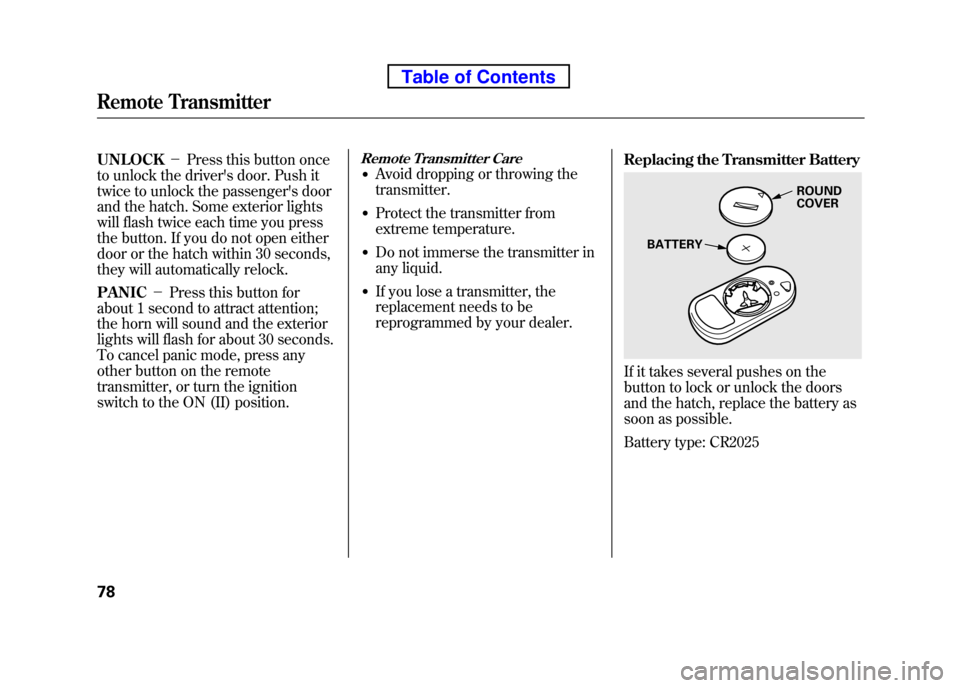
reprogrammed by your dealer. Replacing the Transmitter Battery
If it takes several pushes on the
button to lock or unlock the doors
and the hatch, replace the battery as
soon as possible.
Battery type: CR2025
ROUND COVER
BATTERY
Remote Transmitter
78
Table of Contents
Page 96 of 342

If the front wheels are turned, the
anti-theft lock may make it difficult to
turn the key. Firmly turn the steering
wheel to the left or right as you turn
the key.
ACCESSORY (I)-You can operate
the audio system and the accessory
power sockets in this position.
ON (II) -This is the normal key
position when driving. Several of the
indicators on the instrument panel
come on as a test when you turn the
ignition switch from the
ACCESSORY (I) to the ON (II)position.
START (III) -Use this position
only to start the engine. The switch
returns to the ON (II) position when
you let go of the key. You will hear a reminder beeper if
you leave the key in the LOCK (0) or
the ACCESSORY (I) position and
open the driver's door. Remove the
key to turn off the beeper.
If your vehicle has an automatic
transmission, the shift lever must be
in Park before you can remove the
key from the ignition switch.
Removing the key from the
ignition switch while driving
locks the steering. This can
cause you to lose control of thevehicle.
Remove the key from the
ignition switch only when parked.Power Door Locks
To lock all of the doors and hatch,
press the door lock switch on the
driver's door, or press the lock tab
down on the driver's door, or use the
key on the outside lock. Pressing up
on the door lock switch will unlock
all of the doors and the hatch.
LOCK TAB
DOOR LOCK SWITCH
Ignition Switch, Door Locks
80
Table of Contents
Page 97 of 342

The lock tab on the passenger's door
locks and unlocks only that door.
Pulling up on the driver's door lock
tab only unlocks the driver's door.
To lock the driver's door, remove the
key from the ignition switch, push
the lock tab down or push the door
lock switch down, then close thedoor.
To unlock the driver's door from the
outside, turn the key and release it.
Lockout Prevention
With the driver's door open and the
key in the ignition switch, the master
door lock switch is disabled. It is not
disabled if the driver's door is closed.
If you try to lock the open driver's
door with the key in the ignition
switch by pushing in the lock tab, the
tabs on all doors pop up when you
close the door.Rear DoorsTo open the rear door, pull the rear
door handle located in the rear door
edge. The rear door can be opened
only when the front door is open.
To close the doors, close the rear
door first, then the front door. The
front door cannot be latched without
first closing the rear door. Closing
the rear door on the front door will
damage both doors.HatchTo lock or unlock the hatch.
● Use your master key to lock and
unlock the hatch. Turn the key
counterclockwise to lock the
hatch, and clockwise to unlock it.
Unlock
Lock
CONTINUED
Door Locks
81
Instruments and Controls
Table of Contents
Page 98 of 342
●Lock the hatch by pushing down
the lock tab on the driver's door
(see page 80), or by using the
master key in the driver's door lock.
● Lock or unlock the hatch with the
master door lock switch.
With the hatch unlocked, open it by
pulling the handle and lifting up.
To close the hatch, lower it, then
press down on the back edge.
When both the hatch and tailgate are
open, the hatch cannot be latched
without first closing the tailgate. Tailgate
You can open the tailgate only when
the hatch is open. To open the
tailgate, slide the lock lever to the left
and swing down the tailgate. To close
the tailgate, lift it up and push it
firmly until it latches.
Before closing the tailgate, make
sure the hatch is raised. Closing the
tailgate on the lowered hatch can
damage the hatch and the tailgate.
Door Locks
82
Table of Contents
Page 99 of 342
See page 210 for information on
cargo loading. Keep the tailgate and
the hatch closed at all times while
driving to avoid damaging them, and
to prevent exhaust gas from getting
into the interior. SeeCarbon
Monoxide Hazard on page 52. Seat Adjustments
See pages 11
-13 for important safety
information and warnings about how to properly position seats and seat-backs.
Make all seat adjustments before you
start driving.
Front Seat
To adjust the seat forward and
backward, pull up on the bar under
the seat cushion's front edge. Try to
move the seat to make sure it is
locked in position.
CONTINUED
Door Locks, Seats
83
Instruments and Controls
Table of Contents
Page 111 of 342
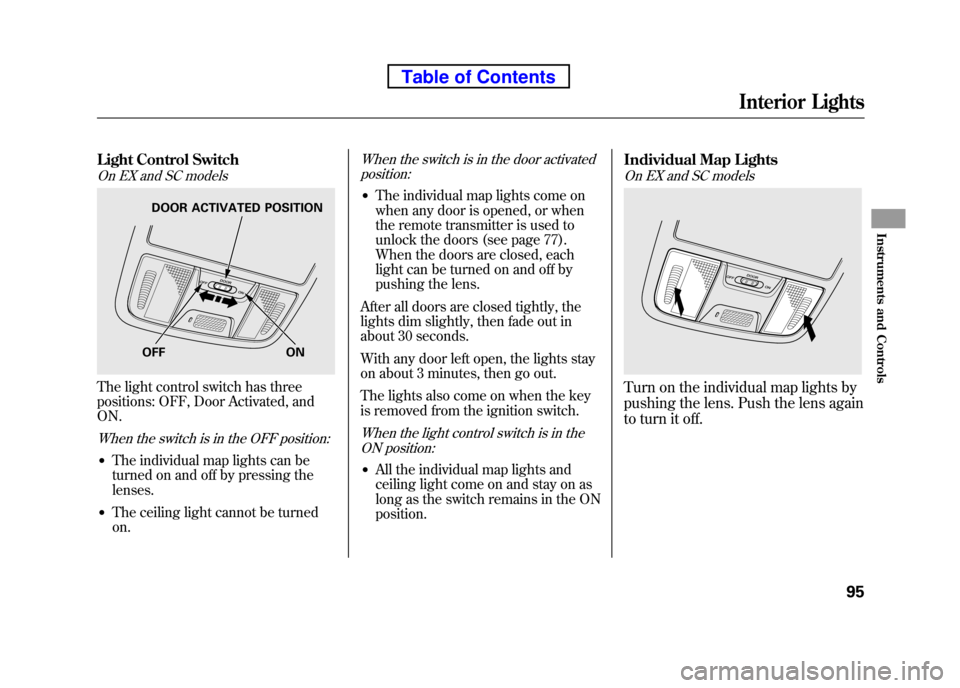
Light Control Switch
On EX and SC models
The light control switch has three
positions: OFF, Door Activated, andON.
When the switch is in the OFF position:
●The individual map lights can be
turned on and off by pressing thelenses.
● The ceiling light cannot be turnedon.
When the switch is in the door activated
position:
● The individual map lights come on
when any door is opened, or when
the remote transmitter is used to
unlock the doors (see page 77).
When the doors are closed, each
light can be turned on and off by
pushing the lens.
After all doors are closed tightly, the
lights dim slightly, then fade out in
about 30 seconds.
With any door left open, the lights stay
on about 3 minutes, then go out.
The lights also come on when the key
is removed from the ignition switch.
When the light control switch is in the ON position:
● All the individual map lights and
ceiling light come on and stay on as
long as the switch remains in the ONposition. Individual Map Lights
On EX and SC models
Turn on the individual map lights by
pushing the lens. Push the lens again
to turn it off.
OFF ON
DOOR ACTIVATED POSITION
Interior Lights
95
Instruments and Controls
Table of Contents


