Page 114 of 441
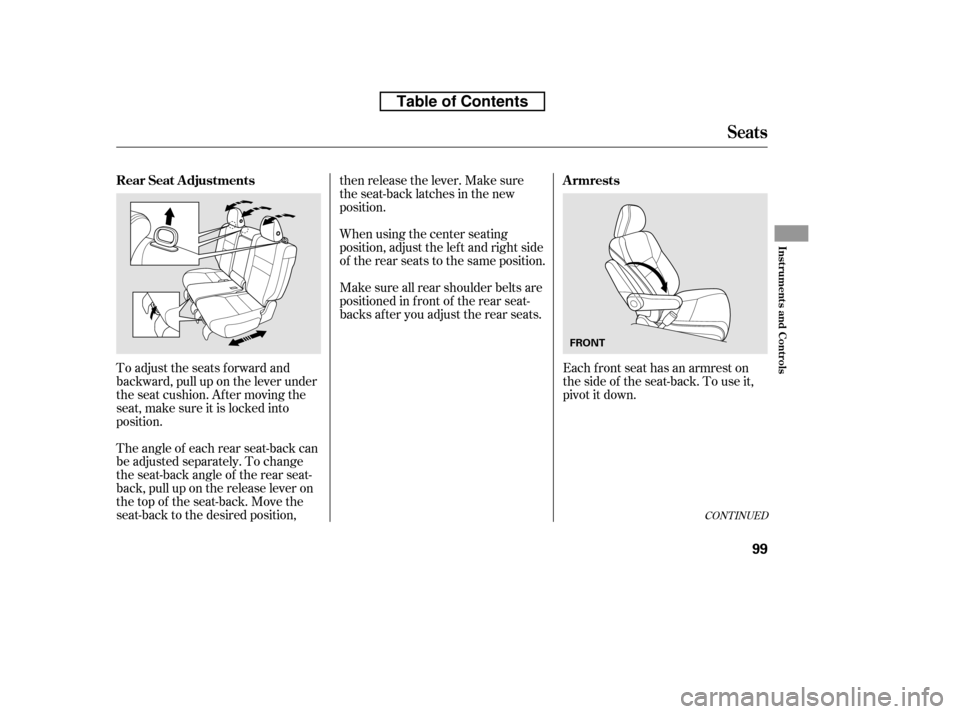
Each front seat has an armrest on
thesideof theseat-back.Touseit,
pivotitdown.
To adjust the seats forward and
backward, pull up on the lever under
the seat cushion. Af ter moving the
seat, make sure it is locked into
position.
The angle of each rear seat-back can
be adjusted separately. To change
the seat-back angle of the rear seat-
back, pull up on the release lever on
the top of the seat-back. Move the
seat-back to the desired position, then release the lever. Make sure
the seat-back latches in the new
position.
Make sure all rear shoulder belts are
positioned in f ront of the rear seat-
backs af ter you adjust the rear seats.
When using the center seating
position, adjust the lef t and right side
of the rear seats to the same position.
CONT INUED
Armrests
Rear Seat Adjustments
Seats
Inst rument s and Cont rols
99
FRONT
Table of Contents
Page 117 of 441
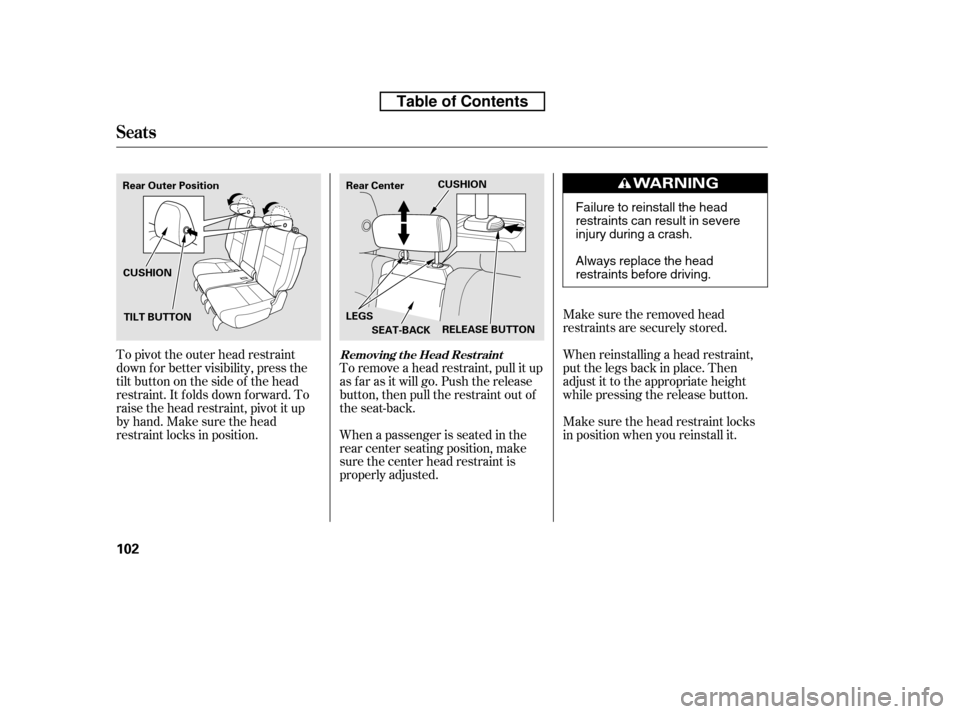
Make sure the removed head
restraints are securely stored.
Make sure the head restraint locks
in position when you reinstall it.
When reinstalling a head restraint,
put the legs back in place. Then
adjust it to the appropriate height
while pressing the release button.
When a passenger is seated in the
rear center seating position, make
sure the center head restraint is
properly adjusted.
To remove a head restraint, pull it up
as f ar as it will go. Push the release
button, then pull the restraint out of
the seat-back.
To pivot the outer head restraint
down f or better visibility, press the
tilt button on the side of the head
restraint. It f olds down f orward. To
raise the head restraint, pivot it up
by hand. Make sure the head
restraint locks in position.
Seats
Removing t he Head Rest raint
102
RELEASE BUTTON
Rear Outer Position Rear Center
CUSHION
LEGS SEAT-BACK
CUSHION
TILT BUTTON
Failure to reinstall the head
restraints can result in severe
injury during a crash.
Always replace the head
restraints before driving.
Table of Contents
Page 119 of 441
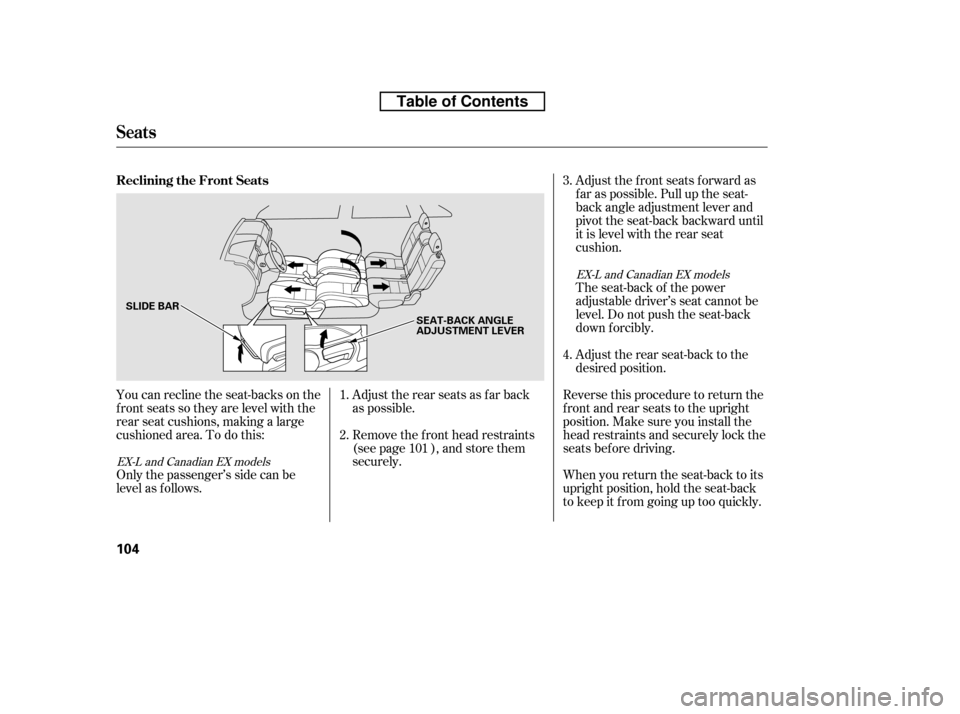
You can recline the seat-backs on the
f ront seats so they are level with the
rear seat cushions, making a large
cushioned area. To do this:Adjust the rear seats as f ar back
as possible.
Remove the f ront head restraints
(see page ), and store them
securely.
Only the passenger’s side can be
level as f ollows. Adjust the front seats forward as
f ar as possible. Pull up the seat-
back angle adjustment lever and
pivot the seat-back backward until
it is level with the rear seat
cushion.
The seat-back of the power
adjustable driver’s seat cannot be
level. Do not push the seat-back
down f orcibly.
Adjust the rear seat-back to the
desired position.
Reverse this procedure to return the
f ront and rear seats to the upright
position. Make sure you install the
head restraints and securely lock the
seats before driving.
When you return the seat-back to its
upright position, hold the seat-back
to keep it f rom going up too quickly.
1. 2.
4.
3.
101
EX-L and Canadian EX models
EX-L and Canadian EX models
Reclining the Front Seats
Seats
104
SLIDE BAR SEAT-BACK ANGLE
ADJUSTMENT LEVER
Table of Contents
Page 123 of 441
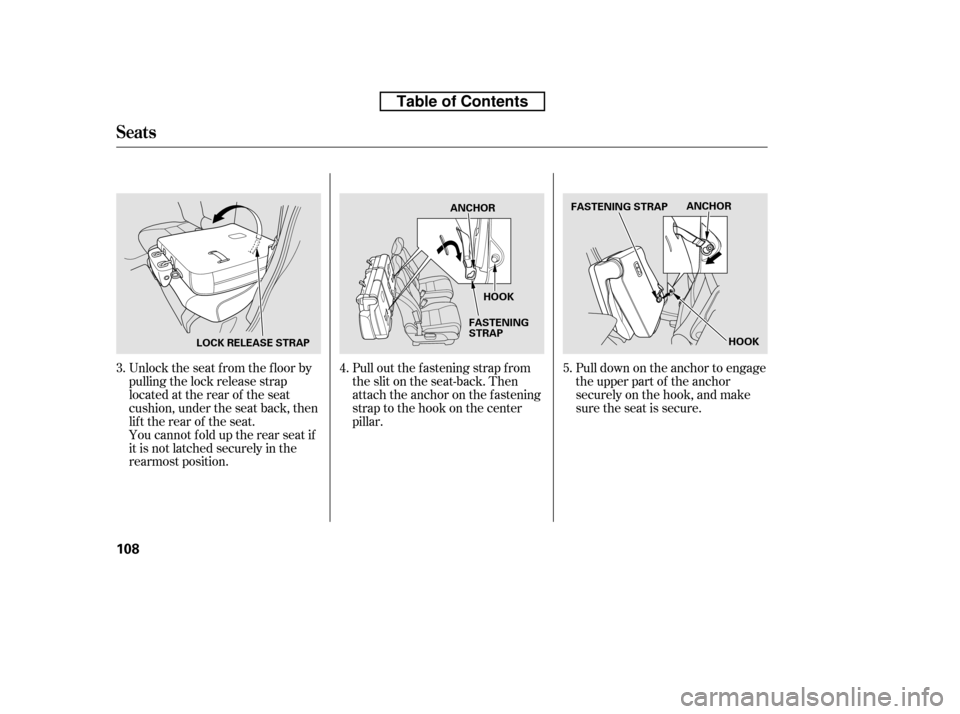
Pull out the f astening strap f rom
the slit on the seat-back. Then
attach the anchor on the fastening
strap to the hook on the center
pillar.Pull down on the anchor to engage
the upper part of the anchor
securely on the hook, and make
sure the seat is secure.
Unlock the seat f rom the f loor by
pulling the lock release strap
located at the rear of the seat
cushion, under the seat back, then
lift the rear of the seat.
You cannot fold up the rear seat if
it is not latched securely in the
rearmost position.
3.
4.5.
Seats
108
LOCK RELEASE STRAP ANCHOR
HOOK
FASTENING
STRAP ANCHOR
FASTENING STRAP
HOOK
Table of Contents
Page 135 of 441
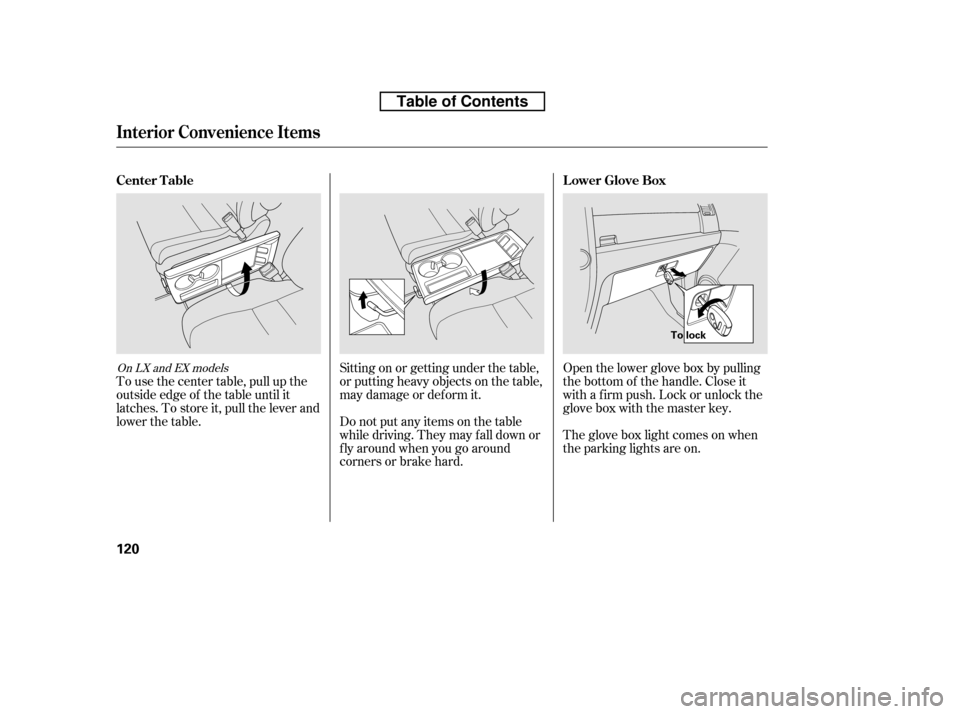
Open the lower glove box by pulling
the bottom of the handle. Close it
with a f irm push. Lock or unlock the
glove box with the master key.
The glove box light comes on when
the parking lights are on.
Sitting on or getting under the table,
or putting heavy objects on the table,
may damage or deform it.
Do not put any items on the table
while driving. They may f all down or
f ly around when you go around
corners or brake hard.
To use the center table, pull up the
outside edge of the table until it
latches. To store it, pull the lever and
lower the table.On LX and EX models
Lower Glove Box
Center Table
Interior Convenience Items
120
To lock
Table of Contents
Page 141 of 441
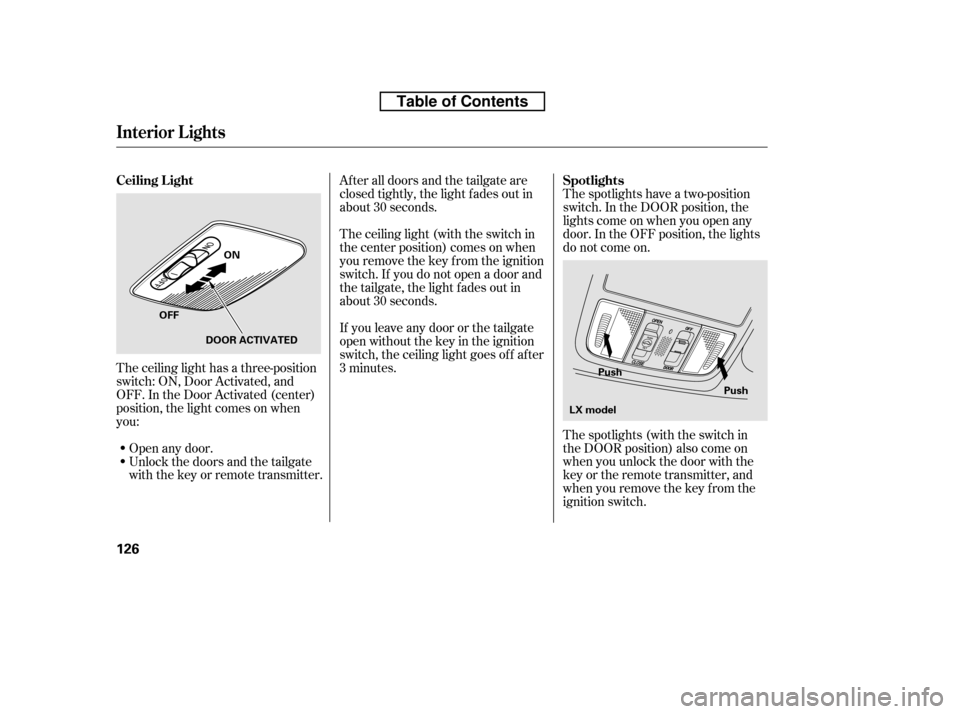
The spotlights have a two-position
switch. In the DOOR position, the
lights come on when you open any
door. In the OFF position, the lights
do not come on.
The spotlights (with the switch in
the DOOR position) also come on
when you unlock the door with the
key or the remote transmitter, and
when you remove the key f rom the
ignition switch.
Af ter all doors and the tailgate are
closed tightly, the light fades out in
about 30 seconds.
The ceiling light (with the switch in
the center position) comes on when
you remove the key f rom the ignition
switch. If you do not open a door and
the tailgate, the light f ades out in
about 30 seconds.
If you leave any door or the tailgate
open without the key in the ignition
switch, the ceiling light goes of f af ter
3 minutes.
The ceiling light has a three-position
switch: ON, Door Activated, and
OFF. In the Door Activated (center)
position, the light comes on when
you:
Unlock the doors and the tailgate
with the key or remote transmitter.
Open any door.
Interior Lights
Spotlights
Ceiling L ight
126
Push
Push
ON
OFF DOOR ACTIVATED
LX model
Table of Contents
Page 144 of 441

The heating and air conditioning
system in your vehicle provides a
comf ortable driving environment in
all weather conditions.
The standard audio system has
many f eatures. This section
describes those f eatures and how to
use them.
Your vehicle has an anti-theft audio
system that requires a code number
to enable it.
The security system helps to
discourage vandalism and thef t of
your vehicle..............
Vents, Heating, and A/C . 130...............
Climate Control System . 135
..........
Dual Temperature Control . 140
..............
Climate Control Sensors . 142
................................
Audio System . 143 ..........
Playing the AM/FM Radio . 145
................................
Playing a Disc . 149
.......
Disc Player Error Messages . 156
..........
Playing the AM/FM Radio . 157
................
Playing the XM
Radio . 161
.................................
Playing Discs . 166
.......
Disc Player Error Messages . 176
............................
PlayinganiPod
. 177
.................
iPod
Error Messages . 183
Playing a USB Flash Memory ........................................
Device . 184
USB Flash Memory Device Error ...................................
Messages . 193
..........
Playing the AM/FM Radio . 194
................
Playing the XM
Radio . 200
................................
Playing a Disc . 206
.......
Disc Player Error Messages . 214
...................................
CD Changer . 215
.....
CD Changer Error Messages . 221
..........................
Playing a PC card . 222 .............
PC card Error Messages . 234
............................
PlayinganiPod
. 235
.................
iPod
Error Messages . 241
Playing a USB Flash Memory
........................................
Device . 242
USB Flash Memory Device Error ...................................
Messages . 249
............
AM/FM Radio Reception . 250
..................
Protecting Your Discs . 252
................
Remote Audio Controls . 255
...
Playing an Optional Audio Unit . 257
.................
Radio Thef t Protection . 258
..........................
Setting the Clock . 259
.........................................
Compass . 260
............................
Security System . 264
...
Rearview Camera and Monitor . 265
...............................
Cruise Control . 266
........
HandsFreeLink. 269
LX model
EX and EX-L models without navigationsystem
EX-L Models with navigation system Bluetooth
Features
Features
129
Page 146 of 441

Turn this dial to increase or decrease
the fan speed and airflow.
Turning this dial clockwise increases
the temperature of the airflow.When the recirculation indicator is
on, air f rom the vehicle’s interior is
sent throughout the system again.
When the indicator is off, air is
brought in f rom the outside of the
vehicle (fresh air mode).
The outside air intakes f or the
heating and cooling system are at
the base of the windshield. Keep this
area clear of leaves and other debris.
Thesystemshouldbeleftinfresh
air mode under almost all conditions.
Keeping the system in recirculation
mode, particularly with the A/C of f ,
can cause the windows to fog up.
Switch to recirculation mode when
driving through dusty or smoky
conditions, then return to fresh air
mode.
This button turns the air
conditioning on and of f . The
indicatorinthebuttonisonwhen
the A/C is on.
The system automatically
turns on the A/C and switches to
recirculation mode (see page to
use this setting). Air f lows f rom the
center and side vents in the
dashboard. Pressing the , A/C,
or any of the mode buttons cancels
MAX A/C, but the A/C stays on. Airf low is divided between
the vents in the dashboard and the
f loor vents. Air flows from the center
and corner vents in the dashboard.
Use the mode control buttons to
select the vents air flows from. Some
air will f low f rom the dashboard
corner vents in all modes.
This button turns the rear window
def ogger of f and on (see page ).
Pushing this button also turns the
power mirror heaters on and of f .
/
80
133
CONT INUED
Canadian models only
Vents, Heating, and A/C
Fan Control Dial
T emperature Control Dial
Air Conditioning (A/C) Button Recirculation Button
MAX A/C Button Mode Control
Rear Window Def ogger
Button
Features
131
Table of Contents