Page 74 of 441

This section gives inf ormation about
the controls and displays that
contribute to the daily operation of
your vehicle. All the essential
controls are within easy reach............................
Control Locations . 60............................
Instrument Panel . 61 ..........
Instrument Panel Indicators . 62
.............................................
Gauges . 68
....................
Inf ormation Display . 69
...................................
Trip Meter . 69
................
Instant Fuel Economy . 70
..............
Average Fuel Economy . 70
...........................................
Range . 70
.....................................
Odometer . 71
..................................
Fuel Gauge . 71
...................
Temperature Gauge . 71
Outside Temperature
..................................
Indicator . 71
..........
Check Fuel Cap Message . 73
..................
Maintenance Minder . 73
Controls Near the Steering
...........................................
Wheel . 74
.
Windshield Wipers and Washers . 75
.........
Turn Signals and Headlights . 76
........
Instrument Panel Brightness . 79
.................
Hazard Warning Button . 79
.................
Rear Window Def ogger . 80
.................................
Parking Brake . 81
..........
Steering Wheel Adjustment . 81
...............................
Keys and Locks . 82
........................
Immobilizer System . 83
................................
Ignition Switch . 84 ......................................
Door Locks . 85
......................
Power Door Locks . 85
.
Auto Door Locking/Unlocking . 86
..............
Childproof Door Locks . 91
.......................
Remote Transmitter . 92
............................................
Tailgate . 95
.................................................
Seats . 97
..................................
Seat Heaters . 111
............................
Power Windows . 112
.......................................
Moonroof . 113
...........................................
Mirrors . 114
.........
Interior Convenience Items . 116
............
Dual Deck Cargo Shelf . 117
.....................
Beverage Holders . 119
.............................
Center Table . 120
......................
Lower Glove Box . 120
......................
Upper Glove Box . 121
............................
Vanity Mirror . 121
...................................
Sun Visor . 122
....................
Sunglasses Holder . 122
................
Conversation Mirror . 123
........
Accessory Power Sockets . 123
.............
Console Compartment . 124
..................................
Coat Hook . 125
.......................
Seat Under Tray . 125
...............................
Interior Lights . 126
Instruments and Controls
Inst rument s and Cont rols
59
Page 89 of 441
�Î �Î�Î
�Î
�Î
�Î
�Î �Î �Î
�Î
�Î
To use the horn, press the center pad of the steering wheel.
If equipped.
Ref er to the navigation system manual.
1:2:3:
Controls Near the Steering Wheel
74
CRUISE CONTROL BUTTON
PARKING BRAKE PEDAL HORN HAZARD WARNING
BUTTON
SHIFT LEVER
REMOTE AUDIO CONTROLS
STEERING WHEEL
ADJUSTMENTS PASSENGER AIRBAG
OFF INDICATOR
REAR WINDOW DEFOGGER
BUTTON
HEATED MIRROR BUTTON
NAVIGATION SYSTEM
VOICE CONTROL BUTTONS
BLUETOOTH HANDSFREELINK SYSTEM
VOICE CONTROL BUTTONS
(P.325)
(P.255)
(P.81)
(P.269) (P.81)
(P.123)
(P.266) (P.115)
(P.80)
(P.315)
(P.194)
AUDIO SYSTEM
(P.79)
(P.33)
(P.145, 157)
AUDIO SYSTEM
VEHICLE STABILITY
ASSIST (VSA) SYSTEM
OFF SWITCH HEADLIGHTS/TURN
SIGNALS
(P.76)
INSTRUMENT PANEL
BRIGHTNESS
(P.79)WINDSHIELD WIPERS/
WASHERS
(P.75)
ACCESSORY POWER SOCKET SEAT HEATER
SWITCHES
(P.111)
MIRROR CONTROLS (P.115)
1
2
2
3 2 2
2
2
Table of Contents
Page 96 of 441

Push the lever under the steering
column all the way down.
Make any steering wheel adjustment
bef ore you start driving.
To apply the parking brake, push the
pedal down with your f oot. To
release it, push on the pedal again.
The parking brake indicator on the
instrument panel should go out when
the parking brake is fully released
(see page ). Move the steering wheel up or
down, and in or out, so it points
toward your chest, not toward
your f ace. Make sure you can see
the instrument panel gauges and
indicators.
1. 2.
62
CONT INUED
Parking Brake Steering Wheel A djustment
Parking Brake, Steering Wheel A djustment
Inst rument s and Cont rols
81
PARKING BRAKE PEDAL
Adjusting the steering wheel
position while driving may
cause you to lose control of the
vehicle and be seriously injured
inacrash.
Adjust the steering wheel only
when the vehicle is stopped.
Driving the vehicle with the parking
brake applied can damage the rear
brakes and hubs. A beeper will sound if
the vehicle is driven with the parking
brake on.
Table of Contents
Page 97 of 441

Youshouldhavereceivedakey
number tag with your keys. You will
need this key number if you ever
have to get a lost key replaced. Use
only Honda-approved key blanks.
These keys contain electronic
circuits that are activated by the
immobilizer system. They will not
work to start the engine if the
circuits are damaged.Protect the keys f rom direct
sunlight, high temperature, and
high humidity.
Donotdropthekeysorsetheavy
objects on them.
Keep the keys away f rom liquids.
If they get wet, dry them
immediately with a sof t cloth.
Push the lever up to lock the
steering wheel in position.
Make sure you have securely
locked the steering wheel in place
by trying to move it up, down, in,
and out.
The master key fits all the locks on
your vehicle. The valet key works
only in the ignition and the driver’s
door lock. You can keep the glove
boxlockedwhenyouleaveyour
vehicle and the valet key at a parking
f acility.
The valet key does not contain a
battery. Do not try to take it apart.
3. 4. Keys and Locks
Steering Wheel A djustment, K eys and L ocks
82
LEVER
KEY
NUMBERTAG
MASTER KEY
WITH REMOTE
TRANSMITTER VALET
KEY
(Gray)
Table of Contents
Page 99 of 441
�µ�µ
�µ
�µ
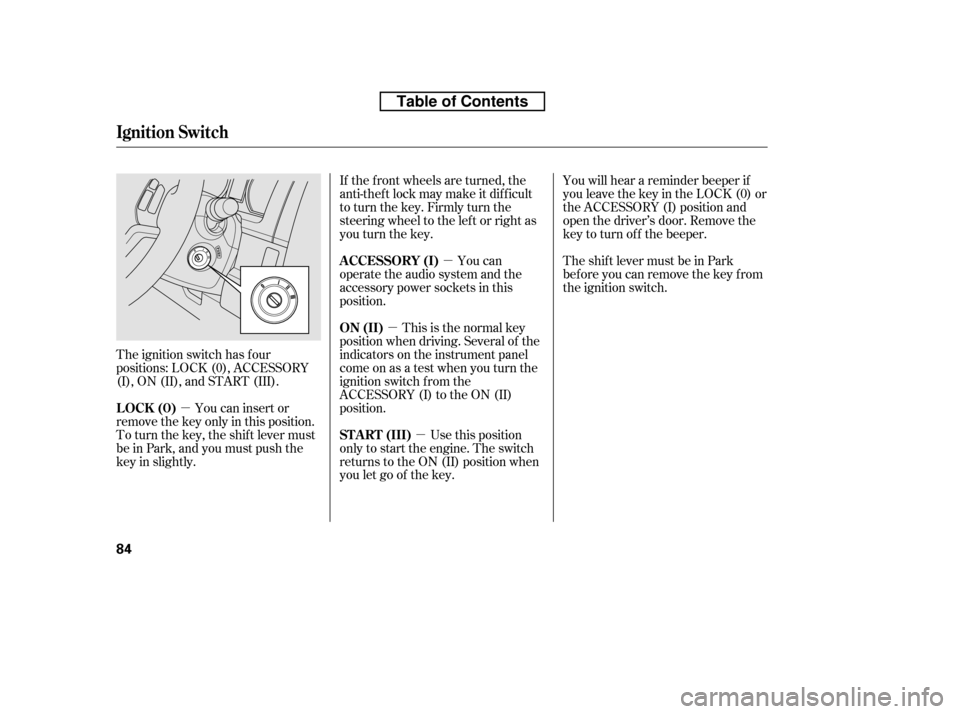
The ignition switch has f our
positions: LOCK (0), ACCESSORY
(I), ON (II), and START (III). If the f ront wheels are turned, the
anti-theft lock may make it difficult
to turn the key. Firmly turn the
steering wheel to the lef t or right as
you turn the key.
This is the normal key
position when driving. Several of the
indicators on the instrument panel
come on as a test when you turn the
ignition switch f rom the
ACCESSORY (I) to the ON (II)
position. You can
operate the audio system and the
accessory power sockets in this
position.
Use this position
only to start the engine. The switch
returns to the ON (II) position when
you let go of the key. You will hear a reminder beeper if
you leave the key in the LOCK (0) or
the ACCESSORY (I) position and
open the driver’s door. Remove the
key to turn of f the beeper.
TheshiftlevermustbeinPark
bef ore you can remove the key f rom
the ignition switch.
You can insert or
remove the key only in this position.
To turn the key, the shift lever must
be in Park, and you must push the
key in slightly. ON (II)
A CCESSORY (I)
ST A RT (III)
LOCK (0)
Ignition Switch
84
Table of Contents
Page 149 of 441

To remove f og f rom the inside of the
windows:Turning the f an speed control dial all
the way to the left shuts the system
of f .
Keep the system of f f or short
periods only.
To keep stale air and mustiness
f rom collecting, you should have
the f an running at all times.
When you switch to , f rom or , the A/C stays on.
This helps prevent the windows f rom
rapidly f ogging up when the air is
suddenly routed away f rom the
windshield. If you want to turn the
A/C off, press and release the A/C
button twice. The indicator in the
buttoncomesonandthengoesoff. Select . The system
automatically switches to f resh air
mode and turns on the A/C.
The A/C indicator does not come
on if it was of f to start with.
Select .
Set the f an and temperature
controls to maximum level.
For your saf ety, make sure you have
a clear view through all the windows
bef ore driving.
To clear the windows f aster, you can
close the dashboard corner vents by
rotating the wheel below each vent.
This sends more warm air to the
windshield def roster vents. Once the
windshield is clear, select f resh air
mode to avoid f ogging the windows.
Set the f an to the desired speed, or
high f or f aster def rosting.
Select . The system
automatically switches to f resh air
mode and turns on the A/C. The
A/C indicator will not come on if it
was off to start with.
Adjust the temperature so the
airf low f eels warm.
Select / to help
clear the rear window.
To increase airf low to the
windshield, close the corner vents.
1. 2. 3.
1. 2. 3. 4.5.
To Defog and Defrost
To Turn Everything Off
T o Remove Exterior Frost or Ice
From the Windows
Vents, Heating, and A/C
134
Table of Contents
Page 154 of 441
Select . The system
automatically switches to f resh air
mode and turns on the A/C.
Adjust the temperature with the
driver’s side temperature control
so the airflow feels warm.
Select to help clear the
rear window.
To increase airf low to the
windshield, close the corner vents.
For f aster def ogging, manually set
the fan speed to high.
For your saf ety, make sure you have
a clear view through all the windows
bef ore driving.
This button directs the main airflow
to the windshield for faster
def rosting. It also overrides any
mode selection you may have made.
When you select , the system
automatically switches to f resh air
mode and turns on the A/C. For
f aster def rosting, manually set the
fanspeedtohigh.Youcanalso
increase airf low to the windshield by
closing the corner vents on the
dashboard. To close the vents, rotate
the wheel under each corner vent.
When you turn of f by
pressing the button again, the
system returns to its former settings. 1. 2.3. 4.
Climat e Cont rol Syst em
Windshield Def rost er But t on
Features
139
Table of Contents
Page 270 of 441

�Û�Ý�´
�µ �´�µ
Three controls f or the audio system
are mounted in the steering wheel
hub. These let you control basic
f unctions without removing your
hand f rom the wheel. The VOL button adjusts the volume
up ( ) or down ( ). Press the top
or bottom of the button and hold it
until the desired volume is reached,
then release it.
The MODE button changes the
mode.
Pressing the MODE button
repeatedly cycles through all
possible media sources whether they
are present or not.
Pressing the MODE button
repeatedly cycles through all present,
connected media sources. Media
sources that are not present or
connected will not appear when
cycling with the MODE button.If you are listening to the radio, use
the CH button to change stations.
Each time you press the top ( ) of
the button, the system goes to the
next preset station on the band you
are listening to. Press the bottom
( ) to go back to the previous
station.If youpressandholdtheCH
button ( ) or ( ), the system goes
into the seek mode. It finds a station
with a strong signal.
If equipped
On models with Navigation System
On models without Navigation System
CONT INUED
Remote Audio Controls
Features
255
CH BUTTON
MODE BUTTON
VOL BUTTON
Table of Contents
