Page 174 of 387
�µ�µ
�µ
�µ
�µ �µ
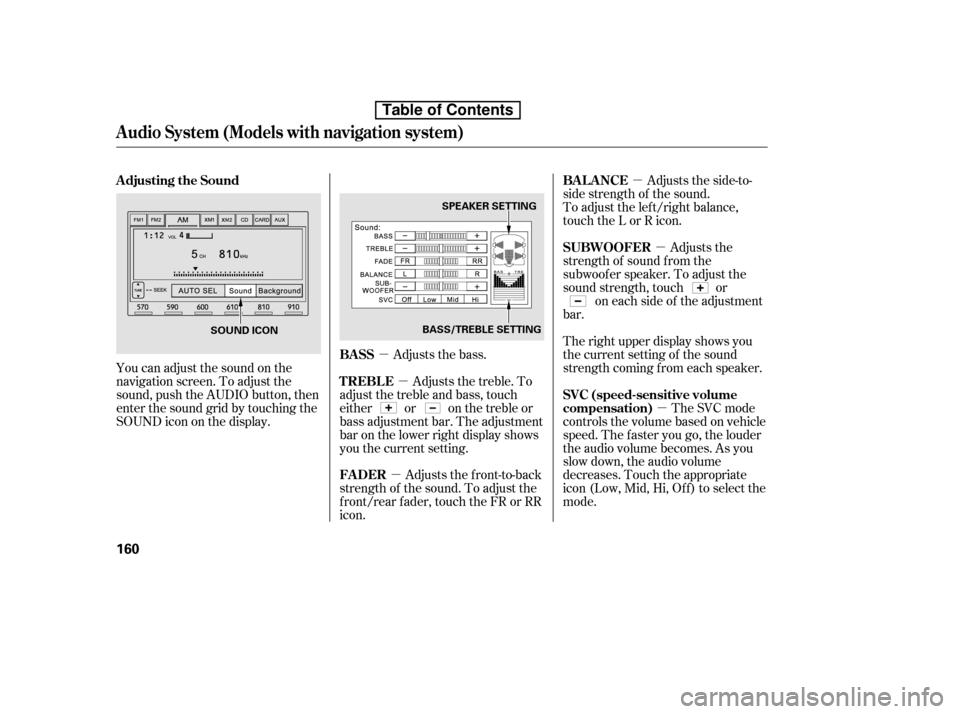
You can adjust the sound on the
navigation screen. To adjust the
sound, push the AUDIO button, then
enter the sound grid by touching the
SOUNDicononthedisplay. Adjusts the bass.Adjusts the side-to-
side strength of the sound.
To adjust the left/right balance,
touch the L or R icon.
Adjusts the
strength of sound f rom the
subwoof er speaker. To adjust the
sound strength, touch or on each side of the adjustment
bar.
The right upper display shows you
the current setting of the sound
strength coming f rom each speaker.
The SVC mode
controls the volume based on vehicle
speed. The f aster you go, the louder
the audio volume becomes. As you
slow down, the audio volume
decreases. Touch the appropriate
icon (Low, Mid, Hi, Of f ) to select the
mode.
Adjusts the front-to-back
strength of the sound. To adjust the
front/rear fader, touch the FR or RR
icon. Adjusts the treble. To
adjust the treble and bass, touch
either or on the treble or
bass adjustment bar. The adjustment
bar on the lower right display shows
you the current setting.
Adjusting the Sound
BASSBAL ANCE
SUBWOOFER
SVC (speed-sensitive volume
compensation)
FADER
TREBLE
Audio System (Models with navigation system)
160
SPEAKER SETTING
BASS/TREBLE SETTING
SOUND ICON
Table of Contents
Page 175 of 387
You can use the instrument panel
brightness control buttons to adjust
the illumination of the audio system
(see page ). The audio system
illuminates when the parking lights
are on, even if the radio is of f .
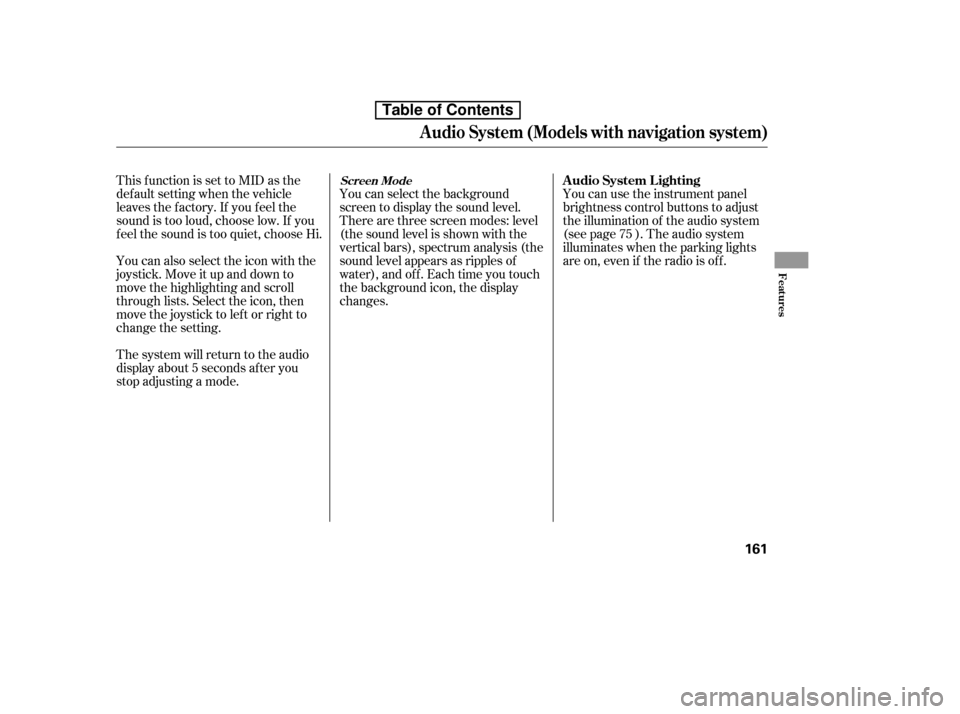
You can select the background
screen to display the sound level.
There are three screen modes: level
(the sound level is shown with the
vertical bars), spectrum analysis (the
sound level appears as ripples of
water), and off. Each time you touch
the background icon, the display
changes.
The system will return to the audio
display about 5 seconds af ter you
stop adjusting a mode.
You can also select the icon with the
joystick. Move it up and down to
move the highlighting and scroll
through lists. Select the icon, then
move the joystick to lef t or right to
change the setting.
This f unction is set to MID as the
def ault setting when the vehicle
leaves the f actory. If you f eel the
sound is too loud, choose low. If you
f eel the sound is too quiet, choose Hi.
75
A udio System L ighting
Screen Mode
Audio System (Models with navigation system)
Features
161
Table of Contents
Page 176 of 387
�µ�´
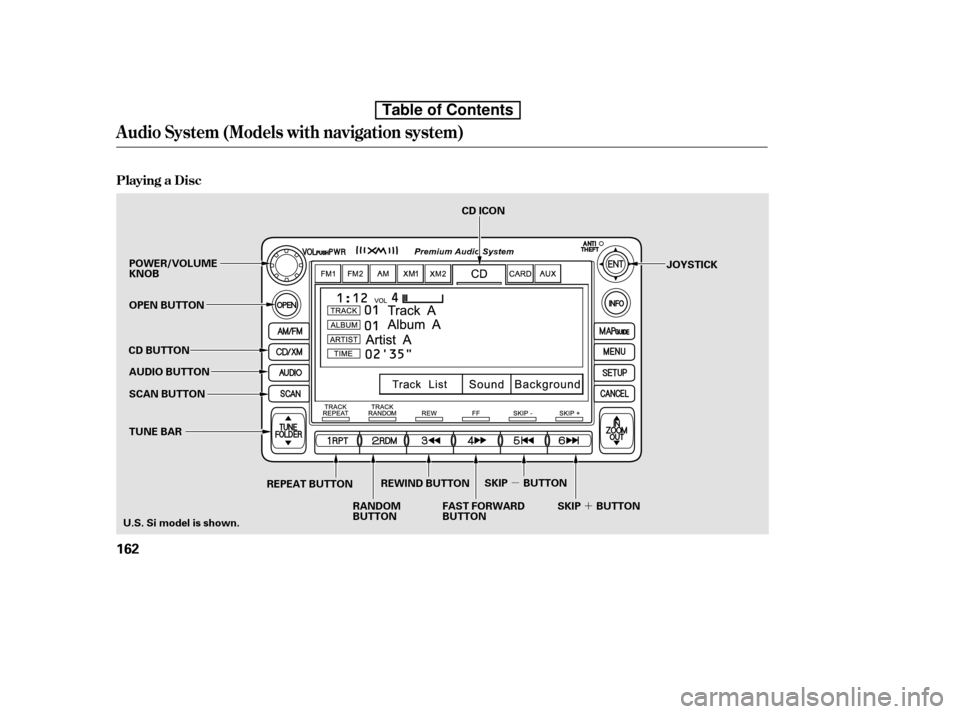
Playing a Disc
Audio System (Models with navigation system)
162
SCAN BUTTON JOYSTICK
AUDIO BUTTON
POWER/VOLUME KNOB
OPEN BUTTON
CD BUTTON
RANDOM
BUTTON
REPEAT BUTTON
FAST FORWARD
BUTTON
TUNE BAR CD ICON
U.S. Si model is shown. REWIND BUTTON
SKIP BUTTON
SKIP BUTTON
Table of Contents
Page 177 of 387
�µ �µ �µ �µ�µ�µ�µ�µ
You operate the disc player with the
same controls used f or the radio. To
load or play discs, the ignition switch
must be in the ACCESSORY (I) or
ON (II) position.
Video CDs and DVDs do not work in
this unit.
Compatible with variable bitrate
and multi-session
Maximum layers
(including ROOT): 8 layers
This audio system can also play CD-
RsandCD-RWscompressedinMP3
or WMA f ormats. When playing a
disc in MP3, you will see ‘‘MP3’’ on
the screen. In WMA f ormat, ‘‘WMA’’
will appear on the screen. You can
select up to 99 f olders and play up to
999 tracks. If the disc has a complex
structure, it takes a while to read the
disc bef ore the system begins to play
it. Maximum layers
(including ROOT): 8 layers
Compatible with variable bitrate
and multi-session
The specif ications f or compatible
MP3 f iles are: The specif ications f or compatible
WMA f iles are:
Bitrate:
32/40/48/56/64/80/96/112/128/
160/192/224/256/320 kbps
(MPEG1)
8/16/24/32/40/48/56/64/80/96/
112/128/160 kbps (MPEG2) Sampling f requency:
32/44.1/48 kHz
Bitrate:
48/64/80/96/128/160/192 kbps
Sampling f requency:
32/44.1/48 kHz (MPEG1)
16/22.05/24 kHz (MPEG2)
If a f ile on WMA disc is protected by
digital rights management (DRM),
the audio unit displays CD FORMAT,
andthenskipstothenextfile.
CONT INUED
To Play a Disc
Audio System (Models with navigation system)
Features
163
NOTE:
Do not use discs with adhesive labels.
The label can curl up and cause the
disc to jam in the unit.
Table of Contents
Page 178 of 387
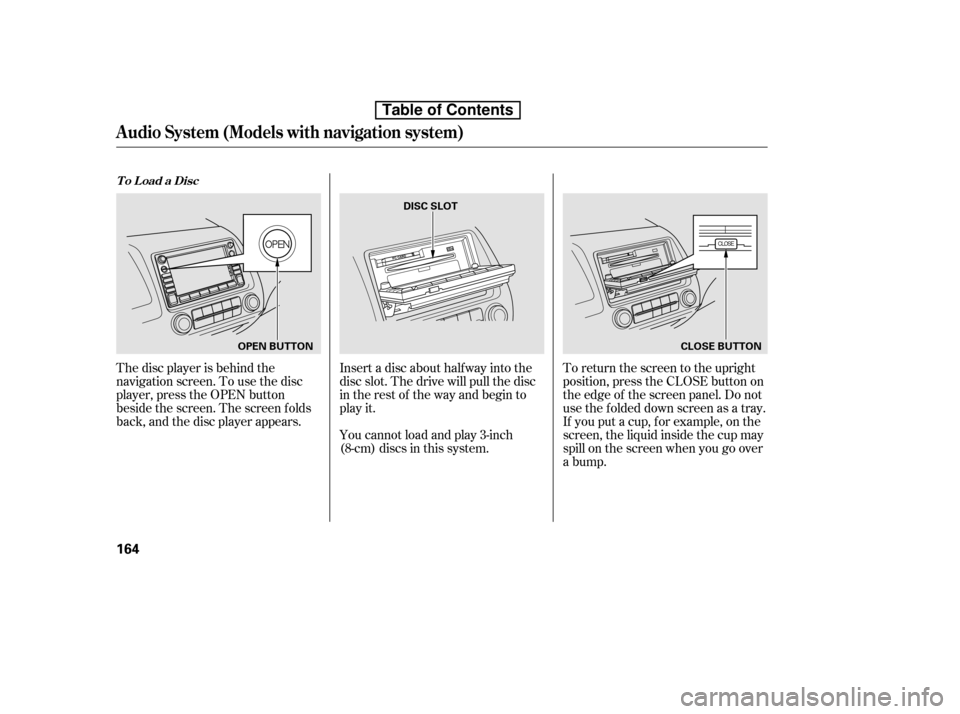
The disc player is behind the
navigation screen. To use the disc
player, press the OPEN button
beside the screen. The screen f olds
back, and the disc player appears.Insert a disc about half way into the
disc slot. The drive will pull the disc
in the rest of the way and begin to
play it.
You cannot load and play 3-inch
(8-cm)discsinthissystem.To return the screen to the upright
position, press the CLOSE button on
the edge of the screen panel. Do not
use the f olded down screen as a tray.
If you put a cup, f or example, on the
screen, the liquid inside the cup may
spill on the screen when you go over
a bump.
To Load a Disc
Audio System (Models with navigation system)
164
OPEN BUTTONDISC SLOT
CLOSE BUTTON
Table of Contents
Page 179 of 387
�µ�µ
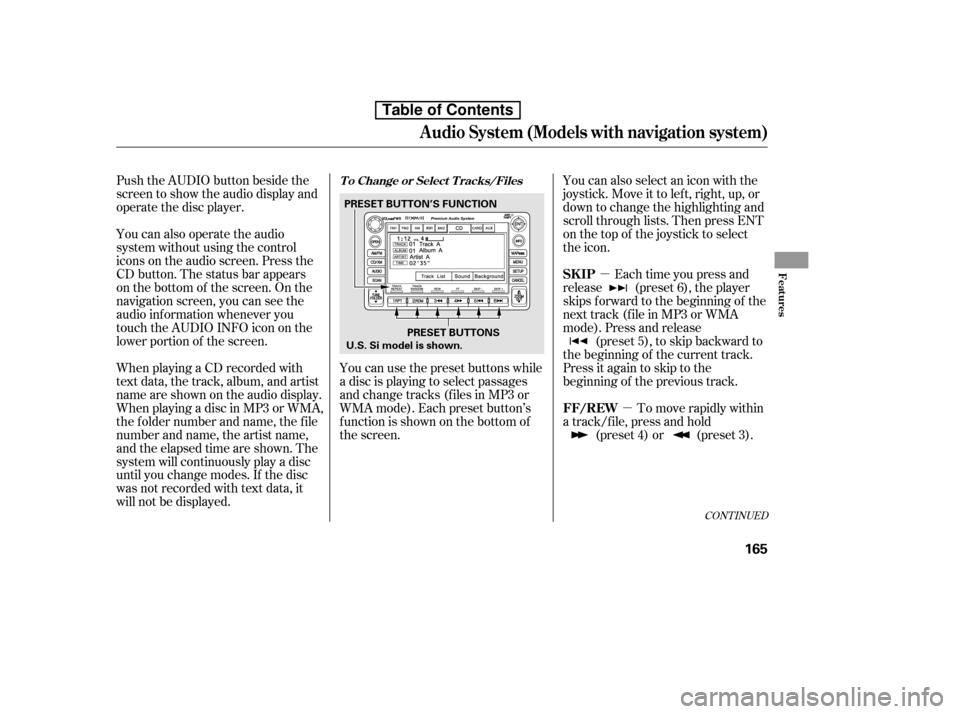
Push the AUDIO button beside the
screen to show the audio display and
operate the disc player.
You can also operate the audio
system without using the control
icons on the audio screen. Press the
CD button. The status bar appears
on the bottom of the screen. On the
navigation screen, you can see the
audio inf ormation whenever you
touch the AUDIO INFO icon on the
lower portion of the screen.
When playing a CD recorded with
text data, the track, album, and artist
name are shown on the audio display.
When playing a disc in MP3 or WMA,
the f older number and name, the f ile
number and name, the artist name,
and the elapsed time are shown. The
system will continuously play a disc
until you change modes. If the disc
was not recorded with text data, it
will not be displayed. You can also select an icon with the
joystick. Move it to left, right, up, or
down to change the highlighting and
scroll through lists. Then press ENT
on the top of the joystick to select
the icon.
Each time you press and
release (preset 6), the player
skips forward to the beginning of the
next track (f ile in MP3 or WMA
mode). Press and release (preset 5), to skip backward to
the beginning of the current track.
Press it again to skip to the
beginning of the previous track.
You can use the preset buttons while
a disc is playing to select passages
and change tracks (files in MP3 or
WMA mode). Each preset button’s
f unction is shown on the bottom of
the screen. To move rapidly within
a track/f ile, press and hold (preset 4) or (preset 3).
CONT INUED
T o Change or Select T racks/Files
SK IP
FF/REW
Audio System (Models with navigation system)
Features
165
PRESET BUTTONS
PRESET BUTTON’S FUNCTION
U.S. Si model is shown.
Table of Contents
Page 180 of 387
�µ
�Û �Ý
�µ �µ
�µ �µ
To
select a dif f erent f older, press either
side of the TUNE bar to move to the
beginning of the next f older. Press
the side of the TUNE bar to skip
to the next folder, and the side to
move to the beginning of the current
folder.Pressitagaintoskiptothe
beginning of the previous f older.
To continuously replay
a track (f ile in MP3 or WMA mode),
press and release the RPT button
(preset 1). You will see TRACK
REPEAT in the display. Press and
hold the RPT button for 2 seconds to
turn it off. This feature,
when activated, replays all f iles in
the selected f older in the order they
are compressed. To activate folder
repeat, press and hold the RPT
button (preset 1). You will see
FOLDER REPEAT in the display.
The system continuously replays the
current f older. Press the RPT button
again to turn it off. Pressing the
RDM button or selecting a dif f erent
folder with the TUNE bar also turns
of f f older repeat.
This
featureplaysthetrackswithinadisc
(the f iles within a f older) in random
order. To activate track random,
press and release the RDM button
(preset 2). You will see TRACK
RANDOM in the display. Press and
hold the RDM button for 2 seconds
to return to normal play. This
feature, when activated, plays all
f iles in each f older in random order,
rather than in the order they are
compressed. To activate folder
random, press the RDM button
(preset 2) twice. You will see
FOLDER RANDOM in the display.
The system then selects and plays
f iles randomly. This continues until
you deactivate folder random by
pressing the RDM button again, or if
you select a dif f erent f older with the
TUNE bar.
In MP3 or WMA mode
In MP3 or WMA mode In MP3 or WMA mode
FOLDER SELECTION
T RA CK REPEA T (FIL E
REPEAT) FOLDER REPEAT
TRACK RANDOM (Random
within a disc/f older)FOLDER RANDOM
Audio System (Models with navigation system)
166
Table of Contents
Page 181 of 387
�µ�µ
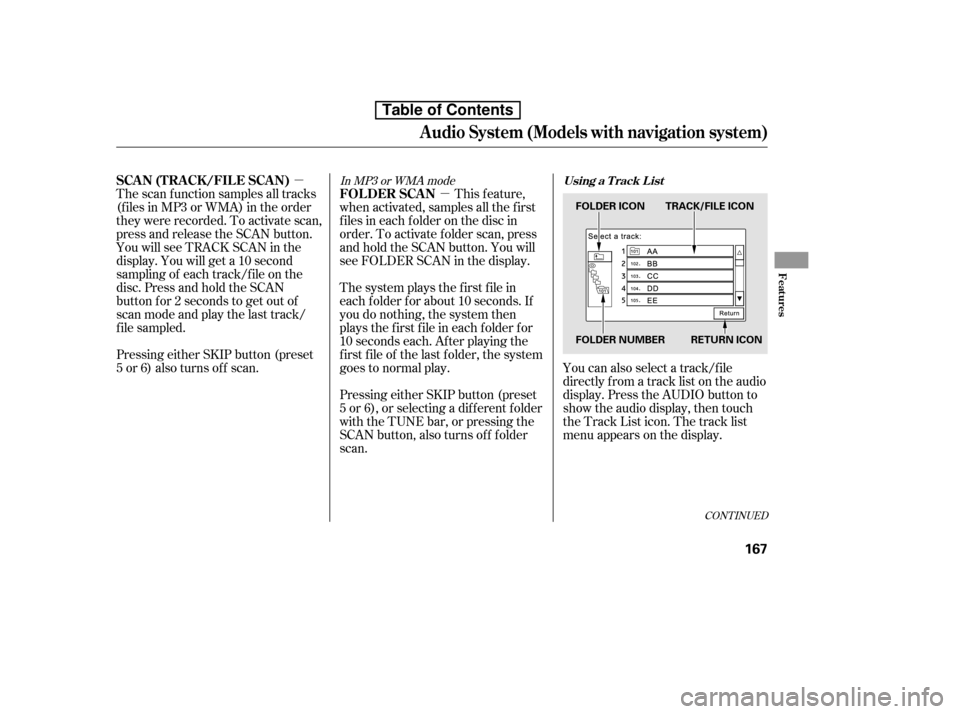
You can also select a track/f ile
directly f rom a track list on the audio
display. Press the AUDIO button to
show the audio display, then touch
the Track List icon. The track list
menu appears on the display.
Pressing either SKIP button (preset
5 or 6) also turns of f scan.
The scan f unction samples all tracks
(f iles in MP3 or WMA) in the order
they were recorded. To activate scan,
press and release the SCAN button.
You will see TRACK SCAN in the
display. You will get a 10 second
sampling of each track/f ile on the
disc. Press and hold the SCAN
button f or 2 seconds to get out of
scan mode and play the last track/
f ile sampled.
This feature,
when activated, samples all the first
f iles in each f older on the disc in
order. To activate f older scan, press
and hold the SCAN button. You will
see FOLDER SCAN in the display.
The system plays the f irst f ile in
each f older f or about 10 seconds. If
you do nothing, the system then
plays the f irst f ile in each f older f or
10 seconds each. Af ter playing the
first file of the last folder, the system
goes to normal play.
Pressing either SKIP button (preset
5 or 6), or selecting a dif f erent f older
with the TUNE bar, or pressing the
SCAN button, also turns of f f older
scan.In MP3 or WMA mode
CONT INUED
Using a T rack L istSCA N (T RA CK /FIL E SCA N)
FOLDER SCAN
Audio System (Models with navigation system)
Features
167
FOLDER ICON TRACK/FILE ICON
FOLDER NUMBER RETURN ICON
Table of Contents