Page 235 of 387

CONT INUED
You can make calls using any phone
number or a name in the HFL
phonebook. You can also redial the
last number called.Press and release the HFL Talk
button bef ore a command.
Say ‘‘ ’’ or ‘‘ .’’
Follow the HFL prompts and say
the phone number you want to dial.
Follow the HFL prompts to
conf irm the number and say
‘‘ ’’ or ‘‘ .’’
Once connected, you will hear the
person you called through the audio
speakers. Press and release the HFL Talk
button bef ore a command.
Follow the HFL prompts to
conf irm the name and make the
call.
Follow the HFL prompts and say
thenamestoredintheHFL
phonebook that you want to call.
Say ‘‘ ’’ or ‘‘ .’’
Bluetooth is the wireless technology
that links your phone to HFL. HFL
uses a Class 2 Bluetooth, which
means the maximum range between
yourphoneandvehicleis30feet(10
meters).
During a call, HFL allows you to talk
up to 30 minutes af ter you remove
the key from the ignition switch.
However, this may weaken the
vehicle’s battery. 1. 2. 3.
1. 2. 3.
BluetoothHandsFreeL ink
Making a Call
Call Dial
Call Dial Call DialT o make a call using a phone
number: Tomakeacallusinganameinthe
HFL phonebook:
Features
221
Table of Contents
Page 238 of 387
If your phone has Call Waiting, press
and release the HFL Talk button to
put the original call on hold and
answer the incoming call.
To return to the original call, press
the HFL Talk button again. If you
don’t want to answer the incoming
call, disregard it and continue with
your original call. If you want to hang
up the original call and answer the
new call, press the HFL Back button.You can transfer a call from HFL to
your phone, or f rom your phone to
HFL.
Press and release the HFL Talk
button and say ‘‘ .’’
When you receive a call, an incoming
call notif ication (if activated) will
play and interrupt the audio system
if it is on.
Press the HFL Talk button to answer
the call, or the HFL Back button to
hang up.
BluetoothHandsFreeL ink
Call Wait ingTransf erring a Call
Transf er
Receiving a Call
224
Table of Contents
Page 261 of 387

Modif ying your vehicle, or installing
some non-Honda accessories, can
make it unsaf e. Bef ore you make any
modif ications or add any accessories,
be sure to read the f ollowing
inf ormation.
Your dealer has Honda accessories
that allow you to personalize your
vehicle, or improve its perf ormance.
These accessories have been
designed and approved f or your
vehicle, and are covered by warranty.
Although non-Honda accessories
may f it on your vehicle, they may not
meet f actory specif ications, and
could adversely af f ect your vehicle’s
handling and stability.When properly installed, cellular
phones, alarms, two-way radios, and
low-powered audio systems should
not interf ere with your vehicle’s
computer controlled systems, such
as your airbags, anti-lock brakes, and
tire pressure monitoring system (if
equipped).Bef ore installing any accessory:
Make sure the accessory does not
obscure any lights, or interf ere
with proper vehicle operation or
perf ormance.
Be sure electronic accessories do
not overload electrical circuits
(see page ) or interf ere with
the proper operation of your
vehicle.
Bef ore installing any electronic
accessory, have the installer
contact your dealer for assistance.
If possible, have your dealer
inspect the f inal installation.
Do not install accessories on the
side pillars or across the rear
windows. Accessories installed in
theseareasmayinterferewith
proper operation of the side
curtain airbags. 342
A ccessories
A ccessories and Modif ications
Bef ore Driving
247
Improper accessories or
modifications can affect your
vehicle’s handling, stability, and
performance, and cause a
crash in which you can be hurt
or killed.
Follow all instructions in this
owner’s manual regarding
accessories and modifications.
Table of Contents
Page 337 of 387
�µ
If you need to connect the battery to
a charger, disconnect both cables to
prevent damaging your vehicle’s
electrical system. Always disconnect
the negative ( ) cable first, and
reconnect it last.
If additional battery maintenance is
needed, see your dealer or a
qualif ied technician.
Battery posts,
terminals, and related accessories
contain lead and lead compounds. If your vehicle’s battery is
disconnected, or goes dead, the
audio system will disable itself . The
nexttimeyouturnontheradio,you
may see ‘‘ENTER CODE’’ in the
f requency display. Use the preset
buttons to enter the code (see page
).
The navigation system will also
disableitself.Thenexttimeyouturn
on the ignition switch, the system
will require you to enter a PIN
bef ore it can be used. Ref er to the
navigation system manual.
If your vehicle’s battery is
disconnected, or goes dead, the time
setting will be reset to 1:00. To set
the time again, f ollow the setting
procedure (see page ).
206
207
On vehicles with navigation system
On vehicles without navigation system
WARNING:
Wash your hands af ter handling.
Checking the Battery
Maint enance
323
The battery gives off explosive
hydrogen gas during normaloperation.
A spark or flame can cause the
battery to explode with enough
force to kill or seriously hurt you.
Wear protective clothing and a
face shield, or have a skilled
technician do the batterymaintenance.
Table of Contents
Page 348 of 387
Although this seems like a simple
procedure, you should take several
precautions.To jump start your vehicle:
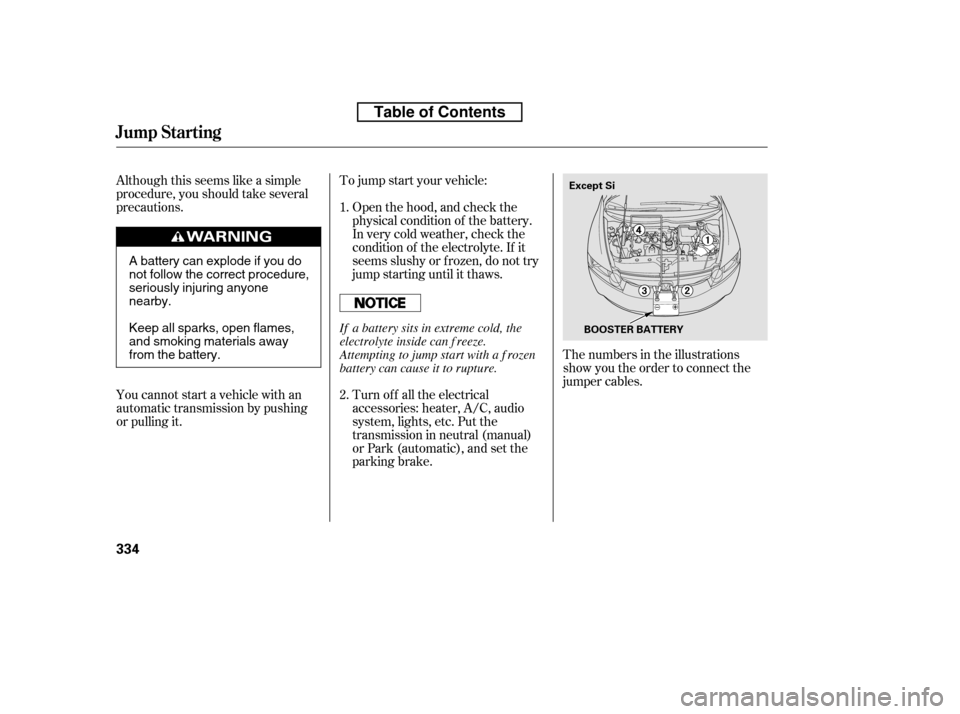
The numbers in the illustrations
show you the order to connect the
jumper cables.
Turn of f all the electrical
accessories: heater, A/C, audio
system, lights, etc. Put the
transmission in neutral (manual)
or Park (automatic), and set the
parking brake.
Open the hood, and check the
physical condition of the battery.
In very cold weather, check the
condition of the electrolyte. If it
seems slushy or f rozen, do not try
jump starting until it thaws.
You cannot start a vehicle with an
automatic transmission by pushing
or pulling it. 1. 2.
Jump Starting
334
Except Si
BOOSTER BATTERY
A battery can explode if you do
not follow the correct procedure,
seriously injuring anyonenearby.
Keep all sparks, open flames,
and smoking materials away
from the battery. If a battery sits in extreme cold, the
electrolyte inside can f reeze.
Attempting to jump start with a f rozen
battery can cause it to rupture.
Table of Contents
Page 359 of 387
When the audio system is disabled,
the clock setting in the audio system
will be canceled. You will need to
reset the clock (see page ).
If the radio f use is removed, the
audio system may disable itself . The
nexttimeyouturnontheradio,you
will see ‘‘ENTER CODE’’ in the
f requency display. Use the preset
buttons to enter the five-digit code
(see page ).
If the replacement fuse of the
same rating blows in a short time,
there is probably a serious
electrical problem with your
vehicle. Leave the blown fuse in
that circuit, and have your vehicle
checked by a qualif ied technician.
6.
206
207
Fuses
T aking Care of t he Unexpect ed
345
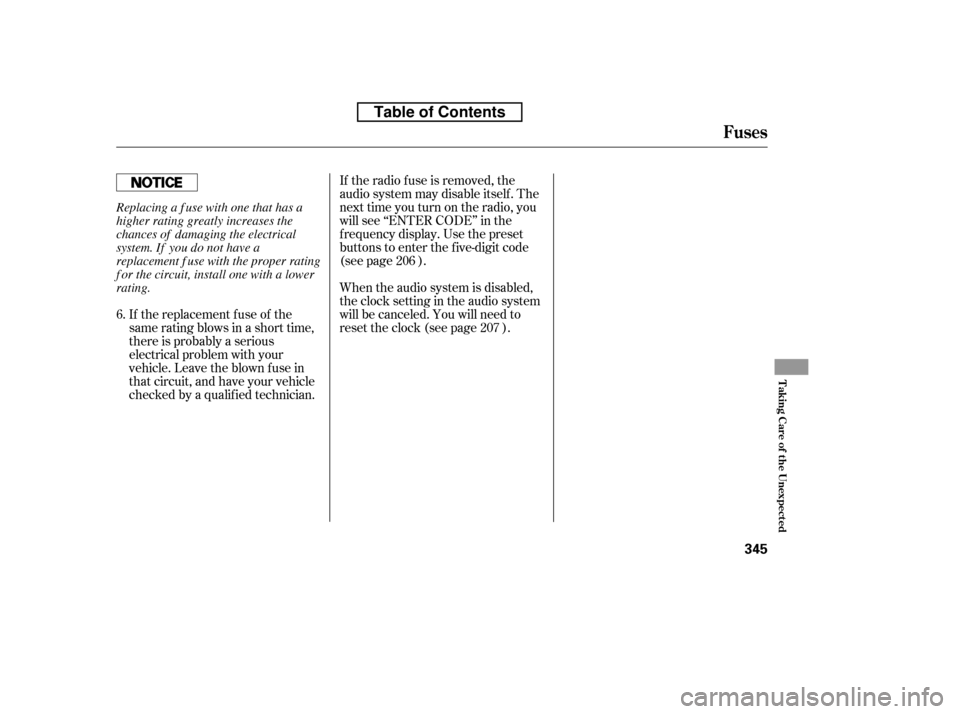
Replacing a f use with one that has a
higher rating greatly increases the
chances of damaging the electrical
system. If you do not have a
replacement f use with the proper rating
f or the circuit, install one with a lower
rating.
Table of Contents
Page 360 of 387
�Î�Î
�Î
�µ �µ �µ �µ
�Î �Î
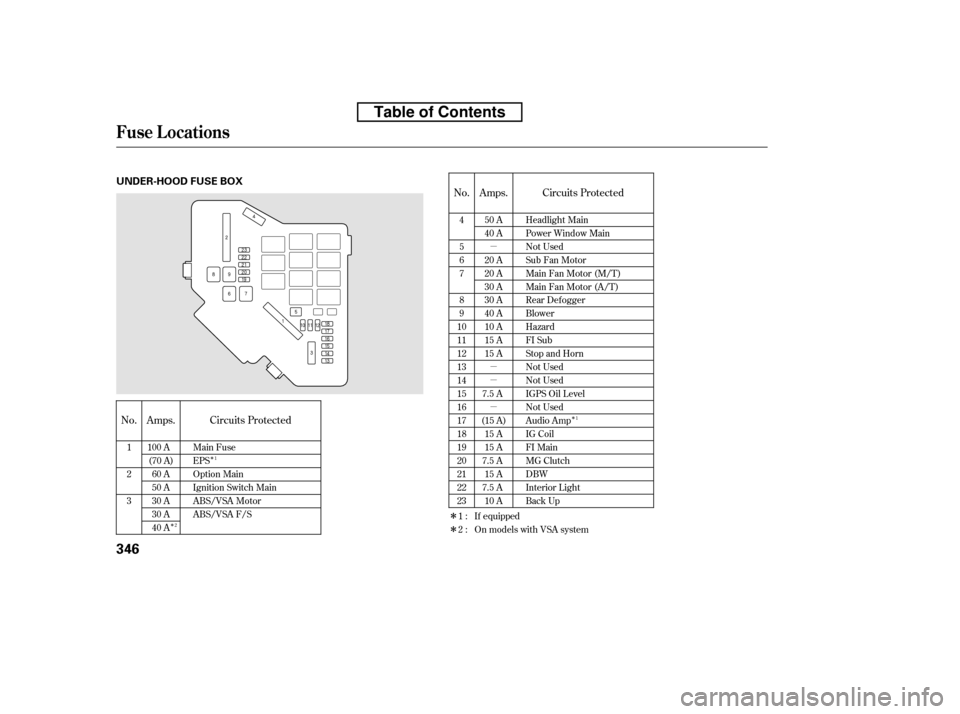
No.
No. Circuits Protected Circuits Protected
Amps. Amps.
4 5 67 8 9
1011121314151617181920212223
1 23 Main Fuse EPS
Option Main
Ignition Switch Main
ABS/VSA Motor
ABS/VSA F/S Headlight Main
Power Window Main
Not Used
Sub Fan Motor
Main Fan Motor (M/T)
Main Fan Motor (A/T)
Rear Defogger
Blower
Hazard
FI Sub
Stop and Horn
Not Used
Not Used
IGPS Oil Level
Not Used
Audio Amp
IG Coil
FI Main
MG Clutch
DBW
Interior Light
Back Up
100 A
(70 A)
60 A
50 A
30 A
30 A
40 A 50 A
40 A
20 A
20 A
30 A
30 A
40 A
10 A
15 A
15 A
7.5 A
(15 A) 15 A
15 A
7.5 A
15 A
7.5 A
10 A
1:2: If equipped
On models with VSA system
1 1
2
Fuse Locations
346
UNDER-HOOD FUSE BOX
Table of Contents