2010 HONDA CIVIC HYBRID bulb
[x] Cancel search: bulbPage 62 of 368

This indicator comes on f or several
seconds when you turn the ignition
switch to the ON (II) position. If it
comes on at any other time, it
indicates that the passenger’s side
airbag has automatically shut off.
For more inf ormation, see page .
This indicator normally comes on f or
a f ew seconds when you turn the
ignition switch to the ON (II)
position. If it comes on at any other
time, there is a problem with the
ABS. If this happens, have your
vehicle checked at a dealer. With
this indicator on, your vehicle still
has normal braking ability but no
anti-lock f unction. For more
inf ormation, see page .The lef t or right turn signal indicator
blinks when you signal a lane change
or turn. If an indicator does not blink
or blinks rapidly, it usually means
one of the turn signal bulbs is
burned out (see pages and ).
Replace the bulb as soon as possible,
since other drivers cannot see that
you are signaling.
When you press the hazard warning
button, both turn signal indicators
and all turn signals on the outside of
the vehicle f lash.
This indicator comes on brief ly when
you turn the ignition switch to the
ON (II) position. It will then go of f if
you have inserted a properly coded
ignition key. If it is not a properly
coded key, the indicator will blink,
and the engine’s f uel system will be
disabled (see page ).
79
31
268 295 296
Instrument Panel Indicators
Side Airbag Of f
Indicator
Anti-lock Brake System
(A BS) Indicator Immobilizer System
Indicator
Turn Signal and
Hazard Warning
Indicators
Inst rument s and Cont rols
59
U.S. Canada
09/07/15 10:37:35 31SNC640_064
2010 Civic Hybrid
Page 296 of 368
CONT INUED
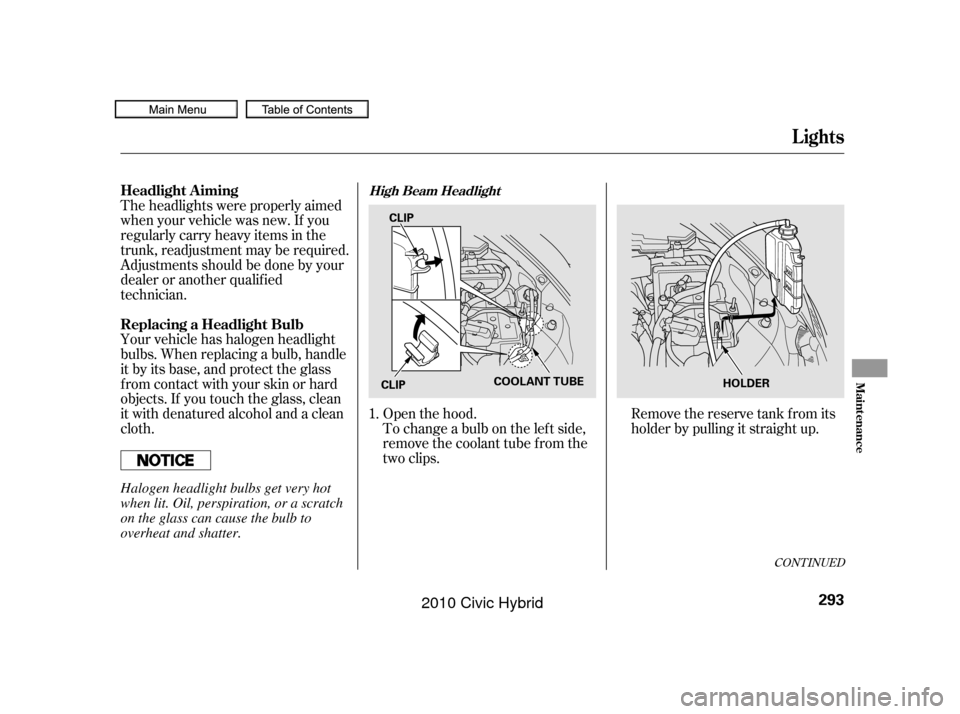
To change a bulb on the lef t side,
remove the coolant tube f rom the
two clips. Openthehood.Removethereservetankfromits
holder by pulling it straight up.
Theheadlightswereproperlyaimed
when your vehicle was new. If you
regularly carry heavy items in the
trunk, readjustment may be required.
Adjustmentsshouldbedonebyyour
dealer or another qualif ied
technician.
Your vehicle has halogen headlight
bulbs. When replacing a bulb, handle
it by its base, and protect the glass
f rom contact with your skin or hard
objects. If you touch the glass, clean
it with denatured alcohol and a clean
cloth.
1.
Headlight A iming
Replacing a Headlight Bulb
Lights
High Beam Headlight
Maint enance
293
COOLANT TUBE
CLIP
CLIP HOLDER
Halogen headlight bulbs get very hot
when lit. Oil, perspiration, or a scratch
on the glass can cause the bulb to
overheat and shatter.
09/07/15 11:09:26 31SNC640_298
2010 Civic Hybrid
Page 297 of 368
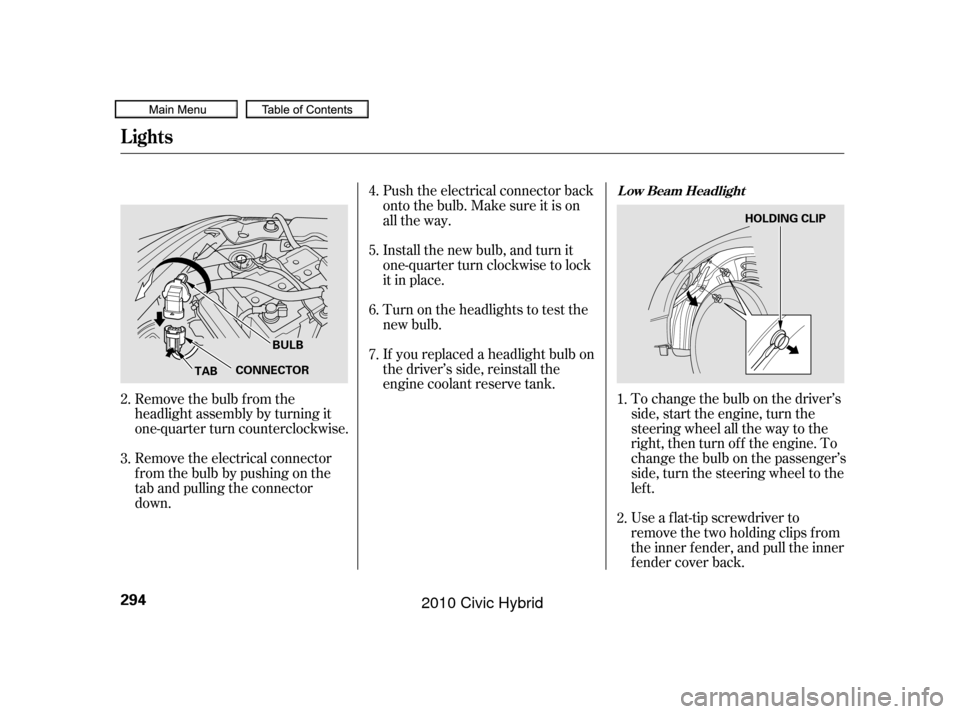
If youreplacedaheadlightbulbon
the driver’s side, reinstall the
engine coolant reserve tank.To change the bulb on the driver’s
side, start the engine, turn the
steering wheel all the way to the
right, then turn of f the engine. To
change the bulb on the passenger’s
side, turn the steering wheel to the
lef t.
Use a f lat-tip screwdriver to
remove the two holding clips f rom
the inner f ender, and pull the inner
f ender cover back.
Push the electrical connector back
onto the bulb. Make sure it is on
all the way.
Install the new bulb, and turn it
one-quarter turn clockwise to lock
it in place.
Turn on the headlights to test the
new bulb.
Remove the electrical connector
f rom the bulb by pushing on the
tab and pulling the connector
down. Remove the bulb f rom the
headlight assembly by turning it
one-quarter turn counterclockwise.
2.
3.
2.
4.
5.
6.
7.
1.
L ow Beam Headlight
Lights
294
TABCONNECTORBULB HOLDING CLIP
09/07/15 11:09:36 31SNC640_299
2010 Civic Hybrid
Page 298 of 368
To change the bulb on the driver’s
side, start the engine, turn the
steering wheel all the way to the
right, then turn of f the engine. To
change the bulb on the passenger’s
side, turn the steering wheel to the
lef t.
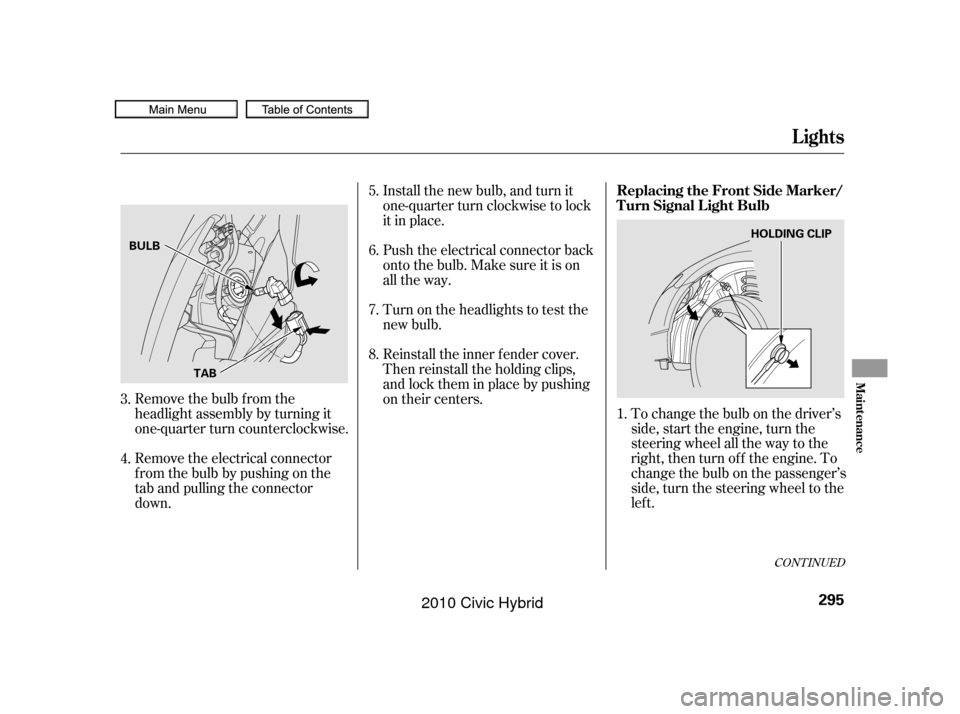
Remove the bulb f rom the
headlight assembly by turning it
one-quarter turn counterclockwise. Install the new bulb, and turn it
one-quarter turn clockwise to lock
it in place.
Push the electrical connector back
onto the bulb. Make sure it is on
all the way.
Turn on the headlights to test the
new bulb.
Reinstall the inner f ender cover.
Then reinstall the holding clips,
andlocktheminplacebypushing
on their centers.
Remove the electrical connector
f rom the bulb by pushing on the
tab and pulling the connector
down. 5.
6.
1.
7.
8.
3.
4.
CONT INUED
Lights
Replacing the Front Side Marker/
Turn Signal Light Bulb
Maint enance
295
TAB
BULB
HOLDING CLIP
09/07/15 11:09:46 31SNC640_300
2010 Civic Hybrid
Page 299 of 368
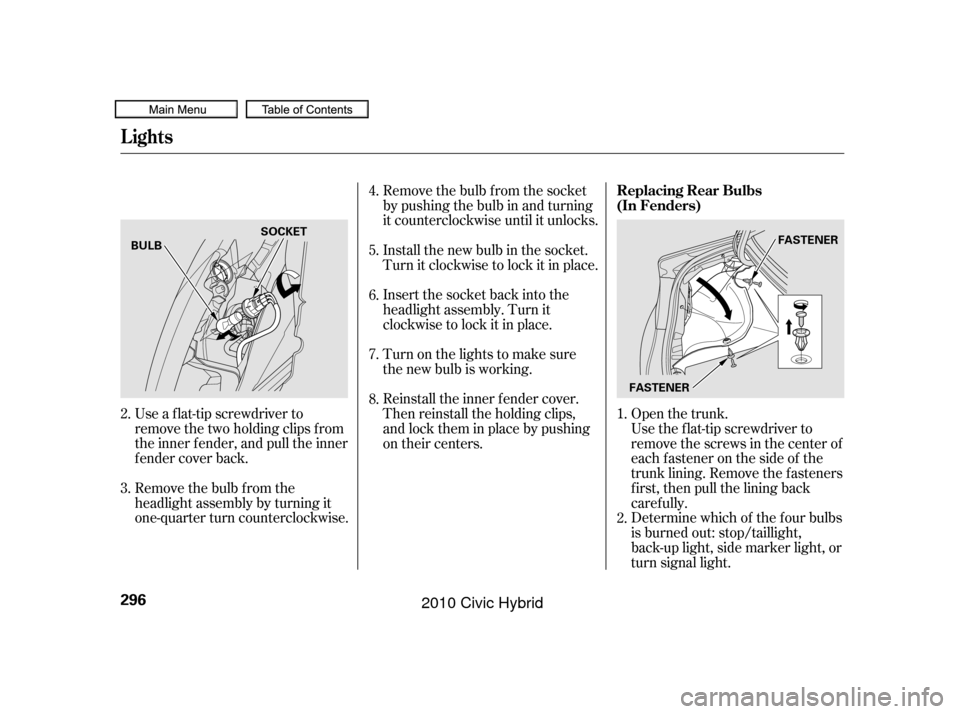
Open the trunk.
Use a f lat-tip screwdriver to
remove the two holding clips f rom
the inner f ender, and pull the inner
f ender cover back. Remove the bulb f rom the socket
by pushing the bulb in and turning
it counterclockwise until it unlocks.
Install the new bulb in the socket.
Turn it clockwise to lock it in place.
Insert the socket back into the
headlight assembly. Turn it
clockwise to lock it in place.
Reinstall the inner f ender cover.
Then reinstall the holding clips,
andlocktheminplacebypushing
on their centers. Turn on the lights to make sure
the new bulb is working.
Remove the bulb f rom the
headlight assembly by turning it
one-quarter turn counterclockwise. Use the f lat-tip screwdriver to
remove the screws in the center of
each f astener on the side of the
trunk lining. Remove the f asteners
first, then pull the lining back
caref ully.
Determine which of the f our bulbs
is burned out: stop/taillight,
back-up light, side marker light, or
turn signal light.
1.
4.
5.
6.
7.
8.
3. 2.
2. Replacing Rear Bulbs
(In Fenders)
Lights
296
FASTENER
BULB
SOCKET
FASTENER
09/07/15 11:09:57 31SNC640_301
2010 Civic Hybrid
Page 300 of 368

Remove the socket by turning it
one-quarter turn counterclockwise.
Pull the bulb straight out of its
socket. Push the new bulb straight
into the socket until it bottoms.
Reinstall the socket into the light
assembly by turning it clockwise
until it locks.Put the f asteners into the holes on
the side of the trunk lining.
Reinstall the screws. Reinstall the trunk lining. Make
sure it is installed under the edge
of the trunk seal. Turn on the lights to make sure
the new bulb is working.
Open the trunk.
Use the Phillips-head screwdriver to
remove the screws in the center of
each f astener on the back of the boot
lid. Remove the f asteners f irst, then
pull the lining back caref ully. 1.
4.
5. 6.
7.
8.
3.
CONT INUED
Replacing Rear Bulbs
(in T runk L id)
Lights
Maint enance
297
BULBS
SOCKETS SOCKETS
BULB
BULB FASTENER
09/07/15 11:10:07 31SNC640_302
2010 Civic Hybrid
Page 301 of 368
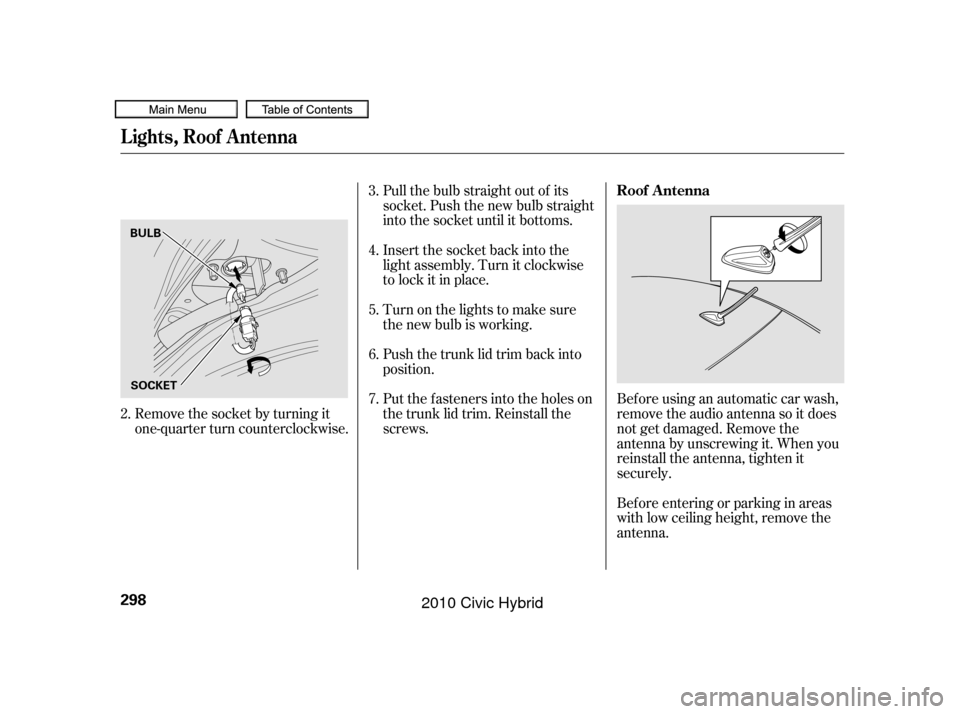
Pull the bulb straight out of its
socket. Push the new bulb straight
into the socket until it bottoms.
Insert the socket back into the
light assembly. Turn it clockwise
to lock it in place.
Push the trunk lid trim back into
position.
Put the f asteners into the holes on
the trunk lid trim. Reinstall the
screws.Beforeusinganautomaticcarwash,
remove the audio antenna so it does
not get damaged. Remove the
antenna by unscrewing it. When you
reinstall the antenna, tighten it
securely.
Bef ore entering or parking in areas
with low ceiling height, remove the
antenna.
Turn on the lights to make sure
the new bulb is working.
Remove the socket by turning it
one-quarter turn counterclockwise.
2. 3.
4.
5.
6.
7.
Roof A ntenna
Lights, Roof Antenna
298
BULB
SOCKET
09/07/15 11:10:17 31SNC640_303
2010 Civic Hybrid
Page 359 of 368
CONT INUED
....................................
Accessories .250
ACCESSORY (Ignition Key .......................................
Position) .80
.............
Accessory Power Socket . 101
....................
Additives, Engine Oil . 285
.............................
Airbag (SRS) .10, 22
...
Airbags, Additional Information . 22
...
Additional Safety Precautions . 33
..........
AdvancedAirbagSystem . 27
.............................
Airbag Service .33
How the Passenger Airbag Of f ......................
Indicator Works .32
How the Side Airbag Of f ......................
Indicator Works .31
..
How the SRS Indicator Works . 31
How Your Front Airbags .........................................
Work .25
...
How Your Side Airbags Work . 29
How Your Side Curtain Airbags .........................................
Work .30
........................
SRS Components .22
..............
Air Conditioning System . 104
.......................
Air Pressure, Tires .304
......................................
Antif reeze .288 Anti-lock Brakes (ABS)
...............................
Indicator .59, 268
...................................
Operation .268
..............
Anti-thef t, Audio System . 209
Anti-thef t Steering Column ..........................................
Lock .80
........................................
Armrest .95
................................
Audio System .110
.....
Auto Door Locking/Unlocking . 82
.........................
Auto Door Locking .82
.....................
Auto Door Unlocking .85
........................
Auto Idle Stop .264, 265
...
Automatic Seat Belt Tensioners . 20
.............
Automatic Speed Control . 214
.
Automatic Transmission (CVT) . 260
..........................
Capacity,Fluid .338
...............
Checking Fluid Level . 291
.......................................
Shif ting .261
Shif t Lever Position ...............................
Indicators .260
................
Shif t Lever Positions . 261
....................
Shif t Lock Release . 263Battery
Charging System ...........................
Indicator .62, 324
............................
Jump Starting .319
..............................
Maintenance .309
............................
Specif ications .339
..............................
Bef ore Driving .241
....................................
Belts,Seat .9,19
...........................
Beverage Holder .101
Brakes ...........
Anti-lock System (ABS) . 268
.............
Break-in, New Linings . 242
....................
Bulb Replacement .296
...........................................
Fluid .292
...................
Pad Wear Indicator . 268
.........................................
Parking .99
...........
System Indicator . 58,63,326
.............................
Braking System .267
.................
Break-in, New Vehicle . 242
..
Brightness Control, Instruments . 75
Index
A B
INDEX
I
09/07/15 11:17:49 31SNC640_362
2010 Civic Hybrid