Page 41 of 120

A reading in the low pressure zone may be caused by
a dangerously low oil level or some other problem
causing low oil pressure. Check the oil as soon as
possible.
{WARNING:
Do not keep driving if the oil pressure is low.
The engine can become so hot that it catches fire.
Someone could be burned. Check the oil as soon
as possible and have the vehicle serviced.
Notice: Lack of proper engine oil maintenance can
damage the engine. The repairs would not be
covered by the vehicle warranty. Always follow the
maintenance schedule in this manual for changing
engine oil.
AUTO STOP
When the engine goes into Automatic Engine Stop,
the oil pressure gage drops to zero when the
tachometer is at the AUTO STOP position. This is
normal and oil pressure returns to the normal operating
range once the engine starts.
See Starting the Vehicle
on page 3‑3for more
information.
AUTO STOP displays in the Driver Information
Center (DIC) when the vehicle speed is zero.
See DIC Warnings and Messages
on page 4‑12for more information.
4-9
Page 42 of 120
Oil Pressure Light
{WARNING:
Do not keep driving if the oil pressure is low.
The engine can become so hot that it catches fire.
Someone could be burned. Check the oil as soon
as possible and have the vehicle serviced.
Notice: Lack of proper engine oil maintenance can
damage the engine. The repairs would not be
covered by the vehicle warranty. Always follow the
maintenance schedule in this manual for changing
engine oil.
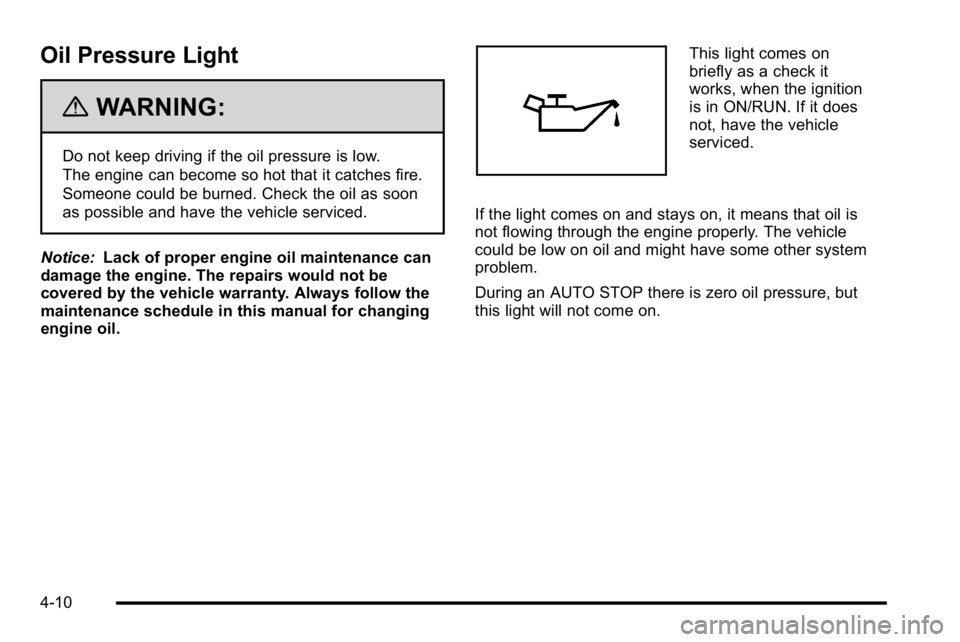
This light comes on
briefly as a check it
works, when the ignition
is in ON/RUN. If it does
not, have the vehicle
serviced.
If the light comes on and stays on, it means that oil is
not flowing through the engine properly. The vehicle
could be low on oil and might have some other system
problem.
During an AUTO STOP there is zero oil pressure, but
this light will not come on.
4-10
Page 44 of 120

Driver Information Center (DIC)
Trip/Fuel Menu Items
Press the trip/fuel button to display the Trip/Fuel Menu
items. For more items see“DIC Operation and
Displays” in the owner manual.
BATTERY VOLTAGE
This display shows the current battery voltage. If the
voltage is in the normal range, the value will display.
For example, the display may read BATTERY
VOLTAGE 13.2 VOLTS. If the voltage is high or low,
the display will read HIGH or LOW. Your vehicle's
charging system regulates voltage based on the state
of the battery. The battery voltage may fluctuate when
viewing this information on the DIC. This is normal.
See“Charging System Light” in the owner manual for
more information. If there is a problem with the battery
charging system, the DIC will display a message.
See DIC Warnings and Messages on page 4‑12.
INST ECON (Instantaneous Economy)
This display normally shows instantaneous fuel
economy. When the vehicle is in Auto Stop mode
AUTO STOP or INST ECON = 99 MPG (l/00km) will be
displayed. See Starting the Vehicle
on page 3‑3for
more information.
DIC Warnings and Messages
Warning messages are displayed on the DIC to notify
the driver that the status of the vehicle has changed
and that some action may be needed by the driver to
correct the condition. If there is more than one message
that needs to be displayed they will appear one after
another.
Some messages may not require immediate action, but
you can press any of the DIC buttons on the instrument
panel or the trip odometer reset stem to acknowledge
that you received the messages and to clear them from
the display.
Some messages cannot be cleared from the DIC
display because they are more urgent. These
messages require action before they can be cleared.
You should take any messages that appear on the
display seriously and remember that clearing the
messages will only make the messages disappear, not
correct the problem.
For information on other DIC messages, see “DIC
Warnings and Messages” in the owner manual Index.
HOOD OPEN
If the hood is not fully closed or there is a problem with
the hood switch, this message will be displayed. Close
the hood to clear the message. If the HOOD OPEN
message continues to be displayed after verifying the
4-12
Page 45 of 120

hood is closed, you should have the hood switch
serviced. Failure to service the hood switch properly
can result in an Auto Start condition.
Auto Stops will be disabled when this message is
displayed. If the vehicle is in auto stop mode when this
message appears, the engine will instantly start.
OIL PRESSURE LOW STOP ENGINE
If engine oil pressure is low, this message will be
displayed on the DIC. Stop the vehicle as soon as
safely possible and do not operate it until the cause of
the low oil pressure has been corrected. Check your oil
level as soon as possible and have your vehicle
serviced. See“Engine Oil”in the owner manual Index.
SERVICE 4 WHEEL DRIVE
This message may display if a problem occurs with the
four-wheel-drive system. If this message appears, stop
as soon as possible and turn off the vehicle. Make sure
the key is in the LOCK/OFF position for at least
one minute and then restart the vehicle and check for
the message on the DIC display. If the message is still
displayed or appears again when you begin driving,
the four-wheel-drive system needs service. See your
dealer/retailer.
SERVICE BATTERY CHARGING
SYSTEM
If the 12V battery system faults or fails this message will
appear on the DIC. The battery/charging system light
will appear in the instrument panel cluster. See “Battery
Warning Light” in the owner manual Index. Driving with
this message on could drain the battery. Have the
electrical system checked as soon as possible.
SERVICE BRAKE SYSTEM
This message will be displayed if there is a problem
with the brake system. You will still be able to brake, but
it will be noticeably more difficult. Pull off the road to a
safe location and have your vehicle towed to the
nearest dealer/retailer for service. See “Brakes,”
“Brake System Warning Light,” and“ABS Brake System
Warning Light” in the owner manual Index.
SERVICE HYBRID SYSTEM
If this message is displayed on the DIC, the vehicle may
continue to operate, but you need to have it serviced as
soon as possible.
SERVICE POWER STEERING
This message displays if a problem has been detected
with the electric power steering. Have your vehicle
serviced by your dealer/retailer immediately.
4-13
Page 50 of 120

Four-Wheel-Drive Vehicles (Except Denali)
Use the following procedure to dinghy tow a
four-wheel-drive vehicle:1. Position the vehicle being towed behind the tow vehicle and shift the transmission to P (Park).
2. Turn the engine off and firmly set the parking brake. See “Parking Brake” in the owner manual
index.
3. Securely attach the vehicle being towed to the tow vehicle.
{WARNING:
Shifting a four-wheel-drive vehicle's transfer case
into N (Neutral) can cause the vehicle to roll even
if the transmission is in P (Park). The driver or
others could be injured. Make sure the parking
brake is firmly set before the transfer case is
shifted to N (Neutral).
4. Shift the transfer case to N (Neutral). See “Shifting
into N (Neutral)” underFour-Wheel Drive
on
page 3‑10for the proper procedure to select the
Neutral position for the vehicle.
5. Release the parking brake only after the vehicle being towed is firmly attached to the towing
vehicle.
6. Turn the ignition to LOCK/OFF and remove the key —the steering wheel will still turn.
5-4
Page 52 of 120
Four-Wheel-Drive Vehicles
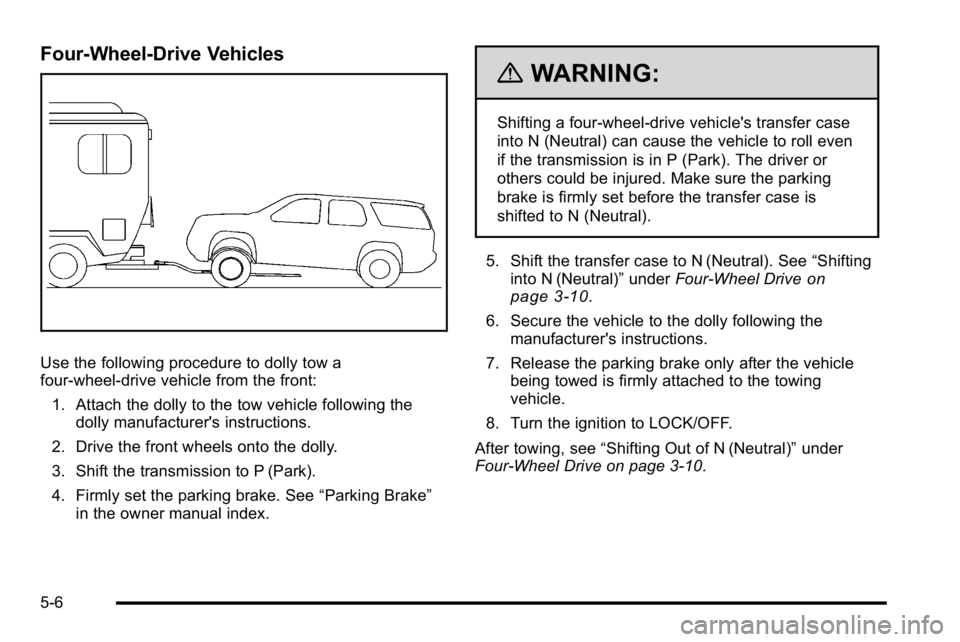
Use the following procedure to dolly tow a
four-wheel-drive vehicle from the front:1. Attach the dolly to the tow vehicle following the dolly manufacturer's instructions.
2. Drive the front wheels onto the dolly.
3. Shift the transmission to P (Park).
4. Firmly set the parking brake. See “Parking Brake”
in the owner manual index.
{WARNING:
Shifting a four-wheel-drive vehicle's transfer case
into N (Neutral) can cause the vehicle to roll even
if the transmission is in P (Park). The driver or
others could be injured. Make sure the parking
brake is firmly set before the transfer case is
shifted to N (Neutral).
5. Shift the transfer case to N (Neutral). See “Shifting
into N (Neutral)” underFour-Wheel Drive
on
page 3‑10.
6. Secure the vehicle to the dolly following the manufacturer's instructions.
7. Release the parking brake only after the vehicle being towed is firmly attached to the towing
vehicle.
8. Turn the ignition to LOCK/OFF.
After towing, see “Shifting Out of N (Neutral)” under
Four-Wheel Drive on page 3‑10.
5-6
Page 54 of 120

6. Use an adequate clamping device designed fortowing to ensure that the front wheels are locked
into the straight position.
{WARNING:
Shifting a four-wheel-drive vehicle's transfer case
into N (Neutral) can cause the vehicle to roll even
if the transmission is in P (Park). The driver or
others could be injured. Make sure the parking
brake is firmly set before the transfer case is
shifted to N (Neutral).
7. Shift the transfer case to N (Neutral). See “Shifting
into N (Neutral)” underFour-Wheel Drive
on
page 3‑10
8. Turn the ignition to LOCK/OFF.
After towing, see “Shifting Out of N (Neutral)” under
Four-Wheel Drive on page 3‑10.
Towing a Trailer
For more information, see “Towing a Trailer”in the
owner manual Index.
Weight of the Trailer
How heavy can a trailer safely be?
It depends on how the rig is used. For example, speed,
altitude, road grades, outside temperature and how
much the vehicle is used to pull a trailer are all
important. It can depend on any special equipment
on the vehicle, and the amount of tongue weight the
vehicle can carry.
Maximum trailer weight is calculated assuming only the
driver is in the tow vehicle and it has all the required
trailering equipment. The weight of additional optional
equipment, passengers and cargo in the tow vehicle
must be subtracted from the maximum trailer weight.
Use the following charts to determine how much the
vehicle can weigh, based upon the vehicle model and
options.
5-8
Page 58 of 120
Service
Doing Your Own Service Work
{WARNING:
Never try to do your own service on hybrid
components. You can be injured and the vehicle
can be damaged if you try to do your own service
work. Service and repair of these hybrid
components should only be performed by a
trained service technician with the proper
knowledge and tools.
{WARNING:
You can be injured and the vehicle could be
damaged if you try to do service work on a vehicle
without knowing enough about it.
.Be sure you have sufficient knowledge,
experience, the proper replacement parts,
and tools before attempting any vehicle
maintenance task.
.Be sure to use the proper nuts, bolts, and
other fasteners. English and metric fasteners
can be easily confused. If the wrong fasteners
are used, parts can later break or fall off. You
could be hurt.
6-2