2010 GMC TERRAIN instrument cluster
[x] Cancel search: instrument clusterPage 136 of 410

5-2 Lighting
Headlamp High/
Low-Beam Changer
2 3
Headlamp High/Low Beam
Changer: Push the turn/lane
change lever away from you to turn
the high beams on.
Pull the lever towards you to return
to low beams.
This indicator light turns on in the
instrument panel cluster when the
high beam headlamps are on.
Flash-to-Pass
The flash‐to‐pass feature works with
the low‐beams or Daytime Running
Lamps (DRL) on or off.
To flash the high beams, pull the
turn signal/lane change lever all the
way towards you. Then release it.
Daytime Running
Lamps (DRL)
With DRL, the low-beam headlamps
come on at a reduced brightness in
daylight when the following
conditions are met:
.The ignition is on.
.The exterior lamp band is in the
automatic position.
.The transmission is not in
P (Park).
.The light sensor determines it is
daytime.
.The parking brake is released.
Fully functional DRL are required on
all vehicles first sold in Canada.
When the DRL are on, the taillamps,
sidemarker, instrument panel lights,
and other lamps will not be on. When the exterior lamp band is
turned to the headlamp position, the
low-beam headlamps come on. The
other lamps that come on with the
headlamps will also come on.
When the headlamps are turned off,
the regular lamps will go off, and the
low-beam headlamps come on to
the reduced brightness.
To idle the vehicle with the DRL off,
move the shift lever to P (Park). The
DRL will stay off until the shift lever
is moved out of the P (Park)
position.
The regular headlamp system
should be turned on when needed.
Page 137 of 410

Lighting 5-3
Hazard Warning Flashers
|
(Hazard Warning Flasher):
Press this button, located on the
center of the instrument panel, to
make the front and rear turn signal
lamps flash on and off. This warns
others that you are having trouble.
Press
|again to turn the
flashers off.
Turn and Lane-Change
Signals
An arrow on the instrument panel
cluster will flash in the direction of
the turn or lane change. Move the lever all the way up or
down to signal a turn.
Raise or lower the lever until the
arrow starts to flash to signal a lane
change. Hold it there until the lane
change is complete.
The lever returns to its starting
position when it is released.
If after signaling a turn or a lane
change the arrows flash rapidly or
do not come on, a signal bulb may
be burned out.
Have the bulbs replaced. If the bulb
is not burned out, check the fuse,
see
Fuses
on page 9‑38for more
information.
Fog Lamps
The fog lamps control is located on
the turn/lane change lever.
Use the fog lamps for better vision
in foggy or misty conditions.
# (Fog Lamps): Turn the fog lamp
band on the lever to
#and release
it, to turn the fog lamps on or off.
The band will return to its original
position.
The parking lamps or low‐beam
headlamps must be on to use the
fog lamps.
The fog lamps will go off whenever
the high-beam headlamps are
turned on. When the high‐beam
headlamps are turned off, the fog
lamps will come on again.
Some localities have laws that
require the headlamps to be on
along with the fog lamps.
Page 246 of 410
8-38 Driving and Operating
Fuel Economy Mode
The vehicle may have a Fuel
Economy Mode. When engaged,
fuel economy mode can improve the
vehicle's fuel economy.
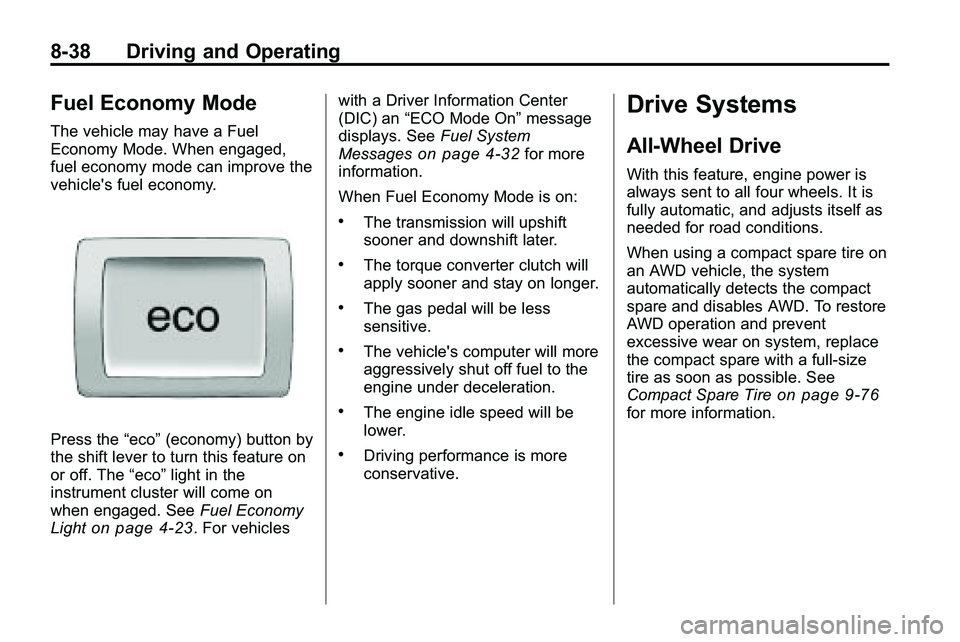
Press the“eco”(economy) button by
the shift lever to turn this feature on
or off. The “eco”light in the
instrument cluster will come on
when engaged. See Fuel Economy
Light
on page 4‑23. For vehicles with a Driver Information Center
(DIC) an
“ECO Mode On” message
displays. See Fuel System
Messages
on page 4‑32for more
information.
When Fuel Economy Mode is on:
.The transmission will upshift
sooner and downshift later.
.The torque converter clutch will
apply sooner and stay on longer.
.The gas pedal will be less
sensitive.
.The vehicle's computer will more
aggressively shut off fuel to the
engine under deceleration.
.The engine idle speed will be
lower.
.Driving performance is more
conservative.
Drive Systems
All-Wheel Drive
With this feature, engine power is
always sent to all four wheels. It is
fully automatic, and adjusts itself as
needed for road conditions.
When using a compact spare tire on
an AWD vehicle, the system
automatically detects the compact
spare and disables AWD. To restore
AWD operation and prevent
excessive wear on system, replace
the compact spare with a full-size
tire as soon as possible. See
Compact Spare Tire
on page 9‑76for more information.
Page 253 of 410

Driving and Operating 8-45
5(On/Off):Press to turn the
cruise control system on and off.
\(Cancel): Press to cancel cruise
control without erasing the set
speed from memory.
RES/+ (Resume/Accel): Move the
thumbwheel up to resume a set
speed or to accelerate to a higher
speed.
SET/− (Set/Coast): Press the
thumbwheel to set a speed or move
the thumbwheel down to decrease
the speed. To set a speed:
1. Press
5.
2. Get to the speed desired.
3. Press the thumbwheel and release it. The desired set speed
briefly appears in the instrument
panel cluster.
4. Take your foot off the accelerator pedal.
When the brakes are applied, the
cruise control shuts off.
Resuming a Set Speed
If the brakes are applied while the
cruise control is at a set speed, the
cruise control disengages. But it
does not need to be reset.
Once the vehicle reaches about
40 km/h (25 mph) or more, move the
thumbwheel up toward RES/+
briefly. The vehicle returns to the
speed selected previously and stays
there. Increasing Speed While Using
Cruise Control
There are two ways to go to a
higher speed. Disengage the cruise
control, but do not turn it off.
.If the cruise control system is
already engaged, move the
thumbwheel up toward RES/+
and hold it until the vehicle
accelerates to the desired
speed, and then release it.
.To increase the speed in small
amounts, move the thumbwheel
up toward RES/+ briefly and
then release it. Each time this is
done, the vehicle goes about
1.6 km/h (1 mph) faster.
Page 317 of 410

Vehicle Care 9-43
Instrument Panel Fuse Block
Mini Fuses Usage 1 Steering Wheel DM
2 Spare
3 Spare
4 Body Control
Module 1 Mini Fuses Usage
5 Infotainment
6 Body Control
Module 7
7 Noise Control
Module Mini Fuses Usage
8 Body Control
Module 4
9 Radio
10 SEO Battery
11 Ultrasonic Rear
Parking Aid Module
12 Heater, Ventilation
and Air Conditioning
Battery
13 Auxiliary Power
Front
14 Heater, Ventilation
and Air Conditioning
Ignition
15 Display
16 Body Control
Module 5
17 Auxiliary
Power Rear
18 Instrument Panel
Cluster Ignition
Page 318 of 410

9-44 Vehicle Care
Mini Fuses Usage19 PDI Module
20 Body Control
Module 6
21 SEO Retained
Accessory Power
22 SDM Ignition
23 Spare
24 Spare
25 PRNDL
26 Spare
27 Spare Mini Fuses Usage
28 Spare
30 Body Control
Module 3
31 Amplifier
32 Discrete Logic
Ignition Switch
33 Communications
Integration Module
34 Body Control
Module 2
35 SDM Battery
36 Data Link
Connection Mini Fuses Usage
37 Instrument Panel
Cluster Battery
38 IOS Module
(Passenger Sensing
System)
39 Spare
J‐Case Fuses Usage
29 Front Blower Motor
40 Body Control
Module 8
Relays Usage 41 LOG Relay
42 Retained Accessory
Power Relay
Page 329 of 410

Vehicle Care 9-55
Tire Pressure Monitor
Operation
This vehicle may have a Tire
Pressure Monitor System (TPMS).
The TPMS is designed to warn the
driver when a low tire pressure
condition exists. TPMS sensors are
mounted onto each tire and wheel
assembly, excluding the spare tire
and wheel assembly. The TPMS
sensors monitor the air pressure in
the vehicle's tires and transmit the
tire pressure readings to a receiver
located in the vehicle.
When a low tire pressure condition
is detected, the TPMS illuminates
the low tire pressure warning light
located on the instrument panel
cluster. If the warning light comes
on, stop as soon as possible andinflate the tires to the recommended
pressure shown on the tire loading
information label. See
Vehicle Load
Limits on page 8‑22.
At the same time a message to
check the pressure in a specific tire
appears on the Driver Information
Center (DIC) display. The low tire
pressure warning light and the DIC
warning message come on at each
ignition cycle until the tires are
inflated to the correct inflation
pressure. Using the DIC, tire
pressure levels can be viewed by
the driver. For additional information
and details about the DIC operation
and displays see Driver Information
Center (DIC) on page 4‑25.
The low tire pressure warning light
may come on in cool weather when
the vehicle is first started, and then
turn off as you start to drive. This
could be an early indicator that the
air pressure in the tire(s) are getting
low and need to be inflated to the
proper pressure. A Tire and Loading Information
label, attached to your vehicle,
shows the size of your vehicle's
original equipment tires and the
correct inflation pressure for your
vehicle's tires when they are cold.
See
Vehicle Load Limits
on
page 8‑22, for an example of the
Tire and Loading Information label
and its location on your vehicle.
Also see Tire Pressure
on
page 9‑52.
Your vehicle's TPMS can warn you
about a low tire pressure condition
but it does not replace normal tire
maintenance. See Tire Inspection
on page 9‑58,Tire Rotationon
page 9‑58and Tires on page 9‑45.
Notice: Liquid tire sealants could
damage the Tire Pressure Monitor
System (TPMS) sensors. Sensor
damage caused by using a tire
sealant is not covered by your
warranty. Do not use liquid tire
sealants.
Page 404 of 410

i-6 INDEX
High-Beam On Light . . . . . . . . . . . 4-24
Highway Hypnosis . . . . . . . . . . . . . 8-18
Hill and Mountain Roads . . . . . . . 8-19
Hill Start Assist (HSA) . . . . . . . . . 8-41
Hood . . . . . . . . . . . . . . . . . . . . . . . . . . . 9-5
Horn . . . . . . . . . . . . . . . . . . . . . . . . . . . . 4-7
How to Wear Safety BeltsProperly . . . . . . . . . . . . . . . . . . . . . . 2-13
I
Ignition Positions . . . . . . . . . . . . . . 8-28
Ignition Transmission LockCheck . . . . . . . . . . . . . . . . . . . . . . . . 9-27
Immobilizer . . . . . . . . . . . . . . . . . . . . 1-13
Infants and Young Children, Restraints . . . . . . . . . . . . . . . . . . . . 2-43
Instrument Cluster . . . . . . . . . . . . . 4-12
Instrument Panel Storage Area . . . . . . . . . . . . . . . . . . 3-1
Instrument Panel Overview . . . . . 4-4
Introduction . . . . . . . . . . . . . . . . . . .iii, 6-1
J
Jump Starting . . . . . . . . . . . . . . . . . . 9-78
K
Key and Lock Messages . . . . . . . 4-33
Keyless Entry Remote (RKE) System . . . . . . . . 1-3
Keyless Entry System . . . . . . . . . . 1-3
Keys . . . . . . . . . . . . . . . . . . . . . . . . . . . . 1-2
L
Labeling, Tire Sidewall . . . . . . . . . 9-46
Lamps Daytime Running (DRL) . . . . . . . 5-2
Dome . . . . . . . . . . . . . . . . . . . . . . . . . . 5-4
Exterior Controls . . . . . . . . . . . . . . . 5-1
License Plate . . . . . . . . . . . . . . . . . 9-37
Malfunction Indicator . . . . . . . . . 4-17
On Reminder . . . . . . . . . . . . . . . . . 4-25
Reading . . . . . . . . . . . . . . . . . . . . . . . 5-4 Lap-Shoulder Belt . . . . . . . . . . . . . 2-18
LATCH System
Replacing Parts After aCrash . . . . . . . . . . . . . . . . . . . . . . . 2-55
Latch, Lower Anchors and Tethers for Children . . . . . . . . . . 2-49
Liftgate
Carbon Monoxide . . . . . . . . . 1-8, 1-9
Light StabiliTrak
®OFF . . . . . . . . . . . . . 4-21
Lighting
Entry . . . . . . . . . . . . . . . . . . . . . . . . . . 5-4
Illumination Control . . . . . . . . . . . . 5-4
Lights Airbag Readiness . . . . . . . . . . . . . 4-15
Antilock Brake System(ABS) Warning . . . . . . . . . . . . . . 4-20
Charging System . . . . . . . . . . . . . 4-16
Cruise Control . . . . . . . . . . . . . . . . 4-25
Engine Oil Pressure . . . . . . . . . . 4-23
Flash-to-Pass . . . . . . . . . . . . . . . . . . 5-2