2010 GMC CANYON four wheel
[x] Cancel search: four wheelPage 1 of 448

In Brief........................................................... 1-1
Instrument Panel
........................................ 1-2
Initial Drive Information
............................... 1-3
Vehicle Features
......................................1-15
Performance and Maintenance
...................1-17
Seats and Restraint System............................. 2-1
Front Seats
............................................... 2-2
Rear Seats
..............................................2-10
Safety Belts
.............................................2-13
Child Restraints
.......................................2-35
Airbag System
.........................................2-64
Restraint System Check
............................2-81
Features and Controls..................................... 3-1
Keys
........................................................ 3-2
Doors and Locks
....................................... 3-5
Windows
.................................................3-10
Theft-Deterrent Systems
............................3-13
Starting and Operating Your Vehicle
...........3-16
Mirrors
....................................................3-36
Storage Areas
.........................................3-40
Sunroof
..................................................3-42Instrument Panel............................................. 4-1
Instrument Panel Overview
.......................... 4-3
Climate Controls
......................................4-16
Warning Lights, Gages, and Indicators
........4-18
Driver Information Center (DIC)
..................4-33
Audio System(s)
.......................................4-42
Driving Your Vehicle....................................... 5-1
Your Driving, the Road, and the Vehicle
....... 5-2
Towing
...................................................5-41
Service and Appearance Care.......................... 6-1
Service
..................................................... 6-3
Fuel
......................................................... 6-5
Checking Things Under the Hood
...............6-10
Rear Axle
...............................................6-47
Four-Wheel Drive
.....................................6-48
Front Axle
...............................................6-49
Headlamp Aiming
.....................................6-50
Bulb Replacement
....................................
6-50
Windshield Wiper Blade Replacement
.........6-55
Tires
......................................................6-57
2010 GMC Canyon Owner ManualM
Page 9 of 448
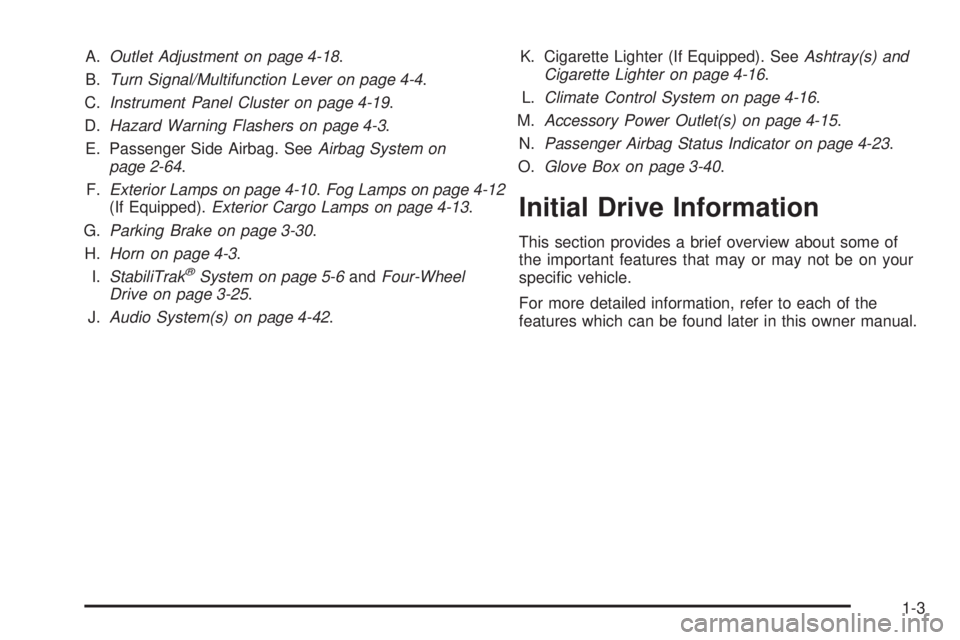
A.Outlet Adjustment on page 4-18.
B.Turn Signal/Multifunction Lever on page 4-4.
C.Instrument Panel Cluster on page 4-19.
D.Hazard Warning Flashers on page 4-3.
E. Passenger Side Airbag. SeeAirbag System on
page 2-64.
F.Exterior Lamps on page 4-10.Fog Lamps on page 4-12
(If Equipped).Exterior Cargo Lamps on page 4-13.
G.Parking Brake on page 3-30.
H.Horn on page 4-3.
I.StabiliTrak
®System on page 5-6andFour-Wheel
Drive on page 3-25.
J.Audio System(s) on page 4-42.K. Cigarette Lighter (If Equipped). SeeAshtray(s) and
Cigarette Lighter on page 4-16.
L.Climate Control System on page 4-16.
M.Accessory Power Outlet(s) on page 4-15.
N.Passenger Airbag Status Indicator on page 4-23.
O.Glove Box on page 3-40.
Initial Drive Information
This section provides a brief overview about some of
the important features that may or may not be on your
specific vehicle.
For more detailed information, refer to each of the
features which can be found later in this owner manual.
1-3
Page 111 of 448
Keys...............................................................3-2
Remote Keyless Entry (RKE) System................3-3
Remote Keyless Entry (RKE) System
Operation...................................................3-3
Doors and Locks.............................................3-5
Door Locks....................................................3-5
Power Door Locks..........................................3-6
Programmable Automatic Door Locks................3-6
Rear Door Security Locks (Crew Cab).................3-7
Lockout Protection..........................................3-7
Rear Doors (Extended Cab)..............................3-7
Tailgate........................................................3-8
Windows........................................................3-10
Manual Windows..........................................3-10
Power Windows............................................3-11
Sliding Rear Window.....................................3-12
Sun Visors...................................................3-12
Theft-Deterrent Systems..................................3-13
Content Theft-Deterrent.................................3-13
Passlock
®(U.S. Only)...................................3-14
PASS-Key®III+ Electronic Immobilizer.............3-15
PASS-Key®III+ Electronic Immobilizer
Operation (Canada Only).............................3-15
Starting and Operating Your Vehicle................3-16
New Vehicle Break-In....................................3-16
Ignition Positions..........................................3-17
Retained Accessory Power (RAP)...................3-18Starting the Engine.......................................3-18
Engine Coolant Heater..................................3-20
Automatic Transmission Operation...................3-21
Manual Transmission Operation......................3-23
Four-Wheel Drive..........................................3-25
Parking Brake..............................................3-30
Shifting Into Park (Automatic Transmission)......3-31
Shifting Out of Park (Automatic Transmission).....3-32
Parking the Vehicle (Manual Transmission).......3-33
Parking Over Things That Burn.......................3-33
Engine Exhaust............................................3-34
Running the Vehicle While Parked..................3-34
Mirrors...........................................................3-36
Manual Rearview Mirror.................................3-36
Automatic Dimming Rearview Mirror................3-36
Compass.....................................................3-37
Outside Manual Mirrors..................................3-38
Outside Power Mirrors...................................3-38
Outside Convex Mirror...................................3-39
Storage Areas................................................3-40
Glove Box...................................................3-40
Cupholders..................................................3-40
Center Console Storage.................................3-40
Assist Handles.............................................3-40
Rear Storage Area........................................3-41
Sunroof.........................................................3-42
Section 3 Features and Controls
3-1
Page 127 of 448

Ignition Positions
The ignition switch has
four different positions.
To shift out of P (Park), turn the ignition to ON/RUN and
apply the regular brake pedal.
Notice:Using a tool to force the key to turn in the
ignition could cause damage to the switch or break
the key. Use the correct key, make sure it is all the
way in, and turn it only with your hand. If the key
cannot be turned by hand, see your dealer/retailer.
(A) LOCK/OFF:This position locks the ignition. It also
locks the transmission on automatic transmission
vehicles. It locks the steering wheel on manual
transmission vehicles. The key can on be removed
in LOCK/OFF.On vehicles with an automatic transmission, the shift
lever must be in P (Park) to turn the ignition switch
to LOCK/OFF.
The steering can bind with the wheels turned off center.
If this happens, move the steering wheel from right to
left while turning the key to ACC/ACCESSORY.
If this doesn’t work, then the vehicle needs service.
(B) ACC/ACCESSORY:This is the position in which
you can operate the electrical accessories or items
plugged into the accessory power outlets. On automatic
transmission vehicles, this position unlocks the
ignition. On manual transmission vehicles, it unlocks the
ignition and steering wheel. Use this position if the
vehicle must be pushed or towed.
(C) ON/RUN:This position can be used to operate
the electrical accessories and to display some
instrument panel cluster warning and indicator lights.
The switch stays in this position when the engine
is running. The transmission is also unlocked in this
position on automatic transmission vehicles.
If you leave the key in the ACC/ACCESSORY or
ON/RUN position with the engine off, the battery could
be drained. You may not be able to start your vehicle
if the battery is allowed to drain for an extended period
of time.
3-17
Page 134 of 448

3 (Third), 4 (Fourth) and 5 (Fifth):Shift into 3 (Third),
4 (Fourth) and 5 (Fifth) the same way you do for
2 (Second). Slowly let up on the clutch pedal as you
press the accelerator pedal.
To stop, let up on the accelerator pedal and press the
brake pedal. Just before the vehicle stops, press the
clutch pedal and the brake pedal, and shift to Neutral.
Neutral:Use this position when you start or idle the
engine.
R (Reverse):To back up, press the clutch pedal.
After the vehicle stops, shift into R (Reverse). Slowly let
up on the clutch pedal as you press the accelerator
pedal. If it is hard to shift, let the shift lever return
to Neutral and release the clutch pedal. Then press
the clutch again and shift into R (Reverse). Do not
attempt to shift into 5 (Fifth) prior to shifting into
R (Reverse). The transmission has a lock out feature
which prevents a 5 (Fifth) gear to R (Reverse) gear shift.
Notice:Shifting to R (Reverse) while the vehicle
is moving forward could damage the transmission.
The repairs would not be covered by the vehicle
warranty. Shift to R (Reverse) only after the vehicle
is stopped.
Use R (Reverse), along with the parking brake, for
parking the vehicle.Up-Shift Light
This light will show you
when to shift to the next
higher gear for best
fuel economy.
When this light comes on, you can shift to the next
higher gear if weather, road and traffic conditions permit.
For the best fuel economy, accelerate slowly and shift
when the light comes on.
While you accelerate, it is normal for the light to go on
and off if you quickly change the position of the
accelerator. Ignore the shift light when you downshift.
If the vehicle has four-wheel drive and has a manual
transmission, disregard the shift light when the transfer
case is in four-wheel low.
3-24
Page 135 of 448
Shift Speeds
{WARNING:
If you skip a gear when you downshift, you could
lose control of the vehicle. You could injure
yourself or others. Do not shift down more than
one gear at a time when you downshift.
Four-Wheel Drive
If the vehicle has four-wheel drive, you can send the
engine’s driving power to all four wheels for extra
traction. To get the best performance out of four-wheel
drive, you must be familiar with its operation. Read
this section before using four-wheel drive. You should
use two-wheel-drive high for most normal driving
conditions.
Notice:Driving on clean, dry pavement in
four-wheel drive for an extended period of time can
cause premature wear on the vehicle’s powertrain.
Do not drive on clean, dry pavement in Four-Wheel
Drive for extended periods of time.Notice:If the vehicle has four-wheel drive and the
different size spare tire is installed on the vehicle,
do not drive in four-wheel drive until you can have
your at tire repaired and/or replaced. You could
damage the vehicle, and the repair costs would not
be covered by your warranty. Never use four-wheel
drive when the different size spare tire is installed on
the vehicle.
Notice:If the vehicle has four-wheel drive and the
compact spare tire is installed on the vehicle, do not
drive in four-wheel drive until you can have the at
tire repaired and/or replaced. You could damage the
vehicle, and the repair costs would not be covered by
your warranty. Never use four-wheel drive when the
compact spare tire is installed on the vehicle.
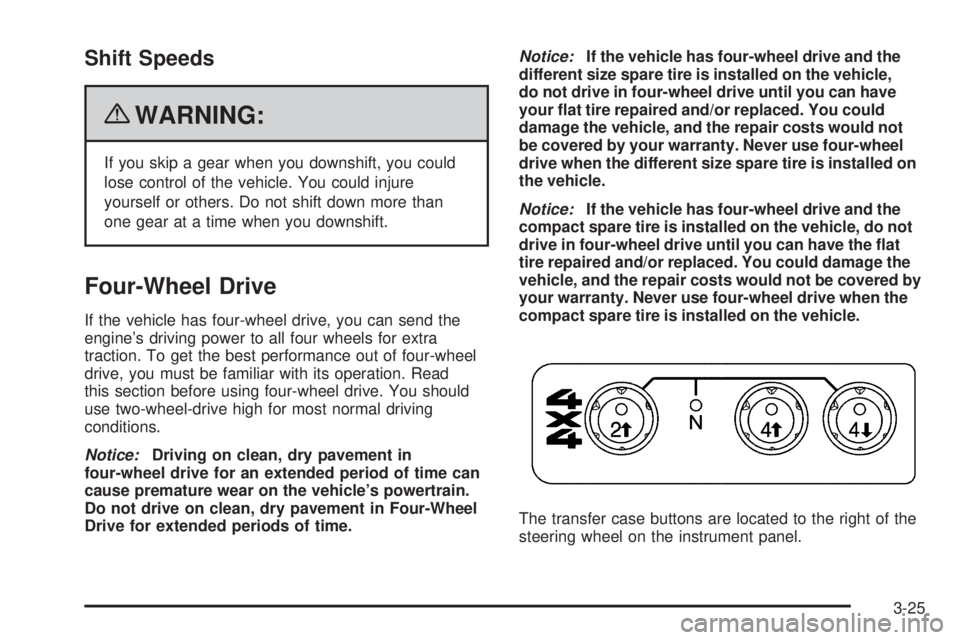
The transfer case buttons are located to the right of the
steering wheel on the instrument panel.
3-25
Page 136 of 448
Recommended Transfer Case Settings
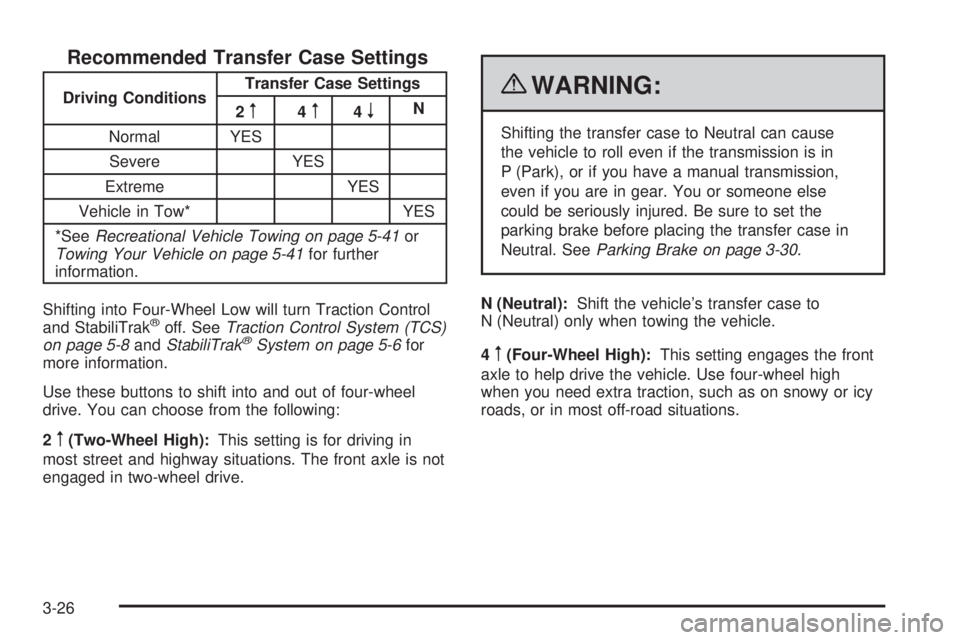
Driving ConditionsTransfer Case Settings
2m4m4nN
Normal YES
Severe YES
Extreme YES
Vehicle in Tow* YES
*SeeRecreational Vehicle Towing on page 5-41or
Towing Your Vehicle on page 5-41for further
information.
Shifting into Four-Wheel Low will turn Traction Control
and StabiliTrak
®off. SeeTraction Control System (TCS)
on page 5-8andStabiliTrak®System on page 5-6for
more information.
Use these buttons to shift into and out of four-wheel
drive. You can choose from the following:
2
m(Two-Wheel High):This setting is for driving in
most street and highway situations. The front axle is not
engaged in two-wheel drive.
{WARNING:
Shifting the transfer case to Neutral can cause
the vehicle to roll even if the transmission is in
P (Park), or if you have a manual transmission,
even if you are in gear. You or someone else
could be seriously injured. Be sure to set the
parking brake before placing the transfer case in
Neutral. SeeParking Brake on page 3-30.
N (Neutral):Shift the vehicle’s transfer case to
N (Neutral) only when towing the vehicle.
4
m(Four-Wheel High):This setting engages the front
axle to help drive the vehicle. Use four-wheel high
when you need extra traction, such as on snowy or icy
roads, or in most off-road situations.
3-26
Page 137 of 448
4n(Four-Wheel Low):This setting also engages the
front axle to give you extra traction. It sends the maximum
power to all four wheels. You might choose four-wheel
low if you were driving off-road in sand, mud, or deep
snow and while climbing or descending steep hills.
Shifting into Four-Wheel Low will turn Traction Control
and StabiliTrak
®off. SeeTraction Control System (TCS)
on page 5-8andStabiliTrak®System on page 5-6for
more information.
Indicator lights in the buttons show you which setting you
are in. The indicator lights will come on briefly when you
turn on the ignition and one will stay on the selected
setting. If the lights do not come on, you should take the
vehicle in for service. An indicator light will flash while
shifting. It will stay on when the shift is completed.
If the transfer case does not shift, it will return to the last
chosen setting.
Shifting from Two-Wheel High to
Four-Wheel High
Press and release the Four-Wheel High button.
This can be done at any speed, and the front axle will
lock automatically.
Shifting from Four-Wheel High to
Two-Wheel High
Press and release the Two-Wheel High button.
This can be done at any speed, and the front axle will
unlock automatically.
It is normal to hear and feel the vehicle’s transfer
case shift into Four-Wheel High. If you shift with the
vehicle stopped, the indicator light may still flash slowly.
It may be necessary to shift the transmission
momentarily into R (Reverse) and D (Drive), for an
automatic transmission, or R (Reverse) and 1 (First) for
a manual transmission to have the light stop flashing.
3-27