2010 GMC CANYON warning
[x] Cancel search: warningPage 333 of 448
Tires
Your new vehicle comes with high-quality tires
made by a leading tire manufacturer. If you ever
have questions about your tire warranty and where
to obtain service, see your vehicle Warranty
booklet for details. For additional information
refer to the tire manufacturer.
{WARNING:
Poorly maintained and improperly used tires
are dangerous.
•Overloading your vehicle’s tires can
cause overheating as a result of too
much flexing. You could have an air-out
and a serious accident. SeeLoading the
Vehicle on page 5-33.
WARNING: (Continued)
WARNING: (Continued)
•
Underinflated tires pose the same danger
as overloaded tires. The resulting accident
could cause serious injury. Check all tires
frequently to maintain the recommended
pressure. Tire pressure should be
checked when your vehicle’s tires are
cold. SeeInation - Tire Pressure on
page 6-64.
•Overinflated tires are more likely to be
cut, punctured, or broken by a sudden
impact — such as when you hit a pothole.
Keep tires at the recommended pressure.
•Worn, old tires can cause accidents.
If the tire’s tread is badly worn, or if your
vehicle’s tires have been damaged,
replace them.
6-57
Page 341 of 448
How to Check
Use a good quality pocket-type gage to check tire
pressure. You cannot tell if your tires are properly
inflated simply by looking at them. Radial tires
may look properly inflated even when they are
underinflated. Check the tire’s inflation pressure
when the tires are cold. Cold means your vehicle
has been sitting for at least three hours or driven
no more than 1 mile (1.6 km).
Remove the valve cap from the tire valve stem.
Press the tire gage firmly onto the valve to
get a pressure measurement. If the cold tire
inflation pressure matches the recommended
pressure on the Tire and Loading Information
label, no further adjustment is necessary. If the
inflation pressure is low, add air until you reach
the recommended amount.
If you overfill the tire, release air by pushing on
the metal stem in the center of the tire valve.
Recheck the tire pressure with the tire gage.
Be sure to put the valve caps back on the valve
stems. They help prevent leaks by keeping out dirt
and moisture.
High-Speed Operation
{WARNING:
Driving at high speeds, 160 km/h (100 mph) or
higher, puts an additional strain on tires. Sustained
high-speed driving causes excessive heat build up
and can cause sudden tire failure. You could have
a crash and you or others could be killed. Some
high-speed rated tires require inflation pressure
adjustment for high speed operation. When speed
limits and road conditions are such that a vehicle
can be driven at high speeds, make sure the tires
are rated for high speed operation, in excellent
condition, and set to the correct cold tire inflation
pressure for the vehicle load.
If your vehicle has P235/50R18 size tires, they will
require inflation pressure adjustment when driving your
vehicle at speeds of 100 mph (160 km/h) or higher.
6-65
Page 343 of 448

When the malfunction indicator is illuminated, the system
may not be able to detect or signal low tire pressure as
intended. TPMS malfunctions may occur for a variety of
reasons, including the installation of replacement or
alternate tires or wheels on the vehicle that prevent the
TPMS from functioning properly. Always check the TPMS
malfunction telltale after replacing one or more tires or
wheels on your vehicle to ensure that the replacement
or alternate tires and wheels allow the TPMS to continue
to function properly.
SeeTire Pressure Monitor Operation on page 6-67for
additional information.
Federal Communications
Commission (FCC) and Industry
and Science Canada
SeeRadio Frequency Statement on page 8-18
for information regarding Part 15 of the Federal
Communications Commission (FCC) Rules and
RSS-210/211 of Industry and Science Canada.
Tire Pressure Monitor Operation
This vehicle may have a Tire Pressure Monitor
System (TPMS). The TPMS is designed to warn the
driver when a low tire pressure condition exists. TPMS
sensors are mounted onto each tire and wheel assembly
on your vehicle, excluding the spare tire. The TPMS
sensors monitor the air pressure in your vehicle’s tires
and transmit the tire pressure readings to a receiver
located in the vehicle.
When a low tire pressure
condition is detected, the
TPMS illuminates the low
tire pressure warning light
located on the instrument
panel cluster.
At the same time, a Driver Information Center (DIC)
message is displayed on the DIC display screen.
The low tire pressure warning light and the DIC warning
message come on at each ignition cycle until the tires are
inflated to the correct inflation pressure. For additional
information and details about the DIC operation and
displays seeDIC Operation and Displays on page 4-33
andDIC Warnings and Messages on page 4-37.
6-67
Page 344 of 448

The low tire pressure warning light may come on in
cool weather when the vehicle is first started, and then
turn off as you start to drive. This could be an early
indicator that the air pressure in the tire(s) are getting
low and need to be inflated to the proper pressure.
A Tire and Loading Information label, attached to
your vehicle, shows the size of your vehicle’s original
equipment tires and the correct inflation pressure for
your vehicle’s tires when they are cold. SeeLoading the
Vehicle on page 5-33, for an example of the Tire and
Loading Information label and its location on your vehicle.
Also seeInation - Tire Pressure on page 6-64.
Your vehicle’s TPMS can warn you about a low tire
pressure condition but it does not replace normal
tire maintenance. SeeTire Inspection and Rotation
on page 6-71andTires on page 6-57.
Notice:Liquid tire sealants could damage the Tire
Pressure Monitor System (TPMS) sensors. Sensor
damage caused by using a tire sealant is not covered
by your warranty. Do not use liquid tire sealants.TPMS Malfunction Light and Message
The TPMS will not function properly if one or more of the
TPMS sensors are missing or inoperable. When the
system detects a malfunction, the low tire warning light
flashes for about one minute and then stays on for the
remainder of the ignition cycle. A DIC warning message
is also displayed. The low tire warning light and DIC
warning message come on at each ignition cycle until
the problem is corrected. Some of the conditions that
can cause the malfunction light and DIC message to
come on are:
•One of the road tires has been replaced with the
spare tire. The spare tire does not have a TPMS
sensor. The TPMS malfunction light and DIC
message should go off once you re-install the
road tire containing the TPMS sensor.
•The TPMS sensor matching process was started but
not completed or not completed successfully after
rotating the vehicle’s tires. The DIC message and
TPMS malfunction light should go off once the TPMS
sensor matching process is performed successfully.
See “TPMS Sensor Matching Process” later in this
section.
6-68
Page 346 of 448

The TPMS sensor matching procedure is outlined
below:
1. Set the parking brake.
2. Turn the ignition switch to ON/RUN with the
engine off.
3. Turn the exterior lamp switch from AUTO to OFF
four times within three seconds. A double horn chirp
will sound and the TPMS low tire warning light starts
flashing. The double horn chirp and flashing TPMS
warning light indicates the TPMS matching process
has started. The TPMS warning light should continue
flashing throughout the matching procedure.
The LOW TIRE message displays on the Driver
Information Center (DIC).
4. Start with the driver side front tire.
5. Remove the valve cap from the valve cap stem.
Activate the TPMS sensor by increasing or
decreasing the tire’s air pressure for 10 seconds,
then stop and listen for a single horn chirp. The
single horn chirp should sound within 15 seconds,
confirming that the sensor identification code has
been matched to this tire and wheel position. If you
do not hear the confirming single horn chirp, turn the
ignition switch to LOCK and start over beginning with
Step 2.6. Proceed to the passenger side front tire, and repeat
the procedure in Step 5.
7. Proceed to the passenger side rear tire, and repeat
the procedure in Step 5.
8. Proceed to the driver side rear tire, and repeat the
procedure in Step 5.
9. After hearing the confirming horn chirp for the driver
side rear tire, check to see if the TPMS low tire
warning light and the DIC LOW TIRE messages
have turned off. If yes, the TPMS sensors have been
relearned. Turn the ignition switch to LOCK/OFF.
If the low tire warning light and the SERV TPM
message on the DIC are on after completing Step 5
for the driver side rear tire, the sensor relearn
process has not been successful. Turn the ignition
switch to LOCK/OFF and repeat the matching
process beginning with Step 2.
10. Set all four tires to the recommended air pressure
level as indicated on the Tire and Loading
Information label.
11. Put the valve caps back on the valve stems.
6-70
Page 348 of 448
Make certain that all wheel nuts are properly
tightened. See “Wheel Nut Torque” under
Capacities and Specications on page 6-118.
{WARNING:
Rust or dirt on a wheel, or on the parts to
which it is fastened, can make wheel nuts
become loose after time. The wheel could
come off and cause an accident. When you
change a wheel, remove any rust or dirt from
places where the wheel attaches to the
vehicle. In an emergency, you can use a cloth
or a paper towel to do this; but be sure to use a
scraper or wire brush later, if needed, to get all
the rust or dirt off. SeeChanging a Flat Tire on
page 6-80.
Make sure the spare tire is stored securely.
Push, pull, and then try to rotate or turn the tire.
If it moves, tighten the cable. SeeStoring a Flat
or Spare Tire and Tools on page 6-96.
When It Is Time for New Tires
Various factors, such as maintenance, temperatures,
driving speeds, vehicle loading, and road conditions,
influence when you need new tires.
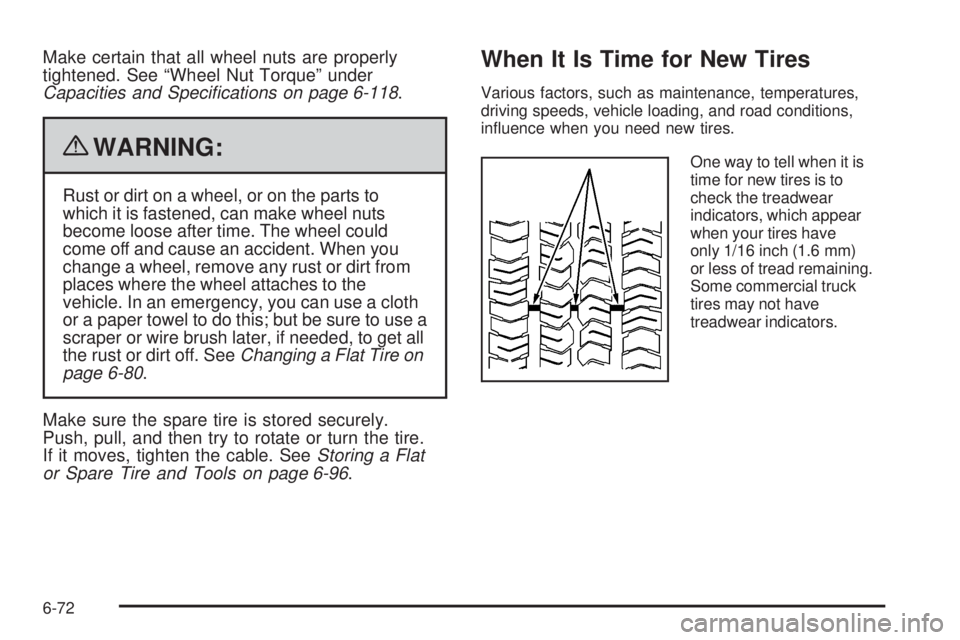
One way to tell when it is
time for new tires is to
check the treadwear
indicators, which appear
when your tires have
only 1/16 inch (1.6 mm)
or less of tread remaining.
Some commercial truck
tires may not have
treadwear indicators.
6-72
Page 350 of 448
GM recommends replacing tires in sets of four. This is
because uniform tread depth on all tires will help keep
your vehicle performing most like it did when the tires
were new. Replacing less than a full set of tires can affect
the braking and handling performance of your vehicle.
SeeTire Inspection and Rotation on page 6-71for
information on proper tire rotation.
{WARNING:
Mixing tires could cause you to lose control of
your vehicle while driving. If you mix tires of
different sizes, brands, or types (radial and
bias-belted tires) the vehicle may not handle
properly, and you could have a crash. Using tires
of different sizes, brands, or types may also cause
damage to your vehicle. Be sure to use the correct
size, brand, and type of tires on all wheels.
Your vehicle may have a compact spare tire and
wheel assembly. It is all right to drive with your
vehicle’s compact spare tire temporarily. It was
developed for use on your vehicle. SeeSpare Tire
on page 6-101.
{WARNING:
If you use bias-ply tires on the vehicle,
the wheel rim flanges could develop cracks
after many miles of driving. A tire and/or
wheel could fail suddenly, causing a crash.
Use only radial-ply tires with the wheels on
the vehicle.
If you must replace your vehicle’s tires with those that do
not have a TPC Spec number, make sure they are the
same size, load range, speed rating, and construction
type (radial and bias-belted tires) as your vehicle’s
original tires.
Vehicles that have a tire pressure monitoring system
could give an inaccurate low-pressure warning if
non-TPC Spec rated tires are installed on your vehicle.
Non-TPC Spec rated tires may give a low-pressure
warning that is higher or lower than the proper warning
level you would get with TPC Spec rated tires. SeeTire
Pressure Monitor System on page 6-66.
Your vehicle’s original equipment tires are listed on
the Tire and Loading Information Label. SeeLoading the
Vehicle on page 5-33, for more information about the
Tire and Loading Information Label and its location
on your vehicle.
6-74
Page 351 of 448
Different Size Tires and Wheels
If you add wheels or tires that are a different size than
your original equipment wheels and tires, this may affect
the way your vehicle performs, including its braking, ride
and handling characteristics, stability, and resistance
to rollover. Additionally, if your vehicle has electronic
systems such as, antilock brakes, traction control, and
electronic stability control, the performance of these
systems can be affected.
{WARNING:
If you add different sized wheels, your vehicle may
not provide an acceptable level of performance and
safety if tires not recommended for those wheels
are selected. You may increase the chance that you
will crash and suffer serious injury. Only use GM
specific wheel and tire systems developed for your
vehicle, and have them properly installed by a GM
certified technician.
SeeBuying New Tires on page 6-73andAccessories
and Modications on page 6-3for additional information.
Uniform Tire Quality Grading
Quality grades can be found where applicable
on the tire sidewall between tread shoulder
and maximum section width. For example:
Treadwear 200 Traction AA
Temperature A
The following information relates to the system
developed by the United States National
Highway Traffic Safety Administration (NHTSA),
which grades tires by treadwear, traction, and
temperature performance. This applies only to
vehicles sold in the United States. The grades are
molded on the sidewalls of most passenger car
tires. The Uniform Tire Quality Grading (UTQG)
system does not apply to deep tread, winter-type
snow tires, space-saver, or temporary use
spare tires, tires with nominal rim diameters
of 10 to 12 inches (25 to 30 cm), or to some
limited-production tires.
While the tires available on General Motors
passenger cars and light trucks may vary with
respect to these grades, they must also conform
to federal safety requirements and additional
General Motors Tire Performance Criteria (TPC)
standards.
6-75