2010 GMC ACADIA center console
[x] Cancel search: center consolePage 213 of 444

Infotainment System 7-31
When the scan is finished, the disc
begins playing files in order by
artist. The current artist playing is
shown on the second line of the
display. Once all songs by that artist
are played, the player moves to the
next artist in alphabetical order and
begins playing files by that artist.
To listen to files by another artist,
press the softkey located below
either arrow tab. The disc goes to
the next or previous artist in
alphabetical order. Continue
pressing either softkey below the
arrow tab until the artist displays.
To change from playback by artist to
playback by album:
1. Press the softkey located belowthe Sort By tab.
2. Press one of the softkeys below the album tab from the sort
screen.
3. Press the softkey below the back tab to return to the main
music navigator screen. The album name displays on the
second line between the arrows and
songs from the current album
begins to play. Once all songs from
that album have played, the player
moves to the next album in
alphabetical order on the CD and
begins playing MP3 files from that
album.
To exit music navigator mode, press
the softkey below the Back tab to
return to normal MP3 playback.
Connecting a USB Storage
Device or iPod®
The USB Port can be used to
control an iPod or a USB storage
device.
To connect a USB storage device,
connect the device to the USB port
located in the center console.
To connect an iPod, connect one
end of the USB cable that came
with the iPod to the iPod’s dock
connector and connect the other
end to the USB port located in the
center console. If the vehicle is on
and the USB connection works,
“OK
to disconnect” and a GM logo may
appear on the iPod and iPod
appears on the radio's display. The
iPod music appears on the radio’s
display and begins playing.
The iPod charges while it is
connected to the vehicle if the
vehicle is in the ACC/ACCESSORY
or ON/RUN position. When the
vehicle is turned off, the iPod
automatically powers off and will not
charge or draw power from the
vehicle's battery.
If you have an older iPod model that
is not supported, it can still be used
by connecting it to the Auxiliary
Input Jack using a standard 3.5 mm
(1/8 in) stereo cable. See “Using the
Auxiliary Input Jack” earlier for more
information.
Page 216 of 444

7-34 Infotainment System
'(Repeat Track):Press the
softkey below
'to repeat one
track. The tab appears raised when
Repeat Track is being used.
Shuffle Functionality
To use Shuffle:
Press the softkey below
>,2,
Shuffle Songs, Shuffle Album,
or Shuffle Folder.
>(Shuffle Off): This is the
default mode when a USB storage
device or iPod is first connected.
2(Shuffle All Songs / Shuffle
Songs): Shuffles all songs on the
USB storage device or iPod.
<(Shuffle Album): Shuffles all
songs in the current album on
an iPod.
=(Shuffle Folder): Shuffles all
songs in the current folder on a USB
storage device.
Auxiliary Devices
The vehicle may have a 3.5 mm
(1/8 in) auxiliary input jack located
on the lower right side of the
faceplate and for vehicles with a
USB port, it is located in the center
console.
Using the 3.5 mm (1/8 in)
Auxiliary Input Jack
The auxiliary input jack is located on
the lower right side of the faceplate.
This is not an audio output; do not
plug a headphone set into the front
auxiliary input jack. Connect an
auxiliary input device such as an
iPod
®, laptop computer, MP3 player,
CD player, or cassette tape player,
etc. to the auxiliary input jack for
use as another source for audio
listening.
Drivers are encouraged to set up
any auxiliary device while the
vehicle is in P (Park). See
Defensive Driving
on page 9‑2for
more information on driver
distraction. To use an auxiliary input device,
connect a 3.5 mm (1/8 in) cable to
the radio's front auxiliary input jack.
O(Power/Volume):
Turn
clockwise or counterclockwise to
increase or decrease the volume of
the portable player. Additional
volume adjustments might have to
be made from the portable device if
the volume is not loud or soft
enough.
BAND: Press to listen to the radio
when a portable audio device is
playing. The portable audio device
continues playing, so you might
want to stop it or turn it off.
CD/AUX (CD/Auxiliary): Press to
select between CD, or Auxiliary.
.When a CD is in the player the
CD icon and a message
showing the disc and/or track
number displays.
.If an auxiliary input device is not
connected, “No Input Device
Found” displays.
Page 217 of 444

Infotainment System 7-35
DVD/CD AUX (Auxiliary):Press to
select between DVD, CD,
or Auxiliary.
.If an auxiliary input device is
not connected, “No Aux Input
Device” displays.
.When a disc is in either slot, the
DVD/CD text tab and a message
showing the track or chapter
number displays.
.If an auxiliary input device is not
connected, and a disc is in both
the DVD slot and the CD slot the
DVD/CD AUX button only cycles
between the two sources and
does not indicate “No Aux Input
Device”.
.If a front auxiliary input device is
connected, the DVD/CD AUX
button cycles through all
available options.
If a disc is inserted into top DVD
slot, the rear seat operator can turn
on the video screen and use the remote control to only navigate the
CD tracks through the remote
control.
See
“Using the Auxiliary Input
Jack(s)” later in this section,
or “Audio/Video (A/V) Jacks” under,
Rear Seat Entertainment (RSE)
System
on page 7‑36for more
information.
Using the USB Port
For vehicles with a USB port, the
connector is located in the center
console.
Radios with a USB port can control
a USB storage device or an iPod
®
using the radio buttons and knobs.
See MP3 (Radio with CD and Radio
with CD/USB)
on page 7‑22or
MP3 (Radio with CD/DVD)on
page 7‑28for information about
how to connect and control a USB
storage device or an iPod. USB Supported Devices
.USB Flash Drives
.Portable USB Hard Drives
.Fifth generation or later iPod
.iPod nanos
.iPod touch
.iPod classic
Not all iPods and USB Drives are
compatible with the USB port.
Make sure the iPod has the latest
firmware from Apple
®for proper
operation. iPod firmware can be
updated using the latest iTunes
®
application. See www.apple.com/
itunes.
For help with identifying your iPod,
go to www.apple.com/support.
Page 247 of 444

Climate Controls 8-9
There is also an exterior
temperature sensor located behind
the front grille. This sensor reads
the outside air temperature and
helps maintain the temperature
inside the vehicle. Any cover on the
front of the vehicle could cause a
false reading in the displayed
temperature.
The climate control system uses the
information from these sensors to
maintain comfort settings by
adjusting the temperature, fan
speed, and the air delivery mode.
The system may also supply cooler
air to the side of the vehicle facing
the sun. The recirculation mode will
also be used as needed to maintain
cool outlet temperatures.Rear Climate Control System (Rear Climate
Control Only)
A. Fan Control
B. Temperature Control
C. Air Delivery Mode Control
For vehicles with the rear climate
control system, the controls are
located on the rear of the center
console. The system can also be
controlled with the front controls.Press the REAR button on the front
climate control system to turn the
rear climate control system on or
off. An indicator comes on when the
rear system is on. The system also
turns on if any of the rear controls
are adjusted.
Mimic Mode:
This mode matches
the rear climate control to the front
climate control settings. It comes on
when REAR is pressed.
Page 248 of 444
8-10 Climate Controls
Independent Mode:This mode
directs rear seating airflow
according to the settings of the rear
controls. It comes on when any rear
control is adjusted.
Fan Control: Turn clockwise or
counterclockwise to increase or
decrease the fan speed. Turn the
knob to
9to turn the fan off.
Temperature Control: Turn
clockwise or counterclockwise to
increase or decrease the airflow
temperature.
Air Delivery Mode Control: Turn
to the desired mode to change the
airflow direction.
H (Vent): Air is directed through
the overhead outlets.
) (Bi-Level): Air is directed
through the rear floor outlets, as
well as the overhead outlets.
6 (Floor): Air is directed through
the floor outlets. The rear system
floor outlets are located under the
third row seats.
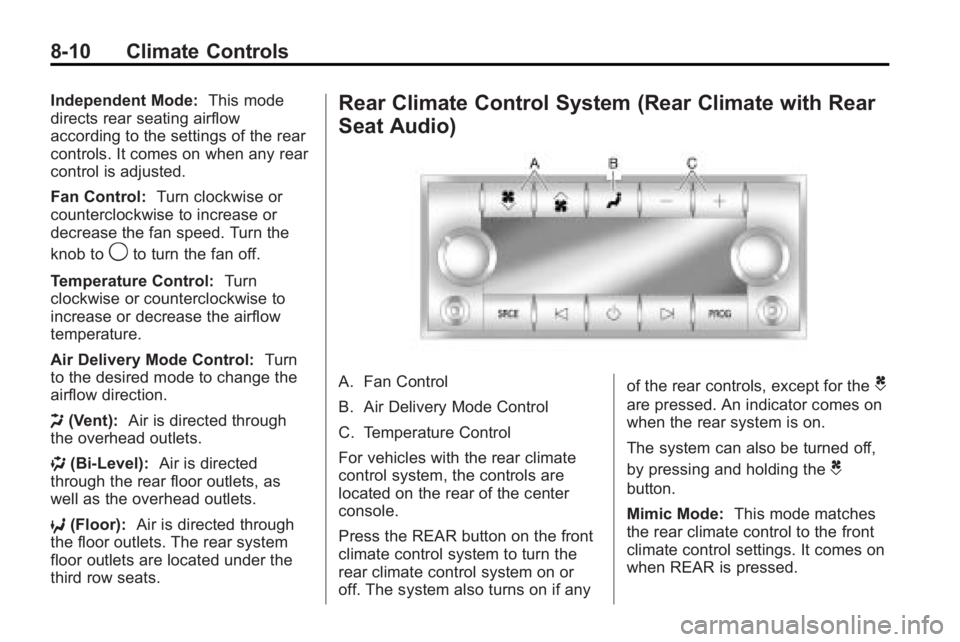
Rear Climate Control System (Rear Climate with Rear
Seat Audio)
A. Fan Control
B. Air Delivery Mode Control
C. Temperature Control
For vehicles with the rear climate
control system, the controls are
located on the rear of the center
console.
Press the REAR button on the front
climate control system to turn the
rear climate control system on or
off. The system also turns on if any of the rear controls, except for theC
are pressed. An indicator comes on
when the rear system is on.
The system can also be turned off,
by pressing and holding the
C
button.
Mimic Mode:
This mode matches
the rear climate control to the front
climate control settings. It comes on
when REAR is pressed.
Page 304 of 444

9-54 Driving and Operating
Trailer Wiring Harness
Basic Trailer Wiring
The trailer wiring harness, with a
seven-pin connector, is located at
the rear of the vehicle and is tied to
the vehicle's frame. The harness
connector can be plugged into a
seven-pin universal heavy-duty
trailer connector available through
your dealer/retailer.
The seven-wire harness contains
the following trailer circuits:
.Yellow: Left Stop/Turn Signal
.Dark Green: Right Stop/Turn
Signal
.Brown: Taillamps
.Black: Ground
.Light Green: Back-up Lamps
.Red/Black: Battery Feed
.Dark Blue: Trailer Brake**The fuse for this circuit is installed
in the underhood electrical center,
but the wires are not connected.
They should be connected by your
dealer/retailer or a qualified service
center.
If the back-up lamp circuit is not
functional, contact your dealer/
retailer.
If a remote (non-vehicle) battery is
being charged, press the Tow/Haul
mode switch located on the center
console near the climate controls.
This will boost the vehicle system
voltage and properly charge the
battery. If the trailer is too light for
Tow/Haul mode, turn on the
headlamps (Non-HID only) as a
second way to boost the vehicle
system and charge the battery.
Electric Trailer Brake Control
Wiring Provisions
These wiring provisions for an
electric trailer brake controller are
included with the vehicle as part of
the trailer wiring package. The
instrument panel contains blunt cut
wires behind the steering column for
the electric trailer brake controller.
The harness contains the following
wires:
.Red/Black: Power Supply
.White: Brake Switch Signal
.Gray: Illumination
.Dark Blue: Trailer Brake Signal
.Black: Ground
The electric trailer brake controller
should be installed by your dealer/
retailer or a qualified service center.
Page 434 of 444

i-2 INDEX
B
Battery . . . . . . . . . . . . . . . . . . . . . . . 10-25Jump Starting . . . . . . . . . . . . . . . 10-78
Load Management . . . . . . . . . . . . . 6-7
Power Protection . . . . . . . . . . . . . . 6-8
Voltage and ChargingMessages . . . . . . . . . . . . . . . . . . . 5-35
Blade Replacement, Wiper . . . 10-27
Bluetooth . . . . . . . . . . . . . . . . . . . . . . 7-46
Brakes . . . . . . . . . . . . . . . . . . . . . . . . 10-23 Antilock . . . . . . . . . . . . . . . . . . . . . . . 9-26
Assist . . . . . . . . . . . . . . . . . . . . . . . . . 9-27
Fluid . . . . . . . . . . . . . . . . . . . . . . . . 10-24
Parking . . . . . . . . . . . . . . . . . . . . . . . 9-27
System Messages . . . . . . . . . . . . 5-35
Braking . . . . . . . . . . . . . . . . . . . . . . . . . 9-3
Break-In, New Vehicle . . . . . . . . . 9-15
Bulb Replacement . . . . . . . . . . . . 10-29
Fog Lamps . . . . . . . . . . . . . . . . . . . . 6-4
Halogen Bulbs . . . . . . . . . . . . . . 10-29
Headlamp Aiming . . . . . . . . . . . 10-28
Headlamps . . . . . . . . . . . . . . . . . 10-29
License Plate Lamps . . . . . . . 10-29
Buying New Tires . . . . . . . . . . . . . 10-51
C
Calibration . . . . . . . . . . . . . . . . . . . . . . 5-6
California Fuel Requirements . . . . . . . . . . . 9-40
Perchlorate MaterialsRequirements . . . . . . . . . . . . . . . 10-3
Warning . . . . . . . . . . . . . . . . . . . . . . 10-3
Camera, Rear Vision . . . . . . . . . . 9-34
Canadian Vehicle Owners . . . . . . . . iii
Capacities and Specifications . . . . . . . . . . . . . . . . 12-2
Carbon Monoxide Engine Exhaust . . . . . . . . . . . . . . . 9-21
Liftgate . . . . . . . . . . . . . . . . . . . . . . . . 2-9
Winter Driving . . . . . . . . . . . . . . . . . 9-8
Cargo
Cover . . . . . . . . . . . . . . . . . . . . . . . . . . 4-3
Management System . . . . . . . . . . 4-3
Tie Downs . . . . . . . . . . . . . . . . . . . . . 4-3
Cautions, Danger, and
Warnings . . . . . . . . . . . . . . . . . . . . . . . . iv
CD DVD Player . . . . . . . . . . . . . . . . . . . 7-14
CD Player . . . . . . . . . . . . . . . . . . . . . 7-12
Center Console Storage . . . . . . . . 4-1
Chains, Tire . . . . . . . . . . . . . . . . . . 10-56 Charging System Light . . . . . . . . 5-16
Check
Engine Lamp . . . . . . . . . . . . . . . . . 5-16
IgnitionTransmission Lock . . . . . . . . 10-27
Child Restraints Infants and Young
Children . . . . . . . . . . . . . . . . . . . . . 3-47
Lower Anchors and Tethers for Children . . . . . . . . . 3-52
Older Children . . . . . . . . . . . . . . . . 3-45
Securing . . . . . . . . . . . . . . . . 3-59, 3-61
Systems . . . . . . . . . . . . . . . . . . . . . . 3-49
Where to Put the Restraint . . . 3-51
Circuit Breakers . . . . . . . . . . . . . . 10-31
Cleaning Exterior Care . . . . . . . . . . . . . . . 10-85
Interior Care . . . . . . . . . . . . . . . . 10-88
Climate Control Systems . . . . . . . 8-1 Dual Automatic . . . . . . . . . . . . . . . . 8-4
Rear . . . . . . . . . . . . . . . . . . . . . 8-9, 8-10
Clock . . . . . . . . . . . . . . . . . . . . . . . . . . . 5-8
Cluster, IP . . . . . . . . . . . . . . . . . . . . . 5-11
Collision Damage Repair . . . . . . 13-9
Compact Spare Tire . . . . . . . . . . 10-77
Compass . . . . . . . . . . . . . . . . . . . . . . . 5-6
Page 442 of 444
i-10 INDEX
Satellite Radio . . . . . . . . . . . . . . . . . . 7-8
Scheduled Maintenance . . . . . . . 11-2
Scheduling Appointments . . . . . . 13-7
Sealant Kit, Tire . . . . . . . . . . . . . . 10-58
SeatsAdjustment, Front . . . . . . . . . . . . . . 3-3
Head Restraints . . . . . . . . . . . . . . . 3-2
Heated and Ventilated Front . . . 3-9
Heated Front . . . . . . . . . . . . . . . . . . 3-8
Lumbar Adjustment, Front . . . . . 3-5
Power Adjustment, Front . . . . . . 3-3
Rear . . . . . . . . . . . . . . . . . . . . . . . . . . . 3-9
Reclining Seatbacks . . . . . . . . . . . 3-6
Third Row Seat . . . . . . . . . . . . . . . 3-11
Secondary Latch System . . . . . 10-74
Securing Child Restraints . . . . . . . . . . . . . . 3-59, 3-61
Security Light . . . . . . . . . . . . . . . . . . . . . . . . . . 5-22
Vehicle . . . . . . . . . . . . . . . . . . . . . . . 2-13
Service
Accessories andModifications . . . . . . . . . . . . . . . . 10-3
Doing Your Own Work . . . . . . . . 10-4
Engine Soon Lamp . . . . . . . . . . . 5-16
Maintenance Records . . . . . . . 11-11 Service (cont.)
Maintenance, General
Information . . . . . . . . . . . . . . . . . . 11-1
Parts Identification Label . . . . . 12-1
Publications Ordering
Information . . . . . . . . . . . . . . . . 13-12
Scheduling Appointments . . . . . 13-7
Vehicle Messages . . . . . . . . . . . . 5-41
Servicing the
Airbag-Equipped Vehicle . . . . . 3-42
Shifting Into Park . . . . . . . . . . . . . . . . . . . . . . 9-19
Out of Park . . . . . . . . . . . . . . . . . . . 9-20
Signals, Turn and
Lane-Change . . . . . . . . . . . . . . . . . 6-4
Spare Tire Compact . . . . . . . . . . . . . . . . . . . . 10-77
Specifications and
Capacities . . . . . . . . . . . . . . . . . . . . 12-2
Speedometer . . . . . . . . . . . . . . . . . . 5-12
StabiliTrak System . . . . . . . . . . . . . 9-28
StabiliTrak
®Indicator Light . . . . 5-20
Start Vehicle, Remote . . . . . . . . . . 2-5
Starter Switch Check . . . . . . . . . 10-26
Starting the Engine . . . . . . . . . . . . 9-17 Steering . . . . . . . . . . . . . . . . . . . . . . . . 9-4
Fluid, Power . . . . . . . . . . . . . . . . 10-21
Wheel Adjustment . . . . . . . . . . . . . 5-2
Wheel Controls . . . . . . . . . . . . . . . . 5-3
Storage Areas Armrest . . . . . . . . . . . . . . . . . . . . . . . . 4-1
Cargo Cover . . . . . . . . . . . . . . . . . . . 4-3
Cargo Management System . . . 4-3
Center Console . . . . . . . . . . . . . . . . 4-1
Convenience Net . . . . . . . . . . . . . . 4-3
Floor Console . . . . . . . . . . . . . . . . . 4-2
Glove Box . . . . . . . . . . . . . . . . . . . . . 4-1
Instrument Panel . . . . . . . . . . . . . . 4-1
Roof Rack System . . . . . . . . . . . . . 4-4
Storing the Tire Sealant and Compressor Kit . . . . . . . . . 10-65
Stuck Vehicle . . . . . . . . . . . . . . . . . . 9-10
Sun Visors . . . . . . . . . . . . . . . . . . . . . 2-21
Sunroof . . . . . . . . . . . . . . . . . . . . . . . . 2-21
Symbols . . . . . . . . . . . . . . . . . . . . . . . . . . iv
System Roof Rack . . . . . . . . . . . . . . . . . . . . . 4-4
System Check Automatic TransmissionShiftlock Control . . . . . . . . . . 10-26