Page 10 of 378
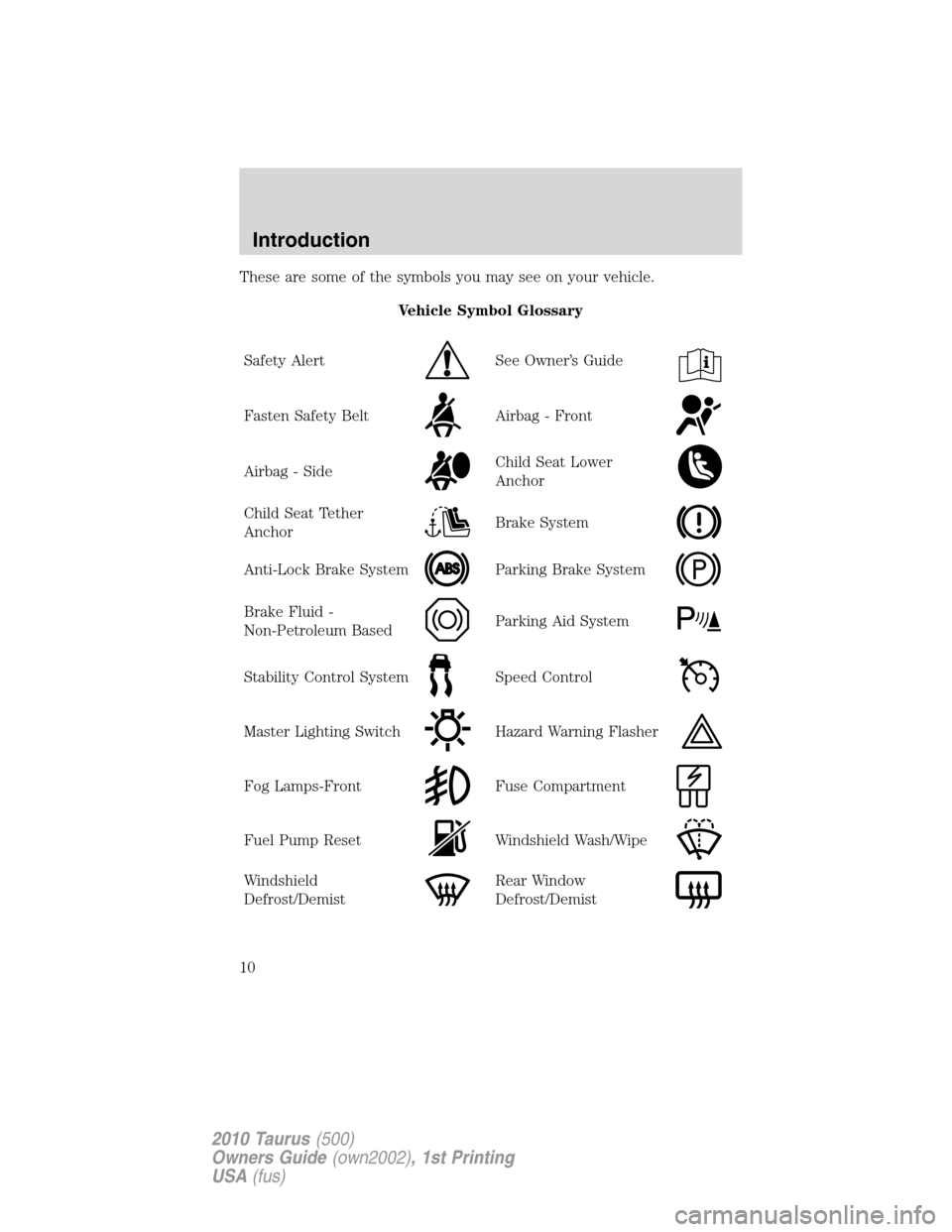
These are some of the symbols you may see on your vehicle.
Vehicle Symbol Glossary
Safety Alert
See Owner’s Guide
Fasten Safety BeltAirbag - Front
Airbag - SideChild Seat Lower
Anchor
Child Seat Tether
AnchorBrake System
Anti-Lock Brake SystemParking Brake System
Brake Fluid -
Non-Petroleum BasedParking Aid System
Stability Control SystemSpeed Control
Master Lighting SwitchHazard Warning Flasher
Fog Lamps-FrontFuse Compartment
Fuel Pump ResetWindshield Wash/Wipe
Windshield
Defrost/DemistRear Window
Defrost/Demist
Introduction
10
2010 Taurus(500)
Owners Guide(own2002), 1st Printing
USA(fus)
Page 50 of 378
•To improve the A/C cool down, drive with the windows slightly open
for 2-3 minutes after start up or until the vehicle has been “aired out.”
During extreme high ambient temperatures when idling stationary for
extended periods of time in gear, it is recommended to run the A/C in
the MAX A/C mode, adjust the blower fan speed to the lowest setting
and put the vehicle’s transmission into the P (Park) position to continue
to receive cool air from your A/C system.
For maximum cooling performance in MAX A/C mode:
•Move temperature control to the coolest setting.
•Set the fan to the highest speed initially, then adjust to maintain
comfort.
For maximum cooling performance in panel or panel/floor modes:
•Move temperature control to the coolest setting.
•Select A/C and
(recirculated air) to provide colder airflow.
•Set the fan to the highest speed initially, then adjust to maintain
comfort.
To aid in side window defogging/demisting in cold weather:
•Select
.
•Select A/C.
•Adjust the temperature control to maintain comfort.
•Set the fan speed to the highest setting.
•Direct the outer instrument panel vents towards the side windows.
•To increase airflow to the outer instrument panel vents, close the
vents located in the middle of the instrument panel.
Climate Controls
50
2010 Taurus(500)
Owners Guide(own2002), 1st Printing
USA(fus)
Page 56 of 378

•:Distributes air through the floor vents, rear seat floor vents.
•
:Distributes air through the windshield defroster vents, de-mister
vents, floor vents and rear seat floor vents. The system will
automatically provide outside air to reduce window fogging.
To return to full automatic control, press AUTO on the main bezel.
Fan Speed:Press to decrease/increase the fan speed.
Dual:Press to activate/deactivate separate driver and passenger
temperature controls.
Max A/C:Distributes recirculated air through the instrument panel
vents to cool the vehicle. This re-cooling of the interior air is more
economical and efficient. Recirculated air may also help reduce
undesirable odors from entering the vehicle. Press Max A/C again for
normal A/C operation.
VOICE COMMANDS IN CLIMATE MODE
Please refer to theVoice commands in climate modesection of the
Navigation supplementfor more information on using voice commands
with the climate control system.
Operating tips
•To reduce fog build up on the windshield during humid weather,
select
(defrost).
•To reduce humidity build up inside the vehicle, do not drive with the
system OFF, or with
(recirculated air) engaged and A/C off.
•Do not put objects under the front seats that will interfere with the
airflow to the back seats.
•Remove any snow, ice or leaves from the air intake area at the base of
the windshield.
•To improve the A/C cool down, drive with the windows slightly open
for 2-3 minutes after start up or until the vehicle has been “aired out.”
During extreme high ambient temperatures when idling stationary for
extended periods of time in gear, it is recommended to run the A/C in
the MAX A/C mode, reduce blower fan speed from the highest setting
and put the vehicle’s transmission in P (Park) to continue to receive cool
air from your A/C system.
Climate Controls
56
2010 Taurus(500)
Owners Guide(own2002), 1st Printing
USA(fus)
Page 62 of 378

•The vehicle speed falls below 27 mph (43 km/h).
•The ambient light level is high enough that high beams are not
needed.
•Severe rain, snow or fog is detected.
•The camera is blocked.
Note:Activating the multi-function lever will put the headlamps in
manual high beam mode (constant or flash-to-pass) until the lever is
returned to the neutral position. To manually override the auto high
beam and go to low beam, the headlamp control must be taken out of
the
(autolamp) position.
Setting auto high beam sensitivity
The automatic high beam system has two sensitivity settings. The default
setting is near. If you would like the high beams to turn off when traffic
is further away, the sensitivity setting can be changed to far. The
procedure is as follows:
Preconditions:
•Vehicle is at a stop.
•Ignition is in the on position.
•The headlamp control is in the
position.
•High-beams are off.
Programming Sequence:
1. Turn the headlamp control from
(On) to(autolamp) three
times within two seconds, ending in
(On).
2. Cycle flash-to-pass three times using the multi-function lever.
3. The sensitivity setting has been changed.
Note: The programming sequence will end if either of the following
occur:
•The vehicle speed is not zero.
•The battery voltage is out of normal range.
Troubleshooting
If the automatic high beam camera becomes blocked, the high beams will
not come on automatically. They will only activate when they are
manually turned on with the multi-function lever.
Typical road dust, dirt and water spots will not affect the automatic high
beam system’s performance.
Lights
62
2010 Taurus(500)
Owners Guide(own2002), 1st Printing
USA(fus)
Page 83 of 378

Automatic dimming interior rear view mirror (if equipped)
Your vehicle may be equipped with an interior rear view mirror that has
an auto-dimming function. The electronic day/night mirror will change
from the normal (high reflective) state to the non-glare (darkened) state
when bright lights (glare) reach the mirror. When the mirror detects
bright light from behind the vehicle, it will automatically adjust (darken)
to minimize glare.
The mirror will automatically return to the normal state whenever the
vehicle is placed in R (Reverse) to ensure a bright clear view when
backing up.
Do not block the sensors on the front and back of the interior
rear view mirror since this may impair proper mirror
performance.
Do not clean the housing or glass of any mirror with harsh
abrasives, fuel or other petroleum-based cleaning products.
Note:If equipped with a rear view camera system, a video image will be
displayed in the mirror or the navigation system display (if equipped)
when the vehicle is put in R (Reverse). Refer toRearview camera
systemin theDrivingchapter.
EXTERIOR MIRRORS
Power side view mirrors
WARNING:Do not adjust the mirror while the vehicle is in
motion.
To adjust your mirrors:
1. Rotate the control clockwise to
adjust the right mirror and rotate
the control counterclockwise to
adjust the left mirror.
2. Move the control in the direction
you wish to tilt the mirror.
3. Return to the center position to lock mirrors in place.
Heated mirrors (if equipped)
Both mirrors are heated automatically to remove ice, mist and fog when
the rear window defrost is activated.
Do not remove ice from the mirrors with a scraper or attempt to
readjust the mirror glass if it is frozen in place. These actions
could cause damage to the glass and mirrors.
Driver Controls
83
2010 Taurus(500)
Owners Guide(own2002), 1st Printing
USA(fus)