2010 FORD SUPER DUTY warning
[x] Cancel search: warningPage 41 of 407
DRIVE TO CLEAN EXHAUST FILTER (Diesel engine only)—
Displayed when the Diesel Particulate Filter (DPF) is full of particles
(exhaust soot) and the vehicle is not being operated in a manner to
allow normal cleaning. This message will stay on until the exhaust filter
cleaning has begun, at which time the CLEANING EXHAUST FILTER
message will be displayed. It is recommended the vehicle operator drive
the vehicle above 30 mph (48 km/h) until the CLEANING EXHAUST
FILTER message turns off. This message is NORMAL. Refer to your
Power Stroke 6.0 and 6.4 Liter Direct Injection Turbo Diesel Owner’s
Guide Supplementfor more information.
Note:If this message is ignored, your vehicle will continue to fill the
Diesel Particulate Filter (DPF) with particles (exhaust soot). If cleaning
is not permitted, the
light will illuminate and engine power may be
limited. If the vehicle is still not operated in a manner to allow cleaning,
the service engine soon light
will illuminate and engine power will
be further limited. Dealer service will then be required to restore your
vehicle to full-power operation.
Note:Diesel Particulate Filter (DPF) regeneration will not initiate at idle
or in Power-Take-Off (PTO) mode. When DRIVE TO CLEAN EXHAUST
FILTER is displayed in the message center, PTO and/or Stationary
Elevated Idle Control (SEIC) must be disengaged/inactive in order to
properly clean the DPF. The vehicle must be driven until the CLEANING
EXHAUST FILTER message turns off.
CLEANING EXHAUST FILTER (Diesel engine only)— Displayed
when the vehicle has entered the cleaning mode. Various engine actions
will raise the exhaust temperature in the Diesel Particulate Filter (DPF)
system to burn off the particles (exhaust soot). After the particles are
burned off, the exhaust temperature will fall back to normal levels. This
message is NORMAL. Refer to yourPower Stroke 6.0 and 6.4 Liter
Direct Injection Turbo Diesel Owner’s Guide Supplementfor more
information.
WARNING:When the CLEANING EXHAUST FILTER message
appears in the message center, do not park near flammable
materials, vapors or structures until filter cleaning is complete.
Instrument Cluster
41
2010 F-250/350/450/550(f23)
Owners Guide, 1st Printing
USA(fus)
Page 42 of 407
EXHAUST FILTER DRIVE COMPLETE (Diesel engine only)—
Displayed when the Diesel Particulate Filter (DPF) has been adequately
cleaned after the DRIVE TO CLEAN EXHAUST FILTER followed by
CLEANING EXHAUST FILTER messages have been displayed. This
message is NORMAL. Refer to yourPower Stroke 6.0 and 6.4 Liter
Direct Injection Turbo Diesel Owner’s Guide Supplementfor more
information.
STOP SAFELY NOW (Diesel engine only)— Displayed and a chime
sounds when the vehicle exhaust system temperature exceeds intended
operating range. If this warning occurs, engine power is reduced and the
engine will shut down when the vehicle speed is below 3 mph (5 km/h).
Stop the vehicle as soon as safely possibleand contact your
authorized dealer. Depending on the severity of the over-temperature
condition, the vehicle may not restart after cycling the ignition off. If the
vehicle restarts, there may be limited power. If the exhaust
over-temperature condition reoccurs, the message center will display
STOP SAFELY NOW, the chime will sound, and engine power will be
reduced again and shut down below 3 mph (5km/h). Refer to your
Power Stroke 6.0 and 6.4 Liter Direct Injection Turbo Diesel Owner’s
Guide Supplementfor more information.
OIL LIFE CHANGE SOON (Gas engine only)— Displayed when the
engine oil life remaining is 5% or less.
OIL CHANGE REQUIRED (Gas engine only)— Displayed when the
oil life left reaches 0%. OIL LIFE OK displays after you have changed the
oil.
Instrument Cluster
42
2010 F-250/350/450/550(f23)
Owners Guide, 1st Printing
USA(fus)
Page 43 of 407
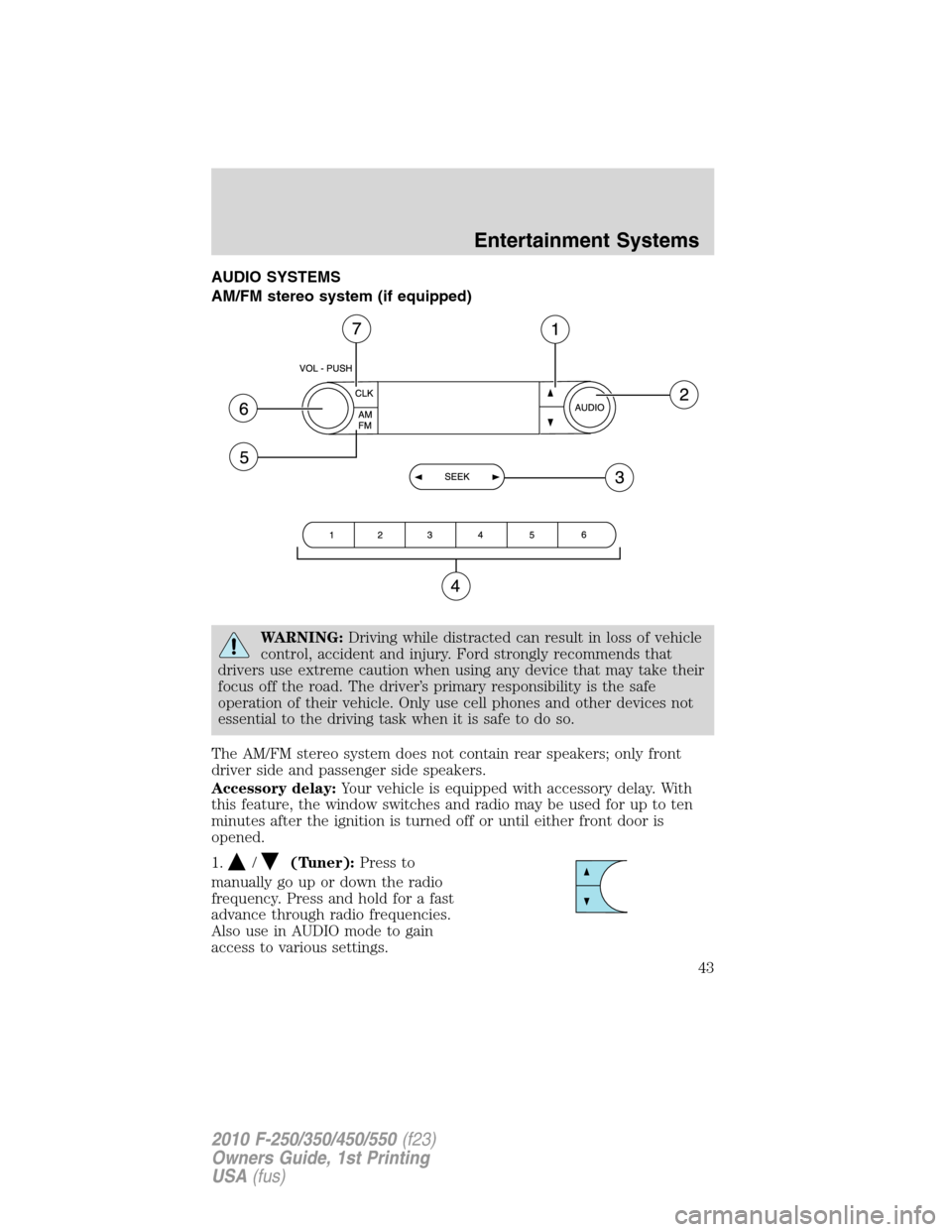
AUDIO SYSTEMS
AM/FM stereo system (if equipped)
WARNING:Driving while distracted can result in loss of vehicle
control, accident and injury. Ford strongly recommends that
drivers use extreme caution when using any device that may take their
focus off the road. The driver’s primary responsibility is the safe
operation of their vehicle. Only use cell phones and other devices not
essential to the driving task when it is safe to do so.
The AM/FM stereo system does not contain rear speakers; only front
driver side and passenger side speakers.
Accessory delay:Your vehicle is equipped with accessory delay. With
this feature, the window switches and radio may be used for up to ten
minutes after the ignition is turned off or until either front door is
opened.
1.
/(Tuner):Press to
manually go up or down the radio
frequency. Press and hold for a fast
advance through radio frequencies.
Also use in AUDIO mode to gain
access to various settings.
Entertainment Systems
43
2010 F-250/350/450/550(f23)
Owners Guide, 1st Printing
USA(fus)
Page 45 of 407
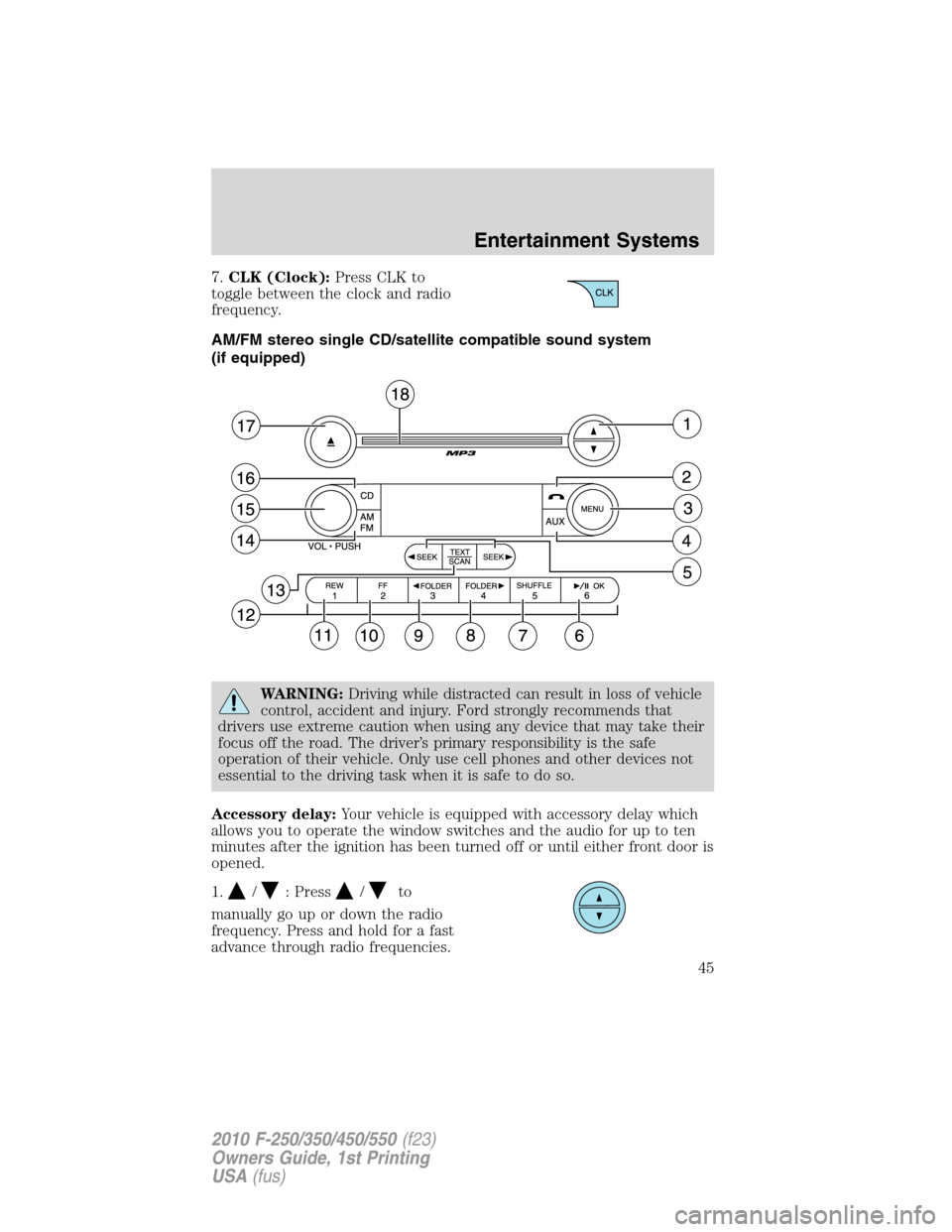
7.CLK (Clock):Press CLK to
toggle between the clock and radio
frequency.
AM/FM stereo single CD/satellite compatible sound system
(if equipped)
WARNING:Driving while distracted can result in loss of vehicle
control, accident and injury. Ford strongly recommends that
drivers use extreme caution when using any device that may take their
focus off the road. The driver’s primary responsibility is the safe
operation of their vehicle. Only use cell phones and other devices not
essential to the driving task when it is safe to do so.
Accessory delay:Your vehicle is equipped with accessory delay which
allows you to operate the window switches and the audio for up to ten
minutes after the ignition has been turned off or until either front door is
opened.
1.
/: Press/to
manually go up or down the radio
frequency. Press and hold for a fast
advance through radio frequencies.
Entertainment Systems
45
2010 F-250/350/450/550(f23)
Owners Guide, 1st Printing
USA(fus)
Page 52 of 407
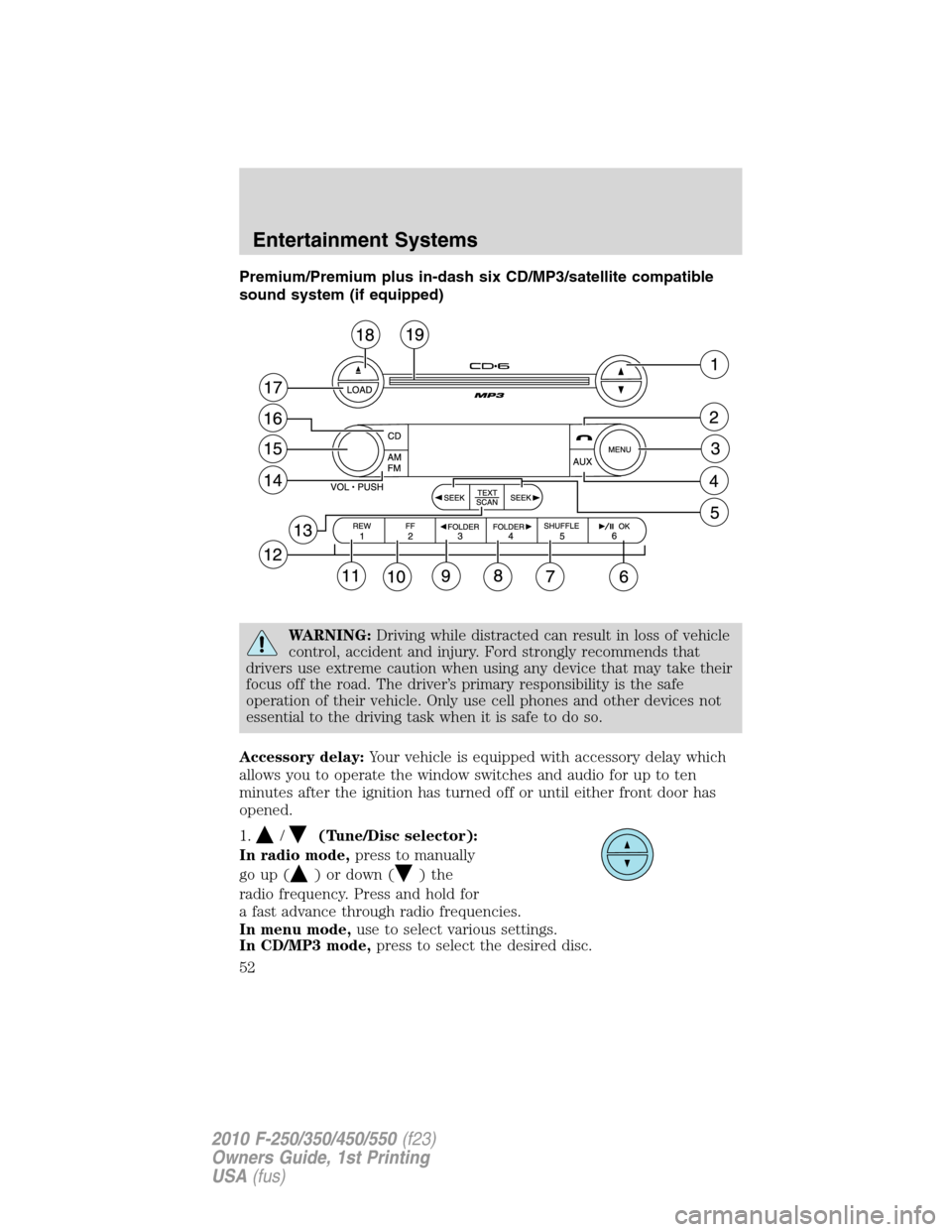
Premium/Premium plus in-dash six CD/MP3/satellite compatible
sound system (if equipped)
WARNING:Driving while distracted can result in loss of vehicle
control, accident and injury. Ford strongly recommends that
drivers use extreme caution when using any device that may take their
focus off the road. The driver’s primary responsibility is the safe
operation of their vehicle. Only use cell phones and other devices not
essential to the driving task when it is safe to do so.
Accessory delay:Your vehicle is equipped with accessory delay which
allows you to operate the window switches and audio for up to ten
minutes after the ignition has turned off or until either front door has
opened.
1.
/(Tune/Disc selector):
In radio mode,press to manually
go up (
) or down ()the
radio frequency. Press and hold for
a fast advance through radio frequencies.
In menu mode,use to select various settings.
In CD/MP3 mode,press to select the desired disc.
Entertainment Systems
52
2010 F-250/350/450/550(f23)
Owners Guide, 1st Printing
USA(fus)
Page 59 of 407
17.LOAD:Toloadadiscintothe
system, press LOAD. Select a slot
number using memory presets 1–6.
When the display reads LOAD CD#,
load the desired disc, label side up.
If you do not choose a slot within five seconds, the system will choose
for you. Once loaded, the first track will begin to play.
To auto load up to 6 discs,press and hold LOAD until the display
reads AUTOLOAD#. Load the desired disc, label side up. The system will
prompt you to load discs for the remaining available slots. Insert the
discs, one at a time, label side up, when prompted. Once loaded, the disc
in the last slot loaded will begin to play.
Note:An MP3 disc with folders will show F001 (folder #) T001 (track #)
in the display. An MP3 disc without folders will show T001 (track#) in
the display. Refer toMP3 track and folder structurelater in this
chapter for further information.
18.
(CD eject):To eject a disc
from the system, press
. Select
the correct slot number using
memory presets 1–6. When ready, the system will eject the disc and the
display will read REMOVE CD. If the disc is not removed in 15 seconds,
the system will reload the disc.
To auto eject up to 6 CDs,press and hold
until the system begins
ejecting the current disc. Remove the current disc and the next disc will
be ejected. If the current disc is not removed, the system will reload the
disc.
19.CD slot:Insert a CD label side
up.
Auxiliary input jack (if equipped)
WARNING:Driving while distracted can result in loss of vehicle
control, accident and injury. Ford strongly recommends that
drivers use extreme caution when using any device that may take their
focus off the road. The driver’s primary responsibility is the safe
operation of their vehicle. Only use cell phones and other devices not
essential to the driving task when it is safe to do so.
Entertainment Systems
59
2010 F-250/350/450/550(f23)
Owners Guide, 1st Printing
USA(fus)
Page 61 of 407
Troubleshooting:
1. Do not connect the audio input jack to a line level output. Line level
outputs are intended for connection to a home stereo and are not
compatible with the AIJ. The AIJ will only work correctly with devices
that have a headphone output with a volume control.
2. Do not set the portable music player’s volume level higher than is
necessary to match the volume of the CD or FM radio in your audio
system as this will cause distortion and will reduce sound quality. Many
portable music players have different output levels, so not all players
should be set at the same levels. Some players will sound best at full
volume and others will need to be set at a lower volume.
3. If the music sounds distorted at lower listening levels, turn the
portable music player volume down. If the problems persist, replace or
recharge the batteries in the portable music player.
4. The portable music player must be controlled in the same manner
when it is used with headphones as the AIJ does not provide control
(play, pause, etc.) over the attached portable music player.
5. For safety reasons, connecting or adjusting the settings on your
portable music player should not be attempted while the vehicle is
moving. Also, the portable music player should be stored in a secure
location, such as the center console or the glove box, when the vehicle is
in motion. The audio extension cable must be long enough to allow the
portable music player to be safely stored while the vehicle is in motion.
USB port (if equipped)
WARNING:Driving while distracted can result in loss of vehicle
control, accident and injury. Ford strongly recommends that
drivers use extreme caution when using any device that may take their
focus off the road. The driver’s primary responsibility is the safe
operation of their vehicle. Only use cell phones and other devices not
essential to the driving task when it is safe to do so.
Entertainment Systems
61
2010 F-250/350/450/550(f23)
Owners Guide, 1st Printing
USA(fus)
Page 68 of 407
FAMILY ENTERTAINMENT DVD SYSTEM (IF EQUIPPED)
WARNING:Driving while distracted can result in loss of vehicle
control, accident and injury. Ford strongly recommends that
drivers use extreme caution when using any device that may take their
focus off the road. The driver’s primary responsibility is the safe
operation of their vehicle. Only use cell phones and other devices not
essential to the driving task when it is safe to do so.
Your vehicle may be equipped with a Family Entertainment System
(FES) which allows you to listen to audio CDs, MP3 discs, watch DVDs
and to plug in and play a variety of standard video game systems. The
DVD player is capable of playing standard DVDs, CDs, MP3s and is
compatible with CD-R/W, CD-R and certain CD-ROM media.
Please review this material to become familiar with the FES features and
controls as well as the very important safety information.
Note:Any notations or restrictions on individual DVD system controls
are applicable to the overhead controls as well as to duplicate controls
found on the remote control.
Quick start
Your Family Entertainment System includes a DVD system, two sets of
wireless infrared (IR) headphones and a wireless infrared (IR) remote
control.
Note:To disable the DVD rear-seat controls:
•If your vehicle is equipped with the navigation system, press the
MEDIA or RADIO hard button. Select the ’Rear Zone’ tab on the
touchscreen. Press the ’disabled’ button. (Press the ’enabled’ button to
turn the rear controls on again.)
•If your vehicle is equipped with an audio system, press the 3 and 5
preset buttons simultaneously. (Press again to enable the controls).
To play a DVD in the DVD system:
The DVD system can play DVD-Video, DVD-R, DVD-R/W discs as well as
audio CDs. To ensure proper disc operation, check the disc for finger
prints, scratches and cleanliness. Clean with a soft cloth, wiping from
center to edge.
1. Ensure that the vehicle is on or the ignition is in accessory mode.
2. Insert a DVD into the system, label-side up to turn on the system. It
will load automatically.
Entertainment Systems
68
2010 F-250/350/450/550(f23)
Owners Guide, 1st Printing
USA(fus)