Page 27 of 286

WARNING:Driving while distracted can result in loss of vehicle
control, accident and injury. Ford strongly recommends that
drivers use extreme caution when using any device that may take their
focus off the road. The driver’s primary responsibility is the safe
operation of their vehicle. Only use cell phones and other devices not
essential to the driving task when it is safe to do so.
1.AM/FM:Press to select
AM/FM1/FM2 frequency bands.
2.CD:Press to enter CD/MP3
mode. If a CD is already in the
system, the disc will start playing.
3.AUX:Press AUX repeatedly to
cycle through SAT1, SAT2, SAT3
(Satellite radio modes, if equipped)
and LINE IN (Auxiliary audio mode,
if equipped).
For more information on Auxiliary audio mode, refer toAuxiliary input
jacklater in this chapter.
Satellite radio is available only with a valid SIRIUS�subscription.
Check with your authorized dealer for availability.
4.EJ(CD eject): To eject an
individual CD, press the eject
control and select the correct slot
number by pressing the corresponding memory preset. Press and hold to
eject all loaded CDs.
5.CLK (Clock):Press CLK until
SELECT HOUR or SELECT MINS is
displayed. Press
MENUto
adjust the hours/minutes. Press CLK
to display the time when the ignition is off.
6.MUTE:Press to mute the playing
media. Press again to return to the
playing media.
Entertainment Systems
27
2010 Ranger(ran)
Owners Guide, 1st Printing
USA(fus)
Page 32 of 286

Satellite radio is available only with a valid SIRIUS�subscription.
Check with your authorized dealer for availability.
17.ON/OFF/Volume:Press to turn
on/off. Turn to increase/decrease
volume.
If the volume is set above a certain
level and the ignition is turned off,
the volume will come back on at a
“nominal” listening level when the ignition switch is turned back on.
18.LOAD:Press to load a CD. To
load a CD disc to a specific slot,
press LOAD and select the slot
number by pressing the memory preset buttons. Press and hold LOAD to
autoload up to six discs.
19.CD slot:Insert a CD, label side
up.
Auxiliary input jack (Line in)-(if equipped)
WARNING:Driving while distracted can result in loss of vehicle
control, accident and injury. Ford strongly recommends that
drivers use extreme caution when using any device that may take their
focus off the road. The driver’s primary responsibility is the safe
operation of their vehicle. Only use cell phones and other devices not
essential to the driving task when it is safe to do so.
Your vehicle may be equipped with
an auxiliary input jack (AIJ). The
auxiliary input jack provides a way
to connect your portable music
player to the in-vehicle audio
system. This allows the audio from a
portable music player to be played
through the vehicle speakers with
high fidelity. To achieve optimal
performance, please observe the
following instructions when
attaching your portable music
device to the audio system.
Entertainment Systems
32
2010 Ranger(ran)
Owners Guide, 1st Printing
USA(fus)
Page 39 of 286
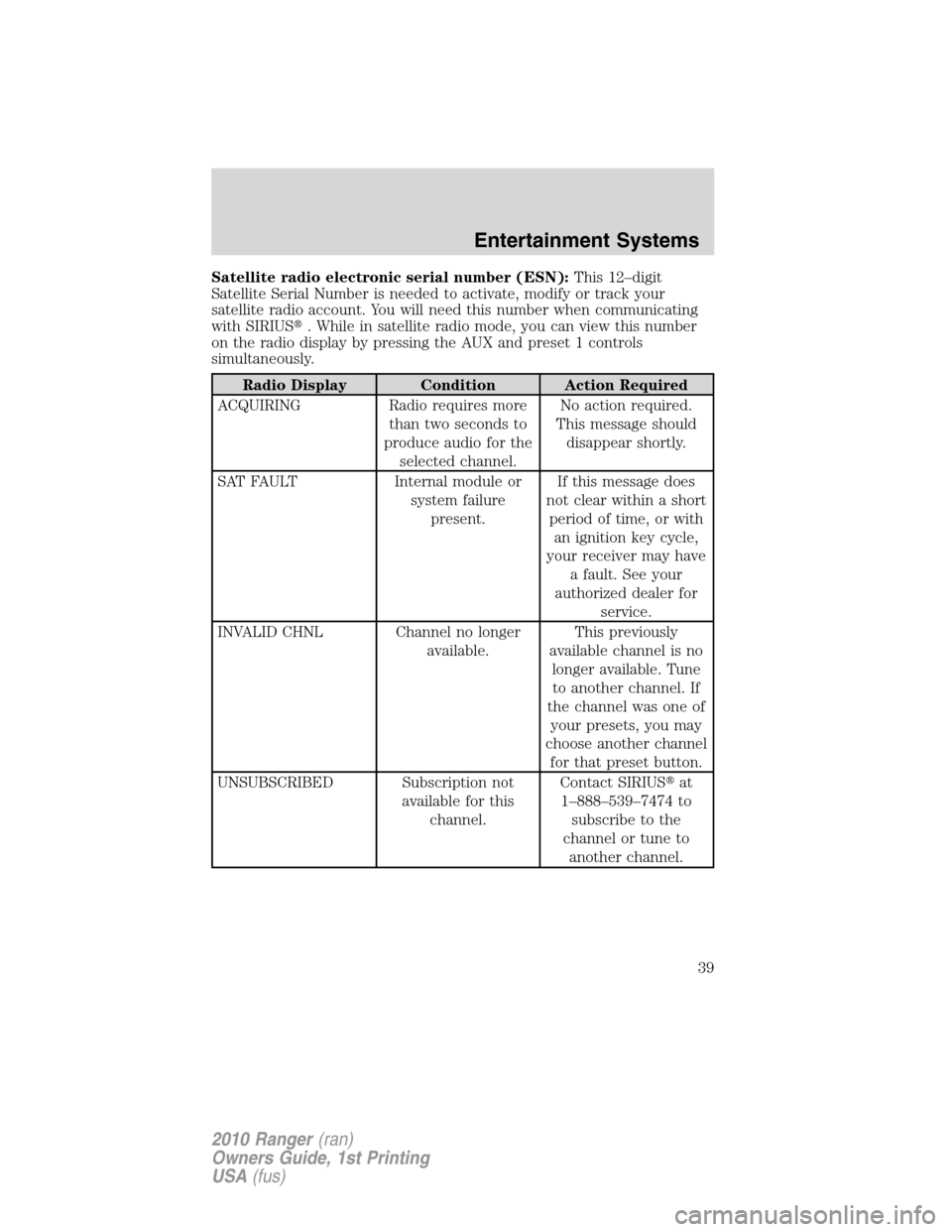
Satellite radio electronic serial number (ESN):This 12–digit
Satellite Serial Number is needed to activate, modify or track your
satellite radio account. You will need this number when communicating
with SIRIUS�. While in satellite radio mode, you can view this number
on the radio display by pressing the AUX and preset 1 controls
simultaneously.
Radio Display Condition Action Required
ACQUIRING Radio requires more
than two seconds to
produce audio for the
selected channel.No action required.
This message should
disappear shortly.
SAT FAULT Internal module or
system failure
present.If this message does
not clear within a short
period of time, or with
an ignition key cycle,
your receiver may have
a fault. See your
authorized dealer for
service.
INVALID CHNL Channel no longer
available.This previously
available channel is no
longer available. Tune
to another channel. If
the channel was one of
your presets, you may
choose another channel
for that preset button.
UNSUBSCRIBED Subscription not
available for this
channel.Contact SIRIUS�at
1–888–539–7474 to
subscribe to the
channel or tune to
another channel.
Entertainment Systems
39
2010 Ranger(ran)
Owners Guide, 1st Printing
USA(fus)
Page 45 of 286

Flash to pass
Pull toward you slightly to activate
and release to deactivate.
Daytime running lamps (DRL) (if equipped)
The daytime running light system turns the headlamps on with a
reduced light output.
To activate:
•the ignition must be in the on position and
•the headlamp system is in the off position or parking lamp position.
WARNING:Always remember to turn on your headlamps at
dusk or during inclement weather. The daytime running light
(DRL) system does not activate your tail lamps and generally may not
provide adequate lighting during these conditions. Failure to activate
your headlamps under these conditions may result in a collision.
PANEL DIMMER CONTROL
Use to adjust the brightness of the
instrument panel and all applicable
switches in the vehicle during
headlamp and parking lamp
operation.
Move the control up or down to
adjust the intensity of the panel
lighting.
Move the control to the full upright
position, past detent, to turn on the
interior lamps.
Lights
45
2010 Ranger(ran)
Owners Guide, 1st Printing
USA(fus)
Page 48 of 286

TURN SIGNAL CONTROL
•Push down to activate the left
turn signal.
•Push up to activate the right turn
signal.
INTERIOR LAMPS
Courtesy/reading lamps (if equipped)
The courtesy lamp lights when:
•any door is opened.
•the instrument panel dimmer
switch is held up until the
courtesy lamps come on.
•the remote entry controls are
pressed and the ignition is off.
BULB REPLACEMENT
Lamp assembly condensation
Exterior lamps are vented to accommodate normal changes in pressure.
Condensation can be a natural by-product of this design. When moist air
enters the lamp assembly through the vents, there is a possibility that
condensation can occur when the temperature is cold. When normal
condensation occurs, a thin film of mist can form on the interior of the
lens. The thin mist eventually clears and exits through the vents during
normal operation. Clearing time may take as long as 48 hours under dry
weather conditions.
Examples of acceptable condensation are:
•Presence of thin mist (no streaks, drip marks or droplets)
•Fine mist covers less than 50% of the lens
Lights
48
2010 Ranger(ran)
Owners Guide, 1st Printing
USA(fus)
Page 61 of 286
Turning off speed control
To turn off the speed control, press OFF or turn off the ignition.
Note:When you turn off the speed control or the ignition, your speed
control set speed memory is erased.
BEDRAILS (IF EQUIPPED)
•This bedrail is for appearance use only.
WARNING:To help prevent injury, do not use bedrail to retain
cargo.
•Retain cargo with the pickup tiedown hooks.
Driver Controls
61
2010 Ranger(ran)
Owners Guide, 1st Printing
USA(fus)
Page 63 of 286

Your vehicle is equipped with a remote entry system which allows you to:
•unlock the vehicle doors without
a key.
•lock all the vehicle doors without
a key.
•activate the personal alarm.
If there are problems with the
remote entry system, make sure to
takeALL remote entry
transmitterswith you to your
authorized dealer in order to aid in
troubleshooting the problem.
Unlocking the doors
1. Pressand release to unlock the driver’s door.Note:The interior
lamps will illuminate.
2. Press
and release again within three seconds to unlock all the
doors.
Vehicles with alarm system, when the doors are not opened after
45 seconds, the system will lock them again.
Locking the doors
1. Pressand release to lock all the doors. The external lights will
flash once to confirm lock; if any of the doors are not properly closed,
the lamps will not flash.
2. If
is pressed a second time within three seconds, the lamps will
flash again and the horn will chirp to confirm all doors are locked and
closed. If either door is ajar the lights will not flash and the horn will
chirp twice.
Car finder
Press
twice within three seconds. The horn will chirp and the turn
lamps will flash. It is recommended that this method be used to locate
your vehicle, rather than using the panic alarm.
Sounding a panic alarm
Press
to activate the alarm. The horn will sound and the parklamps
will flash for approximately three minutes. Press again or turn the
ignition to the on position to deactivate, or wait for the alarm to timeout
in three minutes.
Locks and Security
63
2010 Ranger(ran)
Owners Guide, 1st Printing
USA(fus)
Page 64 of 286

Note:The panic alarm will only operate when the ignition is in the off
position.
Replacing the battery
The remote entry transmitter uses one coin type three-volt lithium
battery CR2032 or equivalent.
To replace the battery:
1. Twist a thin coin between the two
halves of the remote entry
transmitter near the key ring. DO
NOT TAKE THE RUBBER COVER
AND CIRCUIT BOARD OFF THE
FRONT HOUSING OF THE
REMOTE ENTRY TRANSMITTER.
2. Do not wipe off any grease on the
battery terminals on the back
surface of the circuit board.
3. Remove the old battery.
Note:Please refer to local
regulations when disposing of
transmitter batteries.
4. Insert the new battery. Refer to
the diagram inside the remote entry
transmitter for the correct
orientation of the battery. Press the battery down to ensure that the
battery is fully seated in the battery housing cavity.
5. Snap the two halves back together.
Note:Replacement of the battery willnotcause the remote transmitter
to become deprogrammed from your vehicle. The remote transmitter
should operate normally after battery replacement.
Replacing lost remote entry transmitters
If you would like to have your remote entry transmitter reprogrammed
because you lost one, or would like to buy additional remote entry
transmitters, you can either reprogram them yourself, or takeall
remote entry transmittersto your authorized dealer for
reprogramming.
Locks and Security
64
2010 Ranger(ran)
Owners Guide, 1st Printing
USA(fus)
