2010 FORD MONDEO steering
[x] Cancel search: steeringPage 5 of 16
Downloaded from www.Manualslib.com manuals search engine Heated windscreen and heated rear window switches.
N
Climate controls.
O
Cigar lighter.
P
Ignition switch.
Q
Cruise control and speed limiter switches. Adaptive cruise control switches.
Speed limiter switches.
R
Steering wheel adjustment lever.
S
Horn.
T
Cruise control and speed limiter switches. Adaptive cruise control switches.
Speed limiter switches.
U
Driver Knee airbag.
V
KEYLESS ENTRY WARNINGS
For all warnings and cautions, refer
to your Owner's handbook.
The keyless entry system may not
function if the key is close to metal
objects or electronic devices such
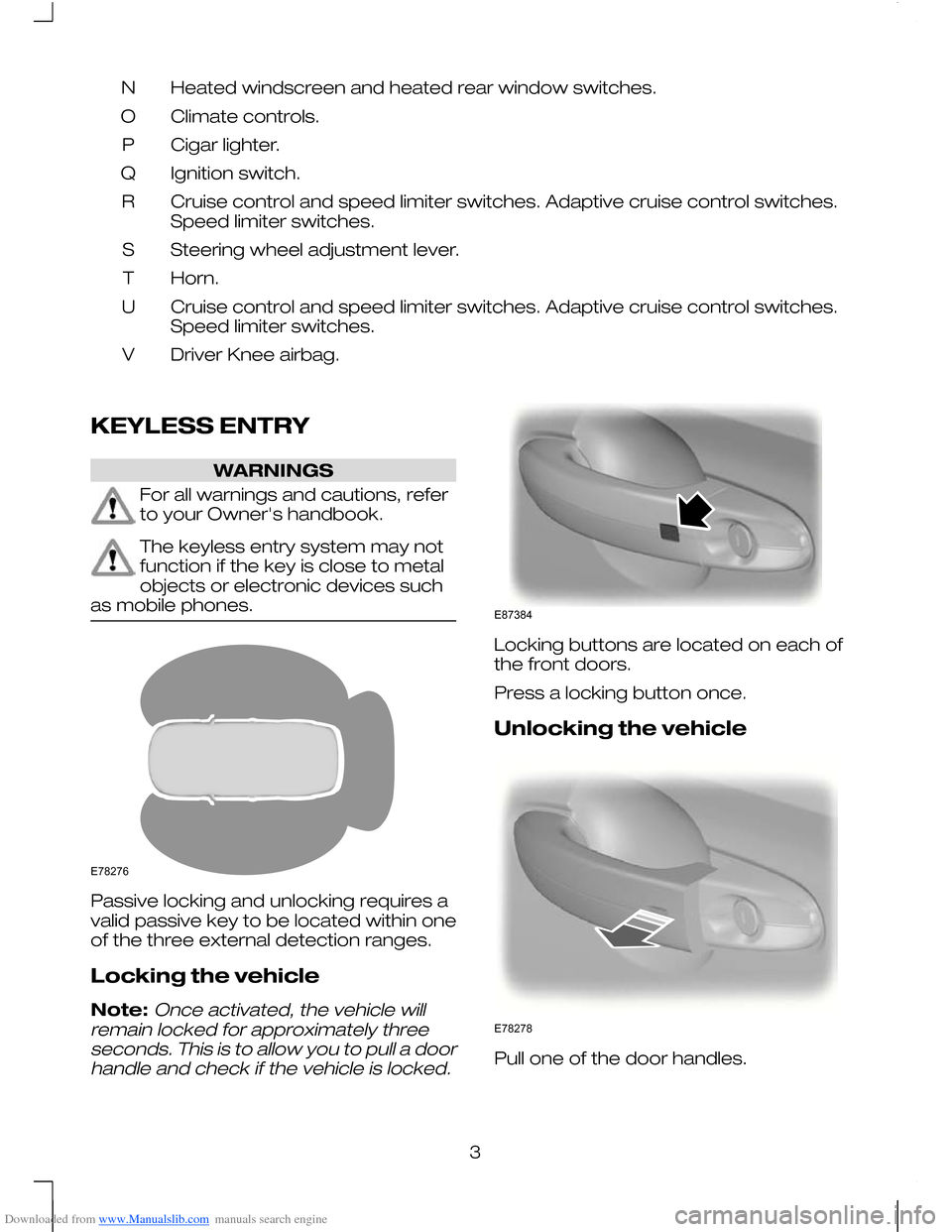
as mobile phones. Passive locking and unlocking requires a
valid passive key to be located within one
of the three external detection ranges.
Locking the vehicle
Note:Once activated, the vehicle will
remain locked for approximately three seconds. This is to allow you to pull a doorhandle and check if the vehicle is locked. Locking buttons are located on each of
the front doors.
Press a locking button once.
Unlocking the vehicle
Pull one of the door handles.
3E78276 E87384 E78278
Page 11 of 16
Downloaded from www.Manualslib.com manuals search engine Fuel operated heater
(depending on country)
The fuel operated heater aids in warming
the engine and the vehicle interior on
vehicles with a diesel engine. It is switched
on or off automatically depending on the
outside air temperature and the coolant
temperature, unless you have deactivated
it.
To deactivate the fuel operated heater:
1. Press the right arrow button on the
steering wheel to enter the main menu.
2. Highlight Setupwith the up and down
arrow buttons and press the right
arrow button.
3. Highlight Aux. Heater and press the
OK button to toggle the heater on and
off. A cross appears in the box when
the heater is activated.
4. Press the left arrow button to exit the menu. Hold the left arrow button
pressed to return to the trip computer
display.
Diesel auxiliary heater
(depending on country)
The diesel auxiliary heater (PTC electrical
heater) aids in warming the vehicle interior
on vehicles with a diesel engine. It is
switched on or off automatically depending
on the outside air temperature, the coolant
temperature and the alternator load. MEMORY FUNCTION WARNINGS
Before activating the seat memory,
make sure that the area immediately
surrounding the seat is clear of
obstructions and that all occupants are
clear of moving parts. Do not use the memory store
function when the vehicle is moving.
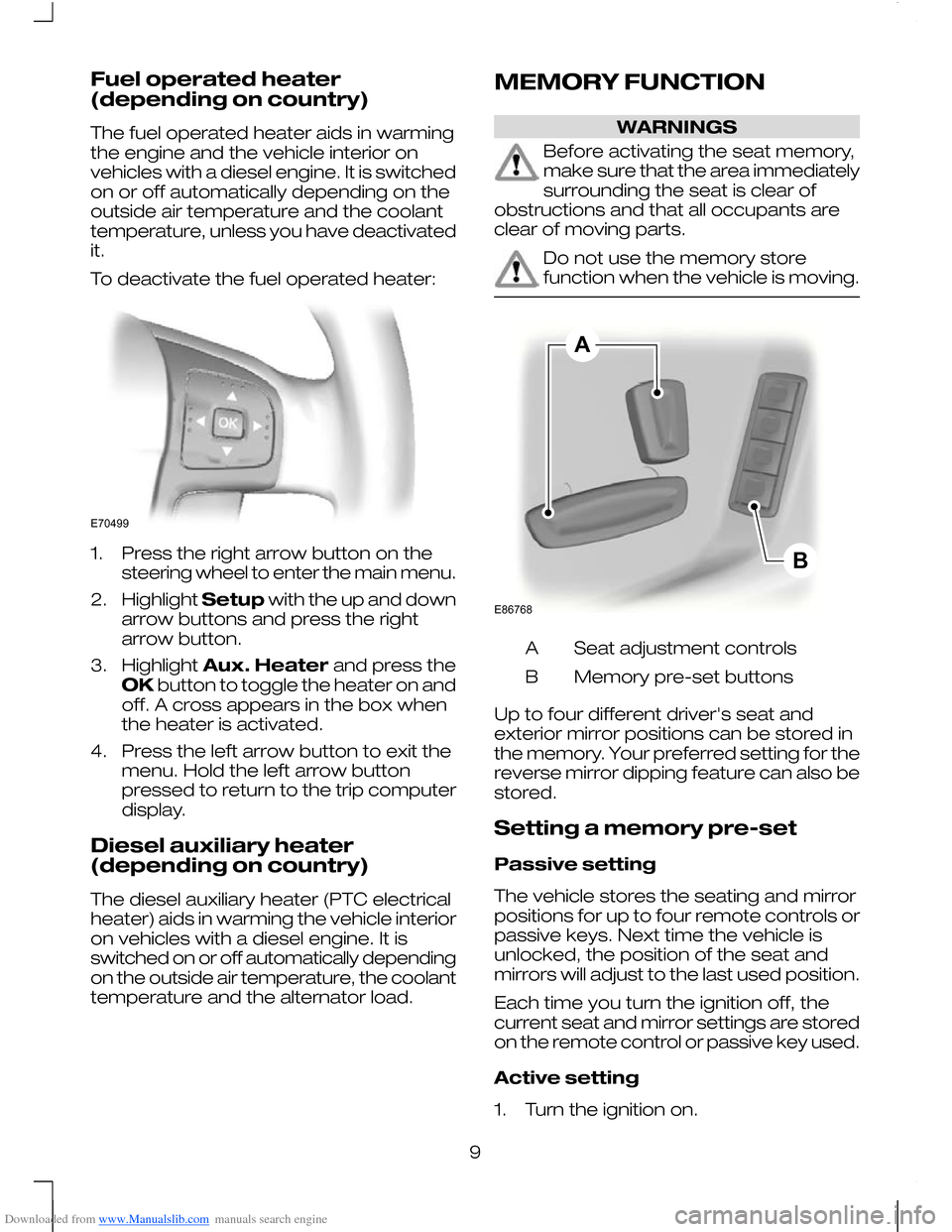
Seat adjustment controls
A
Memory pre-set buttons
B
Up to four different driver's seat and
exterior mirror positions can be stored in
the memory. Your preferred setting for the
reverse mirror dipping feature can also be
stored.
Setting a memory pre-set
Passive setting
The vehicle stores the seating and mirror
positions for up to four remote controls or
passive keys. Next time the vehicle is
unlocked, the position of the seat and
mirrors will adjust to the last used position.
Each time you turn the ignition off, the
current seat and mirror settings are stored
on the remote control or passive key used.
Active setting
1. Turn the ignition on.
9E70499 ABE86768
Page 13 of 16
Downloaded from www.Manualslib.com manuals search engine Stopping the engine when the
vehicle is moving
WARNING
Switching off the engine when the
vehicle is still moving will result in a
loss of brake and steering
assistance. The steering will not be locked,
but higher effort will be required. When the
ignition is switched off some electrical
circuits, warning lamps and indicators may
also be OFF. Press and hold the start button for two
seconds, or press three times within three
seconds.
ECO MODE
The system assists the driver to drive more
efficiently by constantly monitoring
characteristics of gear changing,
anticipation of traffic conditions and
speeds on motorways and open roads.
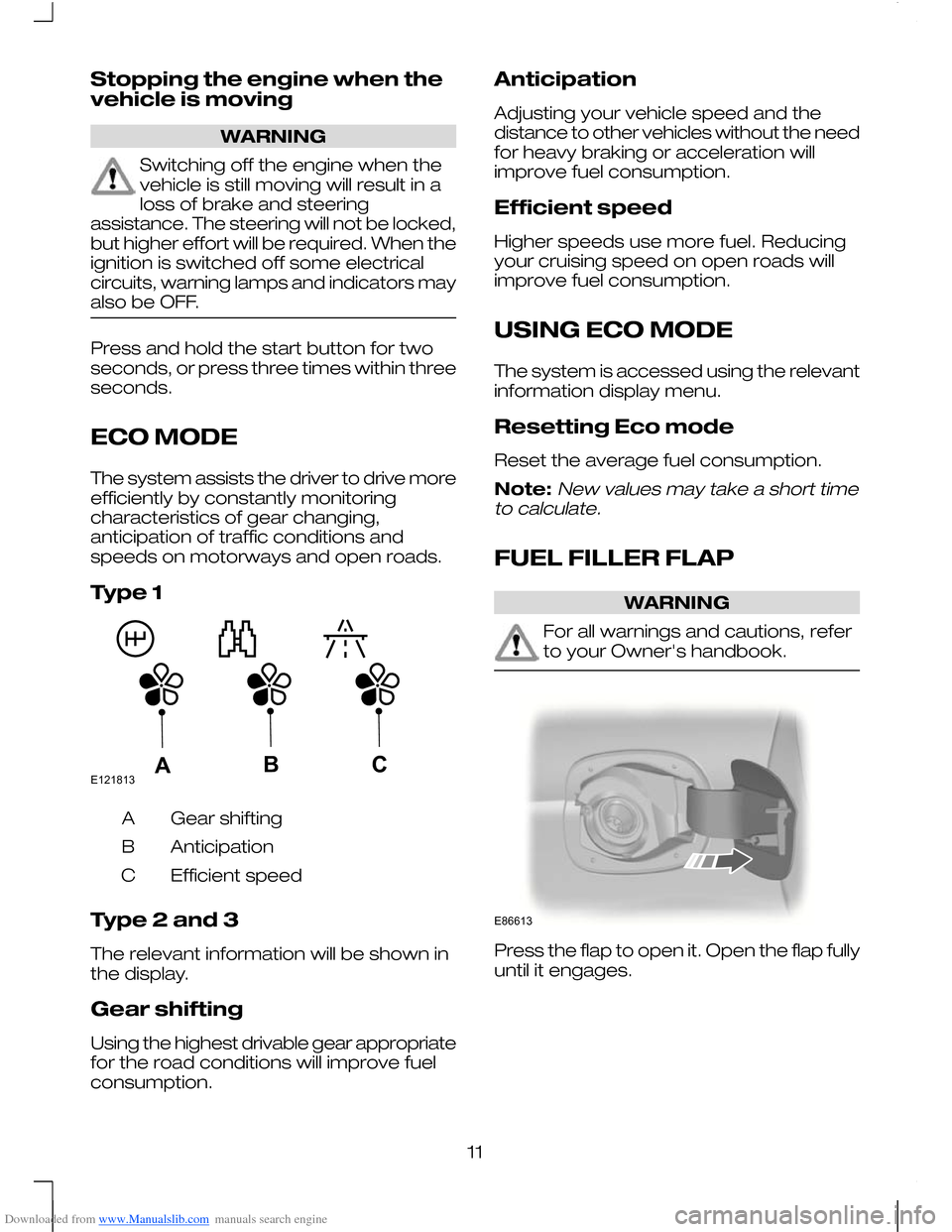
Type 1
Gear shifting
A
Anticipation
B
Efficient speed
C
Type 2 and 3
The relevant information will be shown in
the display.
Gear shifting
Using the highest drivable gear appropriate
for the road conditions will improve fuel
consumption. Anticipation
Adjusting your vehicle speed and the
distance to other vehicles without the need
for heavy braking or acceleration will
improve fuel consumption.
Efficient speed
Higher speeds use more fuel. Reducing
your cruising speed on open roads will
improve fuel consumption.
USING ECO MODE
The system is accessed using the relevant
information display menu.
Resetting Eco mode
Reset the average fuel consumption.
Note:New values may take a short time
to calculate.
FUEL FILLER FLAP WARNING
For all warnings and cautions, refer
to your Owner's handbook.
Press the flap to open it. Open the flap fully
until it engages.
11E121813ABC E86613
Page 15 of 16
Downloaded from www.Manualslib.com manuals search engine System display
When active the system will run
automatically in the background and only
issue warnings if required. You can view
the status at any time using the information
display.
The alertness level is shown by six steps
as a coloured bar.
The status bar will travel from left to right
as the calculated alertness level
decreases.
•
Green - No rest required.
• Yellow - First (temporary) warning.
• Red - Second warning.
LANE DEPARTURE WARNING WARNINGS
For all warnings and cautions, refer
to your Owner's handbook.
The system does not relieve you of
your responsibility to drive with due
care and attention.
CAUTIONS
In cold and severe weather conditions
the system may not function. Rain,
snow, spray and large contrasts in
lighting can all adversely influence the
camera sensor. The system may not operate on roads
with sharp bends or narrow lanes. The system will automatically detect and
track the lane markings on the road. If it
detects that the vehicle is unintentionally
drifting towards the lane boundaries then
a visual warning will be displayed in the
information display. There is also a warning
given in the form of a vibration felt through
the steering wheel.
USING LANE DEPARTURE
WARNING
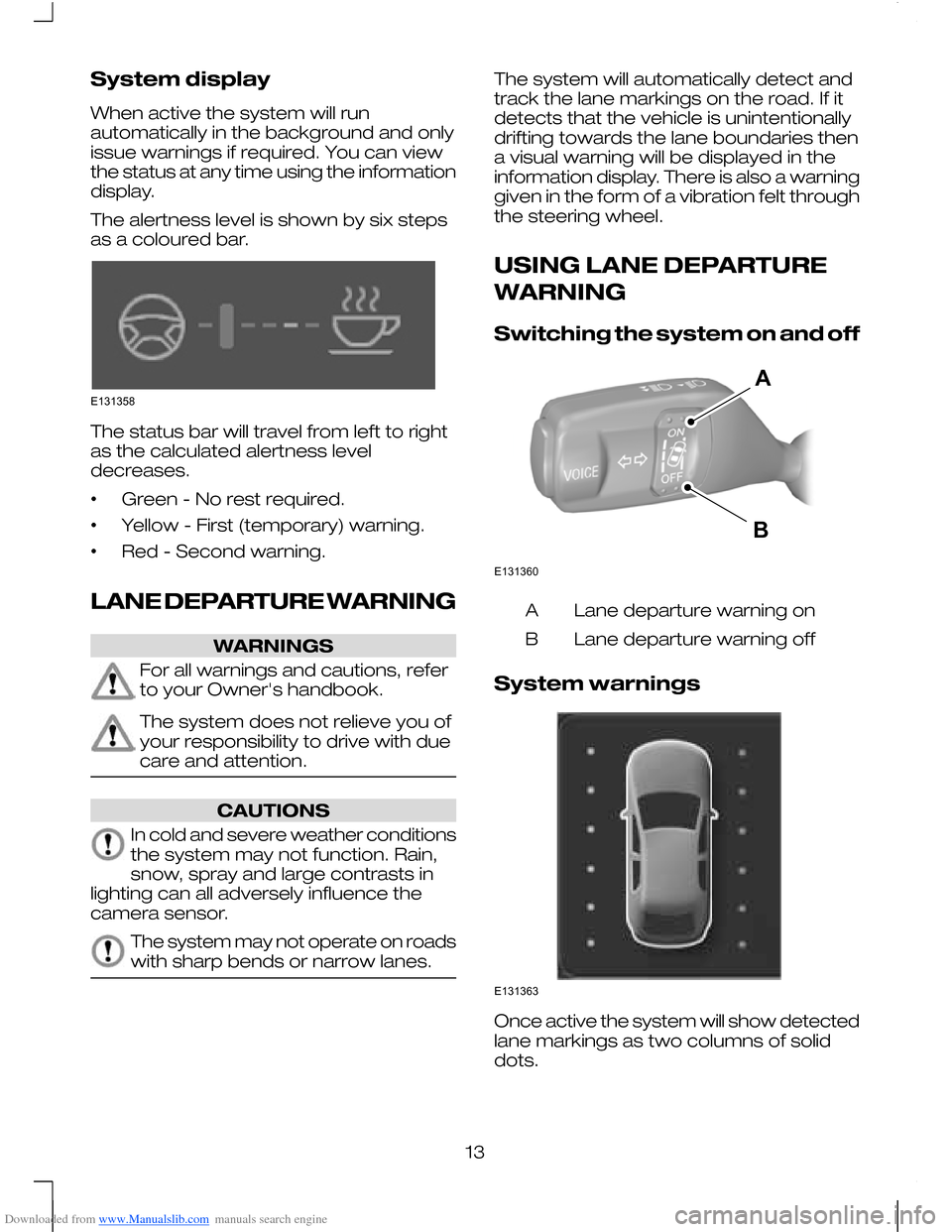
Switching the system on and off
Lane departure warning on
A
Lane departure warning off
B
System warnings Once active the system will show detected
lane markings as two columns of solid
dots.
13E131358 E131360AB E131363
Page 16 of 16
Downloaded from www.Manualslib.com manuals search engine •
Green - The system is ready to warn
you if an unintentional lane departure
may occur.
• Red - The vehicle is approaching or is
too close to the detected lane
boundary.
• Grey - Right or left-hand lane boundary
is suppressed.
Instances where a lane boundary may be
suppressed:
• Lane markings on the road may not be
detected by the camera sensor.
• The direction indicator for that side of
the vehicle is on.
• During hard acceleration and braking,
or if direct steering is applied.
• If ABS or Stability Control (ESP) is
active.
• Narrow lane width.
If the dots turn red or a vibration is felt
through the steering wheel you must take
immediate and safe action to align the
vehicle and correct any unintended lane
drift.
BLUETOOTH SETUP
The Bluetooth mobile phone part of the
system provides interaction with the audio
system and your mobile phone. It allows
you to use the audio system to make and
receive calls without having to hold your
mobile phone.
During bonding, if your mobile phone asks
you to authorize the automatic connection,
select YES.
Refer to your Owner's handbook and also
www.ford-mobile-connectivity.com for
details.
14