Page 71 of 226
Menu structure
69
Information displaysTripOdoAvgFuelAvgSpeedAllSetClock24HourModeABCE98875StandardSportComfortAlwaysoffHelpScreenDisplayConfigureNAVInfoOnGuidanceAlwaysonResetTripMessagesSteeringESPClockSetup
Page 73 of 226

PERSONALISED SETTINGS
1. Use the rotary to enter the main
menu.
2. Press the SET/RESET button to
choose a sub-menu and adjust the
settings.
ESP
Select this option to activate or deactivate
ESP.
1. Use the rotary control to enter the main menu. 2.
Highlight ESPand press the
SET/RESET.
3. Highlight Backand repeatedly press
the SET/RESET button to return to
the main menu.
Steering
Note:For road safety reasons, changes
in the Steering menu can only be made
while the vehicle is stationary. If this menu or one of its sub-menus is open when thevehicle begins to move, the informationdisplay will automatically exit the
Steering menu.
Note:When the vehicle is stationary, the
steering assistance is optimized in all three settings and does not differ noticeably.
Standard: The standard setting is
suitable for all driving styles.
Sport: The steering assistance is
reduced. This suits a sportier driving style
by increasing the feedback through the
steering wheel. The sport setting is also
an advantage when driving on icy and
snowy road conditions.
Comfort: The steering assistance is
increased. The steering will feel lighter and
you will not need to exert as much force
on the wheel.
1. Use the rotary control to enter the main menu.
2. Highlight Steering and press the
SET/RESET button.
3. Highlight the desired setting and press
the SET/RESET button to confirm
the setting.
4. Highlight Backand repeatedly press
the SET/RESET button to return to
the main menu.
Clock setting
1. Use the rotary control to enter the main menu.
71
Information displaysAE98884Time1onSetonceActivenowSetTime1MondayTuesdayWednesdayThursdayFridaySaturdaySundayTime2onSetTime1MondayTuesdayWednesdayThursdayFridaySaturdaySundayParkHeater
Page 77 of 226
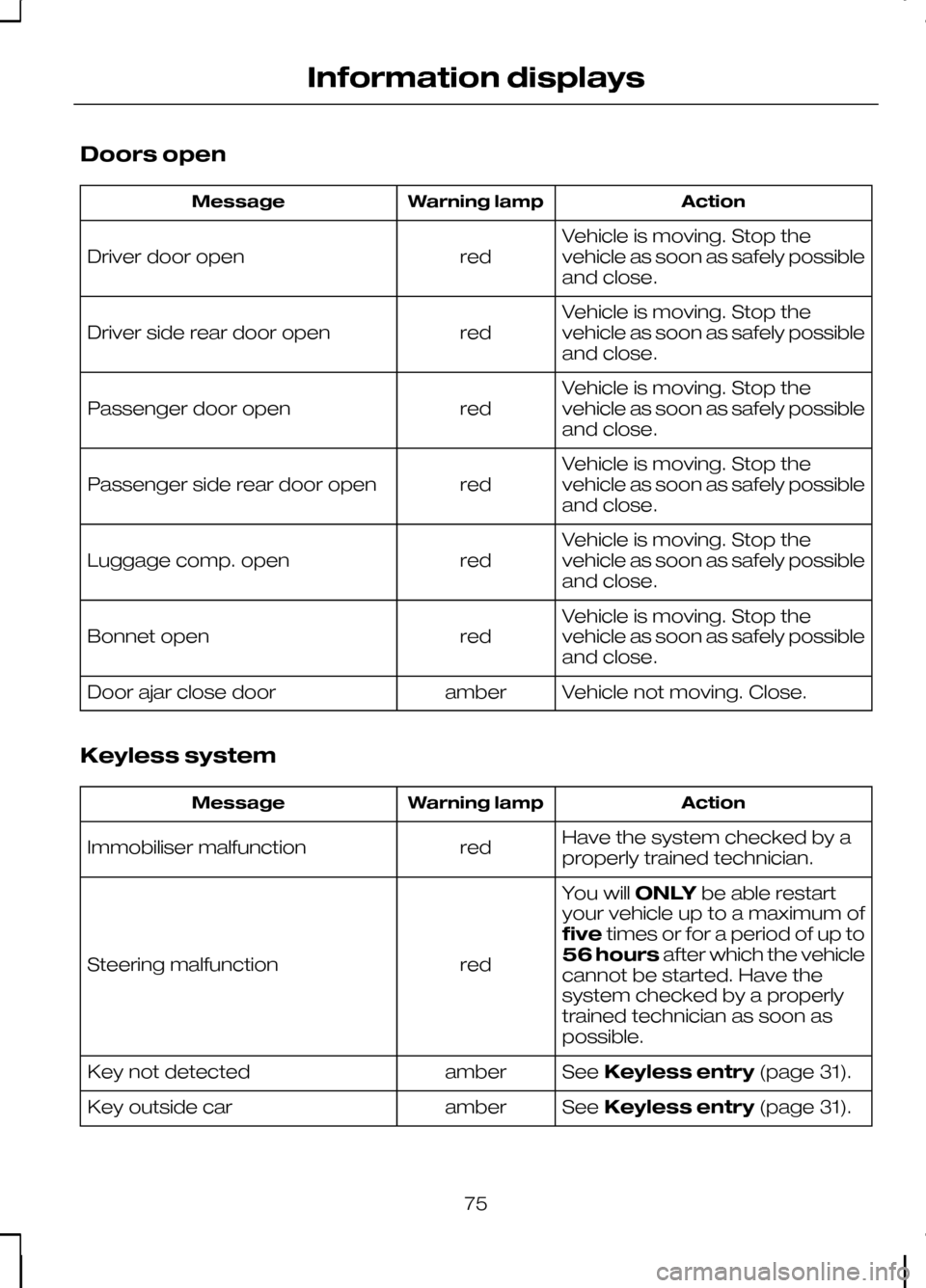
Doors open
Action
Warning lamp
Message
Vehicle is moving. Stop the
vehicle as soon as safely possible
and close.
red
Driver door open
Vehicle is moving. Stop the
vehicle as soon as safely possible
and close.
red
Driver side rear door open
Vehicle is moving. Stop the
vehicle as soon as safely possible
and close.
red
Passenger door open
Vehicle is moving. Stop the
vehicle as soon as safely possible
and close.
red
Passenger side rear door open
Vehicle is moving. Stop the
vehicle as soon as safely possible
and close.
red
Luggage comp. open
Vehicle is moving. Stop the
vehicle as soon as safely possible
and close.
red
Bonnet open
Vehicle not moving. Close.
amber
Door ajar close door
Keyless system Action
Warning lamp
Message
Have the system checked by a
properly trained technician.
red
Immobiliser malfunction
You willONLYbe able restart
your vehicle up to a maximum of
five times or for a period of up to
56 hours after which the vehicle
cannot be started. Have the
system checked by a properly
trained technician as soon as
possible.
red
Steering malfunction
SeeKeyless entry (page 31).
amber
Key not detected
SeeKeyless entry (page 31).
amber
Key outside car
75
Information displays
Page 78 of 226
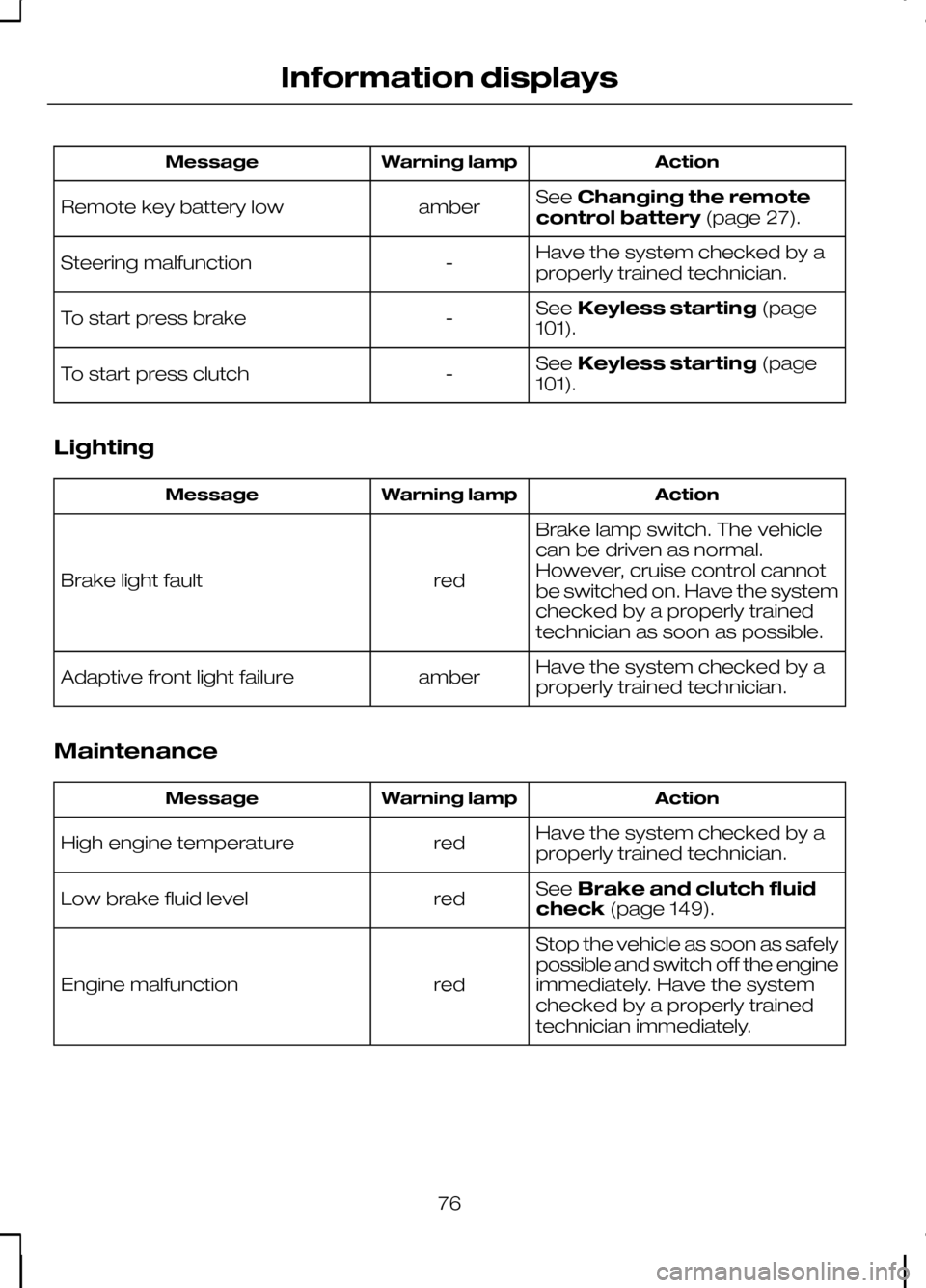
Action
Warning lamp
Message
SeeChanging the remote
control battery (page 27).
amber
Remote key battery low
Have the system checked by a
properly trained technician.
-
Steering malfunction
SeeKeyless starting (page
101).
-
To start press brake
SeeKeyless starting (page
101).
-
To start press clutch
Lighting Action
Warning lamp
Message
Brake lamp switch. The vehicle
can be driven as normal.
However, cruise control cannot
be switched on. Have the system
checked by a properly trained
technician as soon as possible.
red
Brake light fault
Have the system checked by a
properly trained technician.
amber
Adaptive front light failure
Maintenance Action
Warning lamp
Message
Have the system checked by a
properly trained technician.
red
High engine temperature
SeeBrake and clutch fluid
check (page 149).
red
Low brake fluid level
Stop the vehicle as soon as safely
possible and switch off the engine
immediately. Have the system
checked by a properly trained
technician immediately.
red
Engine malfunction
76
Information displays
Page 79 of 226
Action
Warning lamp
Message
Electronic acceleration control
(EAC). The vehicle can be driven
but the acceleration rate will be
noticeably reduced. Maximum
vehicle speed will be maintained.
Have the system checked by a
properly trained technician as
soon as possible.
red
Acceleration reduced
Appears only on vehicles fitted
with headlamp washers. The
washer fluid level is low. Check
the washer fluid level. See
Washer fluid check(page 149).
amber
Low washer fluid level
Have the system checked by a
properly trained technician.
-
Service oil
Power steering Action
Warning lamp
Message
Full steering will be maintained but
you will need to exert greater
force on the steering wheel. Have
the system checked by a properly
trained technician as soon as
possible.
amber
Power steering malfunction
Stability control (ESP) Action
Warning lamp
Message
Have the system checked by a
properly trained technician.
amber
ESP malfunction
77
Information displays
Page 92 of 226

SITTING IN THE CORRECT
POSITION
WARNINGS
Do not adjust the seats when the
vehicle is moving.
Only when you use the seat belt
properly, can it hold you in a position
that allows the airbag to achieve its
optimum effect. When you use them properly, the seat,
head restraint, seat belt and airbags will
provide optimum protection in the event
of a collision. We recommend that you:
•
sit in an upright position with the base
of your spine as far back as possible.
• do not recline the seatback more than
30 degrees.
• adjust the head restraint so that the
top of it is level with the top of your
head and as far forwards as possible,
remaining comfortable.
• keep sufficient distance between
yourself and the steering wheel. We
recommend a minimum of 250
millimetres (10 inches) between your
breastbone and the airbag cover. •
hold the steering wheel with your arms
slightly bent.
• bend your legs slightly so that you can
press the pedals fully.
• position the shoulder strap of the seat
belt over the centre of your shoulder
and position the lap strap tightly
across your hips.
Make sure that your driving position is
comfortable and that you can maintain full
control of your vehicle.
HEAD RESTRAINTS
Adjusting the head restraint WARNINGS
Raise the rear head restraint when
the rear seat is occupied by a
passenger.
When using a forward facing child
restraint on a rear seat, always
remove the head restraint from that
seat. Adjust the head restraint so that the top
of it is level with the top of your head.
Removing the head restraint
Press the locking buttons and remove the
head restraint.
90
SeatsE68595 E66539
Page 103 of 226
GENERAL INFORMATION
General points on starting
If the battery has been disconnected the
vehicle may exhibit some unusual driving
characteristics for approx. 8 kilometres
(5 miles) after reconnecting the battery.
This is because the engine management
system must realign itself with the engine.
Any unusual driving characteristics during
this period may be disregarded.
Starting the engine by towing
or pushing
WARNING
To prevent damage you must not
push or tow start your vehicle. Use
booster cables and a booster
battery. See Using booster cables
(page 154). KEYLESS STARTING
WARNINGS
The keyless starting system may not
function if the key is close to metal
objects or electronic devices such
as mobile phones. Always check that the steering
wheel lock is deactivated before
attempting to move your vehicle.
Note:A valid passive key must be
located inside the vehicle to switch the ignition on and start the engine.
Note:To start your engine you must also
fully depress the brake or clutch pedal, depending on the transmission fitted. Ignition on
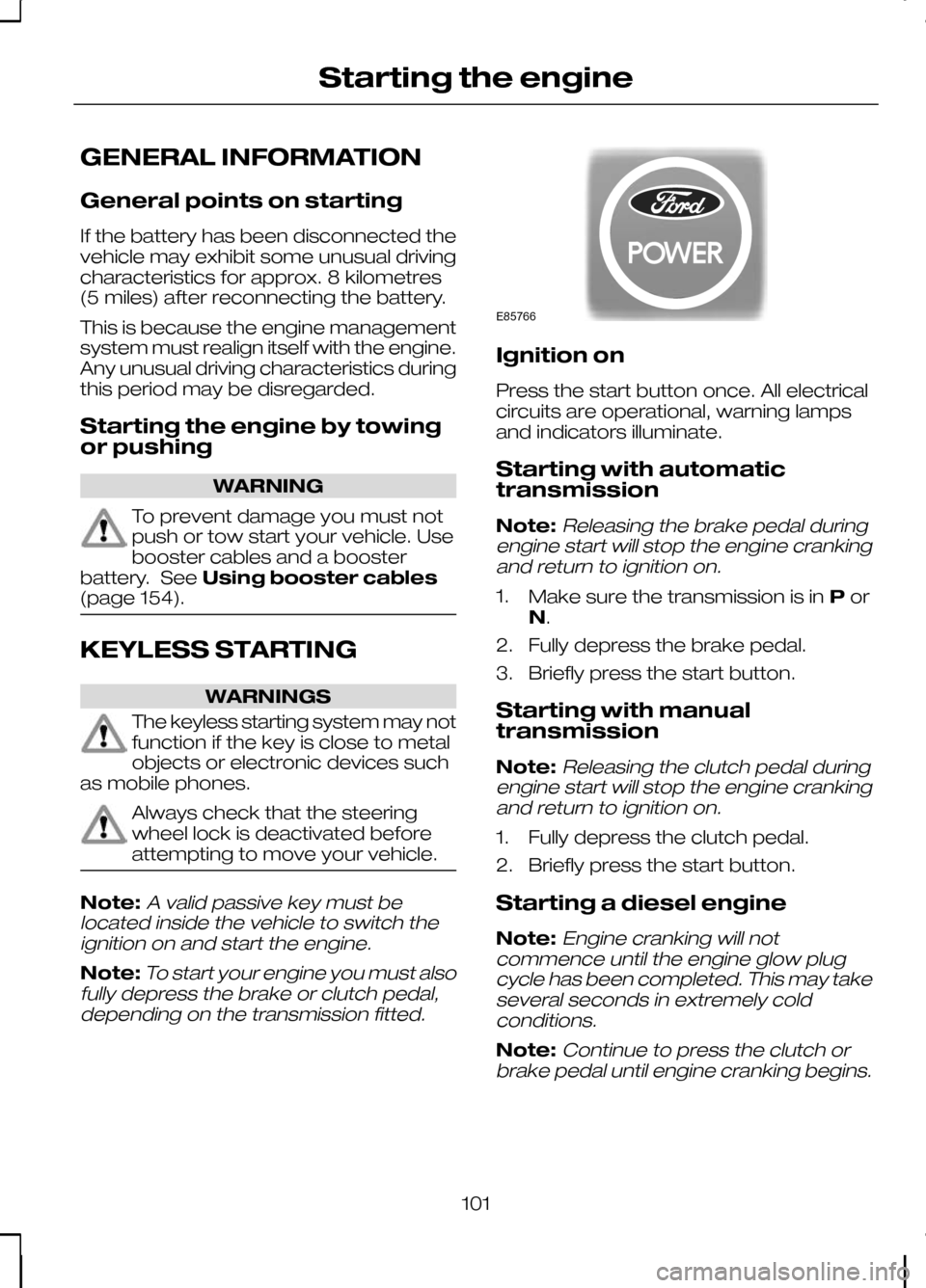
Press the start button once. All electrical
circuits are operational, warning lamps
and indicators illuminate.
Starting with automatic
transmission
Note:
Releasing the brake pedal during
engine start will stop the engine cranking and return to ignition on.
1. Make sure the transmission is in Por
N.
2. Fully depress the brake pedal.
3. Briefly press the start button.
Starting with manual
transmission
Note:
Releasing the clutch pedal during
engine start will stop the engine cranking and return to ignition on.
1. Fully depress the clutch pedal.
2. Briefly press the start button.
Starting a diesel engine
Note:
Engine cranking will not
commence until the engine glow plug cycle has been completed. This may takeseveral seconds in extremely coldconditions.
Note:Continue to press the clutch or
brake pedal until engine cranking begins.
101
Starting the engineE85766
Page 104 of 226

Failure to start
The passive starting system will not
function if:
•
The passive key frequencies are
jammed.
• The passive key battery is flat.
If you are unable to start your vehicle carry
out the following procedure. 1. Hold the key next to the steering
column shroud exactly as shown.
2. With the key in this position you can use the start button to switch the
ignition on and start your vehicle.
If you are still unable to start your vehicle
carry out the following procedure. 1. Carefully prise out the cover. 2.
Remove the key blade. See Keyless
entry (page 31). 3. Insert the key blade into the key
holder.
4. With the key blade in this position you can use the start button to switch the
ignition on and start your vehicle.
Stopping the engine
When your vehicle is stationary, press the
start button to stop the engine. The
ignition, all electrical circuits, warning
lamps and indicators will be switched off.
DIESEL PARTICULATE
FILTER (DPF)
The DPF forms part of the emissions
reduction systems fitted to your vehicle.
It filters harmful diesel particulates (soot)
from the exhaust gas.
102
Starting the engineE99666 E87381 E99586

