Page 50 of 226
You can adjust the level of the headlamp
beams according to the vehicle load.
Recommended headlamp levelling control positions
Control position
Load in luggage
compartment 1
Load
Rear seats
Front seats
0
-
-
1-2
1
-
3
1-2
1.5
Max
3
1-2
3
Max
-
1
1 See Vehicle identification plate (page 170).
HAZARD WARNING
FLASHERS
Note:Depending on applicable laws and
regulations in the country for which your vehicle was originally built, the hazardwarning flashers may flash if you brakeheavily. For item location: See
Quick start(page
8).
48
LightingE71943
Page 52 of 226

DIRECTION INDICATORS
Note:Tap the lever up or down to make
the direction indicators flash only three times.
INTERIOR LAMPS
Courtesy lamp OffA
Door contact
B
OnC If you set the switch to position
B, the
courtesy lamp will come on when you
unlock or open a door or the luggage
compartment lid. If you leave a door open
with the ignition switch off, the courtesy
lamp will go off automatically after some
time to prevent the vehicle battery from
discharging. To switch it back on, switch
on the ignition for a short time.
The courtesy lamp will also come on when
you switch off the ignition. It will go off
automatically after a short time or when
you start or restart the engine.
If you set the switch to position Cwith the
ignition switch off, the courtesy lamp will
come on. It will go off automatically after
a short time to prevent the vehicle battery
from discharging. To switch it back on,
switch on the ignition for a short time.
Reading lamps If you switch off the ignition, the reading
lamps will go off automatically after some
time to prevent the vehicle battery from
discharging. To switch them back on,
switch on the ignition for a short time.
50
LightingE71098 CBAE71945 E71946
Page 65 of 226
GAUGES
Tachometer
A
Engine coolant temperature gauge
B
Fuel gauge
C
Speedometer
D
Information display
E
Engine coolant temperature
gauge
All vehicles
Shows the temperature of the engine
coolant. At normal operating temperature,
the needle will remain in the centre
section. CAUTION
Do not restart the engine until the
cause of overheating has been
resolved.
63
InstrumentsE98738ABCED
Page 68 of 226

If it stays on after starting or
illuminates when driving, this
indicates a malfunction. Stop
your vehicle as soon as it is safe to do so
and switch the engine off. Check the
engine oil level. See Engine oil check
(page 147).
Power steering warning lamp It illuminates to indicate a
malfunction of the power
steering system. Full steering
will be maintained but you will need to
exert greater force on the steering wheel.
Have the system checked by a properly
trained technician as soon as possible.
Rear fog lamp indicator It will illuminate when you switch
the rear fog lamps on.
Seat belt reminder See
Seat belt reminder
(page 24).
Shift indicator It will illuminate to inform you
that shifting to a higher gear
may give better fuel economy
and lower CO2 emissions. It will not
illuminate during periods of high
acceleration, braking or when the clutch
pedal is pressed. Stability control (ESP) indicator While driving, it flashes during
activation of the system. After
switching on the ignition, if it
does not illuminate or illuminates
continuously while driving, this indicates
a malfunction. During a malfunction, the
system switches off. Have the system
checked by a properly trained technician
as soon as possible.
If you switch ESP off, the warning lamp
will illuminate. The lamp will go out when
you switch the system back on or when
you switch the ignition off.
AUDIBLE WARNINGS AND
INDICATORS
Automatic transmission
If position Pis not selected, a warning
chime will sound when the driver’s door
is opened.
Frost WARNING
Even if the temperature rises to
above +4ºC there is no guarantee
that the road is free of hazards
caused by inclement weather. A warning chime will sound in the following
conditions:
•
+4ºC or lower: frost warning
• 0ºC or lower: danger of icy roads.
Key outside car
Vehicles with keyless entry
If the engine is running and a passive key
is no longer detected within the vehicle
interior, a chime will sound as soon as the
door is closed.
66
Instruments
Page 74 of 226

2.
Highlight Clockand press the
SET/RESET button.
3. Highlight Set Clock and press the
SET/RESET button. The hours start
to flash.
4. Use the rotary control to adjust the hours to the desired setting.
5. Press the SET/RESET button to
confirm the setting. The minutes start
to flash.
6. Proceed in the same way to set the minutes and the date.
7. Press the SET/RESET button to
confirm the setting.
8. Highlight Backand repeatedly press
the SET/RESET button to return to
the main menu.
Help screen and navigation
information
The help screen appears for a few
seconds when you switch the ignition on.
If the navigation is operating, information
relating to this system is displayed in the
information display.
To select which information is displayed
in the information display:
1. Use the rotary control to enter the main menu.
2. Highlight Setupand press the
SET/RESET button.
3. Highlight Display and press the
SET/RESET button.
4. Highlight Configure and press the
SET/RESET button.
5. Highlight the desired setting and press
the SET/RESET button to confirm
the setting.
6. Highlight Backand repeatedly press
the SET/RESET button to return to
the main menu. Navigation information
You can also choose when the navigation
information is displayed in the information
display. Three options are available:
•
Always off: No navigation
information is displayed in the
information display.
• On guidance: The navigation
information will only appear when the
navigation system provides a
guidance instruction. This function is
only available on certain navigation
systems.
• Always on: Navigation information
will always appear in the information
display when the navigation system is
operating.
To set when navigation information should
be displayed:
1. Use the rotary control to enter the main menu.
2. Highlight Setupand press the
SET/RESET button.
3. Highlight Display and press the
SET/RESET button.
4. Highlight Configure and press the
SET/RESET button.
5. Highlight Nav Info and press the
SET/RESET button.
6. Highlight the desired setting and press
the SET/RESET button to confirm
the setting.
7. Highlight Backand repeatedly press
the SET/RESET button to return to
the main menu.
Language setting
A choice of eleven languages are
available.
English, German, Italian, French, Spanish,
Turkish, Russian, Dutch, Polish, Swedish
and Portuguese.
72
Information displays
Page 77 of 226
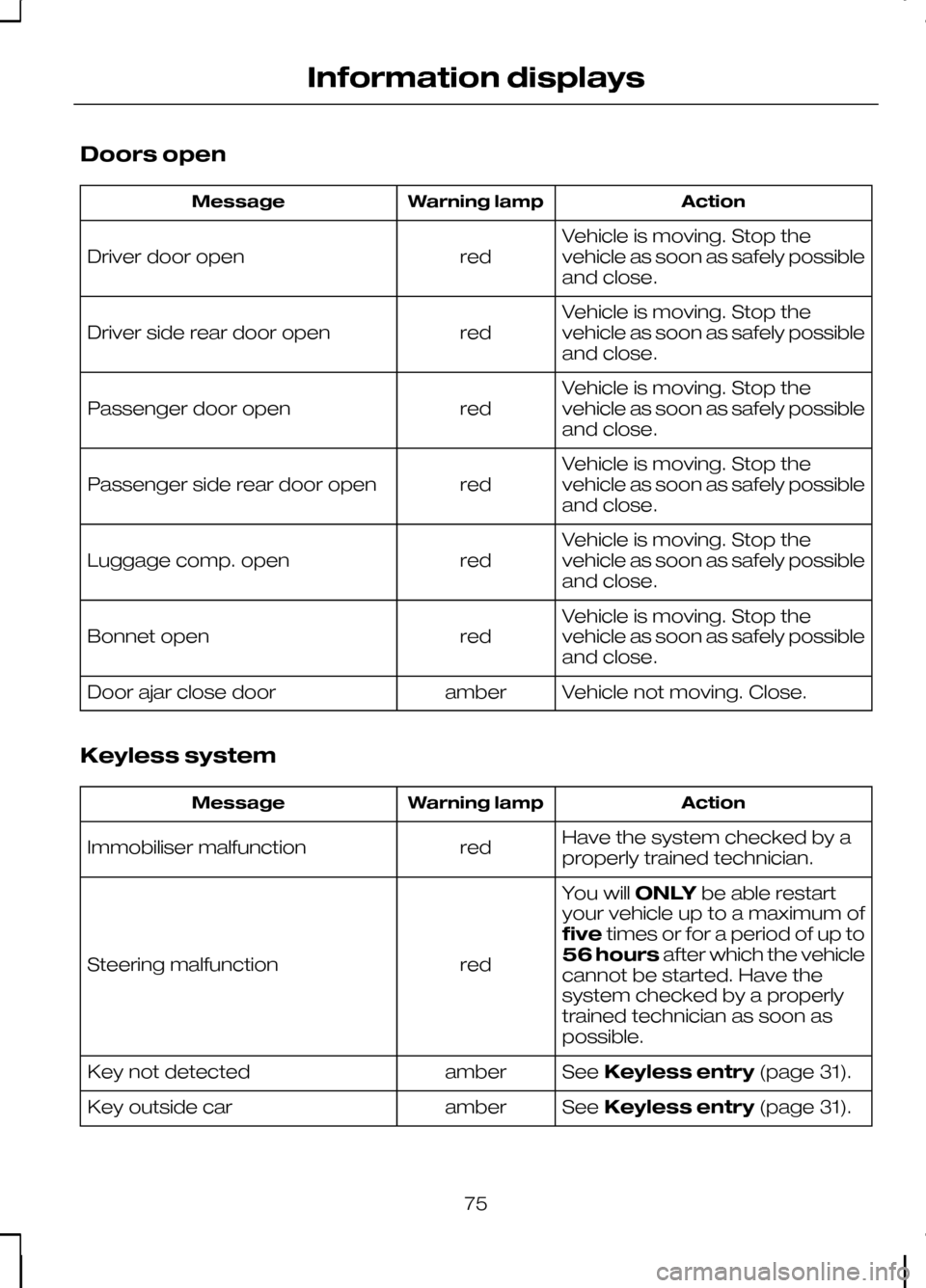
Doors open
Action
Warning lamp
Message
Vehicle is moving. Stop the
vehicle as soon as safely possible
and close.
red
Driver door open
Vehicle is moving. Stop the
vehicle as soon as safely possible
and close.
red
Driver side rear door open
Vehicle is moving. Stop the
vehicle as soon as safely possible
and close.
red
Passenger door open
Vehicle is moving. Stop the
vehicle as soon as safely possible
and close.
red
Passenger side rear door open
Vehicle is moving. Stop the
vehicle as soon as safely possible
and close.
red
Luggage comp. open
Vehicle is moving. Stop the
vehicle as soon as safely possible
and close.
red
Bonnet open
Vehicle not moving. Close.
amber
Door ajar close door
Keyless system Action
Warning lamp
Message
Have the system checked by a
properly trained technician.
red
Immobiliser malfunction
You willONLYbe able restart
your vehicle up to a maximum of
five times or for a period of up to
56 hours after which the vehicle
cannot be started. Have the
system checked by a properly
trained technician as soon as
possible.
red
Steering malfunction
SeeKeyless entry (page 31).
amber
Key not detected
SeeKeyless entry (page 31).
amber
Key outside car
75
Information displays
Page 78 of 226
Action
Warning lamp
Message
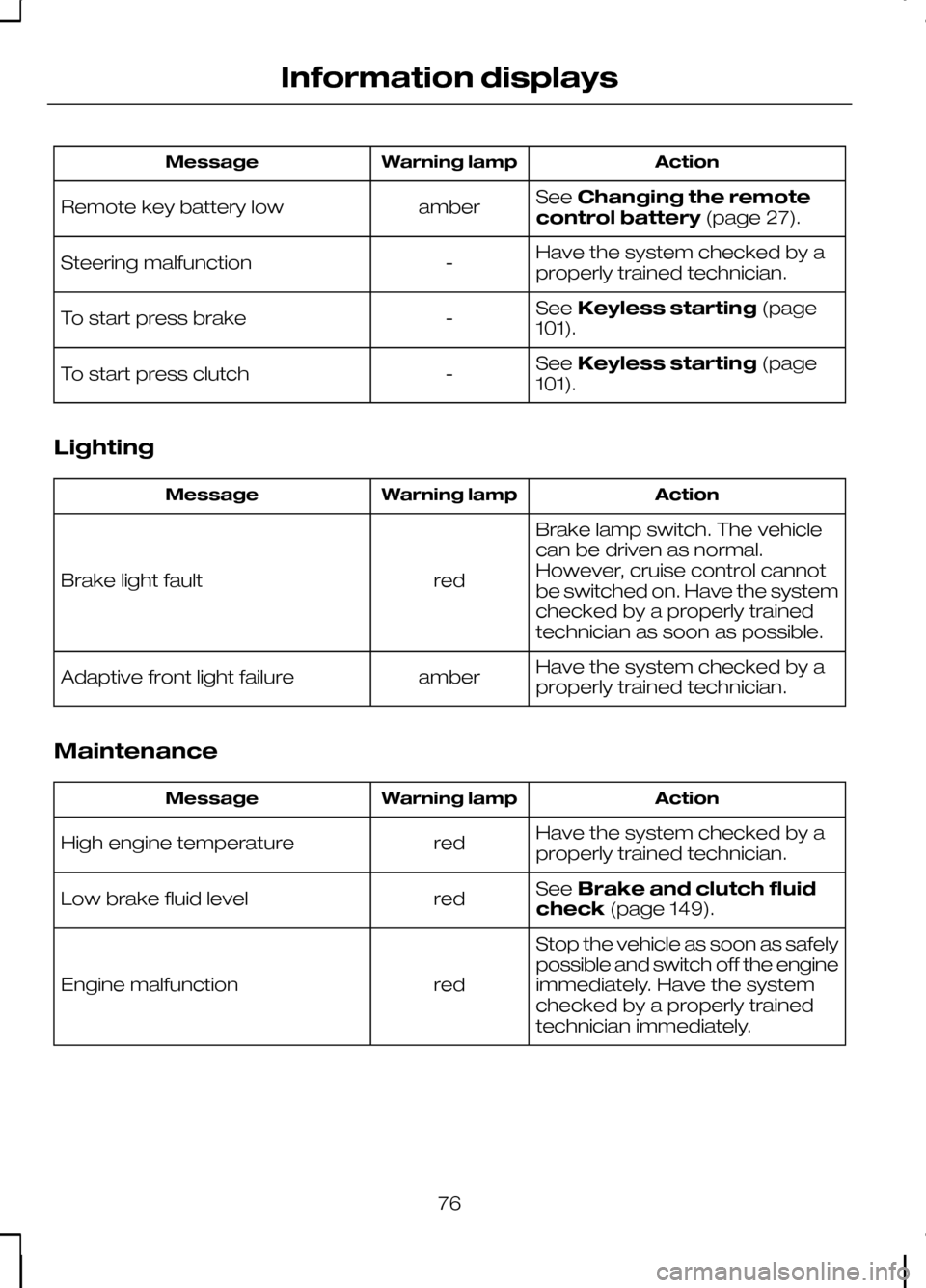
SeeChanging the remote
control battery (page 27).
amber
Remote key battery low
Have the system checked by a
properly trained technician.
-
Steering malfunction
SeeKeyless starting (page
101).
-
To start press brake
SeeKeyless starting (page
101).
-
To start press clutch
Lighting Action
Warning lamp
Message
Brake lamp switch. The vehicle
can be driven as normal.
However, cruise control cannot
be switched on. Have the system
checked by a properly trained
technician as soon as possible.
red
Brake light fault
Have the system checked by a
properly trained technician.
amber
Adaptive front light failure
Maintenance Action
Warning lamp
Message
Have the system checked by a
properly trained technician.
red
High engine temperature
SeeBrake and clutch fluid
check (page 149).
red
Low brake fluid level
Stop the vehicle as soon as safely
possible and switch off the engine
immediately. Have the system
checked by a properly trained
technician immediately.
red
Engine malfunction
76
Information displays
Page 80 of 226

Transmission
Action
Warning lamp
Message
Automatic transmission. The
vehicle can still be driven but have
the system checked by a properly
trained technician as soon as
possible.
amber
Transmission limited function
Under certain driving conditions
it is possible that the clutches in
the transmission can overheat. In
these circumstances it is neces-
sary to press the brake pedal and
stop the vehicle to prevent
red
Transm. too hot. Press brake
damage to the transmission.
SelectN (NEUTRAL) orP
(PARK) and apply the parking
brake until the transmission has
cooled and the message disap-
pears from the display.
The transmission is too hot. In
these extreme conditions the
transmission will disengage drive
in order to prevent damage. You
will not be able to drive until the
transmission has cooled.
red
Transmission too hot
Have the system checked by a
properly trained technician.
amber
Transmission malfunction
At low outside temperatures, after
starting the engine, it may take
the transmission several seconds
to engageR (REVERSE) orD
(DRIVE). Keep the brake pedal
depressed until these messages
disappear from the display.
-
Engagement in progress
Press brake pedal
SeeAutomatic transmission
(page 108). See Starting the
engine (page 101).
-
Move shifter to P
78
Information displays

