2010 FORD KUGA warning
[x] Cancel search: warningPage 167 of 226

RUN FLAT TYRES
Principle of operation
Standard tyre
Wheel rim position with correct
tyre pressure
A
Wheel rim position with
insufficient tyre pressure
B
TyreC
Run flat tyre Wheel rim position with correct
tyre pressure
A
Wheel rim position with
insufficient tyre pressure
B
TyreC
Reinforced sidewall
D When a standard tyre experiences a
drastic loss of inflation pressure, the rim
of the wheel brings the full weight of the
vehicle to bear on the collapsed sidewalls.
You can barely manoeuvre the vehicle
and the tyre is destroyed.
Run flat tyres have sturdy, reinforced
sidewalls that support the rim should the
tyre suffer a loss of inflation pressure.
What to do if a run flat tyre has
a puncture
Due to the run-flat properties of these
tyres, you may not notice any tyre defect.
Your vehicle is equipped with a tyre
pressure monitoring system that alerts
you to any drop in tyre pressure. See
Technical specifications
(page 168).
In the event of a tyre defect:
• immediately slow down to a maximum
speed of 80 km/h (50 mph)
• avoid sudden or erratic braking and
steering manoeuvres and be
especially careful negotiating bends
• do not drive more than 80 kilometres
(50 miles) after the defect is detected
• have the defective tyre replaced as
soon as possible.
Replacing run flat tyres WARNINGS
Make sure that the workshop is
aware that your vehicle is equipped
with special run flat tyres.
Never repair or reuse run flat tyres
that are damaged or have been
driven on run flat.
If a run flat tyre has to be replaced, have
the respective wheel rim inspected for
any damage.
165
Wheels and tyresBACE75207 BDCAE87667
Page 168 of 226

WARNINGS
Do not fit a mixture of run flat and
standard tyres. In isolated cases, a
standard tyre can be temporarily
mounted on a vehicle otherwise equipped
with run flat tyres. It must be pointed out
to the driver that the standard tyre has no
runflat properties. Do not fit run flat tyres on vehicles
that were not originally fitted with
them. Please contact your dealer
for more details regarding compatibility. Run flat tyres may be sold and mounted
only by specially trained and certified tyre
dealers.
TYRE CARE
To make sure the front and rear tyres of
your vehicle wear evenly and last longer,
we recommend that you swap the tyres
from front to rear and vice versa at regular
intervals of between 5 000 and 10 000
km (3 000 and 6 000 miles).
CAUTION
Do not scrub the sidewalls of the
tyres when you are parking.
If you have to mount a kerb, do so slowly
and approach it with the wheels at
right-angles to the kerb. Examine the tyres regularly for cuts,
foreign objects and uneven wear of the
tread. Uneven wear could mean that the
wheel alignment is outside specification.
Check the tyre pressures (including the
spare) when cold, every two weeks.
USING WINTER TYRES
CAUTION
Make sure that you use the correct
wheel nuts for the type of wheel the
winter tyres are fitted to.
If winter tyres are used, make sure that
the tyre pressures are correct. See
Technical specifications
(page 168).
USING SNOW CHAINS WARNINGS
Do not exceed 40 km/h (25 mph)
when using 14 mm ( 0.6 inch) snow
chains or 50 km/h (30 mph) when
using 10 mm ( 0.4 inch) snow chains. Do not use snow chains on
snow-free roads.
Only fit snow chains to 235/60 R16
or 215/65 R16 tyres.
CAUTION
If your vehicle is fitted with wheel
trims, remove them before fitting
snow chains.
Note:The ABS will continue to operate
normally.
Only use small link snow chains.
Only use snow chains on the front wheels.
166
Wheels and tyresE70415
Page 169 of 226

Vehicles with stability control
(ESP)
Vehicles with stability control (ESP) may
exhibit some unusual driving
characteristics which can be avoided by
switching the system off. See
Using
stability control (page 113).
TYRE PRESSURE
MONITORING SYSTEM WARNINGS
The system does not relieve you of
your responsibility to regularly check
the tyre pressures.
The system will only provide a low
tyre pressure warning. It will not
inflate the tyres.
Do not drive on significantly
under-inflated tyres. This may cause
the tyres to overheat and fail.
Under-inflation reduces fuel efficiency,
tyre tread life and may also affect your
ability to drive the vehicle safely. CAUTIONS
Do not bend or damage the valves
when you are inflating the tyres.
Have tyres installed by properly
trained technicians.
The Deflation Detection System will alert
you if there is a change of air pressure in
any tyre. It does this by using the ABS
sensors to detect the rolling
circumference of the wheels. When the
circumference changes, this indicates low
pressure in a tyre, a warning message is
displayed in the information display and
the message indicator will illuminate. See
Information messages
(page 73).Apart from a too low tyre pressure or a
damaged tyre, the following situations can
affect the rolling circumference:
•
Vehicle load is uneven.
• When using a trailer or travelling up
and down an incline.
• Using snow chains.
• Driving on soft surfaces such as snow
or mud.
Note:The system will still function
correctly, but there may be an increased detection time.
If a low pressure warning message is
displayed in the information display, check
the tyre pressures as soon as possible
and inflate them to the recommended
pressure. See Technical
specifications (page 168).
If this happens frequently, have the cause
determined and rectified as soon as
possible.
System reset
Note:
Do not reset the system when the
vehicle is moving.
Note:You should reset the system
following any adjustment to the tyre pressures or any changing of tyres.
Note:Turn the ignition on.
Type 2 instrument cluster
1. Using the multifunction lever, navigate
to'SET' > T. Pres.
2. Press and hold the SET/RESET
button until the message Tyre
Pressure set appears.
Type 3 instrument cluster
1. Using the multifunction lever, navigate
tohold 'SET' to set Tyre Pres.
167
Wheels and tyres
Page 203 of 226

To enable voice control for custom
playlists and folders, follow the procedure
below:
•
Create folders named with the
structure
"Ford<*>" where <*> is a
number 1-10. For example "Ford3"
without an extension.
• Create playlists named with the
structure
"Ford<*>.m3u" where <*>
is a number 1-10. For example
"Ford5.m3u" without any space
between "Ford"and the number.
Thereafter, custom folders and playlists
will be selectable with voice control. See
Audio unit commands (page 183).
iPod
To enable voice control for custom
playlists, create playlists named with the
structure "Ford<*>" where <*> is a
number 1-10. For example "Ford7"
without any space between "Ford"and
the number.
Thereafter, playlists will be selectable with
voice control. See Audio unit
commands (page 183).
CONNECTING AN EXTERNAL
DEVICE WARNING
Make sure the external device is
securely mounted within the vehicle,
and that trailing connections do not
obstruct any of the driving controls. External devices may be connected using
the auxiliary input socket and the USB
port. See
Auxiliary input (AUX IN)
socket (page 99). See USB port(page
100). Connection
Plug in the device, and if necessary
secure it to prevent movement within the
vehicle.
Connecting an iPod
For optimum convenience and audio
quality, we recommend that you purchase
a dedicated single connection lead
available from your dealer.
Alternatively, it is possible to connect your
iPod using the standard iPod USB cable
and a separate 3.5mm audio jack lead. If
using this method preset the iPod volume
to maximum and turn off any equalizer
settings before making the connections:
•
Connect the headphone output of the
iPod to the AUX IN socket.
• Connect the USB cable from the iPod
to the vehicle USB socket.
CONNECTING AN EXTERNAL
DEVICE - VEHICLES WITH:
BLUETOOTH
Connecting a Bluetooth audio
device CAUTION
As various standards exist,
manufacturers are able to implement
a variety of profiles in their Bluetooth
devices. Because of this, an
incompatibility can occur between the
Bluetooth device and the system, which
in some cases may limit system
functionality. To avoid this situation, only
recommended devices should be used.
Please visit the website
www.ford-mobile-connectivity.com
for full details. 201
Connectivity
Page 210 of 226
ROAD SAFETY
WARNINGS
The system provides you with
information designed to help you
reach your destination quickly and
safely. For reasons of safety, the driver
should only program the system
when the vehicle is stationary.
The system provides no assistance
with respect to stop signs, traffic
lights, areas under construction or
other important safety information. Do not use the system until you
have familiarised yourself with its
operation.
Only view the system display when
driving conditions permit.
Safety information
Read and follow all stated safety
precautions. Failure to do so may increase
your risk of collision and personal injury.
Ford Motor Company shall not be liable
for any damages of any type arising from
failure to follow these guidelines.
If detailed viewing of route instructions is
necessary, pull off the road when it is safe
to do so and park your vehicle.
Do not use the navigation system to
locate emergency services.
To use the system as effectively and
safely as possible, always use the latest
navigation information. Your dealer will be
able to assist with this.
208
Navigation introduction
Page 214 of 226
ELECTROMAGNETIC
COMPATIBILITY
WARNINGS
Your vehicle has been tested and
certified to European legislations
relating to electromagnetic
compatibility (2004/104/EC). It is your
responsibility to ensure that any
equipment you have fitted complies with
applicable local legislations. Have any
equipment fitted by properly trained
technicians. WARNINGS
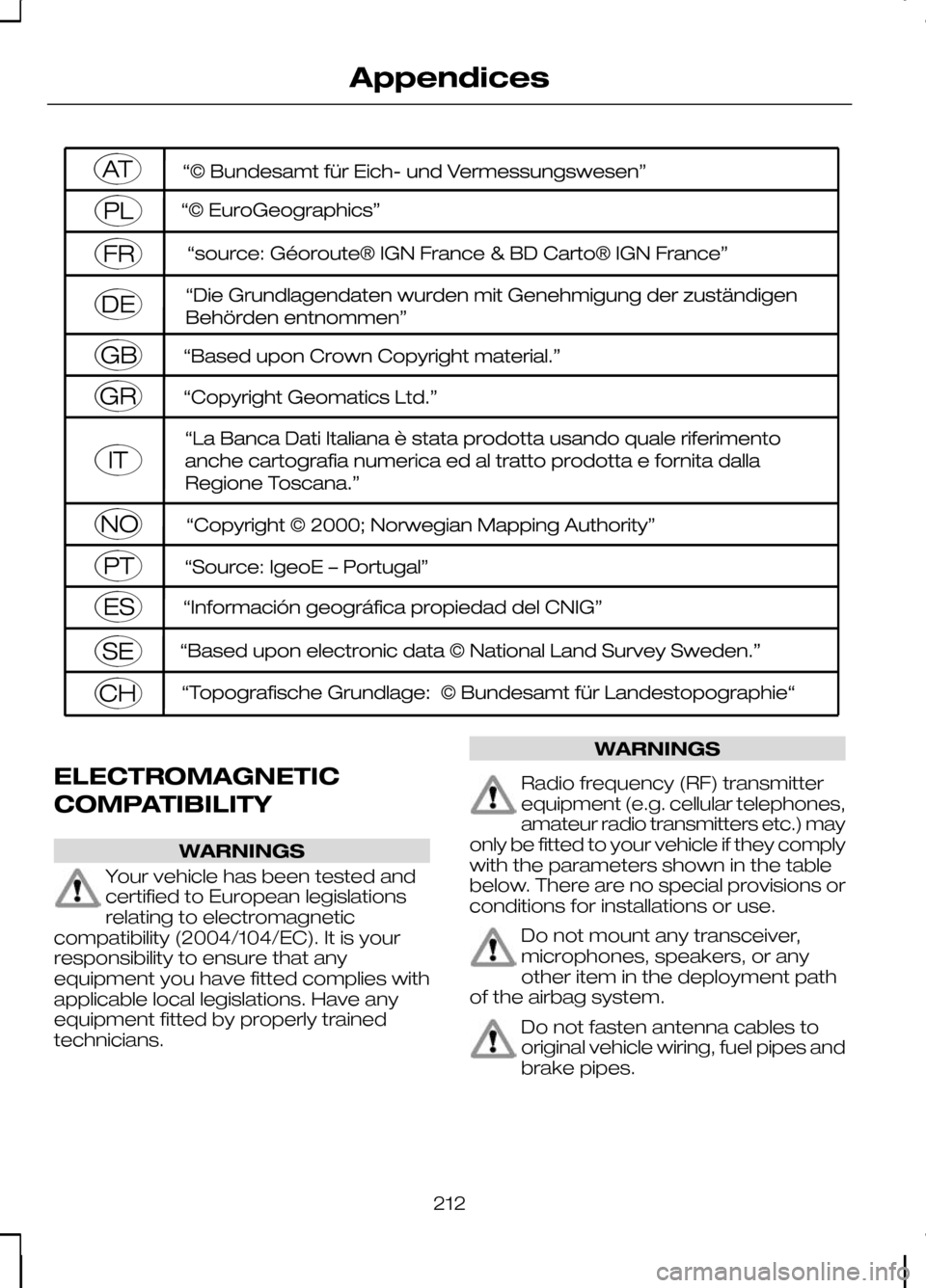
Radio frequency (RF) transmitter
equipment (e.g. cellular telephones,
amateur radio transmitters etc.) may
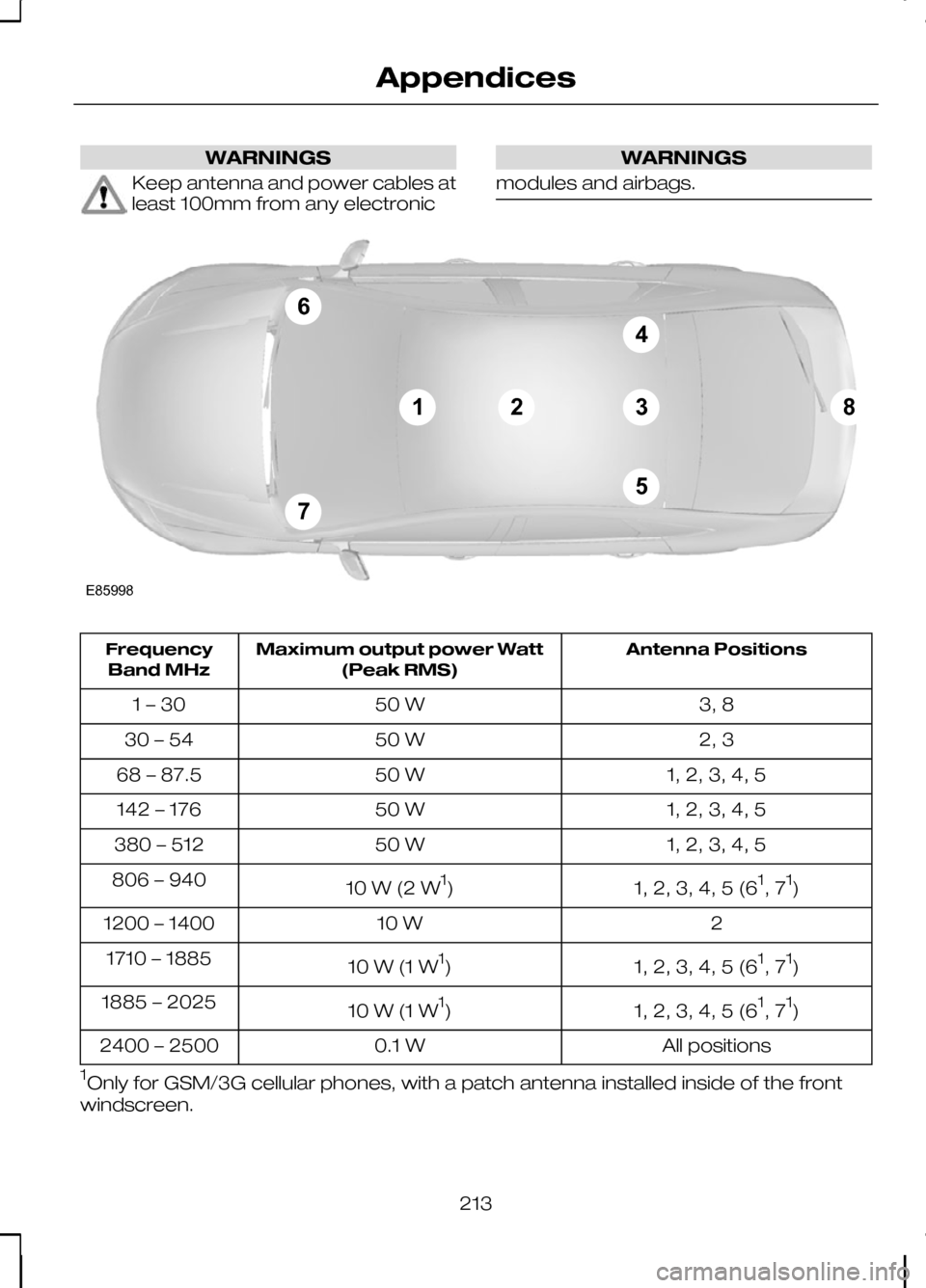
only be fitted to your vehicle if they comply
with the parameters shown in the table
below. There are no special provisions or
conditions for installations or use. Do not mount any transceiver,
microphones, speakers, or any
other item in the deployment path
of the airbag system. Do not fasten antenna cables to
original vehicle wiring, fuel pipes and
brake pipes.
212
AppendicesE114220
Page 215 of 226
WARNINGS
Keep antenna and power cables at
least 100mm from any electronic WARNINGS
modules and airbags. Antenna Positions
Maximum output power Watt
(Peak RMS)
Frequency
Band MHz
3, 8
50 W
1 – 30
2, 3
50 W
30 – 54
1, 2, 3, 4, 5
50 W
68 – 87.5
1, 2, 3, 4, 5
50 W
142 – 176
1, 2, 3, 4, 5
50 W
380 – 512
1, 2, 3, 4, 5 (61
, 7 1
)
10 W (2 W 1
)
806 – 940
2
10 W
1200 – 1400
1, 2, 3, 4, 5 (61
, 7 1
)
10 W (1 W 1
)
1710 – 1885
1, 2, 3, 4, 5 (61
, 7 1
)
10 W (1 W 1
)
1885 – 2025
All positions
0.1 W
2400 – 2500
1 Only for GSM/3G cellular phones, with a patch antenna installed inside of the front
windscreen.
213
AppendicesE8599867123845
Page 217 of 226

A
A/C
See: Climate control....................................80
About this handbook................................5
ABS See: Brakes..................................................112
ABS driving hints See: Hints on driving with ABS..................112
Accessories See: Parts and accessories..........................5
Adaptive front lighting system (AFS).......................................................49
Adjusting the steering wheel.................39
Adjusting the windscreen washer jets...........................................................43
AFS See: Adaptive front lighting system
(AFS)........................................................... 49
Air conditioning See: Climate control....................................80
Air vents....................................................80
Alarm.........................................................37
All-wheel drive (AWD).............................111
Appendices.............................................211
Arming the alarm.....................................37 Automatic arming delay..............................37
Interior sensors.............................................37
Arming the engine immobiliser.............36
Audible warnings and indicators..........66 Automatic transmission..............................66
Frost............................................................... 66
Key-in-ignition............................................... 67
Key outside car.............................................66
Lights on........................................................67
Low fuel..........................................................67
Seat belt reminder........................................67
Audio control...........................................39 Mode.............................................................. 40
Seek............................................................... 40
Volume........................................................... 39
Audio unit commands..........................183 Auxiliary input...............................................189
CD Changer.................................................184
CD Player.....................................................183
External devices - iPod...............................191
External devices - USB..............................189
Radio............................................................. 186Auto-dimming mirror..............................62
Autolamps................................................47
Automatic climate control.....................83
Air distribution...............................................85
Blower............................................................ 84
Mono mode..................................................84
Recirculated air.............................................85
Setting the temperature.............................84
Switching off the automatic climate control........................................................ 85
Switching the air conditioning on and off................................................................ 85
To switch mono mode back on.................84
To switch mono mode off...........................84
Windscreen defrosting and demisting................................................... 85
Automatic transmission........................108 Emergency park position release
lever........................................................... 110
Hints on driving with an automatic transmission............................................. 110
Manual shifting - Vehicles with a 5 speed transmission............................................ 109
Selector lever positions.............................108
Sport mode and manual shifting - Vehicles with a 6 speed transmission.................109
Autowipers................................................41
Auxiliary heater........................................86 Diesel auxiliary heater (depending on
country)..................................................... 89
Fuel operated heater (depending on country)..................................................... 89
Parking heater..............................................86
Auxiliary input (AUX IN) socket..............99
Auxiliary power sockets.........................97 Power inverter...............................................97
AWD See: All-wheel drive (AWD).........................111
B
Bluetooth setup.....................................176 Handling of phones....................................176
Requirements for Bluetooth
connection............................................... 176
Bonnet lock See: Opening and closing the bonnet.....142
215
Index