Page 27 of 340

BLIND SPOT NOT AVAILABLE (if equipped)— Displayed when
blind spot information system is not available. SeeBlind Spot
Information System (BLIS�) with Cross Traffic Alertin theDriving
chapter.
CROSS TRAFFIC NOT AVAILABLE (if equipped)— Displayed
when cross traffic alert is not available. SeeBlind Spot Information
System (BLIS�) with Cross Traffic Alertin theDrivingchapter.
SENSOR BLOCKED SEE MANUAL (if equipped)— Displayed when
the blind spot information system/cross traffic alert system sensors are
blocked. SeeBlind Spot Information System (BLIS�) with Cross
Traffic Alertin theDrivingchapter.
VEHICLE COMING FROM LEFT (if equipped)— Displayed when
the blind spot information system with cross traffic alert (CTA) system is
operating and senses a vehicle. SeeBlind Spot Information System
(BLIS�) with Cross Traffic Alertin theDrivingchapter.
VEHICLE COMING FROM RIGHT (if equipped)— Displayed when
the blind spot information system with cross traffic alert (CTA) system is
operating and senses a vehicle. SeeBlind Spot Information System
(BLIS�) with Cross Traffic Alertin theDrivingchapter.
TO STOP ALARM START VEHICLE— Displayed when the perimeter
alarm system is armed and the vehicle is entered using the key on the
driver’s side door. In order to prevent the perimeter alarm system from
triggering, the ignition must be turned to start before the 12 second
chime expires. SeePerimeter alarm systemin theLocks and security
chapter.
CHECK AWD (if equipped)— Displayed when a problem exists with
the AWD system. Contact your authorized dealer as soon as possible.
Temporary messages:
INTKEY COULD NOT PROGRAM— Displayed when an attempt is
made to program an invalid key or more than the maximum number of
integrated keys allowed. For more information on integrated key, refer to
theLocks and Securitychapter.
Instrument Cluster
27
2010 Fusion(fsn)
Owners Guide, 4th Printing
USA(fus)
ProCarManuals.com
Page 28 of 340
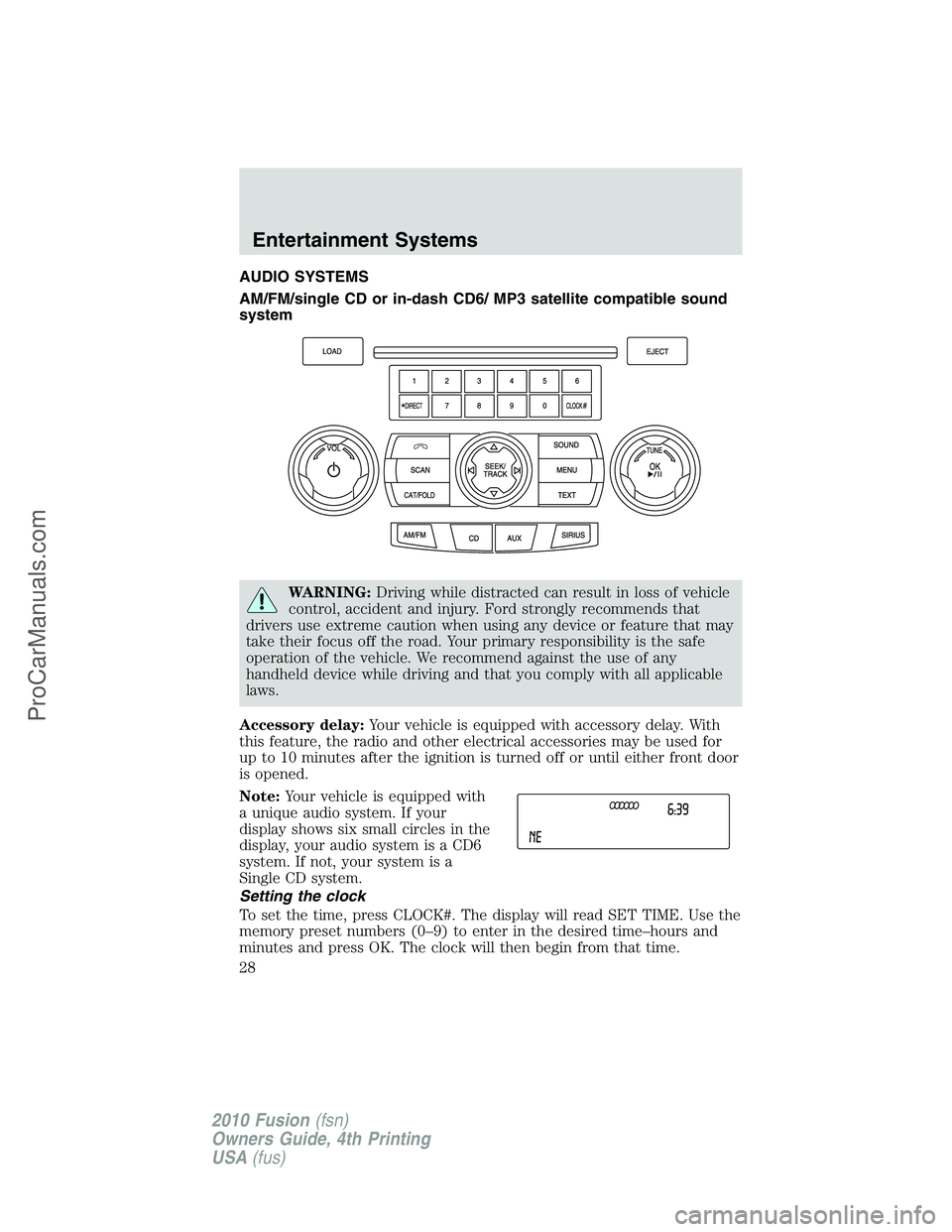
AUDIO SYSTEMS
AM/FM/single CD or in-dash CD6/ MP3 satellite compatible sound
system
WARNING:Driving while distracted can result in loss of vehicle
control, accident and injury. Ford strongly recommends that
drivers use extreme caution when using any device or feature that may
take their focus off the road. Your primary responsibility is the safe
operation of the vehicle. We recommend against the use of any
handheld device while driving and that you comply with all applicable
laws.
Accessory delay:Your vehicle is equipped with accessory delay. With
this feature, the radio and other electrical accessories may be used for
up to 10 minutes after the ignition is turned off or until either front door
is opened.
Note:Your vehicle is equipped with
a unique audio system. If your
display shows six small circles in the
display, your audio system is a CD6
system. If not, your system is a
Single CD system.
Setting the clock
To set the time, press CLOCK#. The display will read SET TIME. Use the
memory preset numbers (0–9) to enter in the desired time–hours and
minutes and press OK. The clock will then begin from that time.
Entertainment Systems
28
2010 Fusion(fsn)
Owners Guide, 4th Printing
USA(fus)
ProCarManuals.com
Page 34 of 340
Note:If there are no songs presently saved, the display will read NO
SONGS.
c. DELETE ALL SONGS:Press OK to delete all song’s from the
system’s memory. The display will read ARE YOU SURE ? Press OK to
confirm deletion of all saved songs and the display will read ALL
DELETED.
Note:If there are no songs presently saved, the display will read NO
SONGS.
d. DISABLE ALERTS/ENABLE ALERTS:Press OK to
enable/disable the satellite alert status which alerts you when your
selected songs are playing on a satellite radio channel. (The system
default is disabled.) SONG ALERTS ENABLED/DISABLED will appear
in the display. The menu listing will display the opposite state. For
example, if you have chosen to enable the song alerts, the menu
listing will read DISABLE as the alerts are currently on, so your other
optionistoturnthemoff.
•CHANNEL LOCKOUT MENU-Press OK to enter the Channel
Lockout menu. Press the
/to scroll through the following
options:
a. LOCK/UNLOCK THIS CHANNEL:Press OK when
LOCK/UNLOCK THIS CHANNEL is displayed and the display will read
ENTER PIN. Enter your four-digit PIN (initial PIN is 1234) and the
system will lock/unlock the channel and CHANNEL LOCKED or
UNLOCKED will be displayed.
Note:You must be tuned to the specific channel you want to
lock/unlock when using this feature.
b. CHANGE PIN:Press OK when CHANGE PIN is displayed. The
display will read ENTER OLD PIN. Enter your current (old) PIN and
when the system accepts your entry it will display ENTER NEW PIN.
Enter your new four-digit PIN and the system will save the new PIN
and PIN SAVED will display.
c. UNLOCK ALL CHANNELS:Press OK when UNLOCK ALL
CHANNELS is displayed and the display will read ENTER PIN. Enter
your four-digit PIN and the system will unlock all channels and the
display will read CHANNEL UNLOCKED.
d. RESET PIN:Press OK when RESET PIN is displayed. The display
will read ARE YOUR SURE. Press OK again to automatically reset the
PIN to its initial password setting (1234). PIN RESET TO DEFAULT
PIN will be displayed.
e. RETURN:Press OK when RETURN is displayed and the system
will exit back to the satellite radio menu.
Entertainment Systems
34
2010 Fusion(fsn)
Owners Guide, 4th Printing
USA(fus)
ProCarManuals.com
Page 44 of 340

Radio Display Condition Action Required
NO TEXT Category
information not
available.Category information not
available at this time on
this channel. The system is
working properly.
NO SIGNAL Loss of signal from
the SIRIUS�
satellite or SIRIUS�
tower to the vehicle
antenna.You are in a location that is
blocking the SIRIUS�signal
(i.e., tunnel, under an
overpass, dense foliage,
etc). The system is working
properly. When you move
into an open area, the
signal should return.
UPDATING Update of channel
programming in
progress.No action required. The
process may take up to
three minutes.
CALL SIRIUS�
1–888–539–7474Satellite service has
been deactivated by
SIRIUS�satellite
radio.Call SIRIUS�at
1–888–539–7474 to
re-activate or resolve
subscription issues.
NAVIGATION SYSTEM (IF EQUIPPED)
Your vehicle may be equipped with a navigation system. Refer to the
Navigation Systemsupplement for further information.
SYNC�(IF EQUIPPED)
Your vehicle may be equipped with SYNC�, a hands-free communications
and entertainment system with special phone and media features. For
more information, please refer to theSYNC�supplement or to the
SYNC�section in theNavigation Systemsupplement (if equipped).
Entertainment Systems
44
2010 Fusion(fsn)
Owners Guide, 4th Printing
USA(fus)
ProCarManuals.com
Page 58 of 340

Note:If the battery is disconnected, discharged, or a new battery is
installed, the dimmer control requires re-calibration. Press the dimmer
control from the full dim position to the full on position to reset. This
will ensure that your displays are visible under all lighting conditions.
AIMING THE HEADLAMPS
The headlamps on your vehicle are properly aimed at the assembly plant.
If your vehicle has been in an accident, the alignment of your headlamps
should be checked by your authorized dealer.
Vertical aim adjustment
1. Park the vehicle directly in front of a wall or screen on a level surface,
approximately 25 feet (7.6 meters) away.
•(1) 8 feet (2.4 meters)
•(2) Center height of lamp to
ground
•(3) 25 feet (7.6 meters)
•(4) Horizontal reference line
2. Measure the height of the
headlamp bulb center from the
ground and mark an 8 foot
(2.4 meter) horizontal reference line
on the vertical wall or screen at this
height (a piece of masking tape works well).
3. Turn on the low beam headlamps to illuminate the wall or screen and
open the hood.
To see a clearer light pattern for adjusting, you may want to block the
light from one headlamp while adjusting the other.
4. On the wall or screen you will
observe an area of high intensity
light. The top of the high intensity
area should touch the horizontal
reference line, if not, the beam will
need to be adjusted using the next
step.
Lights
58
2010 Fusion(fsn)
Owners Guide, 4th Printing
USA(fus)
ProCarManuals.com
Page 59 of 340
5. Locate the vertical adjuster on
each headlamp. Using a Phillips #2
screwdriver, turn the adjuster either
clockwise (to adjust down) or
counterclockwise (to adjust up).
The horizontal edge of the brighter
light should touch the horizontal
reference line.
6. Close the hood and turn off the
lamps.
HORIZONTAL AIM IS NOT REQUIRED FOR THIS VEHICLE AND IS
NON-ADJUSTABLE.
TURN SIGNAL CONTROL
•Push down to activate the left
turn signal.
•Push up to activate the right turn
signal.
INTERIOR LAMPS
Dome lamps and map lamps
The map lamps are located on the
overhead console. Press the controls
to turn on the lamps.
Lights
59
2010 Fusion(fsn)
Owners Guide, 4th Printing
USA(fus)
ProCarManuals.com
Page 63 of 340
Low beam
6. Disconnect the electrical connector.
To install, reverse the removal procedure.
For passenger side replacement of the high beam bulb, do the
following:
1. Make sure the headlamp control is in the off position, then open the
hood.
2. Reach over the front bolster.
3. Disengage the windshield washer bottle flexible neck strap attachment
and move it to gain access to the bulb.
4. Remove the rubber headlamp bulb access cover.
5. Remove the bulb socket by
rotating it counterclockwise, then
pull it straight out of the lamp
assembly.
Lights
63
2010 Fusion(fsn)
Owners Guide, 4th Printing
USA(fus)
ProCarManuals.com
Page 65 of 340
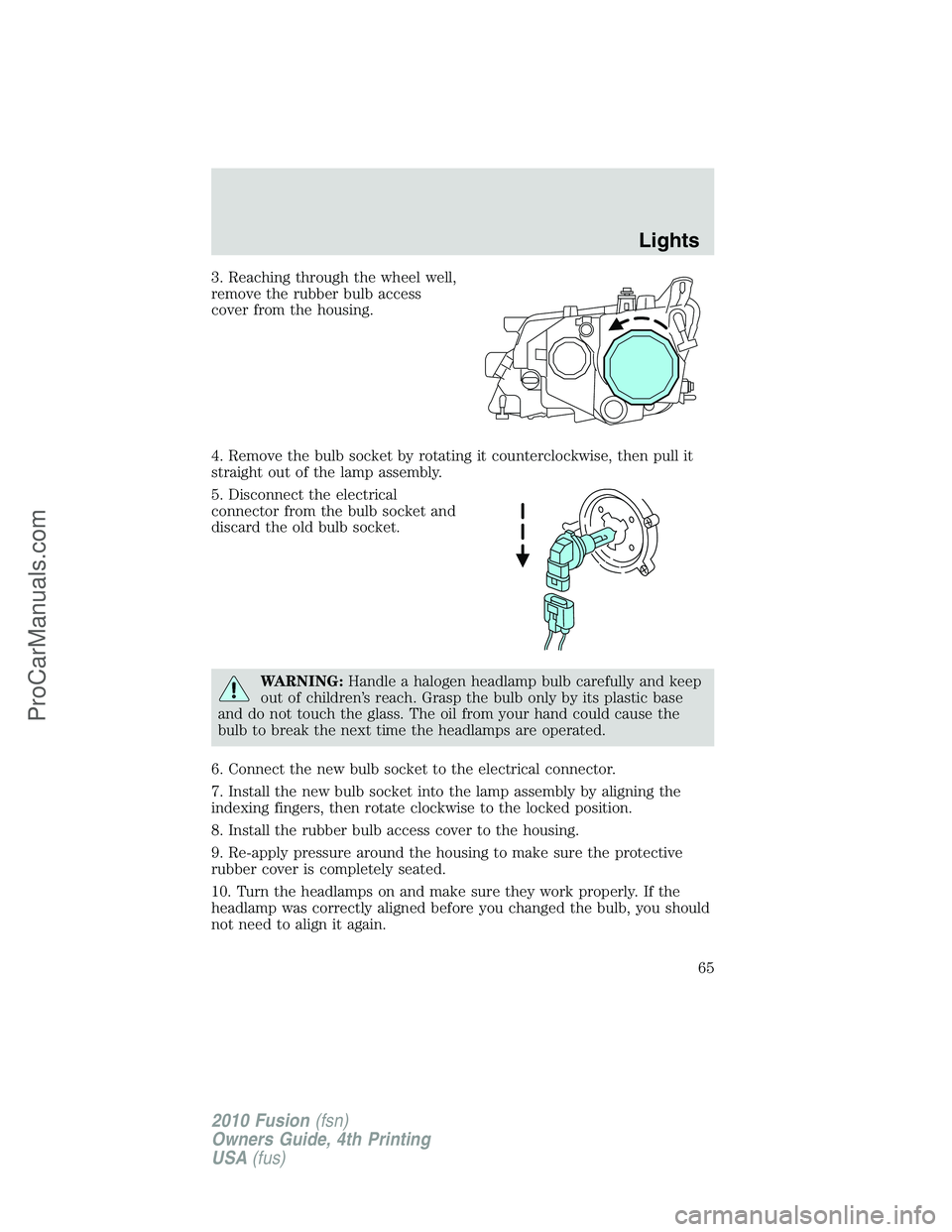
3. Reaching through the wheel well,
remove the rubber bulb access
cover from the housing.
4. Remove the bulb socket by rotating it counterclockwise, then pull it
straight out of the lamp assembly.
5. Disconnect the electrical
connector from the bulb socket and
discard the old bulb socket.
WARNING:Handle a halogen headlamp bulb carefully and keep
out of children’s reach. Grasp the bulb only by its plastic base
and do not touch the glass. The oil from your hand could cause the
bulb to break the next time the headlamps are operated.
6. Connect the new bulb socket to the electrical connector.
7. Install the new bulb socket into the lamp assembly by aligning the
indexing fingers, then rotate clockwise to the locked position.
8. Install the rubber bulb access cover to the housing.
9. Re-apply pressure around the housing to make sure the protective
rubber cover is completely seated.
10. Turn the headlamps on and make sure they work properly. If the
headlamp was correctly aligned before you changed the bulb, you should
not need to align it again.
Lights
65
2010 Fusion(fsn)
Owners Guide, 4th Printing
USA(fus)
ProCarManuals.com

